How to fix
“Cannot connect to the iTunes Store” Error
on Windows
Resolve "Cannot connect to the iTunes Store" error with our expert tips for Windows 10 and Windows 11 users. Fixed in minutes for seamless use!

What causes How to fix “Cannot connect to the iTunes Store” Error on Mac OS X?
- Internet connection issues
- Problems with KeyChain application certificates
- Temporary unavailability of the iTunes Store
- Network settings misconfiguration
- Background applications interfering with iTunes
Repairs Windows system files, removes malware, and restores a clean OS state — without reinstalling.
Hello to all. For some reason I cannot download a single app from iTunes Store. Each attempt leads to an error message "We could not complete your iTunes Store request. The network connection timed out. Make sure your network settings are correct and your network connection is active, then try again." It’s interesting because this message pop-ups on my screen even if iTunes is running in the background and I’m not using it at all. The only option on it is OK, so I click it and the message disappears. Nevertheless, after an hour or so, it shows up again. This makes me nervous. Could you please help? I’m using MacOS Sierra. Any ideas are appreciated! Thanks!
iTunes Store related errors like "Cannot connect to the iTunes Store" Error, are quite an often problem that emerges on Mac operating system supporting devices. However, recent research has revealed that Mac OS users encounter iTunes Store bugs far more frequently.[ref en-1]
iTunes is a great tool for organizing, enjoying and buying the latest music, movies, videos, TV shows, and so on. However, it is not unflawed. One of the more known problems with the Mac App Store is this message that shows issues with the direct connection to the store.[ref en-2]
The cause can be anything from the internet connection to a direct problem with the KeyChain application certificates. You can try relaunching the Mac App Store to fix the connection issue but logging back to the store usualy is not enough to fix the problem.
iTunes Store errors is not a novelty. Nevertheless, at the moment of writing, people encounter the following error messages most frequently:
"Cannot connect to the iTunes Store. An unknown error has occurred."
"We could not complete your iTunes Store request. The iTunes Store is temporarily unavailable. Please try again later."
"iTunes could not connect to the iTunes Store. Make sure your network connection is active and try again."
"We could not complete your iTunes Store request. The network connection could not be established. There was an error in the iTunes Store. Please try again later."
How to Fix iTunes Store Error on Mac OS X?
To start with, you should ensure that your Mac OS system is fully optimized. For this purpose, you can use [rev id=”Reimage”]. It is believed that MacOS is more secure than other operating systems but you need to employ reputable security software to avoid cyber infections and other issues with your device in the future. Note that malware has been targeting this OS specifically.[ref en-3]
Enable the iTunes Store
- Open iTunes.
- On the iTunes menu, select Preferences.
- Click on Parental Controls tab and check the boxes next to the Disable the iTunes Store and Allow access to iTunes.
- Click OK and open iTunes Preferences one more time.
- Select Parental Controls tab and remove the check mark next to the Disable the iTunes Store.
- Click OK and check if the Cannot connect to the iTunes Store error shows up again. If the issue still persists, try the other fixes.
Test Network Connectivity
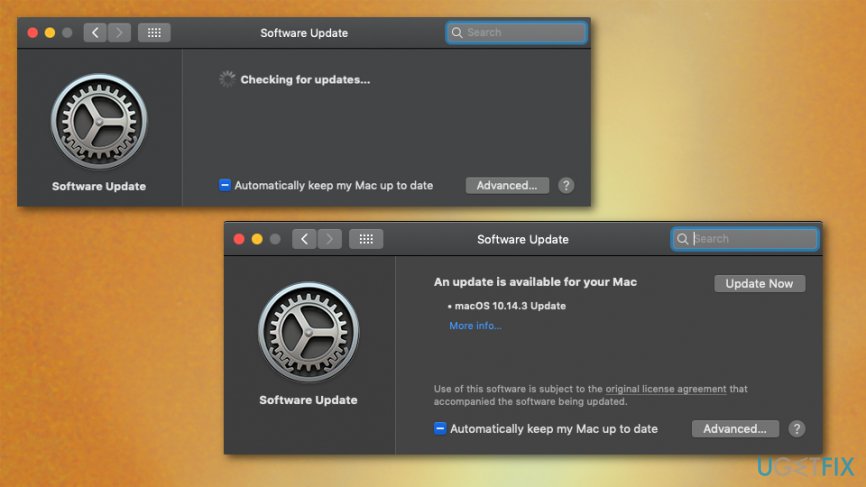
Check if there are no connectivity-related issues. If everything is fine, verify the state of your OS, i.e. if it’s up-to-date. For this purpose, you should click Apple icon and go to Software Update. In addition to that, make sure that you have the latest version of the Safari web browser and iTunes.
Reset Firewall
In some of the cases, Firewall may block iTunes Store, so try to reset Firewall. For this purpose, you have to:
Open System Preferences and click on Security & Privacy.
- Select Firewall and verify Firewall options.
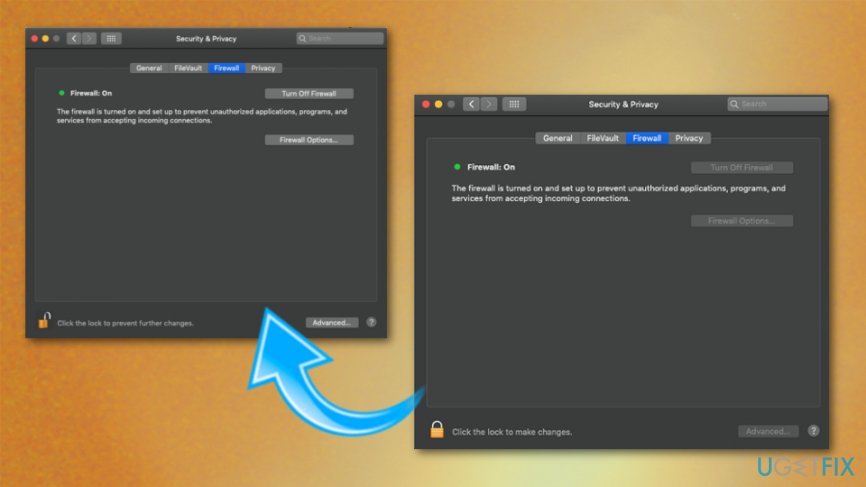
How to fix cannot connect to the itunes store error on mac firewall - You should see whether iTunes Store connection is allowed or not.
- If you see that the connection to iTunes Store is denied, enable this option.
Turn on Keychain First Aid
- Navigate to Applications -> Utilities -> Keychain Access.
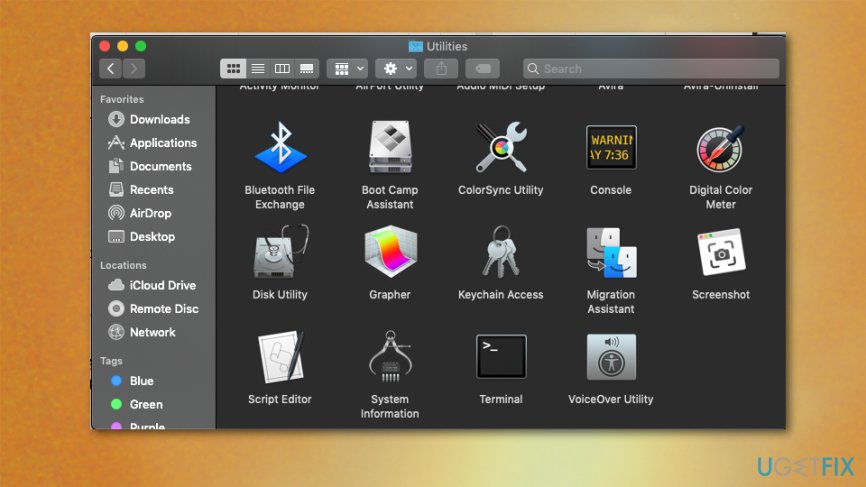
How to fix cannot connect to the itunes store error on mac keychain - Select Keychain First Aid and enter your user name and password.
- Select Verify and click on Start.
- If the scan ends up with the list of problems, select Repair, and click Start.
Bottom line
To fix the 'Cannot connect to the iTunes Store' error, you can try relaunching the Mac App Store, checking your network settings, and ensuring your internet connection is active. If these solutions do not resolve the issue, consider logging out and back into the iTunes Store or checking for updates.
Frequently asked questions
To resolve this error on Windows 10, ensure that your date and time settings are correct, and check if iTunes has the latest updates installed. Additionally, try disabling any firewall or antivirus software temporarily to see if they are blocking the connection.
Yes, on Windows 11, you can fix this issue by resetting the Windows Store cache using the command 'wsreset' in the Run dialog. Also, verify your internet connection and ensure that iTunes is not being blocked by any network settings.
If iTunes on your Windows PC keeps showing the 'Cannot connect to the iTunes Store' message, try signing out and back into your Apple ID within the app. If the problem persists, reinstalling iTunes may help resolve underlying issues.




Report an issue
What's wrong with this guide? We review every report and update or remove content.
Report received — thank you. We'll review and fix it.
You need a free account to submit a report.
Be the first to comment