How to fix
DRIVER_IRQL_NOT_LESS_OR_EQUAL (netio.sys) or SYSTEM_THREAD_EXCEPTION_NOT_HANDLED (netio.sys) BSOD error
on Windows
Resolve the DRIVER_IRQL_NOT_LESS_OR_EQUAL or SYSTEM_THREAD_EXCEPTION_NOT_HANDLED BSOD errors on Windows 10 and 11 quickly, with expert-tested solutions.


What causes How to fix DRIVER_IRQL_NOT_LESS_OR_EQUAL (netio.sys) or SYSTEM_THREAD_EXCEPTION_NOT_HANDLED (netio.sys) BSOD error?
- Malware
- Third-party anti-virus
- Torrent software
- Network adapter drivers
Repairs Windows system files, removes malware, and restores a clean OS state — without reinstalling.
I’m running Windows 10 on my laptop and recently ran into BSOD Window that reports about DRIVER_IRQL_NOT_LESS_OR_EQUAL (NETIO.SYS). I’ve noticed that it appears when I open Torrent in particular. I tried using uTorrent and BitTorrent services, but both of them deliver the mentioned screen of death. What I did to solve this issue was scanning the system with antivirus, but that did not help. I don’t know what further actions I should take to fix this mess?
DRIVER_IRQL_NOT_LESS_OR_EQUAL (NETIO.SYS) and SYSTEM_THREAD_EXCEPTION_NOT_HANDLED (NETIO.SYS) are Blue screens of Death[ref en-1] that are related to the Netio.sys system file which is related to the computer's network card and its drivers.[ref en-2] It is a constituent of Windows system, so modifying or deleting it may cause your card to stop working entirely. Instead, you should focus on how to fix DRIVER_IRQL_NOT_LESS_OR_EQUAL (NETIO.SYS) and SYSTEM_THREAD_EXCEPTION_NOT_HANDLED (NETIO.SYS) errors.
Specialists claim that DRIVER_IRQL_NOT_LESS_OR_EQUAL (NETIO.SYS BSOD is caused by malware,[ref en-3] third-party anti-virus, torrent software or network adapter drivers.
DRIVER_IRQL_NOT_LESS_OR_EQUAL (NETIO.SYS) or SYSTEM_THREAD_EXCEPTION_NOT_HANDLED (NETIO.SYS) appears as a BSOD (Blue Screen of Death). It may occur when downloading updates, running software like a torrent client, when downloading data, and so on.
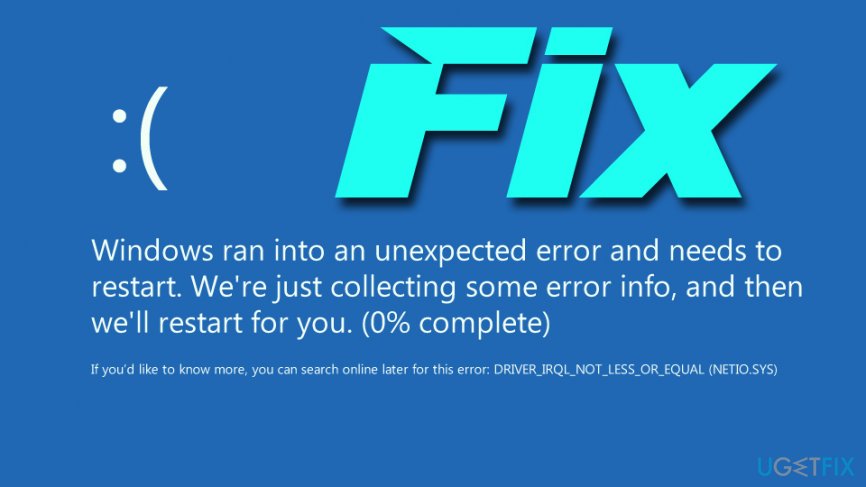
This BSOD window freezes the system, causes crashes, which is why you may lose the work that you’ve been currently working. Therefore, it is vital to fix DRIVER_IRQL_NOT_LESS_OR_EQUAL (NETIO.SYS) and SYSTEM_THREAD_EXCEPTION_NOT_HANDLED (NETIO.SYS) error, so please follow the below solutions.
Solution 1. Check your anti-malware software
As we’ve mentioned, SYSTEM_THREAD_EXCEPTION_NOT_HANDLED (NETIO.SYS) or DRIVER_IRQL_NOT_LESS_OR_EQUAL (NETIO.SYS) BSOD may be caused by the conflict between antivirus and your system. According to Windows specialists, McAfee and Zone Alarm are the ones causing problems. Therefore, we would recommend uninstalling them. This can be done by doing these steps:
- Press on Ctrl + Shift + Esc simultaneously to launch Task Manager
- Locate McAfee/Zone Alarm
- Click on the application and select End Task
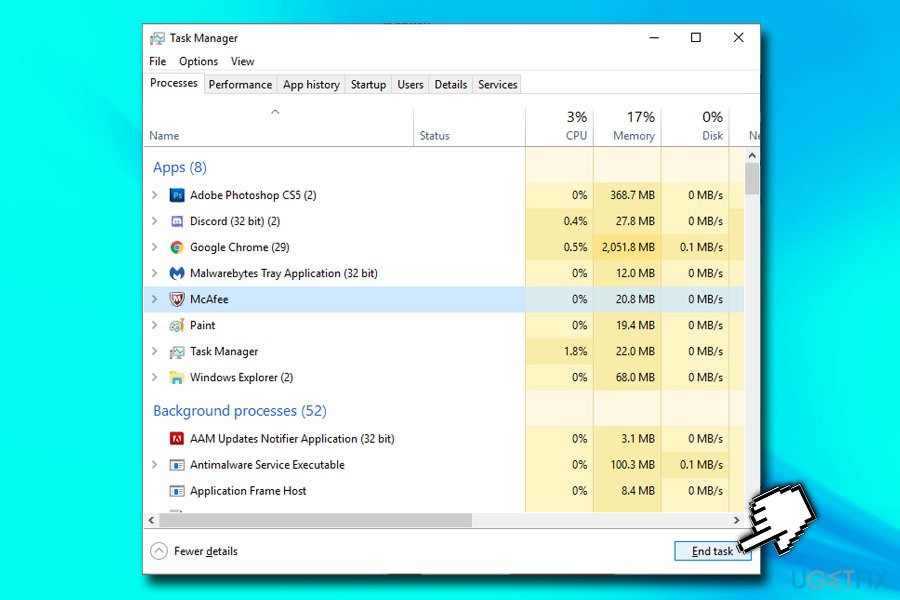
Fix driver irql not less or equal netio sys or system thread exception not handled netio sys bsod stop mcafee process - Type in Control Panel into Cortana's search bar and hit Enter
- Go to Programs > Uninstall a program
- Locate McAfee or Zone Alarm and double click it
- Proceed with on-screen instructions
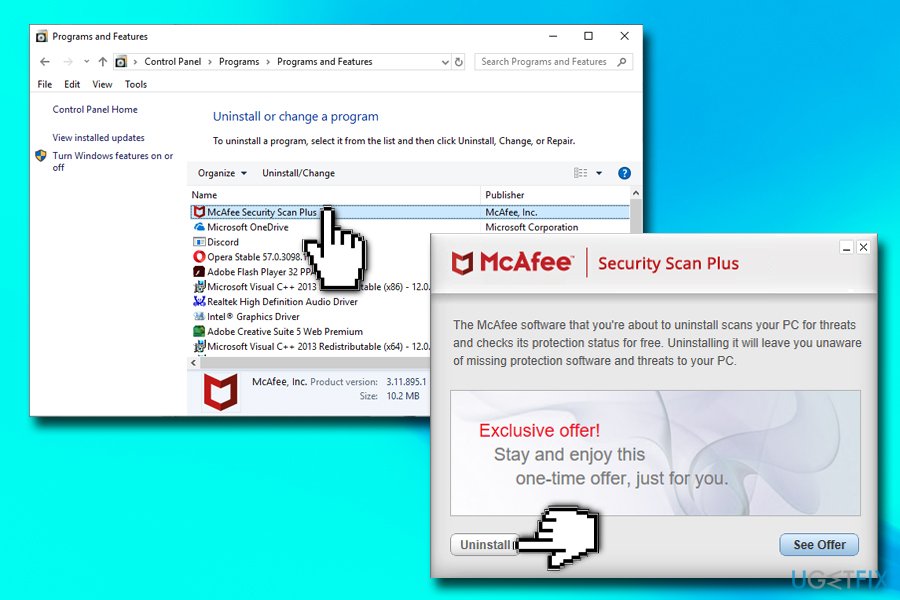
Fix driver irql not less or equal netio sys or system thread exception not handled netio sys bsod uninstall mcafee software
Please remember that leaving your system unprotected can cause it serious harm due to malware infections. You can simply rely on Windows Defender (which is a built-in security software from Microsoft) or find a comprehensive security program online.
Solution 2. Check torrent software for cache
Netio.sys error is triggered by network threshold. To check your Torrent software, you have to:
- Open BitTorent client
- Go to Options and pick Preferences
- Click on Advanced and pick Disk Cache
- Untick Enable caching of disk reads and Enable caching of disk writes
- Click Apply and OK
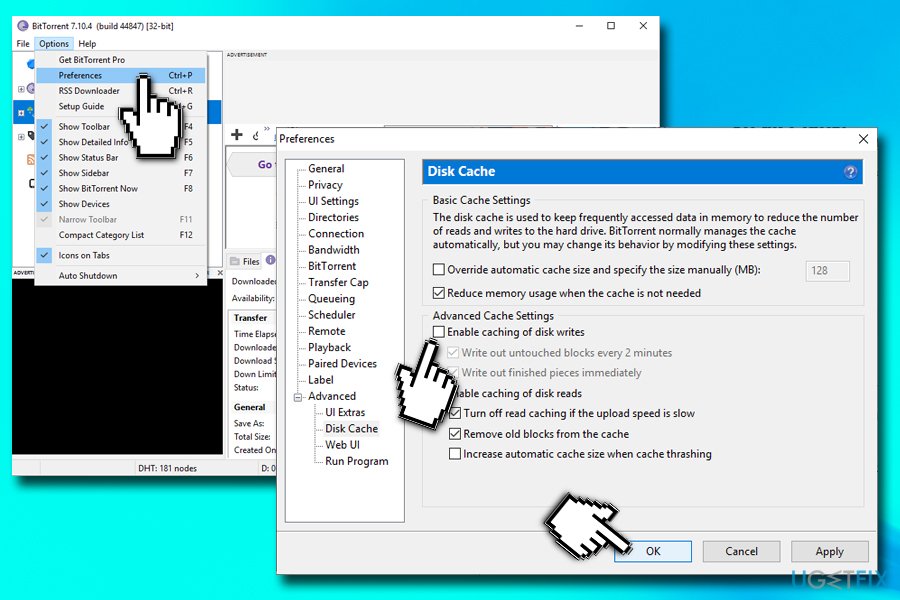
Fix driver irql not less or equal netio sys or system thread exception not handled netio sys bsod check torrent client
Now you should use your PC without seeing SYSTEM_THREAD_EXCEPTION_NOT_HANDLED (NETIO.SYS) or DRIVER_IRQL_NOT_LESS_OR_EQUAL (NETIO.SYS) error.
Solution 3. Reinstall network adapter drivers
SYSTEM_THREAD_EXCEPTION_NOT_HANDLED (NETIO.SYS) or DRIVER_IRQL_NOT_LESS_OR_EQUAL (NETIO.SYS) error is said to be triggered by netio.sys and drivers incompatibility. Therefore, you should try upgrading the drivers. For that, do the following:
- Right-click on the Start button and select Device Manager
- Expand Network adapters
- Right-click on your network adapter, and choose Update Driver
- Next, click on Search automatically for updated software
- Wait till Windows installs new updates and installs them automatically
- Reboot your PC
Solution 4. Roll back drivers
In some cases, running back the driver helps users fix SYSTEM_THREAD_EXCEPTION_NOT_HANDLED (netio.sys) or DRIVER_IRQL_NOT_LESS_OR_EQUAL (netio.sys) BSOD:
- Go to Device Manager > Network adapters
- Right-click on the network adapter, and select Properties
- Select Driver
- Next, click on Roll Back Driver
- Pick a reason for rolling back and click OK
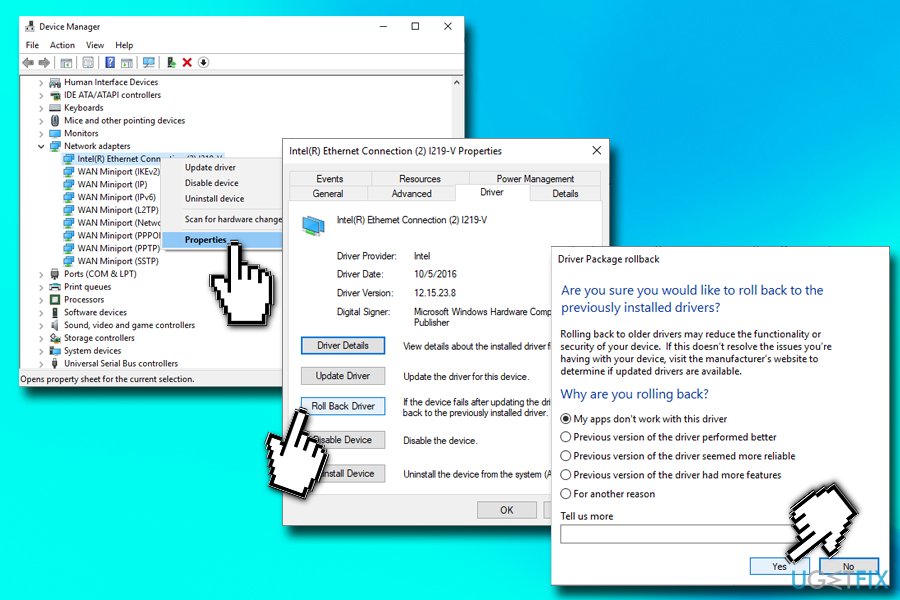
Fix driver irql not less or equal netio sys or system thread exception not handled netio sys bsod roll back driver
Solution 5. Reinstall Windows
This is the last thing that you should do if nothing else helps to fix SYSTEM_THREAD_EXCEPTION_NOT_HANDLED (netio.sys) error. If none of the aforementioned fixes help, it means that the core of the issue is a corrupted Windows file. Therefore, the only solution would be to install a Windows system from scratch.
NOTE: Our piece of advice would be to install [d1] software to fix and maintain Windows performance and security. In the case of netio.sys error fix, these programs may also help because they troubleshoot the problems, repair them, and take care of the updates automatically.
Bottom line
To fix the DRIVER_IRQL_NOT_LESS_OR_EQUAL (NETIO.SYS) and SYSTEM_THREAD_EXCEPTION_NOT_HANDLED (NETIO.SYS) errors, you should check your anti-malware software and consider uninstalling problematic applications like McAfee or Zone Alarm. If these solutions do not resolve the issue, further investigation into other potential causes may be necessary.
Frequently asked questions
This error is typically caused by outdated or incompatible network drivers, corrupted system files, or issues with third-party antivirus software in Windows 10.
To fix this error on Windows 11, you can try updating your network drivers, performing a system file check, or booting into safe mode to uninstall recent updates.
Yes, reinstalling the network driver can often resolve netio.sys BSOD errors on both Windows 10 and Windows 11 by ensuring that the correct and most up-to-date drivers are in use.




Report an issue
What's wrong with this guide? We review every report and update or remove content.
Report received — thank you. We'll review and fix it.
You need a free account to submit a report.
Be the first to comment