How to fix
Encrypted files by ODIN ransomware
on Windows
Recover your encrypted files from ODIN ransomware on Windows 10/11. Follow our expert-tested solutions to restore your data quickly and securely.

What causes How to fix encrypted files by ODIN ransomware?
- Opened suspicious email message
- Virus infiltrated the device
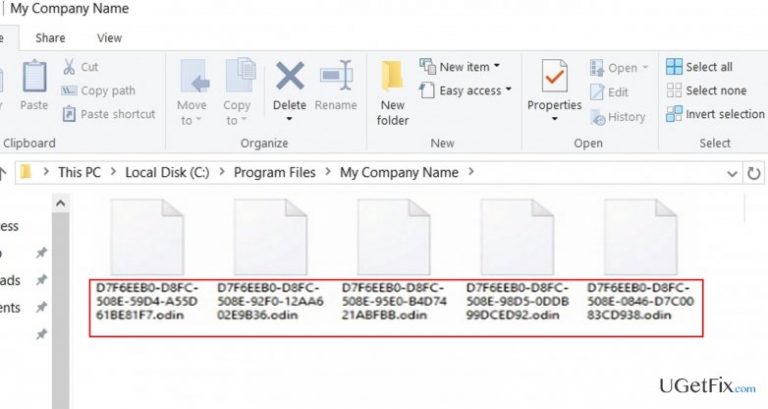
- Files encrypted by ODIN ransomware
- Ransomware demands payment via Tor browser
- No backup of files available
Repairs Windows system files, removes malware, and restores a clean OS state — without reinstalling.
I suspect that I opened some suspicious email message which explains how this virus got into my PC. Now all important files are locked, and they have a .odin extension. I’m dealing with such virus for the first time, so I’m not aware of the methods to recover the files. Any help would be appreciated.
ODIN ransomware operates as the new edition of notorious Locky. The ransomware has been granted such title malware after it appends a .odin extension to the damaged files. Moreover, the virus shifts to using .dll files for executing its command from previously employed .wsf and .js files. The former files increase the better operation of the virus as they can be used by several applications at the same time. These files contain specific codes within them, and, particularly, they enable a user to use them several times. In addition, the files occupy less space than .js or .wsf files.
When the ransomware succeeds in infiltrating the device and encrypting the files, it presents its demands in _[2_digit_number]_HOWDO_text.html, _HOWDO_text.bmp, and _HOWDO_text.html. As common for the viruses of Locky family, the victims are supposed to transfer the ransom via Tor browser which makes the transaction anonymous and helps conceal the crooks‘ identity. In any case, if this menace has befallen you, you should not give in to panic. The following methods might help you restore, if not all, at least a good share of the files. The best way would be to employ original ODIN Decrypter (Note. Do not download the one promoted by the hackers). While the virus researchers are working on it, you can use the alternative methods. In addition, if you backed up your files, you do not need extra decryption tool as you simply need to eliminate the threat and restore the files. Before you move on the data recovery options, do not forget to terminate ODIN completely with [d1].
Option 1. Employing Data Recovery Pro
This tool [rev id=”Data Recovery Pro”] is created for dealing with damaged and missing files after an unexpected system crash. Taking into the account the recent activity of ransomware threats, the developers of this software updated it. Likewise, it might serve as the alternative restoring your files.
Option 2. Launching Shadow Explorer
The program manages to restore the files by using volume shadow copies which are automatically generated by the operating system. Minor ransomware threats do not delete these copies, so users manage to retrieve the files using the application. In the case of ODIN ransomware, you still might stand a chance as some users reported of recovering the data after launching this application
Option 3. Access Windows Previous Version feature
These steps help you recover the valuable documents only when System Restore function is enabled. So check the settings in the Security and Maintenance (Update and Security in Windows 10) after navigating to Control Panel or Settings. These steps should be applied to each file separately. You will need some time after you go through all of them:
- Locate the encoded file and right-click on it.
- Choose Properties and navigate to Previous Versions tab.
- Look for the available copies of the file in Folder versions. After finding the right one, click Restore.
Backup tutorial. How to back up your files?
- Press Start button, then navigate to Control Panel > (Settings in Windows 10) System and Maintenance (Update and Security in Windows 10) > Backup and Restore.
- In case you do not have previous backup copies create a new one by clicking Set up backup.
Bottom line
To fix encrypted files by ODIN ransomware, you should employ the original ODIN Decrypter and consider using Data Recovery Pro for damaged files. If you have backups, eliminate the threat and restore your files directly. If these methods do not work, further assistance from virus researchers may be necessary.
Frequently asked questions
Immediately disconnect from the internet to prevent further encryption and use a reputable antivirus program to scan your system for the ransomware.
Yes, you can attempt to recover your files using backup solutions or data recovery software, but success is not guaranteed.
Keep your operating system and all software updated, use a reliable antivirus, and regularly back up your important files to a secure location.




Report an issue
What's wrong with this guide? We review every report and update or remove content.
Report received — thank you. We'll review and fix it.
You need a free account to submit a report.
Be the first to comment