How to fix
ERR_CONNECTION_RESET error
on Windows
Resolve the ERR_CONNECTION_RESET error on Windows 10 or 11 quickly and easily. Get expert-tested solutions and browse with confidence again, fixed in mi…

What causes How to fix ERR_CONNECTION_RESET error?
- Registry changes
- Network changes
- Third-party applications
- PC optimization tools
- Anti-malware interference
- Third-party firewall interference
Repairs Windows system files, removes malware, and restores a clean OS state — without reinstalling.
My laptop, which runs Windows 10, encounters error ERR_CONNECTION_RESET quite often when I try to access certain websites. The weird thing is that it does not happen all the time, and I face this problem occasionally. Can you explain to me what's the problem? Is there something wrong with the website I'm trying to connect to or is it related to my network?
ERR_CONNECTION_RESET is a common error that users encounter while browsing the internet. This error is related explicitly to Chrome, that means that it’s will not appear on Internet Explorer, Mozilla Firefox, Safari, and other web browsers.
In contrast to other system errors, Error 101 (net:: ERR_CONNECTION_RESET): The Connection was reset occurs only when browsing the Internet. It’s delivered in the form of a pop-up window that shows up when the user is trying to open a random web page. Usually, the pop-up does not go away by itself, and to get rid of it, one has to open Task Manager and end Google Chrome’s task.
As soon as IT specialists heard about ERR_CONNECTION_RESET issue, they have immediately started working on it and, luckily, there are a couple of methods that help to fix it.
It has been found that ERR_CONNECTION_RESET error is triggered by the registry or network changes due to which certain web pages can’t establish a connection with the destination web site. Sometimes users make those changes themselves either purposely or accidentally.
Nevertheless, it seems that registry and network modifications are caused by third-party applications, PC optimization tools for the most part. However, to fix the ERR_CONNECTION_RESET error, you may also have to disable anti-malware or third party firewall as they may also be the core of the problem.
How to fix ERR_CONNECTION_RESET error?
Protip: Before you start following the instructions provided below, it’s advisable to check if all third-party applications installed on your PC are in use. If you find some of them not used for more than half of the year, make sure you remove them because third-party software often triggers PC errors like ERR_CONNECTION_RESET. Besides, we would highly recommend installing [d1] or [rev id=”RegCure Pro”] tools to check your PC for errors, corrupted files, malware, and other issues.
Fix 1. Disable Anti-Malware software
A disabling of anti-virus program will help you to check what the cause of the ERR_CONNECTION_RESET error is. If after disabling your anti-malware and restarting web browser, the pop-up error remains, it means that you have to look for another solution. In case, disabling anti-virus helps to fix ERR_CONNECTION_RESET error, then you have to reinstall Anti-virus. How do disable firewall and real-time scanner?
- Find the icon of you Anti-virus (bottom-right corner) and right-click on it
- Select Disable
- Click Ctrl + Alt + Delete to open Task Manager
- Check if your Anti-virus is not running in the background
- In case you still find it running, right-click on it and select End Task
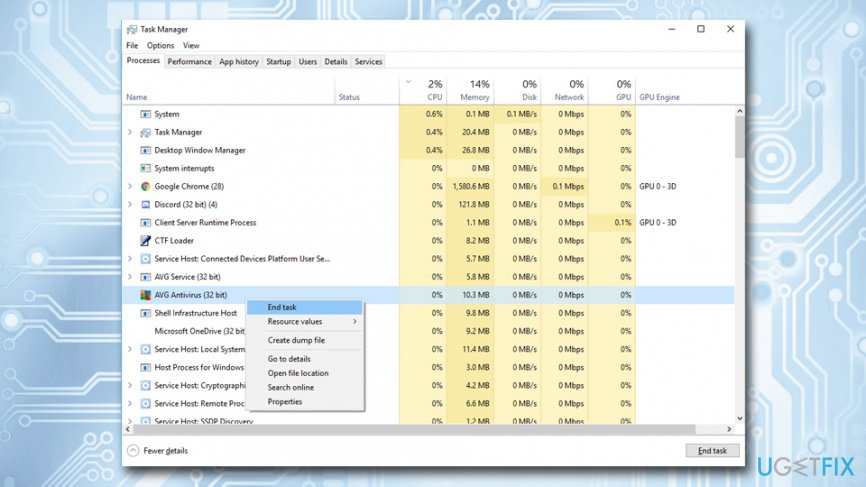
Err connection reset disable antivirus
If this method didn’t work for you, don’t worry. The majority of PC users who faced ERR_CONNECTION_RESET error managed to fix it with the help of the second method.
Fix 2. Setup your Maximum Transmission Unit (MTU)
Faulty MTU settings might be the cause of ERR_CONNECTION_RESET error on Windows. That may be an intricate task for inexperienced PC users to set MTU value, so we are going to explain that in details. Before making changes to MTU setup, you have to identify the name of the network adapter. For this purpose, do the following:
- Hold Windows key, Click R, and type ncpa.cpl
- Pick out and copy the name of the active adapter from the network connection list
- After that, hold Windows key and press X
- Open Command Prompt (Admin)
- When the Command Prompt window opens, enter the following command into it:
netsh interface ipv4 set subinterface “Wireless Network Connection 4” mtu=1472 store=persistent - Paste the name of your network adapter in the field of Local Area Connection
Fix 3. Uninstall potentially unwanted programs
While most PUPs are quite harmless, some might modify system settings, like scheduling a task or modifying Windows Registry. By eliminating questionable applications, you can stop malicious processes that might have caused ERR_CONNECTION_RESET error:
- Click on Start button and type in Control Panel
- Next, go to Programs > Uninstall a program
- Select the questionable application, right click on it and pick Uninstall
- Restart your machine
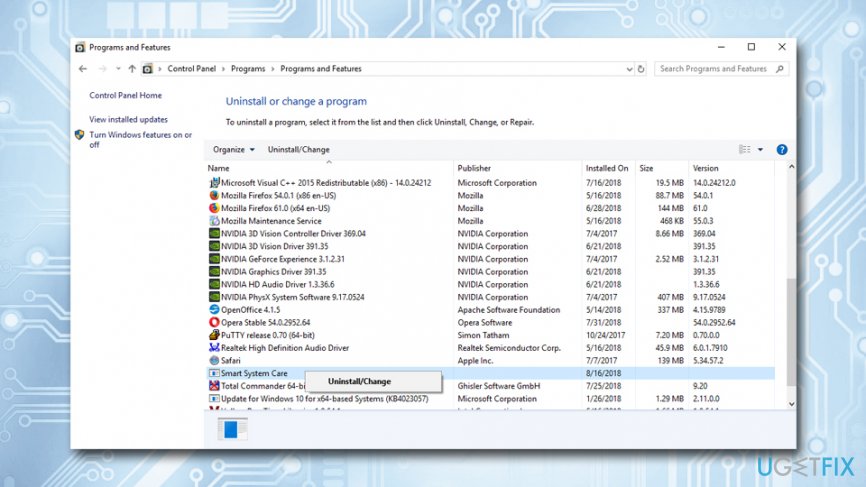
Err connection reset uninstall potentially unwanted programs
Fix 4. Reset Windsock catalog back to default
- Type in cmd or Command Prompt into the search box
- Right-click on the result and pick Run as administrator
- Type netsh Winsock reset and then press Enter
- Windows will notify you that you have to restart your machine to complete the action
Fix 5. Use another browser
You can also try using another browser. There are hundreds of browsers available, try one of the following:
- Mozilla Firefox
- MS Edge
- Safari
- Opera
- Vivaldi
- Maxthorn
- Brave, etc.
Err connection reset use another browser
Bottom line
To fix the ERR_CONNECTION_RESET error, you may need to disable anti-malware or third-party firewalls, and consider removing unused third-party applications. If the problem persists after trying these methods, further investigation into your network settings may be necessary.
Frequently asked questions
The ERR_CONNECTION_RESET error typically occurs due to network configuration issues, problems with the browser, or firewall settings that block the connection.
You can fix the error by running Command Prompt as an administrator and executing commands like 'netsh int ip reset' and 'ipconfig /flushdns' to reset your network settings.
Yes, temporarily disabling the firewall can help determine if it is causing the ERR_CONNECTION_RESET error, but ensure to re-enable it after testing.




Report an issue
What's wrong with this guide? We review every report and update or remove content.
Report received — thank you. We'll review and fix it.
You need a free account to submit a report.
Be the first to comment