How to fix
Error # 3658fa2deb39539
on Windows
Resolve the #3658fa2deb39539 error quickly on Windows 10 or 11 with our expert-tested solutions. Get your system running smoothly again!

What causes How to Fix Error # 3658fa2deb39539?
- Adware infection
- Distribution through ad-supported extensions
- Bundled with freewares or sharewares
- Suspicious activity from IP address
- Clicking on suspicious ads
- Visiting illegal websites
Repairs Windows system files, removes malware, and restores a clean OS state — without reinstalling.
Yesterday I found my web browser blocked with error code # 3658fa2deb39539. To fix it, I’m urged to call technical support to prevent data loss. What seems strange to me is the lead line of the alert is misspelled. Instead of access denied, it’s written denicedaccess33321x00.com says. Tell me if that’s a genuine notification or a scam?
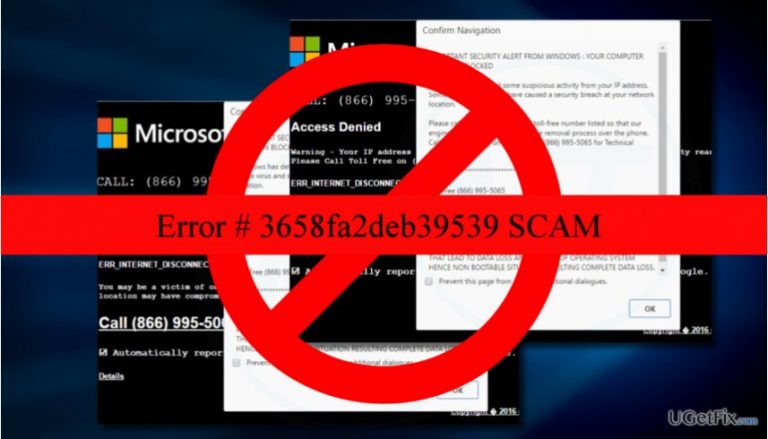
The Error # 3658fa2deb39539 pop-up on Chrome, Firefox, IE or any other web browser does not mean that your PC is infected with a virus. This message is a Tech-Support-Scam, which is spread by hackers to trick people into calling for them and revealing personal information. Therefore, as long as you DO NOT call for the supposed Microsoft-certified technicians whose number is given in the # 3658fa2deb39539 pop-up, private information, including Facebook login, credit card details, email account login, photos, documents, etc., will neither be lost nor stolen. This fake pop-up alert is triggered by adware infection. Hundreds of ad-supported extensions are distributed via official websites or other third-party download sources, but most frequently they are distributed bundled with other freewares or sharewares as disguised attachments.
Error # 3658fa2deb39539
YOUR COMPUTER HAS BEEN BLOCKED Windows has detected some suspicious activity from your IP address.
Some virus and spyware have caused a security breach at your network location. Please call us immediately at the toll-free number listed so that our engineers can walk you through the removal process over the phone.
Call us immediately on our Toll-Free for Technical Assistance.
Toll Free
Please do not use any internet-based services to avoid any identity thefts.
PLEASE DO NOT SHUT DOWN OR RESTART YOUR COMPUTER. DOING THAT LEAD TO DATA LOSS AND FAILURE OF OPERATING SYSTEM HENCE NON-BOOTABLE SITUATION RESULTING COMPLETE DATA LOSS.
Although the # 3658fa2deb39539 alert may seem to be convincing, don’t forget that it has been submitted by experienced, well-trained hackers who grasped people’s psychology and know well how to deceive people. If you have recently initiated doubtful activities on the system, for example, visited illegal websites or clicked on suspicious ads, your PC might have been infected. However, even in this kind of scenario, you should NEVER dial the number provided on doubtful web browser’s alerts. Instead of that, perform a full system scan with a trustworthy and updated anti-virus. No virus detected? Then make sure to fix Error # 3658fa2deb39539 by removing the adware and then resetting your web browser.
Remove Error # 3658fa2deb39539 on Windows:
- To start with, terminate the web browser's process via Task Manager. Press Ctrl + Shift + Esc, find your web browser, click it, and select End Task.
- Then make sure to uninstall all unknown/suspicious programs. Right-click on Windows key and select Control Panel.
- Open Uninstall a Program feature and look for apps you are not familiar with or the ones that seem suspicious. If you can't find anything, sort programs according to the date. Try to find out the ones whose installation coincide with the emergence of # 3658fa2deb39539 scam.
- Uninstall all of them. For that, click on the program's name and select Uninstall.
- Click OK to save the changes and close Control Panel.
- Then open your web browser, but DO NOT restore the last browsing session. To terminate all potentially dangerous files and add-ons, you should reset it to default.
Finally, to make sure that the # 3658fa2deb39539 adware removal was successfully executed, run a full system scan with a professional anti-malware. This way, you will prevent adware leftovers from restoring the malware. Our recommendation would be [rev id=”Reimage”].
Bottom line
The error # 3658fa2deb39539 is a Tech-Support-Scam that does not indicate a virus infection. To resolve the issue, avoid calling the provided number, remove any adware, and ensure your system is secure. If these steps do not work, consider seeking professional help.
Frequently asked questions
Error # 3658fa2deb39539 typically signifies a corrupted system file or an issue with a specific application. This error can prevent certain features from functioning properly.
To fix error # 3658fa2deb39539, you can run the System File Checker tool by executing 'sfc /scannow' in the Command Prompt with administrator privileges.
Yes, you can use the built-in Windows Troubleshooter for apps to automatically detect and fix issues related to error # 3658fa2deb39539.




Report an issue
What's wrong with this guide? We review every report and update or remove content.
Report received — thank you. We'll review and fix it.
You need a free account to submit a report.
Be the first to comment