How to fix
Error Code 0x000019F
on Windows
Resolve Error Code 0x000019F on Windows 10 and 11 quickly with proven solutions. Expert-tested methods guarantee a hassle-free fix in minutes.

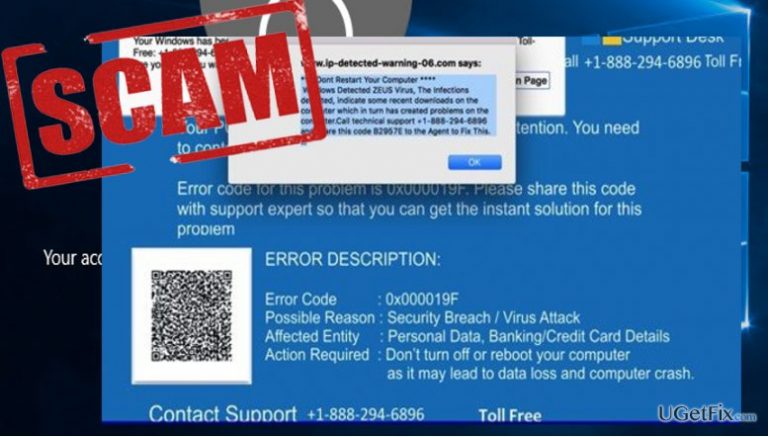
What causes How to fix Error Code 0x000019F?
- Fake Windows error
- Injected into web browser
- Potentially unwanted program
- Adware-driven infection
- Redirects to fraudulent websites
Repairs Windows system files, removes malware, and restores a clean OS state — without reinstalling.
My computer has been acting really strange lately. I keep receiving notifications informing me that an Error Code 0x000019F has occurred and that I must contact tech support to fix it. The messages seem to be originating from Microsoft, but I don’t understand why this error only appears when I’m on the web. Is there a problem with my browser? How do I fix Error Code 0x000019F?
Error Code 0x000019F is a fake Windows error that gets injected into the web browser after a potentially unwanted program, namely a Tech Support Virus, is deployed on the computer. These particular viruses are rapidly taking over the web because of their ability to apply ransomware-like techniques into the system infiltration. Tech support infections typically divided into two types: Web-based and system-based ones. Error Code 0x000019F virus falls into the first category. It is an adware-driven infection which, apart from displaying a bunch of other suspicious sponsored ads and links redirects the infected users to websites that display fraudulent notifications such as Error Code 0x000019F. In such sites, the user is often frightened into assuming that taking action such as rebooting the computer or closing the browser will inevitably result in the loss of personal data, banking information, etc. They are persuaded into calling the toll-free support number +1-644-573-0161 and contacting the technicians who are said to be the only ones that are competent enough to solve this problem. In reality, no major security breach has occurred, and it is merely a potentially unwanted program that is triggering these notifications on your browser. Thus, in order to fix the Error Code 0x000019F error, you simply need to remove this virus from your computer.
How is “Error Code 0x000019F” support scam distributed?
If you are not infected with Error Code 0x000019F tech support scam yet, knowing how this virus spreads can help you save time from the long and complicated virus removal. Though Error Code 0x000019F virus is only active on the Web browser, it still needs to place its executable on the computer first. The adware does that by attaching itself to freeware and shareware bundles. If the user chooses to install the downloaded applications via Quick or Recommended settings, the virus can easily sneak in. Thus, the most rational thing to do is to be careful about choosing sources for your downloads and to always check the obtained software for additional components before installing it on the computer. An important part of adware prevention are the regular system scans with reputable antivirus software, such as [d1].
How to fix Error Code 0x000019F?
Step 1. Closing the blocked browser
If the Error Code 0x000019F blocks your browser, you can unblock it by accessing Windows Task manager via ALT + CTRL + DEL key combination. In the running process list, locate the browser that has been blocked and click End Task. Then, you can proceed with the malware removal.
Step 2. Eliminating the virus
Scan your device with antivirus software (e.g. [d1]) to locate and eliminate the virus from the computer automatically. If you do not have this option follow the steps below:
- Right-click the Windows icon at the bottom of the screen
- In the Quick Access Menu select Control Panel and Uninstall a Program.
- In the list of the installed applications look for suspicious applications, browser extensions, etc.
- Uninstall all the questionable software click OK to confirm the changes.
Bottom line
To fix Error Code 0x000019F, you need to remove the adware from your computer. This can be done by uninstalling any suspicious programs and running a malware scan. If these steps do not resolve the issue, consider seeking professional tech support.
Frequently asked questions
Error Code 0x000019F typically indicates a problem with the system's boot configuration or a corrupted system file. This error can prevent Windows from starting properly.
To fix Error Code 0x000019F, boot your Windows 10 or Windows 11 PC from a recovery drive, select 'Repair your computer,' then choose 'Startup Repair' to automatically fix issues preventing Windows from starting.
Yes, you can resolve Error Code 0x000019F by booting into Windows Recovery Environment, opening Command Prompt, and running commands like 'sfc /scannow' and 'chkdsk /f' to repair system files and check disk integrity.




Report an issue
What's wrong with this guide? We review every report and update or remove content.
Report received — thank you. We'll review and fix it.
You need a free account to submit a report.
Be the first to comment