How to fix
Error Code HT201169
on Windows
Resolve Error Code HT201169 on Windows 10 or 11 effortlessly with our expert-tested solutions. Get your system running smoothly in minutes!

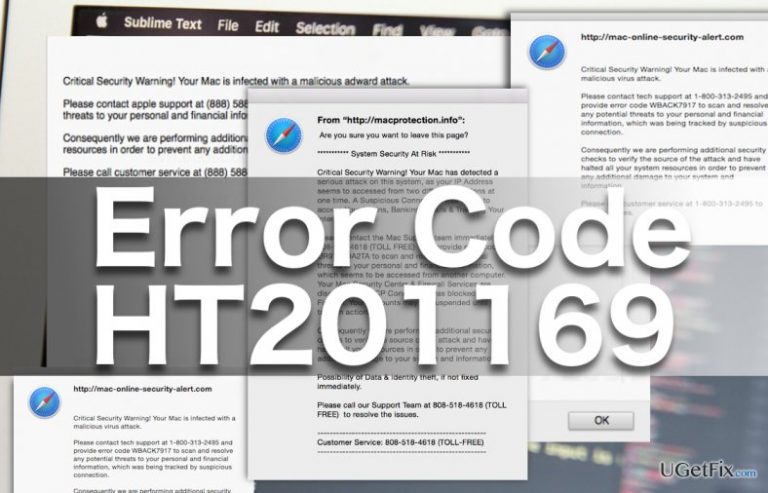
What causes How to fix Error Code HT201169 on Mac OS X?
- Adware infection
- Fraudulent warning messages
- Scare tactics from scammers
- Redirecting to malicious domains
- Potential remote access by scammers
Repairs Windows system files, removes malware, and restores a clean OS state — without reinstalling.
For the past couple of days, my Mac’s been dropping the Error Code HT201169. It announces that some serious problem has occurred on my PC, but I had no problems with it before. I think someone’s trying to scam me. How can I fix this error and some peace of mind already?
Error Code HT201169 is not a legitimate Mac OS error. The warning messages that inform about it are generated by a potentially unwanted program, typically, an adware that affiliates with some fraudulent parties which engage in online crime. Adware helps redirect the victims to the malicious domains, turning them directly into the hands of Tech Support scammers. On these sites, the users are immediately subjected to a form of scare tactics, when the browser window is simply bombarded fraudulent dialog boxes displaying words ”Critical Security Warning!”. In these messages, scammers continue to explain that the victim’s computer has been infected with a severe infection and that the only way to save files, login information and banking credentials stored on it is to call the Apple technicians on the toll-free helpline +1-888-225-6662 and allow them to fix the computer remotely. Unfortunately, such repair can easily end up in even more damage, as this number actually connects users to the online scammer. If you’re on the phone with the culprits, you should hang up immediately and by no means grant them access to your computer. If you have already given this permission, you should cut the connection immediately and launch the antivirus scan. If you have no access to the sophisticated antivirus software such as [rev id=”MacKeeper”], you can also try to remove the virus manually. Follow recommendations below to carry out the process safely.
How to fix Error Code HT201169 on Mac OS X?
Before you can take any actions towards Error Code HT201169 removal, you should close the browser and terminate the annoying pop-ups. If the virus prevents you from closing the browser, press Command + Option + Escape to access Force Quit Applications panel. When the dialog shows up, in the list of running programs select Google Chrome and click “Force Quit” below.
When it comes to the virus removal, there are several things to consider. First, you should keep in mind that there is no specific program that could be related to the Error Code HT201169 virus. Thus, you will need to go through the list of recently installed programs manually and look for programs that look unfamiliar. Investigate such applications closer and remove them from your computer if you suspect they might be malicious. Below you will find step-by-step instructions that will help you remove Error Code HT201169 from your PC:
- Click on the Finder icon in the control dock on the bottom of your screen
- In the new window select “Applications” located on the right-hand sidebar
- Search the list of applications for potentially malicious files and when found, right-click the desired icons and select “Move to Trash” from the drop-down menu. You can also simply drag the icon of the application directly to the trash catalog on the control dock.
Delete the program from your Trash catalog by right-clicking it and selecting “Delete permanently…” - Restart your device.
To make sure no malicious components are left installed on your browsers, go through each individual application delete all the suspicious toolbar, add-ons, extensions you can find. Then reset browsers following official recommendations.
Bottom line
To fix Error Code HT201169, close the browser and terminate any pop-ups. If necessary, use Command + Option + Escape to access the Force Quit Applications panel. If these steps do not resolve the issue, consider running an antivirus scan or removing the virus manually.
Frequently asked questions
Error Code HT201169 is specific to Mac OS X; however, if you're encountering similar issues on Windows 10, try running the built-in troubleshooter or checking for system updates.
While Windows 11 won't directly resolve Mac OS X errors like HT201169, you can use virtualization software to run Mac applications and troubleshoot from there.
If you're seeing Error Code HT201169 while using Windows applications, ensure that your Windows 10 or Windows 11 system is up to date and consider reinstalling the application causing the error.




Report an issue
What's wrong with this guide? We review every report and update or remove content.
Report received — thank you. We'll review and fix it.
You need a free account to submit a report.
Be the first to comment