How to fix
Error Ticket: WBCKL457
on Windows
Resolve Error Ticket: WBCKL457 quickly with proven solutions for Windows 10 and Windows 11. Get expert-tested fixes and enjoy a smoother experience!

What causes How to fix Error Ticket: WBCKL457?
- Adware infection
- Tech Support Scam
- Malicious website redirection
- Imitation of Windows BSOD error
- Threatening messages about Zeus Trojan
Repairs Windows system files, removes malware, and restores a clean OS state — without reinstalling.
System error Error Ticket: WBCKL457 occurred while browsing the web and informs me that my PC’s been infected with Zeus Trojan. Is it normal to see security notifications on the web browser or is the Error Ticket: WBCKL457 some kind of nasty scam?
If you see Error Ticket: WBCKL457, when you open your browser, don’t panic -- it is nothing more than a Tech Support Scam which spreads around the web along with various adware programs. Let’s look at what this malware is all about.
Error Ticket: WBCKL457 scam starts with an Adware infection. For those unfamiliar with the term, we should say that adware is a type of cyber infection specifically designed to inject various pop-up ads, sponsored links, in-text ads and other content on the victim’s computer. While some of the parties that the advertisers collaborate with are reliable and offer legitimate products and services, others may be up for some far more uglier activities. Adware are chosen by the tech support scammers because the numerous ads they generate ensure the easiest and quickest way to reach the potential victims.
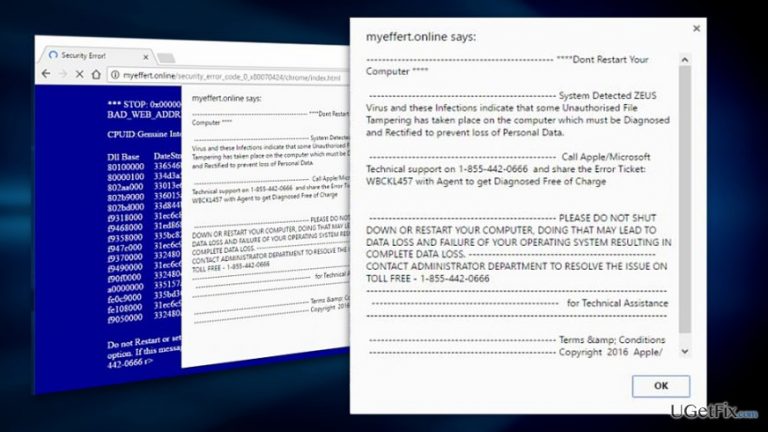
After the ad-based virus infiltrates the computer, Error Ticket: WBCKL457 may proceed to the next step of the attack. It first employs adware redirect functionality. The link to the scam page may be concealed under some regular-looking link or advertisement. Such links redirect users to the malicious website immediately which then activated browser blocking feature and prevents the user from closing the browser. The page imitates the Windows BSOD error and imitates some random error details. Then the new dialog window pops-up threatening the potential victims that their devices have been infected by a malicious Zeus banking trojan and that closing the browser or shutting off the computer will result in immediate loss of the private information. Take a look at this message yourself:
Confirm Navigation
This alert indicates that an attempt to Tamper Data on this PC has been made.
Error Ticket: WBCKL457 has been generated
You are advised to call Customer Support on 1-855-442-0666 (Toll Free) and share this code with the agent
Are you sure you want to leave this page?
System Detected ZEUS Virus and these Infections indicate that some Unauthorised File Tampering has taken place on the computer which must be Diagnosed and Rectified to prevent loss of Personal Data
Call Apple/Microsoft Technical support on 1-855-442-0666 and share the Error Ticket: WBCKL457 with Agent to get Diagnosed Free of Charge
PLEASE DO NOT SHUT DOWN OR RESTART YOUR COMPUTER, DOING THAT MAY LEAD TO DATA LOSS AND FAILURE OF YOUR OPERATING SYSTEM RESULTING IN COMPLETE DATA LOSS.
CONTACT ADMINISTRATOR DEPARTMENT TO RESOLVE THE ISSUE ON TOLL FREE – 1-855-442-0666
Obviously, dialing 1-855-442-0666 will not connect you to any support technicians. Instead, you will be greeted by a scammer who will try to persuade you into purchasing some rogue antivirus software or a bogus subscription to the remote technical support. Do NOT purchase anything that may be offered to your after calling the mentioned number! Also, do not disclose any information about yourself or your device to the scammers and do not grant them access to your system. Instead, run a scan of your system with some reputable antivirus software without delay or remove the virus manually.
Automatic Error Ticket: WBCKL457 tech support scam removal:
Security experts agree that the automatic Error Ticket: WBCKL457 removal is the most effective way to get rid of the undesirable ads. We recommend scanning your computer with [d1] . Make sure you use updated antivirus version to ensure the smoothest elimination.
Manual Error Ticket: WBCKL457 removal from Windows:
When eliminating Error Ticket: WBCKL457 manually, you will have to concentrate on unfamiliar programs that may have been installed on your computer without your permission. Here are more detailed steps on how to remove the virus yourself:
- Close all running programs and open Windows menu
- From the selection menu choose Control Panel and click on Programs and Features (Add/Remove Programs) when the panel opens
- Filter the list of programs, to display recently installed programs on top
- Then, look for unfamiliar components -- toolbars or other browser helpers and uninstall them
- Click Ok to confirm the changes.
After you are done with these steps, you will have to reset your web browsers. Here are the instructions how to do it:
Bottom line
Error Ticket: WBCKL457 is primarily a scam that results from adware infections. To fix this issue, users should remove the adware, avoid engaging with the scam messages, and ensure their security software is up to date. If these steps do not resolve the issue, consider seeking professional help.
Frequently asked questions
Error Ticket: WBCKL457 typically indicates a problem with system files or installed applications on Windows 10, often requiring troubleshooting to resolve.
To troubleshoot Error Ticket: WBCKL457 in Windows 11, you can run the System File Checker tool or use the DISM command to repair corrupted system files.
Yes, ensuring that your Windows 10 or Windows 11 system is updated with the latest patches can help fix Error Ticket: WBCKL457 and other related issues.




Report an issue
What's wrong with this guide? We review every report and update or remove content.
Report received — thank you. We'll review and fix it.
You need a free account to submit a report.
Be the first to comment