How to fix
“Expired DigiCert Certificate” error on Chrome
on Windows
Resolve the "Expired DigiCert Certificate" error on Windows 10 or 11 effortlessly. Get expert-tested solutions and fix it in minutes!


What causes How to Fix “Expired DigiCert Certificate” error on Chrome?
- Expired DigiCert certificate
- Website owner has not renewed the validation of the certificate
- Websites dealing with private data require a valid certificate
- DigiCert is a company that verifies the authenticity of secure internet sites
- HTTPS indicates a secure connection
Repairs Windows system files, removes malware, and restores a clean OS state — without reinstalling.
Hello, when I try to open particular websites, I receive "Delete Expired DigiCert Certificate” error. I am not sure what does it mean? Is it a serious problem or can I fix it?
"Expired DigiCert Certificate” is one of Google Chrome connection errors that might show up anytime when browsing the web. However, only Mac OS X users might encounter this error. Thus, Windows operating system users cannot be disturbed by this connection error while surfing the Internet using Chrome. However, Windows users encounter other issues due to the recent updates.[ref en-1]
The reason behind this particular error is related to expired DigiCert certificate which is used in some websites that are dealing with private data, such as banking details, credit card information, etc. DigiCert is a company that verifies the authenticity of secure internet sites.[ref en-2]
For instance, banks, online shops and other sites that are working with private information need to ensure that user’s or customer’s data is safe and invisible for third-parties. Thus, this "Expired DigiCert Certificate” error message informs that the owner of the website has not renewed the validation of the certificate.

When browsing the web, you might find that different site addresses might start either with HTTP or HTTPS. The letter S stands for security; thus, the website has a DigiCert certificate. However, you should not think that sites with HTTP are not safe to browse.[ref en-3] It’s not true.
Actually, the majority of websites use it because they simply do not have to deal with private information and they don’t need to spend money on this certificate. However, if you browse through online shops and think about buying something, you should pay attention to the website address. If it does not have HTTPS, you should look for another retailer in order to protect your personal information. HTTPS uses data encryption to protect your data from third-parties or cybercriminals.
Fix to "Expired DigiCert Certificate" error
If you have encountered "Expired DigiCert Certificate” error, you just need to know that this error informs about expired validation of the security certificate. Usually, website owners quickly fix this problem and renew the authentication. Meanwhile, you can get rid of this error by scanning the device using [d1]. If the scan delivers good results and there are no issues that could be fixed automatically, follow the manual methods below.
Method for "Expired DigiCert Certificate" fix on Mac OS X
- Go to Spotlight search and type “Keychain Access."
- In the search result find and open Keychain Access app.
- On the top of the screen, you will find View Show Expired Certificates. Click on it.
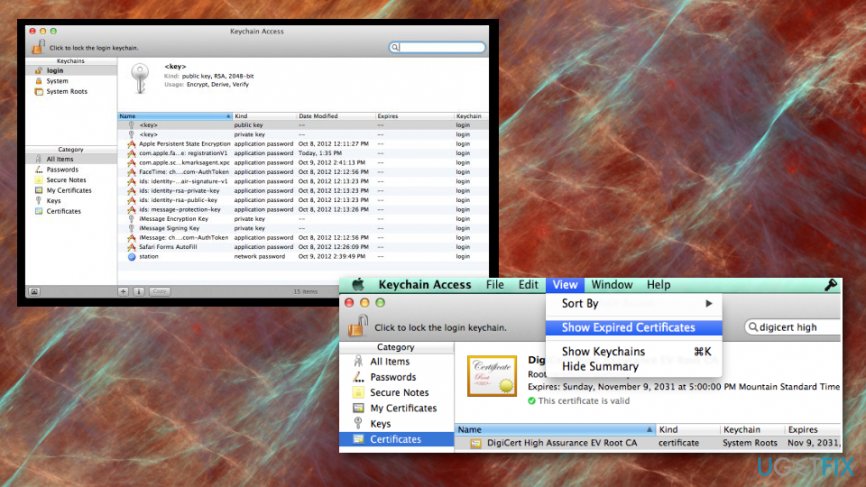
How to fix expired digicert certificate error keychain access - Now you should see a list of certificates.
- With the help of a search bar (top-right of the screen) find DigiCert High and press Enter.
- Look for DigiCert High Assurance Root CA, which is marked as "expired" and delete it by pressing Delete button on a keyboard.
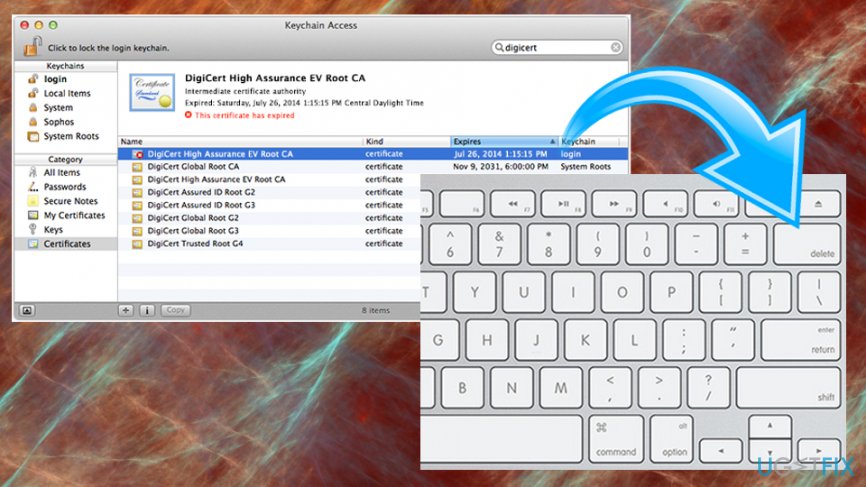
How to fix expired digicert certificate error delete expired - If you see more expired certificates on the list, delete them as well.
- Restart Mac. You should not receive "Expired DigiCert Certificate” error anymore.
Bottom line
To fix the 'Expired DigiCert Certificate' error, website owners should renew their security certificate promptly. Users should ensure they are browsing secure sites, especially when entering personal information. If the issue persists, consider contacting the website owner or checking for updates on your browser.
Frequently asked questions
This error typically occurs when the DigiCert security certificate for a website has expired, preventing Chrome from establishing a secure connection. It can also be triggered by incorrect system date and time settings.
To check your date and time settings, right-click on the clock in the taskbar, select 'Adjust date/time', and ensure that both the time zone and the date and time are correct.
If the error continues, try clearing your browser's cache and cookies, or consider updating Chrome to the latest version to ensure compatibility with current security certificates.




Report an issue
What's wrong with this guide? We review every report and update or remove content.
Report received — thank you. We'll review and fix it.
You need a free account to submit a report.
Be the first to comment