How to fix
Google Voice scam
on Windows
Protect your Windows 10 or 11 device from Google Voice scams with effective troubleshooting tips. Safeguard your account today, expert-tested solutions …

What causes How to fix Google Voice scam?
- Scammers hijack victims' phone numbers
- Victims publicly post their phone numbers online
- Scammers use misleading stories to gain trust
- Victims disclose verification codes to scammers
- Scammers create Google Voice accounts using hijacked numbers
Repairs Windows system files, removes malware, and restores a clean OS state — without reinstalling.
Hello. Please help me, as I think I got scammed. I placed an ad online trying to sell an item, and I got a text message saying that the person was interested in it. Then they told me to enter a six-digit code I got texted from another user, so I did. The person claimed it is needed so that he would know I am real. I never got another message again, and I believe that my phone number is now used by scammers on Google Voice, as I got a notification about it. Should I be worried? Please help me.
Google Voice scam is a fraudulent activity carried out by scammers who hijack a victim's phone number and create a Google Voice account, which subsequently allows them to scam other people and remain undetected. Since 2019 the topic on Reddit related to this scam does not go silent. Otherwise known as Google Voice Code Verification scam[ref en-1], this phony can be initiated for anyone who posts a phone number publicly on the Internet. Scammers then call for a potential victim responding to the advertisement shared online and ask to prove not being a bot or invent other misleading stories. Bad actors ask claims that the victim will receive a message or a call with a six-digit number, which has further be sent to the supposed clients. Disclosed a code - the number hijacked.
The Google Voice scam is usually associated with Craigslist[ref en-3] - an American advertising website, which features categories for jobs, housing, services, items for sale, items wanted, discussion forums, and others. Most of the posts or ads positioned on this site contain the author's phone number, which can be seen publicly. Consequently, scammers can try to scam any user of this platform. It's important to stress the fact that Craigslist does not initiate calls for registered users to verify their ads or comments. It's nothing else but a craigslist verification code scam.
One may consider why this scam technique is so successful. Since many people are asking questions like what is a google voice verification code or what Google Voice means, the scale of people with their phone numbers hijacked will hardly fall. Shortly, Google Voice[ref en-4] is a communication program that assigns you with a specific number. However, to activate it, you need to have a personal phone number. A six-digit code is usually sent to the user, and he or she needs to enter it to finalize the registration process. In such a way, the calls made to you via Google Voice can be forwarded to your personal phone, so you never miss them. All in all, it is a communication service that is comfortable and free to use.
Google Voice scam relates to malicious actors getting the six-digit code from the user and creating a new account. Now, the purpose of such a scam might be different; for example, it can be used to scam other people. Therefore, it is vital to fix Google Voice Scam and reclaim the number as soon as possible.
The scam works in the following scheme:
- A user puts up the phone number on a public website (most of the victims claimed they shared the number on Craigslist,[ref en-2] so some people might refer to this scam as Google Voice Craigslist scam).
- Crooks contact the user via the provided phone number, pretending to be interested in the ad.
- They then ask the user to provide the code that is sent to them from Google (which they don't know about initially, as crooks provide some excuse about it, such as that they use special phone that they need to verify, etc.)
- The verification code is then being used to finalize the account, and Google Voice scam is complete.
Users will never hear from these people again, although they cannot use Google Voice because their forwarding number is deleted. Here's the message:
Please note that the forwarding number (XXX) XXX-XXXX was deleted from your Google Voice account ([email protected]) because it was claimed and verified by another Google Voice user.
If you still want this forwarding number on your account and believe this was an error, please click here to learn more.
If you were the victim of Google Voice scam, you should take your personal number back, even if you are not a user of Google Voice. In such a case, please follow the instructions below on how to create an account, and then reclaim the number.
Step 1. Create Google Voice account (if don't own one)
- Visit the official Google Voice website - https://voice.google.com/about
- Click on For personal use
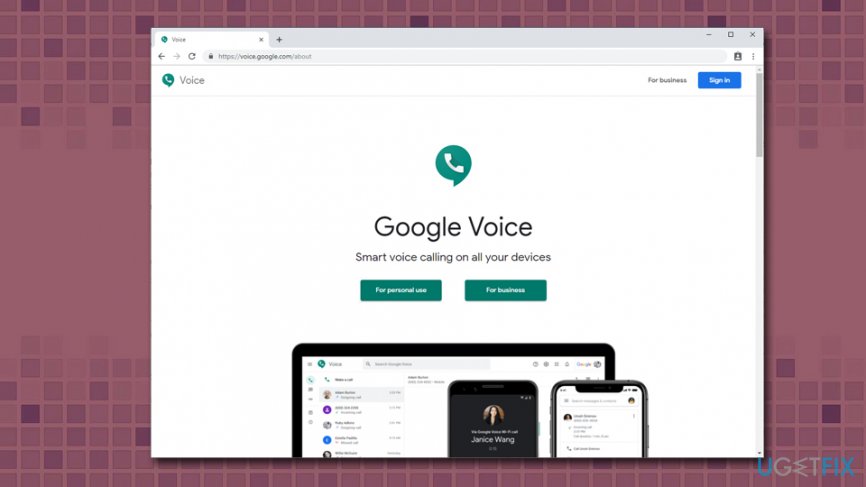
How to fix google voice scam create google voice account - Pick the platform - Android, iOS or Web
- Create a Google account or log in to the existing one
- Press Continue
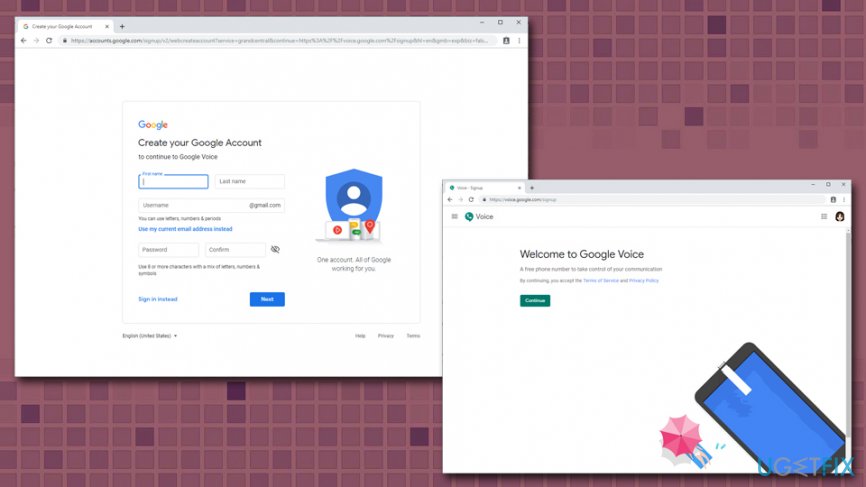
How to fix google voice scam create enter google credentials
Step 2. Use the verification code on an alternative number
Now is the crucial part. You need to make sure you do NOT provide the number that scammers stole from you. Instead, ask somebody you know to use their phone number. Any number will work as long as it was never used to create a Google Voice account. You can remove the number later after you reclaim the stolen number without any problems.
As soon as you receive the six-digit code, you can enter it into the required field. This will finalize the registration.
Step 3. Retrieve your phone number
- As soon as you log in to the account, click on the Add another phone or New linked number
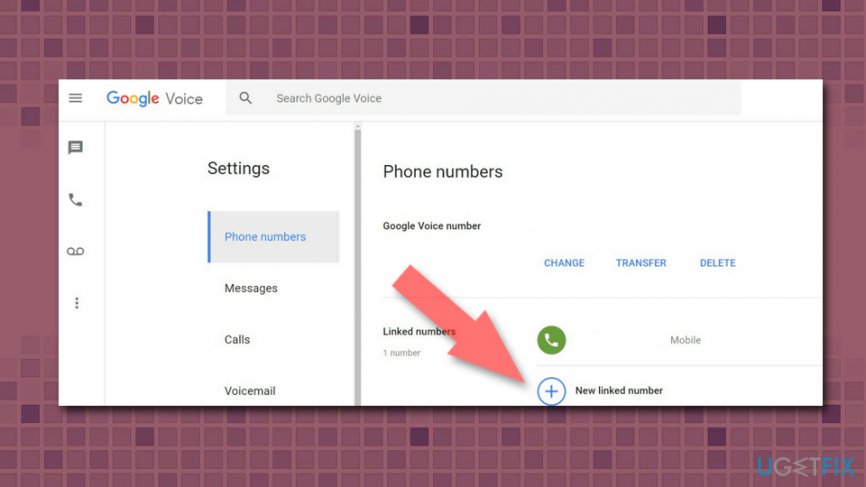
How to fix google voice scam add new number - Enter the stolen number (your own number) that scammer used
- You should get a warning that the number is currently in use by another account
- Confirm with Yes when you are asked if you want to reclaim it. If you do not get such a warning, it means that scammers are no longer using your number, and you should simply ignore the message
These steps should help you fix the Google Voice scam issue, and will make sure that your number is not used for whatever malicious deeds scammers come up with. On the side note, please never send any verification codes to unknown individuals, no matter what excuse they provide you with.
Bottom line
To address the Google Voice scam, ensure you do not share verification codes with anyone and be cautious when posting your phone number online. If you suspect your number has been compromised, consider changing your phone number and reporting the scam to the authorities. If these steps do not resolve the issue, seek further assistance from Google Voice support.
Frequently asked questions
You can look for unusual caller IDs or unsolicited messages that ask for personal information, which are common indicators of scams. Additionally, Google Voice allows you to block numbers that seem suspicious.
Immediately report the message to Google through your Google Voice settings and consider blocking the number to prevent further contact. You should also avoid sharing personal information or clicking on any links provided in the message.
Yes, enable two-factor authentication for your Google account and regularly update your password to enhance security, which can help protect your Google Voice account from scams.




Report an issue
What's wrong with this guide? We review every report and update or remove content.
Report received — thank you. We'll review and fix it.
You need a free account to submit a report.
Be the first to comment