How to fix
Handoff not working on Big Sur
on Windows
Resolve Handoff issues on Windows 10 or 11 effortlessly and enjoy seamless connectivity with expert-tested solutions that fix your problems in minutes.

What causes How to fix Handoff not working on Big Sur?
- Misconfiguration in the handoff setup
- Connection issues between devices
- Compatibility problems with various OS versions
- Disabling of features in supported applications
- Recent operating system updates causing disruptions
Repairs Windows system files, removes malware, and restores a clean OS state — without reinstalling.
Hello. I have issues with handoff/airplay on my iPad and on my MacBook. I have a fresh BigSur 11.0.1 install. It is permanently off and I can't change it no matter what I try to do. Restarted, changed firewall settings, and all that. Can you help me with Handoff not working on the Big Sur issue?
Issues BigSur and macOS updates are not new, unfortunately.[ref en-1] Even though some people tend to think that macOS is not prone to any errors, issues, o even security incidents. Handoff not working on Big Sur is the problem that can be triggered by a misconfiguration in the handoff setup, so the feature cannot be used between Apple devices. These handoff issues are reported by users[ref en-2] pretty often.
Sudden disabling of the feature appears to affect various OSs and devices, including iOS 14, 13, 12/iPad OS. It is the issue that becomes a huge problem after an update on the operating system. Handoff not working on Big Sur frustrates and annoys users because the Handoff feature is one of the more important time management features.
Handoff not working on Big Sur issues include various additional frustrations like no tab sharing appearing at all, copy and paste function, calls cutting off.[ref en-3] Continuity features like handoff should work seamlessly between various devices, but connection issues and compatibility problems can trigger the disabling of the option.
Since Handoff is supported on applications some of the features can be disabled or all of them do not work anymore. Handoff not working on Big Sur triggers issues with:
- contacts;
- pages;
- mail;
- maps;
- calendar;
- reminder;
- airbnb;
- keynote;
- numbers;
- safari;
- many more.
It is possible that you might only need to troubleshoot the issue to fix Handoff not working on Big Sur or enable some features, change preferences. it might be quick and easy for some users and more difficult, demanding on the root cause and particular devices that fail to perform. However, some of the solutions for the issue might require your attention and more in-depth alterations.
How to fix Handoff not working on Big Sur
Handoff not working on Big Sur can be annoying when the feature is no longer works. However, there might be possible compatibility issues when the devices you want to connect are not supposed to connect using this option. Handoff is compatible with iOS 8 or later versions; iPhone 5 and newer versions, iPad Pro, OS X Yosemite or later, MacBook Air/Pro 2012 or newer, Apple Watch versions from 1st generation, MacBook as old as 2015 or newer. Other devices that are newer should have this function available.
You can decide how to go after this issue yourself, but you should go through the methods below to properly tackle the issue. You might also want to make sure that devices are connected to the same wi-fi and that it is working. Turn of Bluetooth and wi-fi on all devices you try to connect, all pieces should use the same Apple ID and hold close to each other. Then try to fix Handoff not working on Big Sur.
Make sure to enable Handoff on your Mac
- You should check if the function is turned on your iPad or iPhone by going to Settings > General > AirPlay & Handoff.
- Then got to Apple menu on your Mac.
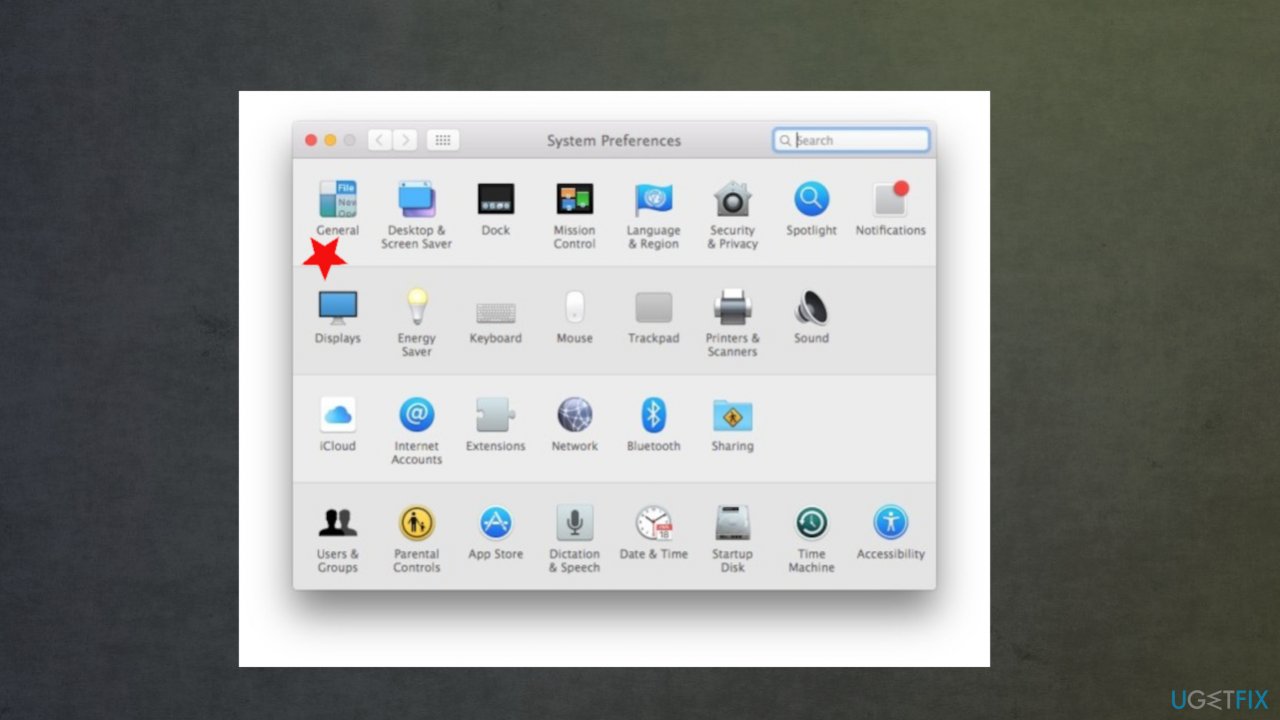
Handoff not working big dur fix general settings - Find System Preferences and choose General.
- Check the box for Allow Handoff between this Mac and your iCloud devices.
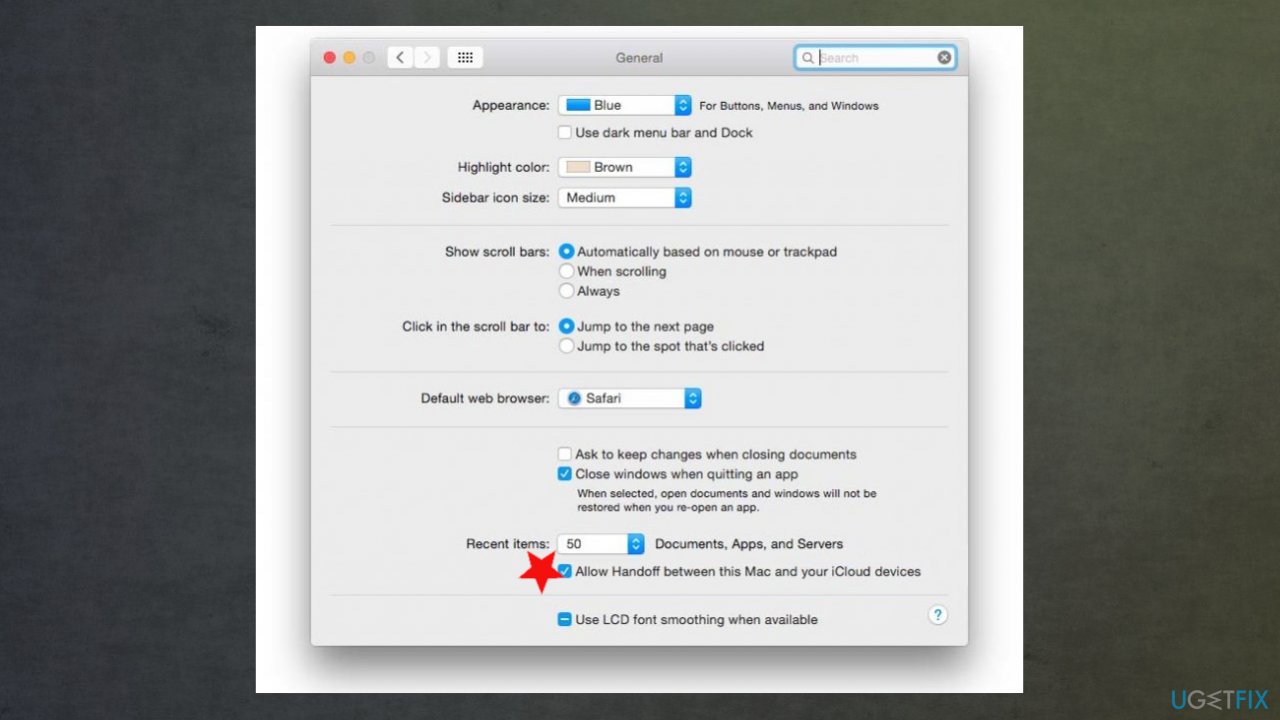
Handoff not working big dur fix allow
Restart those devices you want to connect
iPhones
- Press and release quickly the Volume Up button.
- Repeat that with Volume down button.
- Press and hold the Side button.
- Let go when the Apple logo appears.
Mac
- Click the Apple logo and choose to restart.
Apple Watch
- Press and hold the Digital Crown and Side button at the same time for 10 seconds or more. Once the apple logo shows up release.
Reset all settings to fix Handoff not working on Big Sur
- Go to Settings and then General.
- Click Reset and Reset all settings on your phone.
- All saved passwords, personal hotspot, Apple ID sign-ins get reset.
Check for OS updates
- Some issues can get fixed with the newest update of the operating system.
On iOS:
You can find the update check under the General Setting section.
On macOS:
Go to App store app and Updates. Then Download Update and install.
Use Terminal commands
- Open the Terminal via Finder.
- Execute the following:
defaults read ~/Library/Preferences com.apple.coreservices.useractivityd.plist - Run the following command to delete the ClipboardSharingEnabled if it is zero:
defaults delete ~/Library/Preferences/com.apple.coreservices.useractivityd.plist ClipboardSharingEnabled - Reboot the computer and test the Universal Clipdoard.
Sign off out of iCloud to fix Handoff not working on Big Sur
iPhone
- Go to Settings on your phone and click on your user name.
- Scroll down to find the Sign out button.
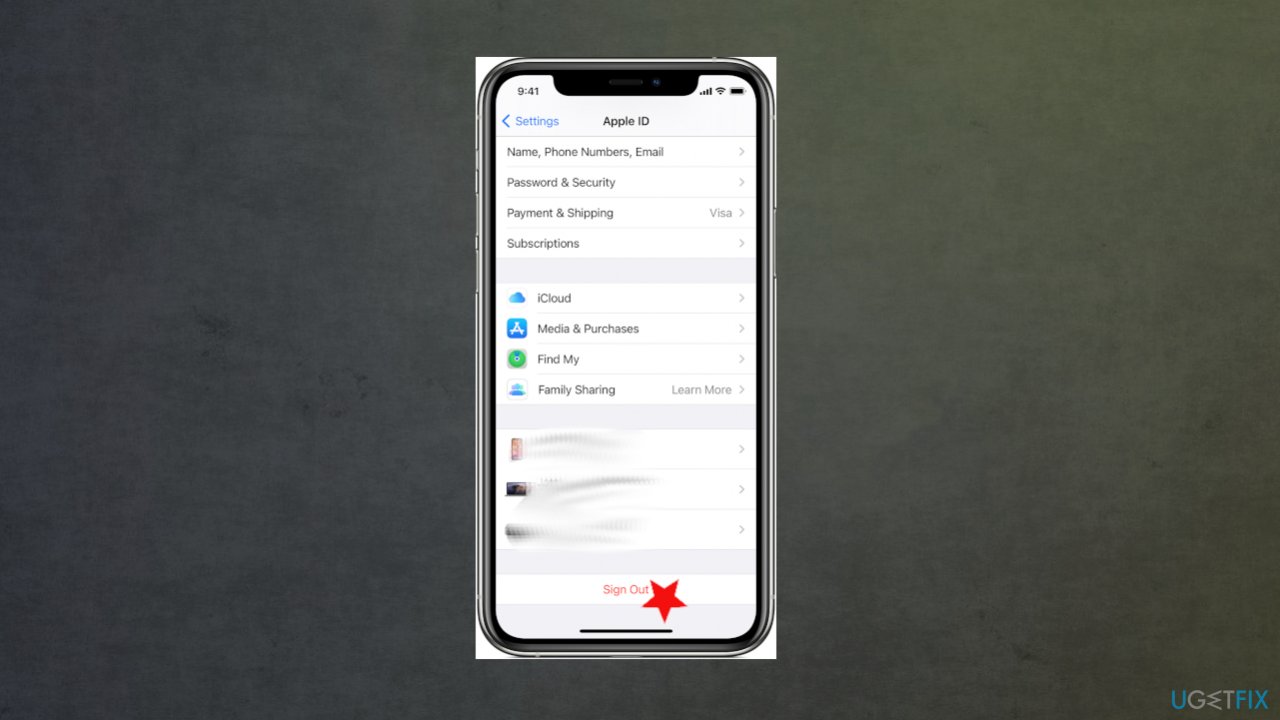
Handoff not working big dur fix apple id sign out - Unter the password and then Turn off.
- Turn on the data that you want to keep a copy of on the device.
- Tap Sign out to confirm.
Mac
- Click on the Apple menu.
- Find System Preferences and then choose Apple ID.
- Click overview or iCloud and Sign Out.
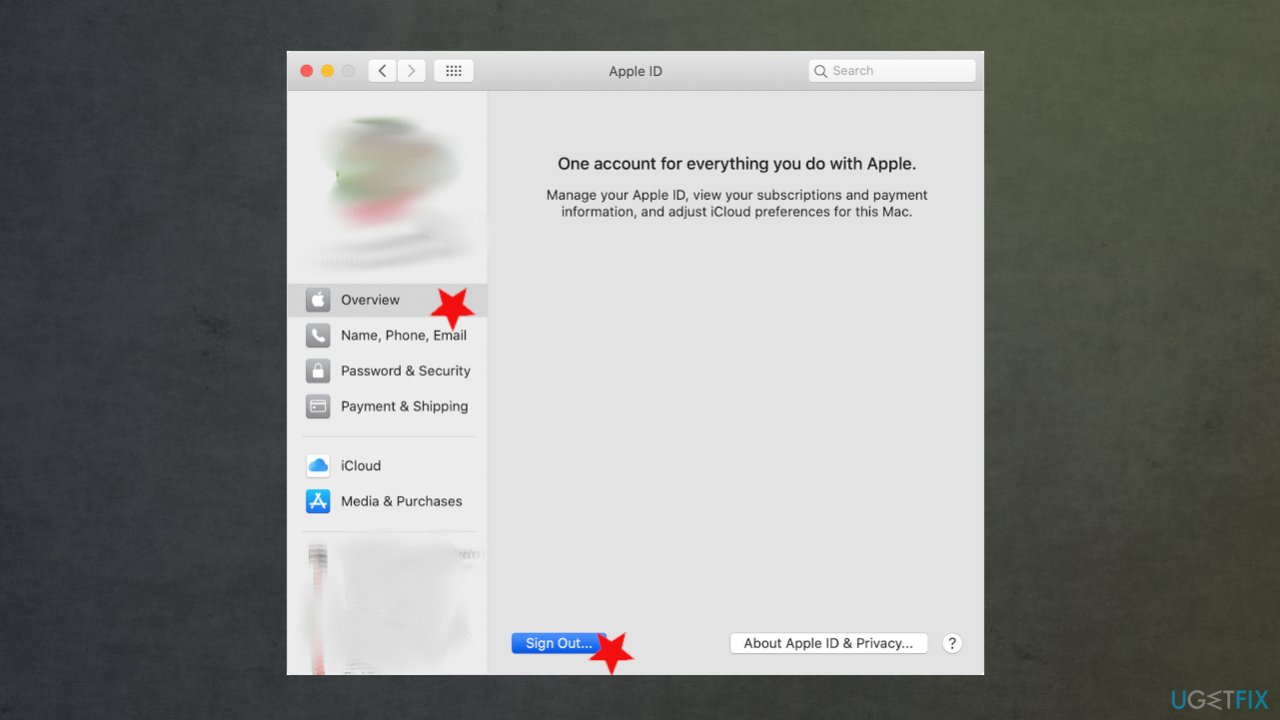
Handoff not working big dur fix apple id - Choose if you want to keep a copy of your data before you sign out.
Bottom line
To fix Handoff not working on Big Sur, you may need to troubleshoot the issue, change preferences, or enable certain features. If these solutions do not resolve the problem, consider seeking more in-depth alterations or professional assistance.
Frequently asked questions
Handoff is a feature exclusive to Apple devices, and it cannot be directly fixed on Windows 10. However, ensuring your Mac is updated and checking your network settings may help improve connectivity.
Handoff relies on Apple’s ecosystem; thus, if you're using Windows 11, ensure your iPhone is connected to the same Wi-Fi network and Bluetooth is enabled.
While there are no direct replacements for Handoff on Windows 10, apps like Pushbullet or Join can help you share notifications and files between devices.




Report an issue
What's wrong with this guide? We review every report and update or remove content.
Report received — thank you. We'll review and fix it.
You need a free account to submit a report.
Be the first to comment