How to fix
High CPU Usage by Sppsvc.exe
on Windows
Resolve high CPU usage caused by sppsvc.exe on Windows 10 with effective solutions. Get expert-tested fixes that eliminate the problem swiftly!

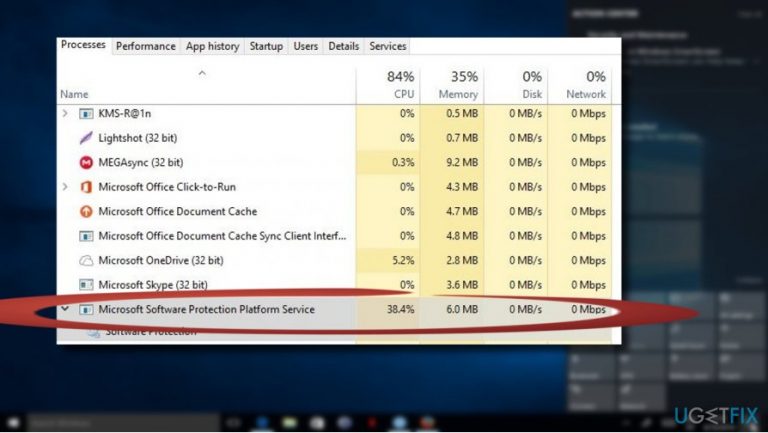
What causes How to Fix High CPU Usage by Sppsvc.exe on Windows 10?
- High CPU usage by Sppsvc.exe
- Virus infection
- Multiple Sppsvc.exe processes running
- Malicious files mimicking sppsvc.exe
- Misuse of legitimate files by hackers
Repairs Windows system files, removes malware, and restores a clean OS state — without reinstalling.
Hi. I bought a brand new laptop before a half of the year or so, which has an inbuilt Windows 10 OS. I’ve been using it with no problems until a few days when I started noticing random freezes and slowdowns.
Besides, it sometimes gets difficult to browser both with Chrome and Edge as the websites do not load or the browser crashes. The same happens with the apps. What I have noticed is the high CPU usage by Sppsvc.exe (about 35%).
Is this normal? Could those slowdowns and crashes be related?
Sppsvc.exe is a Microsoft Software Protection Platform Service, which is also referred to as sppsvc. It belongs to Microsoft Windows Operating System and is one of the integral parts of the Windows OS. The service is aimed at piracy prevention[ref en-1] and software tampering protection, which helps to initiate licensing easier.
According to Microsoft, Sppsvc.exe service “exhibit improvements in how Microsoft software activates, is validated online and behaves when tampering or hacking[ref en-2] is detected.” However, this executable file tends to initiate issues related to high CPU.
Many people have reported that Sppsvc.exe CPU usage often reaches 35% or even more, which is why the PC starts to perform in an unusual manner. Due to misused CPU, the system may become sluggish and unresponsive.
This might happen due to several reasons. First of all, you should check your PC for virus infection. The original sppsvc.exe file is signed by Microsoft[ref en-3] and exhibits only 2% of dangerous level. Therefore, the process itself is a crucial part of Windows and should not be related to malicious activities. However, it is often misused by hackers who name the malicious files after the legitimate sppsvc.exe process to prevent virus detection.
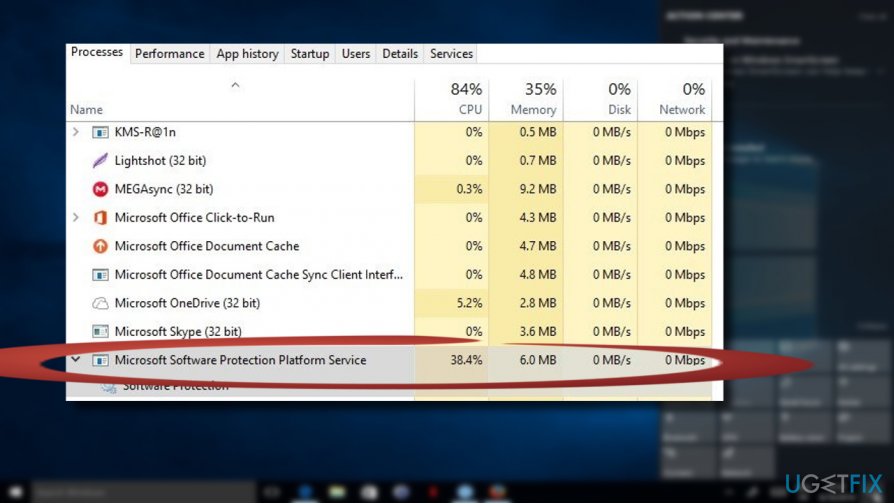
However, hackers often misuse legitimate files for concealing viruses. Sppsvc.exe file is not an exception. If several Sppsvc.exe processes are running on Windows Task Manager, it's a sign that the system may be infected with a malicious virus.
Therefore, if you have noticed high CPU usage by sppsvc.exe, run a full scan with a powerful anti-malware, for example, [d1]. If the tool did not find any malware, try to fix high CPU usage by sppsvc.exe using the instructions given below.
The Instructions on How to Fix High CPU Usage by Sppsvc.exe on Windows 10
NOTE: We have noticed that various blogs are offering people to remove the sppsvc.exe file, which is NOT appropriate. Sppsvc.exe is an integral part of Windows OS, removal of which may lead to Windows activation problems.
Consequently, you will either need to perform a clean install of Windows or restore the sppsvc.exe executable file.
Here is the video with information about elimination of this problem:
[youtube lg84dkB9baQ]
Method 1. Upgrade the system to the latest build
Sppsvc.exe may start sucking up system’s resources due to the missing Windows updates. Outdated system drivers and software often result is multitude of errors, so try to install all available Windows 10 updates.
- Click Windows key + I and select Updates & Security.
- Open Windows Updates section.
- Click Check for Updates button and wait for a while.
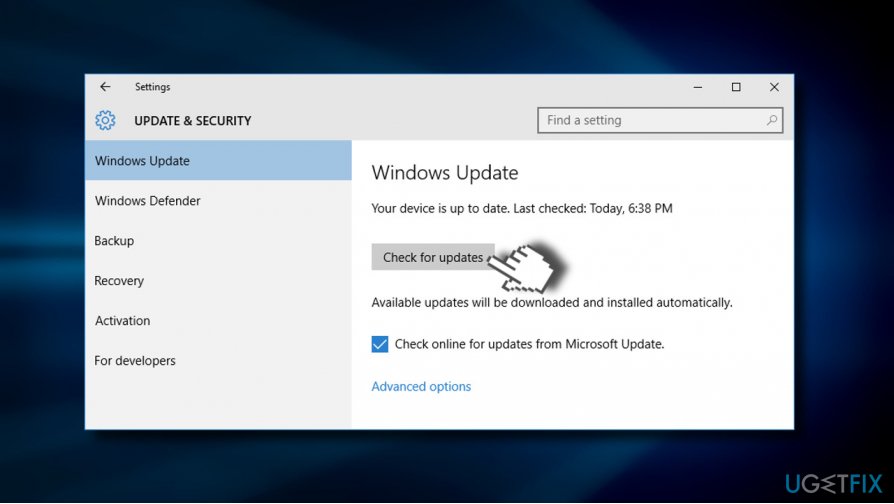
- The system will automatically detect available updates. If no updates are required, you'll see this message: "Your device is up to date. Last checked: (date)."
- If the system lacks for the updates, click Run the Updates.
- Finally, restart the system and check if this helped to fix Sppsvc.exe high CPU usage.
Method 2. Try a clean boot
To start with, boot your system into Safe Mode and check if the Sppsvc.exe still consumes system’s resources unreasonably. If the problem disappears while in Safe Mode, we would recommend trying a clean boot. It might be that Sppsvc.exe error emerges due to the software clash with the Microsoft Software Protection Platform Service.
- Click Windows key and type msconfig.
- Click System Configuration and open Services tab.
- Mark Hide all Microsoft services box and select Disable all.
- Open Startup tab and click Open Task Manager.
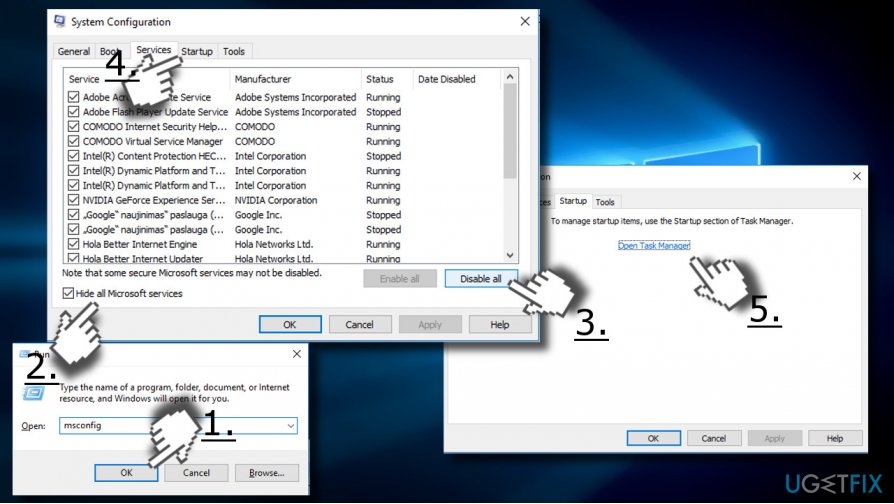
- Click on each startup item and select Disable.
- Close Task Manager and click OK on the System Configuration window.
- Reboot the system.
If the CPU usage by Sppsvc.exe went back to normal, try to enable Windows services one by one to find out which program is causing the problem. If you manage to identify the exact application, we would recommend reinstalling.
Method 3. Restart Sppsvc.exe process
NOTE: disable Sppsvc.exe process temporarily to check if after that it’s gone from the Task Manager. If you still find it running and consuming system’s resources, then your system must be infected with a virus. Once checked, enable the process to prevent Windows activation errors.
- Click Win key + R, type regedit, and press Enter.
- Navigate to the HKLM\\SYSTEM\\CurrentControlSet\\Services\\sppsvc using the left pane.
- Modify the Start value from any number to 4.
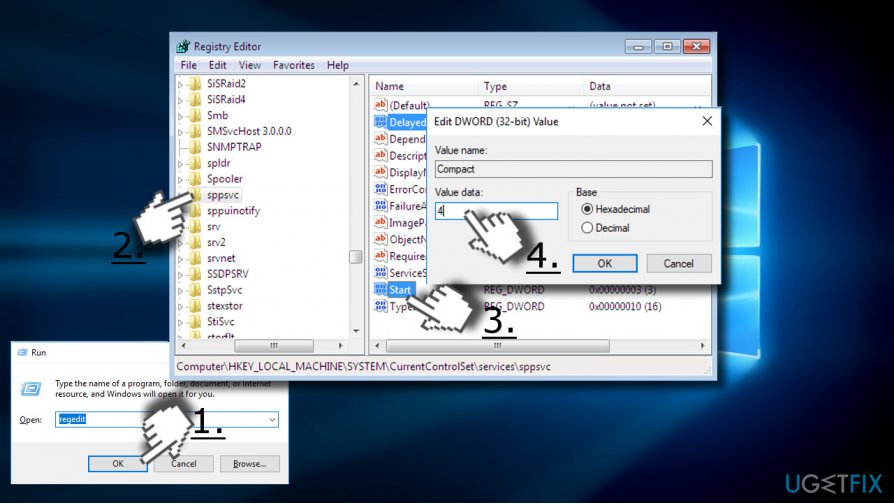
- Once done, reboot the system and check if disabling Sppsvc.exe helped to fix high CPU usage.
- If you found the process on Task Manager anyway, scan the system with anti-malware one more time. If the process is no longer active, enable it and check if it is still using too much CPU.
Please let us know if you are still having the problem, so that we could further investigate it.
Bottom line
To address high CPU usage by Sppsvc.exe, check your PC for virus infections, run a full scan with a powerful anti-malware tool, and ensure that only one instance of Sppsvc.exe is running. If these steps do not resolve the issue, further investigation may be necessary.
Frequently asked questions
Sppsvc.exe is the Software Protection Service that helps manage licenses for Windows and Microsoft products. High CPU usage may occur due to issues with software activation or conflicts with third-party applications.
You can reduce CPU usage by running the Windows Update troubleshooter, checking for system updates, or disabling unnecessary startup programs that may conflict with the service.
Disabling sppsvc.exe is not recommended as it may lead to issues with software activation and licensing; instead, focus on troubleshooting the underlying causes of the high CPU usage.




Report an issue
What's wrong with this guide? We review every report and update or remove content.
Report received — thank you. We'll review and fix it.
You need a free account to submit a report.
Be the first to comment