How to fix
KERNEL_AUTO_BOOST_INVALID_LOCK_RELEASE
on Windows
Resolve the KERNEL_AUTO_BOOST_INVALID_LOCK_RELEASE error on Windows 10 and 11 effortlessly. Expert-tested solutions ensure your system runs smoothly.


What causes How to fix KERNEL_AUTO_BOOST_INVALID_LOCK_RELEASE?
- Outdated device drivers
- Cyber infections damaging files
- Memory issues
- Incompatible application versions
- Buggy Windows Update
Repairs Windows system files, removes malware, and restores a clean OS state — without reinstalling.
I have an issue with my computer. A blue screen of death appears very often. I receive random crashes and the error sometimes occurs too. KERNEL_AUTO_BOOST_INVALID_LOCK_RELEASE is the code that appears. My PC runs on Windows 10 OS version. Can you help me?
KERNEL_AUTO_BOOST_INVALID_LOCK_RELEASE is the error that often is related to outdated device drivers. The issue is reported online by various users[ref en-1] who suffer from problems with their machines. Issues include BSOD screen,[ref en-2] system crashes, and other issues with the performance of the computer.
The problem can be quickly fixed when the driver update is performed. However, this problem with the Stop Cose can also be caused by some cyber infections[ref en-3] that damaged files. KERNEL_AUTO_BOOST_INVALID_LOCK_RELEASE can be related to memory issues and other settings of the machine, so altering them can solve the problem once and for all.
You can fix the KERNEL_AUTO_BOOST_INVALID_LOCK_RELEASE error, but the main thing about such errors and system crashes is an indication of the root cause. The problem can occur when an incompatible version of the application was installed or the program got damaged.
KERNEL_AUTO_BOOST_INVALID_LOCK_RELEASE error code can also appear on the screen when Windows Update is buggy or has an issue with other programs, anti-malware programs. Windows registry is the place where some of the malware damage might be located, so these issues are not solved until the damage is repaired.
How to fix KERNEL_AUTO_BOOST_INVALID_LOCK_RELEASE
KERNEL_AUTO_BOOST_INVALID_LOCK_RELEASE issue can be related to outdated software and you might solve the issue when the program is updated. Windows registry files once damaged, corrupted, or deleted can trigger problems with the operating system and other programs. Unfortunately, interfering with such a part of the machine can lead to more issues.

The manual registry editing is not recommended, but you can try to run a program that is designed to alter such parts of the os and can help you fix KERNEL_AUTO_BOOST_INVALID_LOCK_RELEASE. [d1] is one of the tools made for the PC issue repair and especially when it comes to OS files and registry.
Run a compatibility troubleshooter
- If you know the program that is possibly triggering the issue or was installed recently, you can find that app and right-click on it.
- In the menu, choose Troubleshoot compatibility.
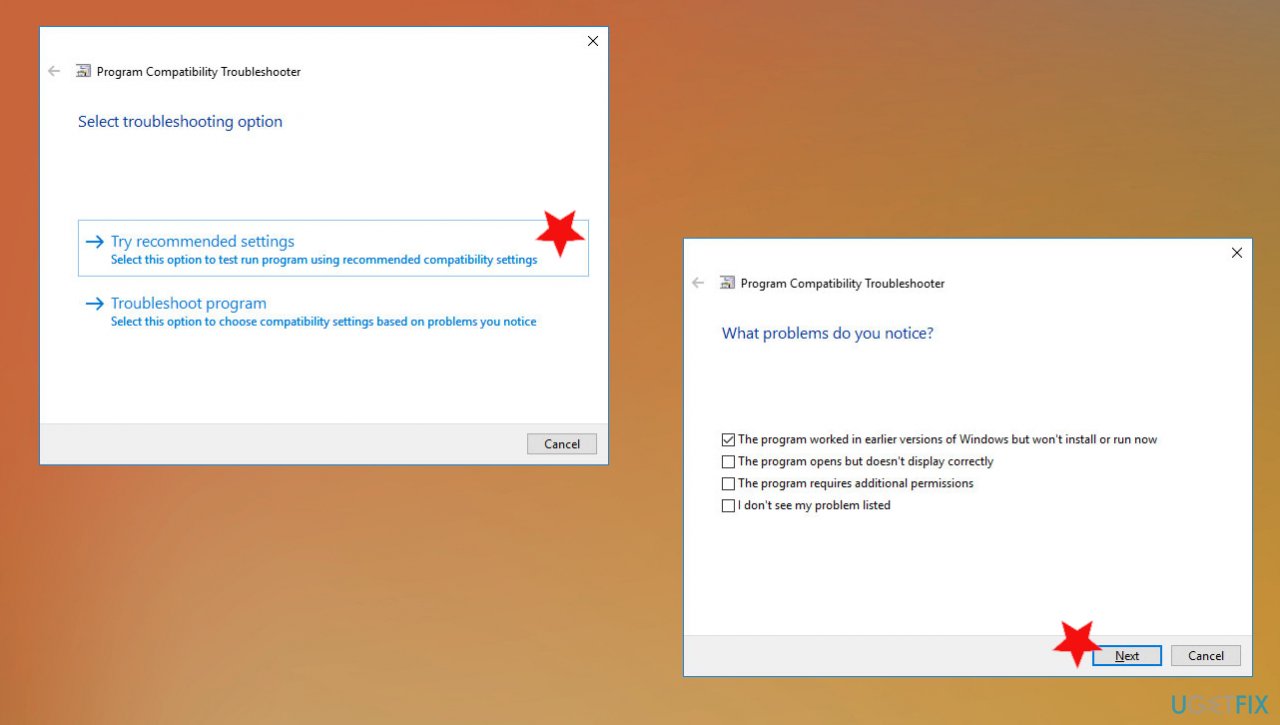
How to fix kernel lock release error compatibility - Once there you can choose from options:
Recommended settings that test run the program using compatibility settings.
Troubleshooting program that chooses compatibility settings based on problems you have encountered. - Follow with the check.
Disable the Windows Automatic restart
- Right-click on This PC.
- Choose properties and go to System.
- Select Advanced system settings and go to the Advanced tab.
- Choose Startup and recovery.
- Click Settings.
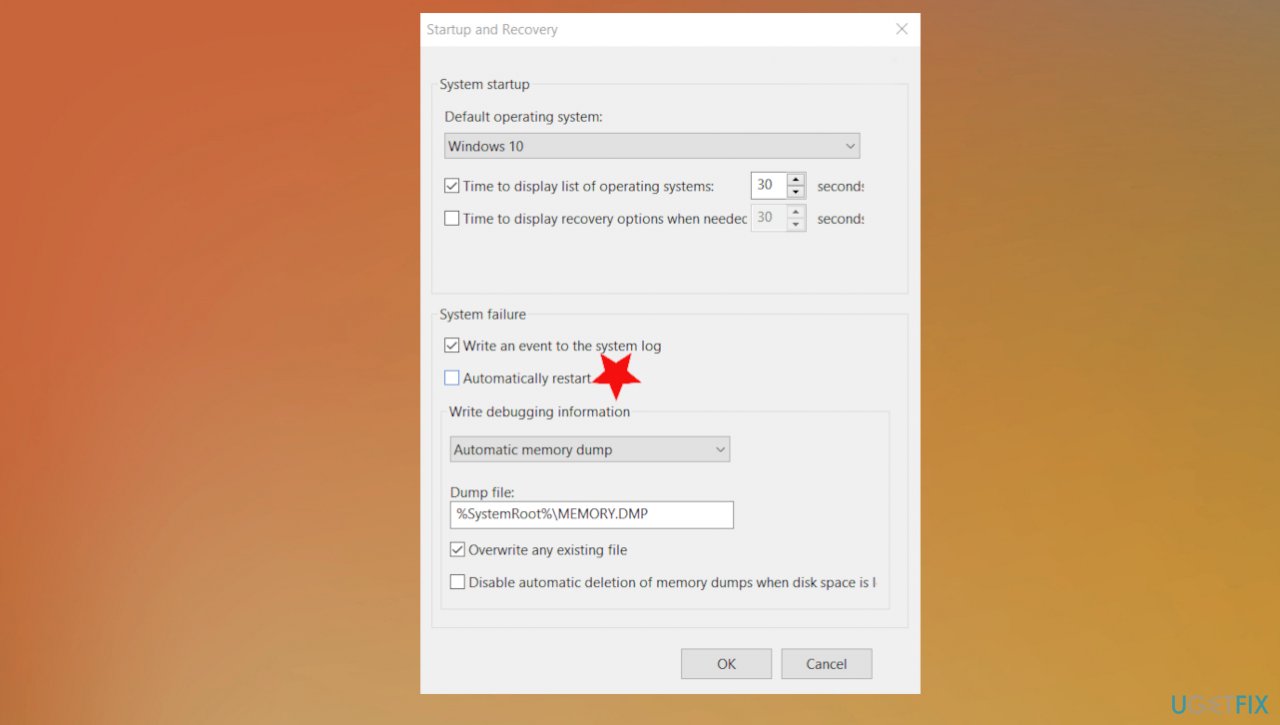
How to fix kernel lock release error automatic restart - Under System Failure and uncheck the Automatically restart option.
- Choose OK.
Check for malware to fix KERNEL_AUTO_BOOST_INVALID_LOCK_RELEASE
- Go to the tight of the taskbar and click on the arrow to show hidden items.
- Click the shield to open Windows security.
- Select Virus & threat protection.
- Choose Scan options.
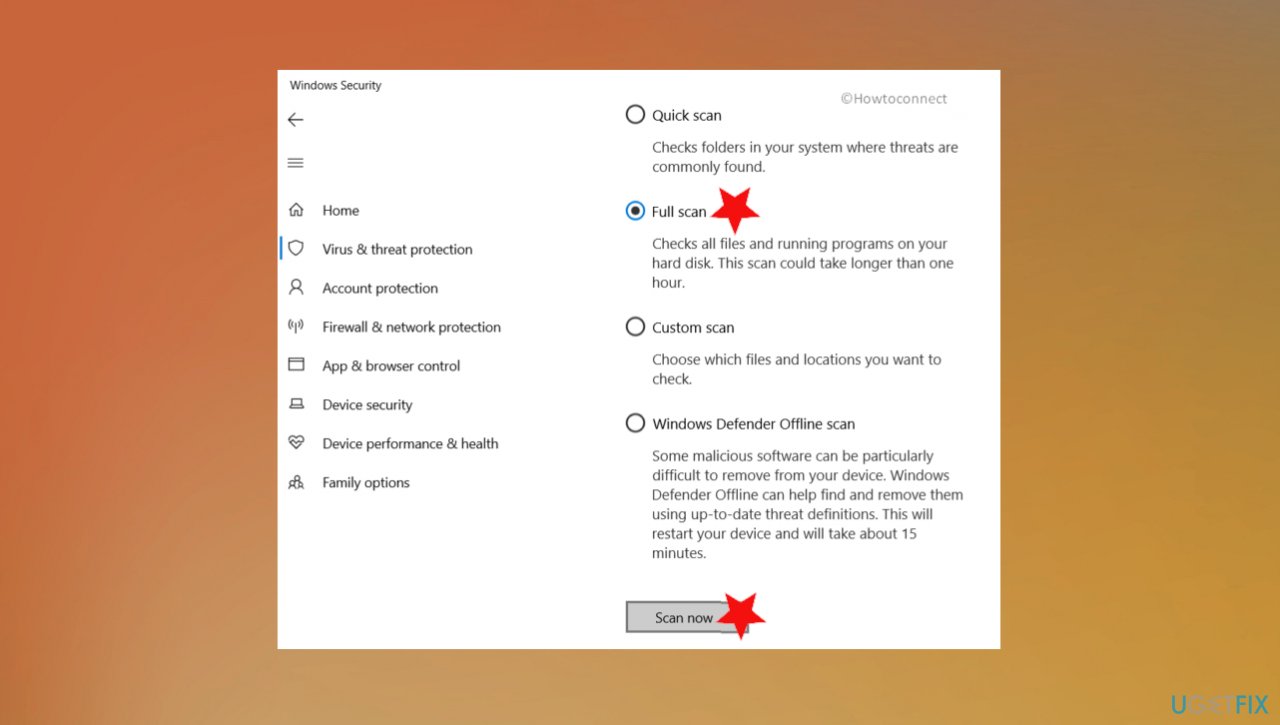
How to fix kernel lock release error windows security scan - Select Full scan and click on Scan now.
- Clean threats when any of them detected.
- Choose to Remove and Start to clear threats.
Use the Windows Memory Diagnostic tool
- Click Win and S keys.
- Type memory in the search.
- Go to Windows Memory Diagnostic from results.
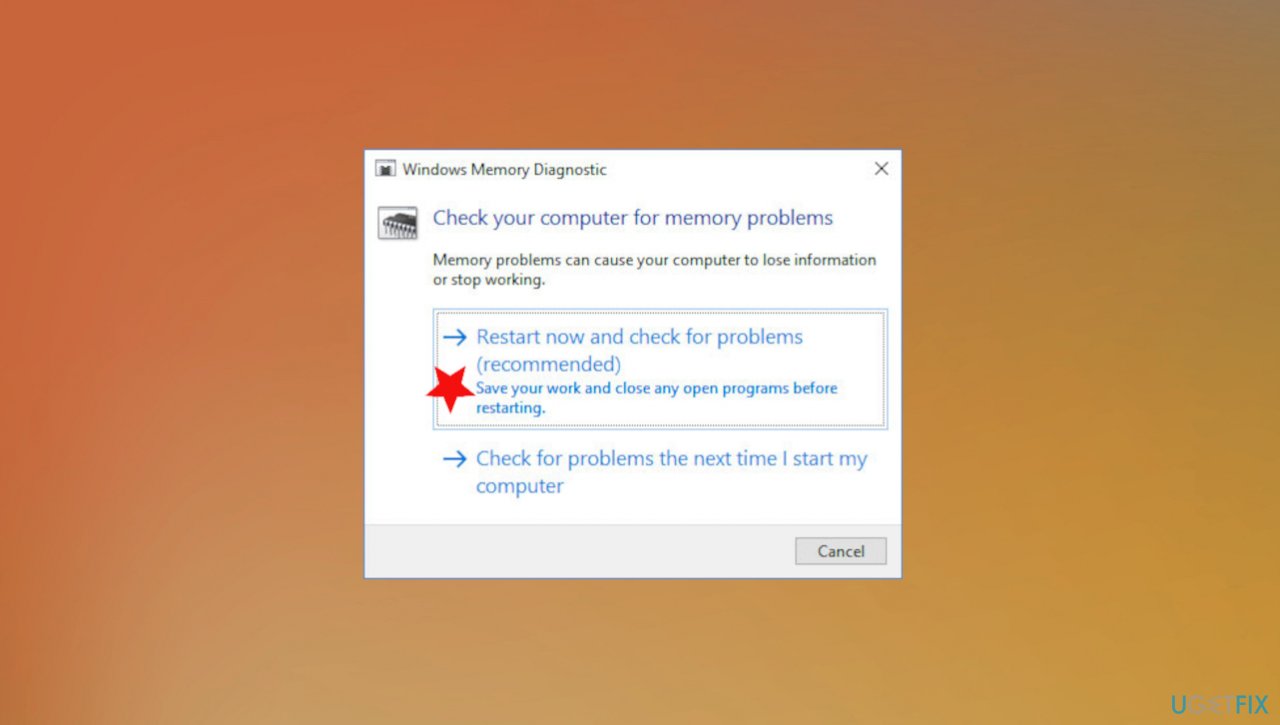
How to fix kernel lock release error windows memory tool - Choose Restart now and check for problems.
- Once the system reboots after a check, look for results.
- Your memory issues should be corrected.
Update drivers via Device Manager
- Right-click the Start menu and choose Run.
- Type devmgmt.msc and hit OK.
- Right-click the driver and choose the Update driver option.
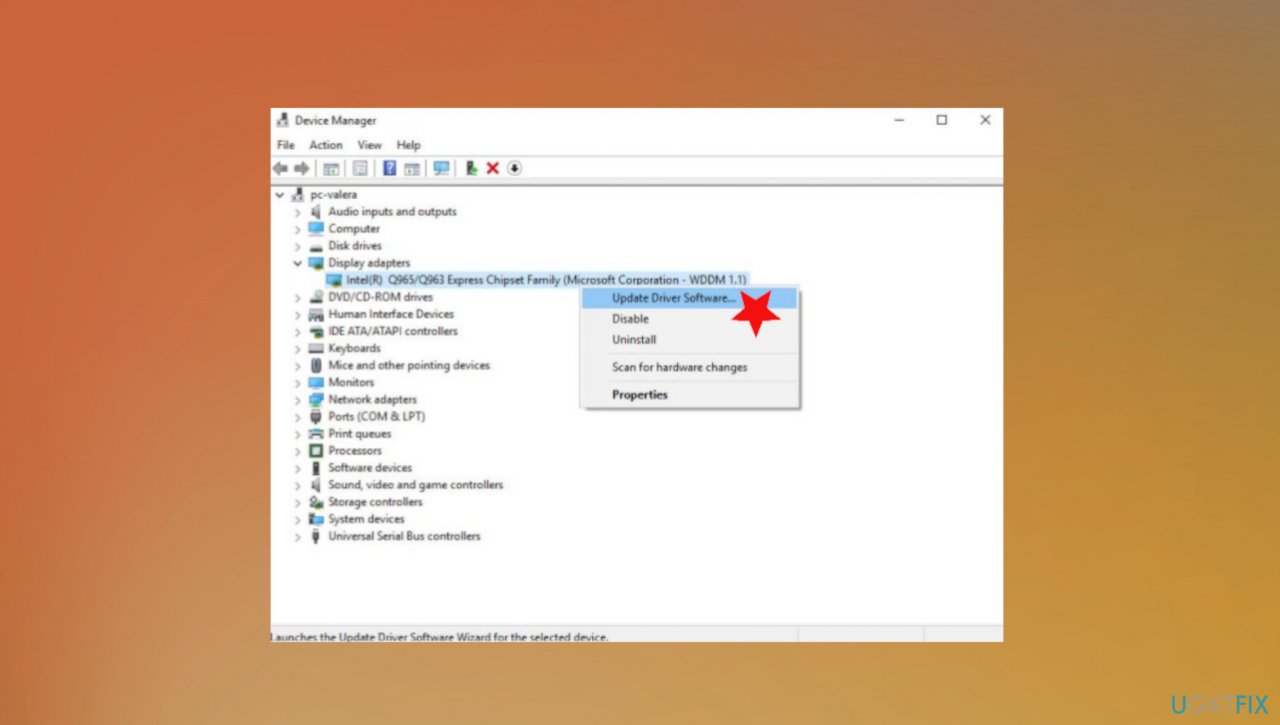
How to fix kernel lock release drivers - Repeat with other outdated drivers.
Update drivers automatically and fix KERNEL_AUTO_BOOST_INVALID_LOCK_RELEASE issue
You can run a tool like [rev id="DriverFix"] that checks various drivers on the system and can update them by finding the best match and compatible versions for the machine you are using. This is the better option for people that are not so tech-savvy because this is the process during which your device gets needed fixes without any risk for compatibility issues. The application does the job for you and you can possibly fix any other issues with the following methods.
Boot the PC in Safe Mode
- Open Start and search for msconfig.
- Go to System Configuration.
- Navigate to Boot and check the Safe Mode option.
- Make sure all options are active.
- Check Minimal and click Apply.
- Then click OK.
- Restart your PC.
- Press F8 continuously.
- Choose the Safe Boot option.
Bottom line
To fix the KERNEL_AUTO_BOOST_INVALID_LOCK_RELEASE error, you should update your device drivers and software. Running a compatibility troubleshooter and using specialized repair tools for the operating system and registry can also help. If these solutions do not work, consider seeking professional assistance.
Frequently asked questions
This error typically occurs due to a system driver conflict or a corrupted system file. Running a system file check can help identify and resolve the issue.
To fix this error on Windows 11, you can update your device drivers and perform a clean boot to eliminate software conflicts.
Yes, using the DISM tool is safe and can effectively repair corrupt system files that may be causing the KERNEL_AUTO_BOOST_INVALID_LOCK_RELEASE error.




Report an issue
What's wrong with this guide? We review every report and update or remove content.
Report received — thank you. We'll review and fix it.
You need a free account to submit a report.
Be the first to comment