
How to fix Local Users and Groups missing in Windows?

Prefer to fix it yourself? The manual steps follow.
- 7methods
- 2 to 30 minutes
- Easy
Applies to Windows 11 and Windows 10, Home, Pro, Enterprise and Education
7 methods in this guide
Hello. I just found that Local Users and Groups is missing from my PC. I have not made any changes to it recently, and the feature definitely used to be there before. Any tips on what is going on and how to restore Local Users and Groups?
Local Users and Groups (lusrmgr.msc) is missing from Computer Management on almost every PC for one reason: the PC runs Windows 11 Home or Windows 10 Home, which does not include the snap-in. Nothing is broken. Check your edition first, then manage accounts with netplwiz, Settings or the command line, or upgrade to Pro.
Open Settings > System > About and read Edition. On Windows 11 Home or Windows 10 Home, Local Users and Groups is not included. Opening lusrmgr.msc there shows only an edition message. Use netplwiz instead (Fix 2): it adds users and changes their group. On Pro or higher, run lusrmgr.msc directly (Fix 1).
| Error | Local Users and Groups is not under System Tools in Computer Management, or lusrmgr.msc opens with: "This snapin may not be used with this edition of Windows 10." |
|---|---|
| Where it appears | Computer Management (compmgmt.msc) under System Tools, and the standalone console lusrmgr.msc. Settings can also open it when you add a user. |
| Main cause | The PC runs a Home edition. Home does not include the Local Users and Groups snap-in, so the node is simply not in the tree. |
| Fastest fix | Check the edition (Fix 1). On Home, open netplwiz (Fix 2) to add users and set their group. On Pro, run lusrmgr.msc directly. |
| Also written as | local users and groups missing in computer management, local users and groups not showing, no local users and groups in computer management, lusrmgr.msc missing, local user manager. |
| Affects | Windows 11 Home and Windows 10 Home, including Single Language. Pro, Enterprise and Education include the snap-in. Windows 10 left support on 14 October 2025. |
| Vendor status | Not a bug. Microsoft ships the snap-in only in Pro and higher, and the console names the edition as the reason. No update removes it from Pro. |
| Time to fix | 2 minutes to check the edition. About 5 minutes with netplwiz or Settings. 15 to 30 minutes to upgrade to Pro. |
Facts checked on 15 October 2026. Steps written for Windows 11 (25H2 and 26H2) and Windows 10 22H2.
What Local Users and Groups is and why it is missing from Computer Management
Local Users and Groups is a Microsoft Management Console snap-in. It lists every local account on the PC under Users and every local security group, such as Administrators and Users, under Groups. You open it from Computer Management > System Tools, or on its own with lusrmgr.msc, often called local user manager.
On a Home edition, Computer Management shows Task Scheduler, Event Viewer, Shared Folders, Performance and Device Manager, but no Local Users and Groups. If you open lusrmgr.msc anyway, or if Settings hands you the console when you add a user, the middle pane reads:
"This snapin may not be used with this edition of Windows 10. To manage user accounts for this computer, use the User Accounts tool in the Control Panel." On Windows 11 Home the same message appears; users report it naming Windows 10 even there.
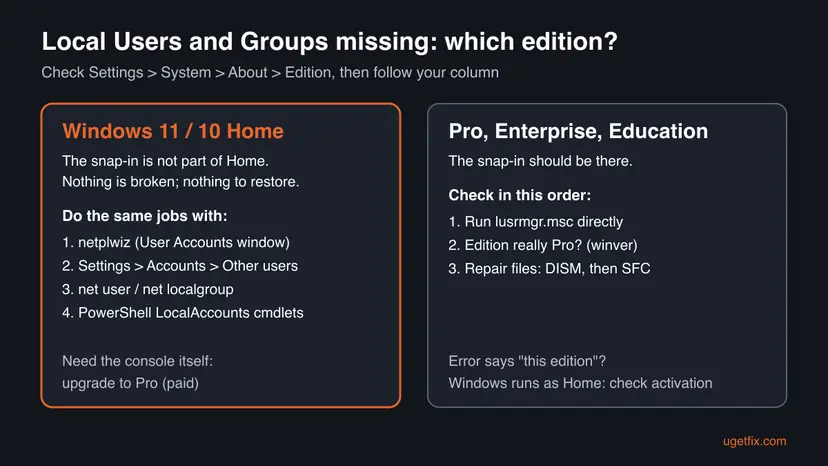
The reader's question says the tool was there before. The usual reason is a change of edition you did not choose: a reinstall or a new PC that activated as Home from its firmware licence, or a second PC that is Pro while this one is Home. A Windows update does not remove the snap-in from Pro.
Why Local Users and Groups is not showing: causes ranked
| How often | Cause | Typical sign | Fix |
|---|---|---|---|
| Most often | Windows 11 Home or Windows 10 Home | Edition in About reads Home; lusrmgr.msc shows the edition message | Fix 1, then Fix 2 to Fix 5 or Fix 6 |
| Often | You looked in the wrong place on Pro | Computer Management shows the node only when System Tools is expanded | Fix 1 |
| Less often | Windows was reinstalled and activated as Home | The PC used to be Pro, now About reads Home | Fix 6 |
| Rarely | Damaged system files on a Pro edition | Pro edition, but lusrmgr.msc fails to open or the console is empty | Fix 7 |
The old version of this page suggested System Restore and a download of a third-party lusrmgr.exe from GitHub. A restore point cannot add a snap-in that your edition does not include, and we do not send readers to unofficial account tools: the built-in tools below do the same jobs.
How to fix Local Users and Groups missing in Computer Management
Fix 1 tells you in two minutes which group you are in. Home users go to Fix 2 to Fix 5, which do the same jobs without the snap-in, or Fix 6 to get the snap-in itself. Fix 7 is only for Pro editions where the console is really damaged.
| What you see or have | Start with |
|---|---|
| You do not know your edition | Fix 1 |
| Home edition, you want to add a user or make someone an administrator | Fix 2 or Fix 3 |
| Home edition, you want to add a user to a group other than Administrators or Users | Fix 2, Fix 4 or Fix 5 |
| Home edition, you need the full console for work | Fix 6 |
Pro edition, but lusrmgr.msc fails or shows an empty console | Fix 7 |
Fix 1. Check your Windows edition and open lusrmgr.msc directly
2 minutesLow riskEvery reader, first: anyone who cannot find Local Users and Groups and does not know which Windows edition the PC runs.
The snap-in exists only in Pro, Enterprise and Education. Reading the edition tells you at once whether the tool is hidden or simply not part of your Windows.
- Press Win + I and open System > About.
- Under Windows specifications, read Edition. You can also press Win + R, type
winverand press Enter. - If it reads Home or Home Single Language, the snap-in is not included. Skip to Fix 2.
- If it reads Pro, Enterprise or Education, press Win + R, type
lusrmgr.mscand press Enter. - Or right-click Start, open Computer Management and expand System Tools in the left pane.
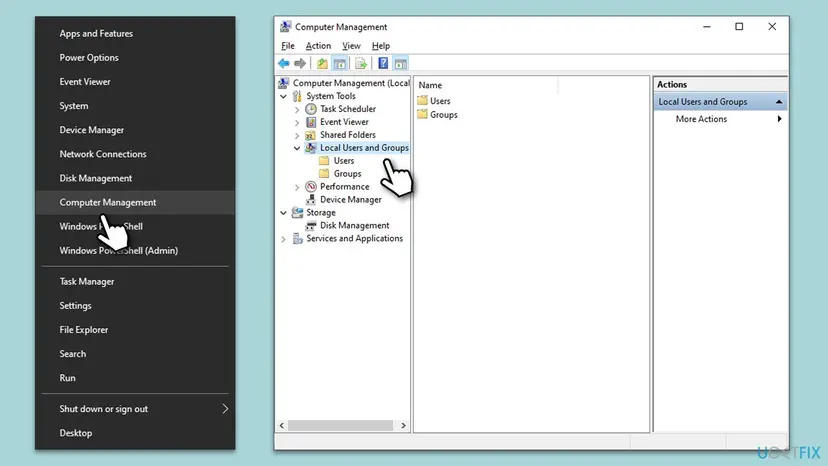
It worked if: On Pro, the console lists Users and Groups. On Home, you now know the tool is not missing by mistake.
If not: Home: use Fix 2. Pro and the console still fails: use Fix 7.
Fix 2. Use netplwiz to add users and change their group on Windows Home
5 minutesLow riskHome edition; you want to add, remove or rename a user, or put an account into a group.
The edition message itself points to the User Accounts tool. netplwiz is the advanced User Accounts window, and unlike Settings it lets you pick any local group for an account, not only Administrator or Standard.
- Sign in with an administrator account.
- Press Win + R, type
netplwizand press Enter. The User Accounts window opens. - To add someone, select Add and follow the wizard. For an account with no Microsoft sign-in, choose Sign in without a Microsoft account, then Local account.
- To change a group, select the user and choose Properties.
- Open the Group Membership tab. Pick Standard user, Administrator, or Other and choose a group from the list.
- Select OK, then Apply. Sign the user out and in again for the change to take effect.
The Group Membership tab sets one group per account. To place an account in several groups, use Fix 4 or Fix 5.
It worked if: The account shows the new group in the Group column of the User Accounts window.
If not: If you only need a new user or an administrator, Fix 3 is simpler. For several groups, use Fix 4.
Fix 3. Add a local user and make it an administrator in Settings
5 minutesLow riskHome or Pro; you only need a new local account, standard or administrator.
Settings covers the two jobs most people open Local Users and Groups for: adding an account and changing it between Standard user and Administrator. It works the same on every edition.
- Open Other users. Open Settings > Accounts > Other users. You can also press Windows key + R and run the command below.
ms-settings:otherusers - Add an account. Next to Add other user, select Add account.
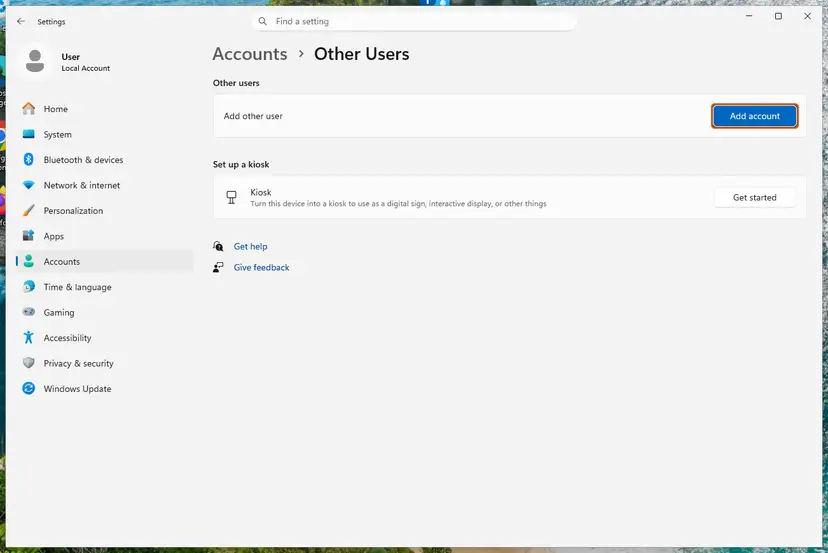
Add account is next to Add other user. Screenshot: Windows 11 26H2. - Skip the Microsoft account. Select I don't have this person's sign-in information.
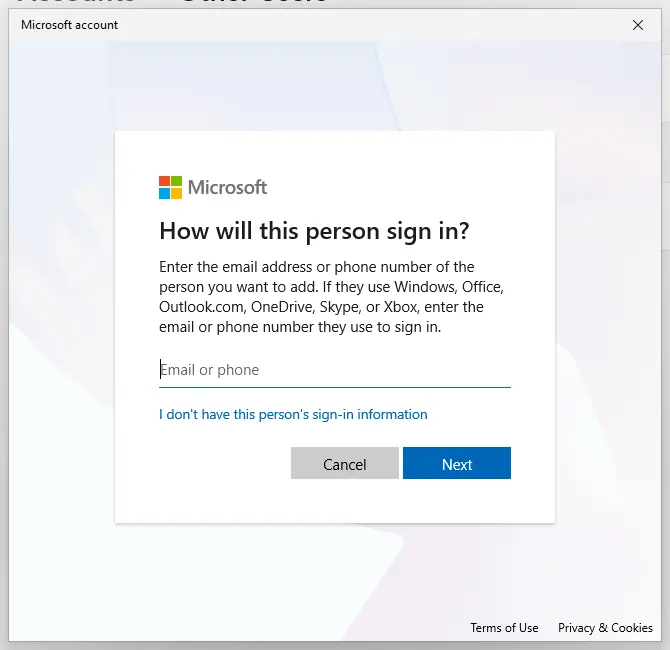
The link for a local account is under the email box. Screenshot: Windows 11 26H2. - Choose a local account. Select Add a user without a Microsoft account.
- Name the account. Type a user name and, if you want one, a password. If you set a password, Windows also asks for answers to security questions. Select Next.
- Make it an administrator (optional). Back in Other users, select the new account, then Change account type next to Account options. Choose Administrator and select OK. For testing a problem, a standard account is usually enough.
- Sign in to the new account. Open Start, select your account picture and choose the new account. The first sign-in takes a few minutes while Windows sets up the profile.
These steps were written for Windows 11 24H2, 25H2 and 26H2. The full page with the other versions and what each result means: Create a new user account to test a problem
It worked if: The new account appears under Other users with Administrator or Standard user under its name.
If not: If Settings opens the Local Users and Groups console with the edition message instead, use Fix 2 or Fix 4.
Fix 4. Manage users and groups with net user and net localgroup
5 minutesLow riskHome edition; you are comfortable typing commands, or need an account in several groups.
The net commands talk to the same local account database as the snap-in, so they work on Home. They are the closest replacement for the Users and Groups lists.
- Type
cmdin Start search, right-click Command Prompt and select Run as administrator. Select Yes. - List the local users:
net user - Add a user. The star makes Windows ask for the password, so it is not left in the window:
net user NewUser * /add - List the local groups, then add the user to one:
net localgroup net localgroup Administrators NewUser /add - Remove a user from a group, or delete the account:
net localgroup Administrators NewUser /delete
net user NewUser /delete
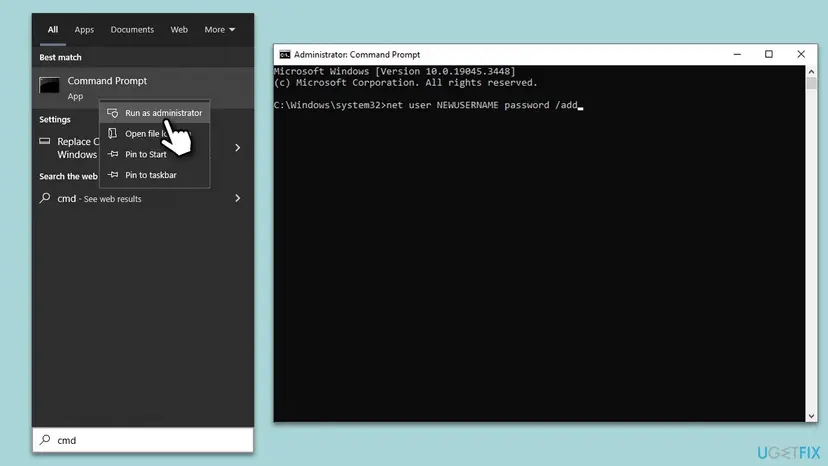
Deleting an account removes its profile folder from use. Keep at least one other administrator account before you delete or demote an administrator.
It worked if: Each command ends with "The command completed successfully." and net localgroup Administrators lists the new member.
If not: "System error 5" means Command Prompt is not elevated: open it again with Run as administrator. For scripts, use Fix 5.
Fix 5. Use the PowerShell LocalAccounts cmdlets
5 minutesLow riskHome or Pro; you want the Users and Groups lists in one view, or you script account changes.
Microsoft's Microsoft.PowerShell.LocalAccounts module manages local users and groups directly. It shows where each member comes from: Local, Active Directory, Microsoft Entra group or Microsoft Account.
- Right-click Start and open Terminal (Admin) or Windows PowerShell (Admin).
- List users and groups:
Get-LocalUser Get-LocalGroup - See who is in a group, with where each member comes from:
Get-LocalGroupMember -Group "Administrators" - Add a member to a group:
Add-LocalGroupMember -Group "Administrators" -Member "NewUser" - Remove it again:
Remove-LocalGroupMember -Group "Administrators" -Member "NewUser"
Microsoft notes the module is not available in 32-bit PowerShell on a 64-bit system. Terminal and the normal Windows PowerShell entry on Start are 64-bit.
It worked if: Get-LocalGroupMember lists the account, and the command returns no error.
If not: "Access denied" means the window is not elevated. If the cmdlets are not found, you opened 32-bit PowerShell: use Terminal (Admin).
Fix 6. Upgrade Windows Home to Pro to get Local Users and Groups
15 to 30 minutesLow riskHome edition, and you need the console itself, for example for work or for Group Policy as well.
The snap-in is part of Pro and higher. An in-place upgrade keeps your files and apps and adds the console, Group Policy Editor and other Pro tools.
- On Windows 11, open Settings > System > Activation. On Windows 10, open Settings > Update & Security > Activation.
- Expand Upgrade your edition of Windows.
- If you have a Pro product key, select Change next to Change product key and type it.
- Otherwise select Open Store next to Upgrade in the Microsoft app and buy the upgrade.
- Let Windows restart, then run
lusrmgr.mscas in Fix 1.
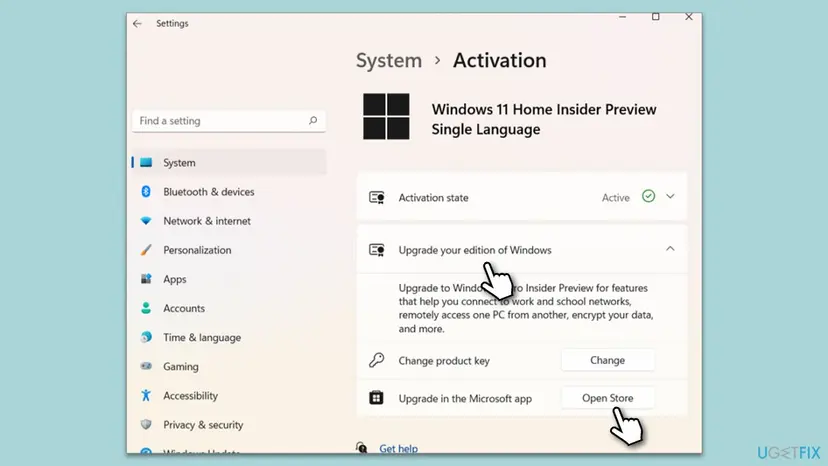
If this PC had Pro before a reinstall, Windows may have activated as Home from the firmware licence. Type your Pro key under Change product key, or contact the seller, before you buy a new one.
It worked if: Edition in About reads Pro, and Computer Management shows Local Users and Groups under System Tools.
If not: If the edition reads Pro and the node is still missing, use Fix 7.
Fix 7. Repair system files when lusrmgr.msc fails on a Pro edition
20 minutesLow riskPro, Enterprise or Education, and lusrmgr.msc will not open, opens empty or shows an error that does not mention the edition.
On an edition that includes the snap-in, a failing console points to damaged Windows files. DISM repairs the system image and SFC then replaces damaged files from it.
- Right-click Start and open Terminal (Admin).
- Repair the image first and wait for it to finish:
DISM /Online /Cleanup-Image /RestoreHealth - Then check the system files:
sfc /scannow - Restart the PC and run
lusrmgr.mscagain.
Step by step, with what each result means: Run DISM and SFC to repair Windows system files.
It worked if: SFC reports that it found no integrity violations or repaired them, and the console opens with Users and Groups.
If not: If the console still fails, see the next section before you consider a repair install.
Local Users and Groups still missing: what to check next
On Home there is nothing more to repair: the snap-in is not part of the edition, and Fix 2 to Fix 5 are the supported way to manage accounts. On Pro, collect these facts before you ask on Microsoft Q&A or your IT desk.
- The exact edition and version from
winver, such as Windows 11 Pro 25H2. - The exact text in the console when you run
lusrmgr.msc, or the error dialog. - Whether
net localgrouplists groups in an administrator Command Prompt. If it does, the account database is fine and only the console is affected. - The last lines of
C:\Windows\Logs\CBS\CBS.logafter SFC, if SFC could not repair files. - Whether the PC is joined to a work domain, where IT may manage accounts centrally.
On a work PC, local accounts and groups are often set by IT through policy, and changes you make are reset at the next sync. Ask IT instead of fighting the policy.
How to avoid losing Local Users and Groups again
- Keep your Pro product key, or note that the licence is digital and linked to your Microsoft account, before you reinstall Windows.
- After a reinstall, check Edition in Settings > System > About before you set up accounts.
- Keep a second local administrator account, so a wrong group change never locks you out.
- Write down which accounts belong to which groups, or save the output of
Get-LocalGroupMember, so you can rebuild them quickly.
Windows 10 left support on 14 October 2025. The tools above work the same on Windows 10 22H2, but the PC no longer gets security updates.
Frequently asked questions
Why are Local Users and Groups missing in Computer Management?
Because the PC almost certainly runs a Home edition. Windows 11 Home and Windows 10 Home do not include the Local Users and Groups snap-in, so Computer Management shows System Tools without it. Check Settings > System > About > Edition. On Home, manage accounts with netplwiz, Settings > Accounts > Other users, or the net user and net localgroup commands. On Pro, expand System Tools or run lusrmgr.msc directly.
Local Users and Groups not showing in Computer Management on Windows 10: is it different?
No. Windows 10 Home lacks the snap-in exactly like Windows 11 Home, and the message even names Windows 10. The fixes are the same on both. The only path that differs is Activation: on Windows 10 it is under Settings > Update & Security > Activation. Windows 10 left support on 14 October 2025, so an upgrade to Pro there brings the console but no further security updates.
What does "This snapin may not be used with this edition of Windows 10" mean?
It means the console found that your edition does not allow the Local Users and Groups snap-in. The file lusrmgr.msc exists, but the snap-in refuses to load on Home. The message goes on to suggest the User Accounts tool in Control Panel. The most useful form of that tool is netplwiz, which adds users and changes their group (Fix 2).
Where is lusrmgr.msc on Windows 10 and Windows 11?
The console file is in C:\Windows\System32 on every edition, and you open it with Win + R, lusrmgr.msc, Enter. Being present does not mean it works: on Home it opens with the edition message. On Pro, Enterprise and Education it opens Local Users and Groups with the Users and Groups folders, and it needs an administrator account to make changes.
Can I enable Local Users and Groups on Windows Home?
Not with any Microsoft-supported switch. The supported routes are an upgrade to Pro (Fix 6) or the built-in tools that do the same jobs: netplwiz, Settings, net user, net localgroup and the PowerShell LocalAccounts cmdlets. Unofficial installers and copied files from Pro are not supported and we do not recommend them for a tool that controls administrator rights.
Is the lusrmgr.exe tool from GitHub safe?
We have not tested it and do not recommend it. It is a third-party program, not a Microsoft one, and it would run with administrator rights over your accounts. The earlier version of this page linked it; we removed the link. Everything it offers is available with the built-in netplwiz, net localgroup and PowerShell cmdlets, which need no download.
Did a Windows update remove Local Users and Groups?
We found no Microsoft source that ties the missing snap-in to an update, and on Pro it stays after updates. When it seems to vanish, the PC usually runs Home after a reinstall, or it is a different PC than the one where you used it. Check the edition first. If it reads Pro and the console fails, repair the system files (Fix 7).
How do I make a user an administrator without Local Users and Groups?
Open Settings > Accounts > Other users, select the account, choose Change account type, pick Administrator and select OK. In Command Prompt as administrator, net localgroup Administrators UserName /add does the same. In netplwiz, choose Properties > Group Membership > Administrator. Keep at least one other administrator account in case something goes wrong.
Will System Restore bring Local Users and Groups back?
No, not on Home. A restore point rolls back system files and settings to an earlier date, but it cannot add a snap-in that your edition does not include. On Pro, System Restore can undo a recent change that damaged Windows files, but DISM and SFC (Fix 7) are the more direct repair and do not roll back your other changes.
Sources
Did this fix work?
One click, no account. It tells the next reader which guides are worth their time.
Questions and experiences: fix Local Users and Groups missing in Windows
Still broken, or found a fix we did not cover? Ask here: members and our editors answer. Reading is open; writing needs a free account.
…