How to fix
“Malware detected Windows Defender is taking action” alerts
on Windows
Resolve "Malware detected" alerts on Windows 10 and 11 effortlessly. Follow our expert-tested solutions for a secure system and peace of mind today!

What causes How to fix “Malware detected Windows Defender is taking action” alerts?
- Third-party security software interference
- Malware not being fully removed
- Outdated Windows Defender
- Corrupted Windows Defender files
- User permissions issues
Repairs Windows system files, removes malware, and restores a clean OS state — without reinstalling.
Hi, I have a problem I hope you could help me with. I use Windows Defender as my antivirus, and recently I have been receiving spammy messages from the app with BrowserModifier:Win32 detection. However, these notifications don't disappear. Any idea how to fix "Malware detected Windows Defender is taking action" alert?
"Malware detected Windows Defender is taking action to clean detected malware" is an alert that Windows Defender users might encounter at random times. Essentially, it indicates that some type of malicious software was detected on the computer, and the security app is attempting to eliminate it. However, some users encounter recurring pop-ups, so they are seeking for help when trying to fix "Malware detected Windows Defender is taking action" spam.
Windows Defender has a relatively hectic past. Previously known as Microsoft Security Essentials, the anti-virus software can be downloaded by Windows XP, Windows Vista, and Windows 7 users for free. While users appreciated its ease of use, the detection and protection rates were not brilliant, and third-party competitors even accused Microsoft of violating the competition law.[ref en-3] With the release of Windows 8, the anti-virus tool was renamed to Windows Defender and began to be shipped as a built-in component within the operating system.
Over the years, Windows Defender has been drastically improved and is considered to be one of the leading anti-malware solutions, often surpassing third-party vendors in protection and detection rates.[ref en-1] Considering the app is free, it becomes an excellent choice for many home users. However, it does come with certain downsides, and the spam of "Malware detected Windows Defender is taking action," or similar messages is one of them.
"Malware detected Windows Defender is taking action" is an issue since the malware is detected repeatedly, and users don't know how to stop these notifications. Essentially, the infection and all its files should be eliminated immediately after they have been detected. When that does not happen, it means that there are some issues that should be addressed.
"Malware detected Windows Defender is taking action" can occur due to several different reasons, although the most common one is third-party security software. Initially, Windows Defender had compatibility issues when used along with other anti-malware tools. While this problem was addressed over the years, some security tools still might be a problem for Windows Defender.
Additionally, some malicious files might not be removed appropriately - some malware can interfere with the actions taken by Windows Defender. The threat can then be eliminated manually. Alternatively, you can also employ alternative/third-party anti-virus and perform a full system scan with it.
Finally, repeated "Malware detected Windows Defender is taking action" pop-ups might also indicate a false-positive. In such a case, the detected file or folder should be added to exceptions - we explain how to do that below.
Tip: some malware might damage your Windows in a way that it won't be able to run properly anymore, and you might start facing crashes, lag, BSODs,[ref en-2] and similar problems. If you want to fix these issues automatically, we suggest using repair software [d1].
Fix 1. Update Windows
Windows Defender gets its database definition updates via the Windows update process. Thus, you should make sure that your OS is running the latest version:
- Right-click on Start and select Settings
- Go to Update & Security
- On the right side of the window, click on Check for updates
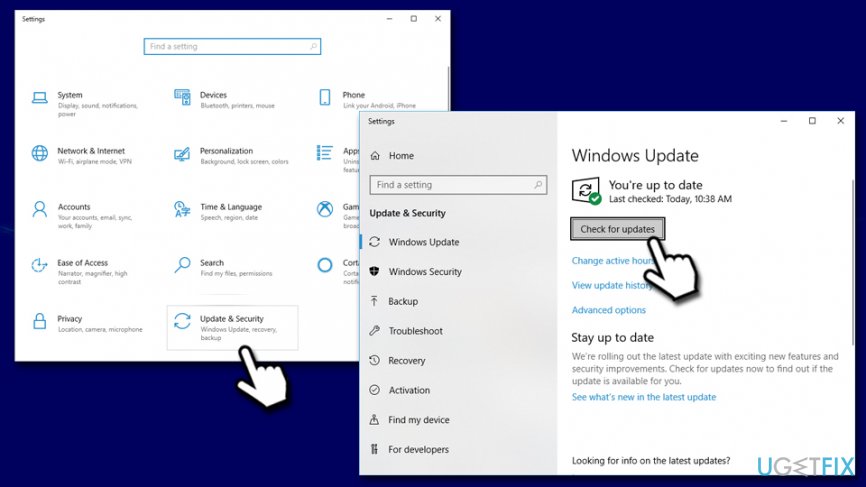
How to fix malware detected windows defender is taking action check for windows updates - Wait till Windows downloads and installs the updates
- Reboot your PC.
Fix 2. Delete Windows Defender history
- Type in Event Viewer in Windows search box and hit Enter
- Expand the Applications and Services logs section
- Expand Microsoft section and press on Windows
- On the right-side, scroll down to Windows Defender and double click it (or right-click and select Open)
- Right-click on Operational and pick Clear log
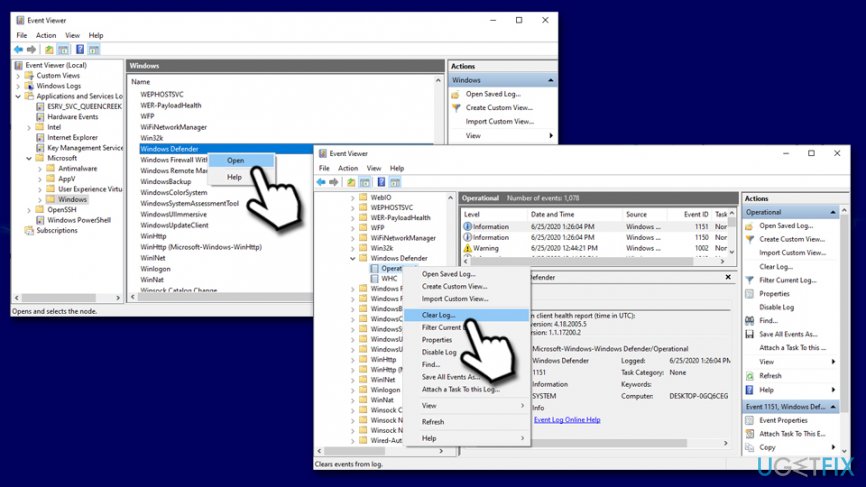
How to fix malware detected windows defender is taking action delete windows defender logs - In the new pop-up window, either pick Save and Clear or Clear (the former will save the log so you can view it later).
Fix 3. Delete the detected files manually
In some cases Windows Defender is incapable of deleting the detected files correctly. Thus, you should go to the location that the program is indicating and eliminate the malicious files.
- Right-click on Start and select Settings
- Go to Update & Security
- On the left side, pick Windows Security
- Click on Virus & threat protection
- Select Protection history
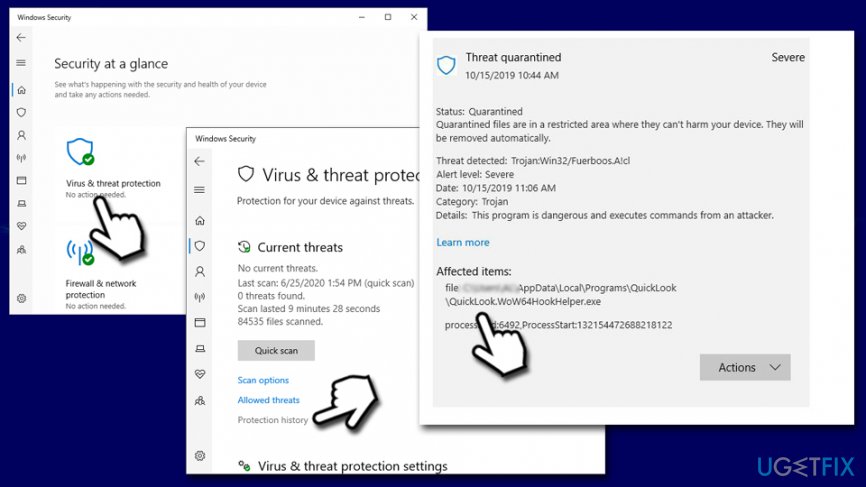
How to fix malware detected windows defender is taking action delete file manually - In here, you will the name and the location of the problematic file
- Navigate to the shown location and delete the file/folder.
Fix 4. Scan the computer with alternative security software
While Windows Defender is a powerful security tool, reputable third-party AVs are capable of performing a more complex scan. Thus, you should download and install powerful security software and perform a full system scan. Once you install the new security app, Windows Defender should automatically turn off.
Additionally, if you already used third-party security software, you should try temporarily disabling it and then performing a full scan with Windows Defender.
Fix 5. Clear browser cache and data
Browsers accumulate a significant amount of data over time. Some of it might be related to insecure websites - background connections could be established due to this, resulting in repeated detection, and the "Malware detected Windows Defender is taking action to clean detected malware" pop-ups.
- Click on menu (three vertical dots at the top-right) and select Settings
- Locate Privacy and Security section and select Clear browsing data
- In the new window, select All time under Time range
- Tick all the boxes and click Clear data
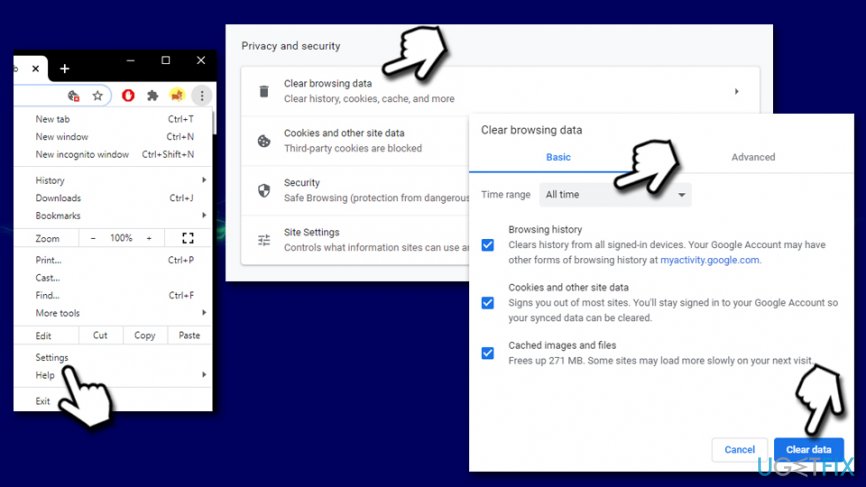
How to fix malware detected windows defender is taking action clear browser data
Fix 6. Add an exception if it is a false-positive
- Open Windows Security section once again
- Go to Virus & Threat protection
- Under Virus & Threat protection settings, click Manage settings
- Scroll down to locate Exclusions section and then pick Add or remove exclusions
- Click on Add an exclusion
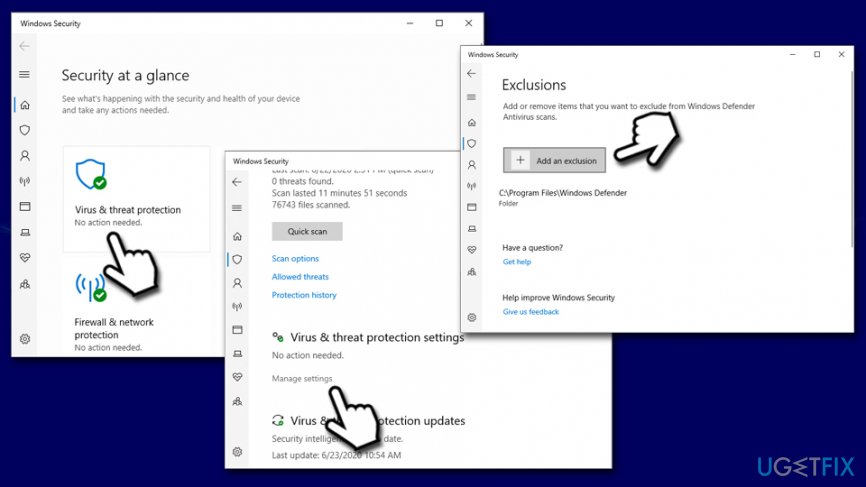
How to fix malware detected windows defender is taking action add an exclusion - Locate problematic file and add it
After performing these steps, you should no longer receive the "Malware detected Windows Defender is taking action" pop-ups repeatedly.
Bottom line
To resolve the 'Malware detected Windows Defender is taking action' alerts, users can try uninstalling third-party antivirus software, ensuring Windows Defender is updated, and performing a full system scan. If the issue persists, consider resetting Windows Defender or seeking professional assistance.
Frequently asked questions
You should run a full system scan using Windows Defender and remove any detected threats. Additionally, consider using a different antivirus for a second opinion if problems persist.
You can adjust the notification settings in Windows Defender by going to 'Settings' > 'Update & Security' > 'Windows Security' > 'Virus & threat protection' and modifying the notification preferences.
You can submit the detected file to Microsoft for analysis using the Windows Defender Security Intelligence portal and check for any updates that might resolve the false positive issue.




Report an issue
What's wrong with this guide? We review every report and update or remove content.
Report received — thank you. We'll review and fix it.
You need a free account to submit a report.
Be the first to comment