How to fix
Microsoft Office error 30088-26
on Windows
Resolve Microsoft Office error 30088-26 on Windows 10 and 11 with our expert-tested solutions. Get back to work in minutes, zero traces left!

What causes How to fix Microsoft Office error 30088-26 in Windows?
- Shaky network connection
- Corrupted Office files
- Windows system glitches
- Lingering Office processes
- Incomplete updates
Repairs Windows system files, removes malware, and restores a clean OS state — without reinstalling.
I’m running Windows 11 and trying to update Microsoft Office, but I keep getting error code 30088-26. It stops the update midway, and I can’t use the latest features. Restarting my PC didn’t fix it - what can I do?
Microsoft Office stands as a cornerstone for productivity, powering tasks from drafting documents in Word to crunching numbers in Excel on Windows 11. Yet, users occasionally hit snags like Error 30088-26, a frustrating roadblock that typically emerges during updates or installations.
When this error strikes, people see an abrupt halt - updates freeze, progress bars stall, and a cryptic message pops up, leaving Office stuck in limbo. For the user on Windows 11, this meant losing access to new features or security patches, disrupting their workflow.
This error doesn’t just test patience; it hints at underlying hiccups. Users might notice Office apps lagging before the error appears, or they could face repeated failures despite solid internet connections. The experience varies—some see it when installing a fresh copy, others during routine updates - but the outcome is the same: a stalled process and growing annoyance.
The causes behind error 30088-26 are diverse. If the issue stems from a shaky network, stabilizing it might resolve things. If corrupted Office files are to blame, a repair is in order. If Windows system glitches interfere, deeper fixes are needed. The tricky part? The exact trigger isn’t always clear, so the solution might not work until you try several methods listed below. Tools like [d1] can help address underlying Windows issues that could contribute, ensuring a smoother path to fixing this Office snag.

Fix 1. End Office-related processes
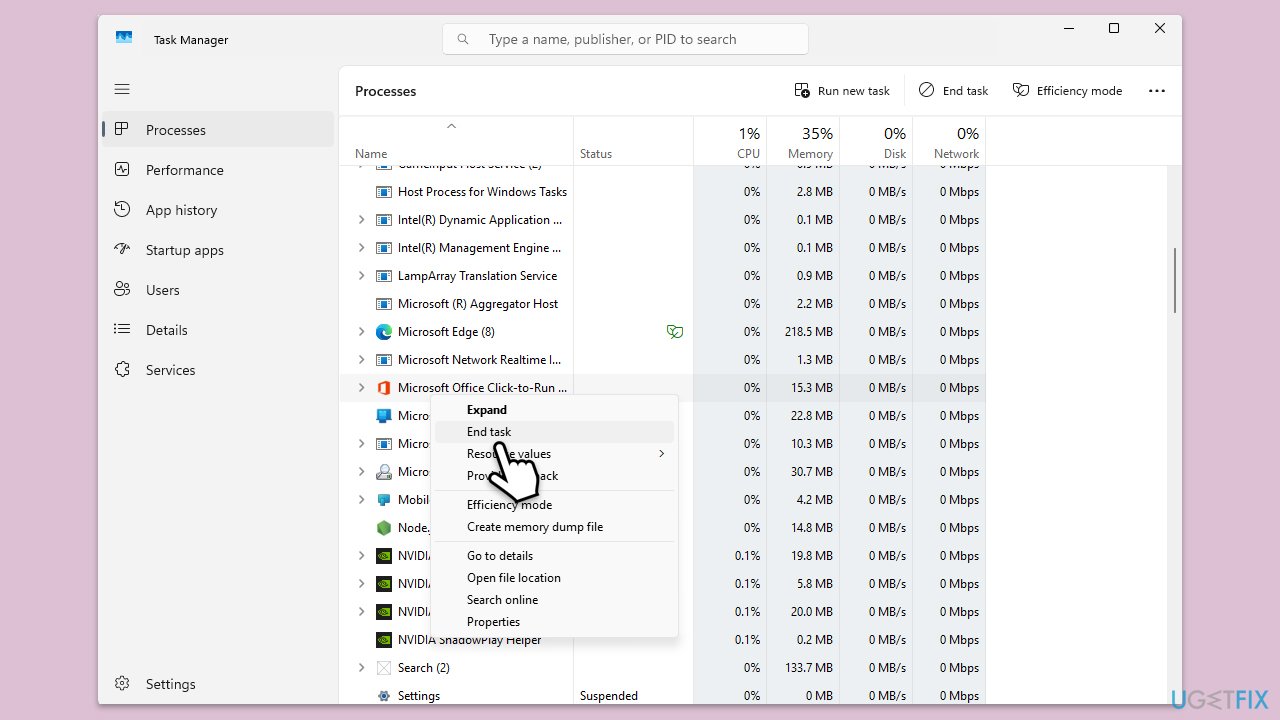
Lingering Office tasks might block the update - shutting them down clears the slate.
- Press Ctrl + Shift + Esc and open Task Manager.
- Sort the processes tab by Name.
- Find entries like MSOSYNC.EXE or WINWORD.EXE and select them.
- Click End Task for each.
- Relaunch the Office update process.
Fix 2. Update Windows
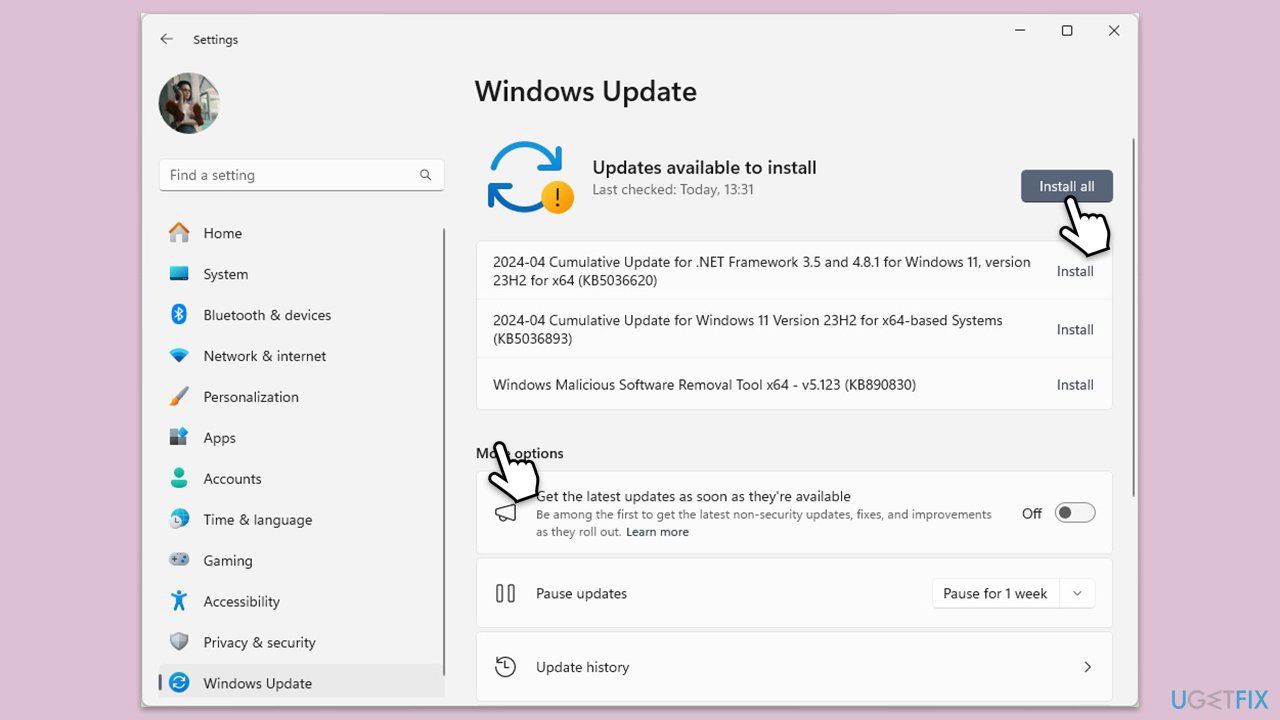
Outdated system files can misalign with Office, so make sure your Windows are updated.
- Type Updates in Windows search and hit Enter.
- If updates are available, click Install updates.
- Otherwise, click Check for updates.
- If optional updates are available, install them as well.
- When all the update processes are complete, restart your computer.
Fix 3. Run Office as administrator
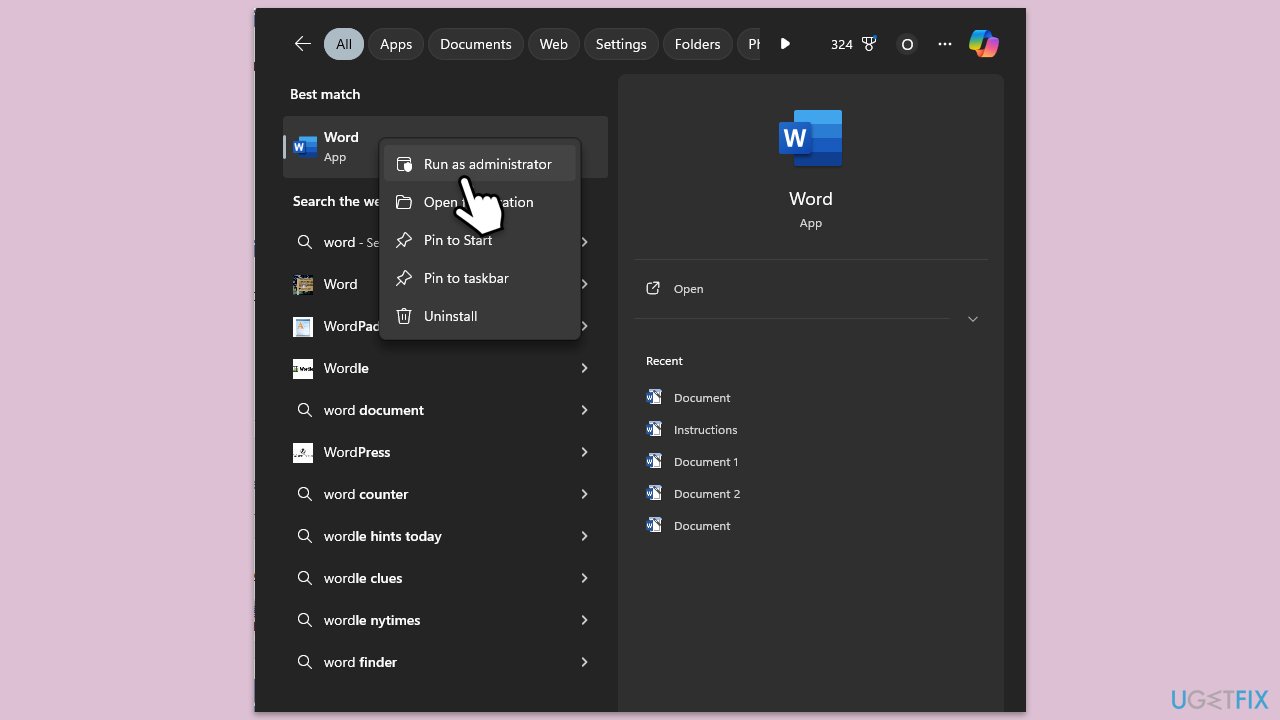
Running Office as administrator can address permission issues that could have been involved.
- Right-click on the Microsoft Office app or the application's shortcut.
- Select Run as administrator.
- When the User Account Control prompt shows up, click Yes.
- See if the issue has been resolved.
Fix 4. Reset Office update cache
A clogged update cache might complicate the process, so clearing it necessitates a fresh download.
- Close all Office apps.
- Open File Explorer and go to the following location:
C:\ProgramData\Microsoft\ClickToRun - Delete the Updates folder if present.
- Restart your PC.
- Launch Office and check for updates again.
Fix 5. Stabilize network connection
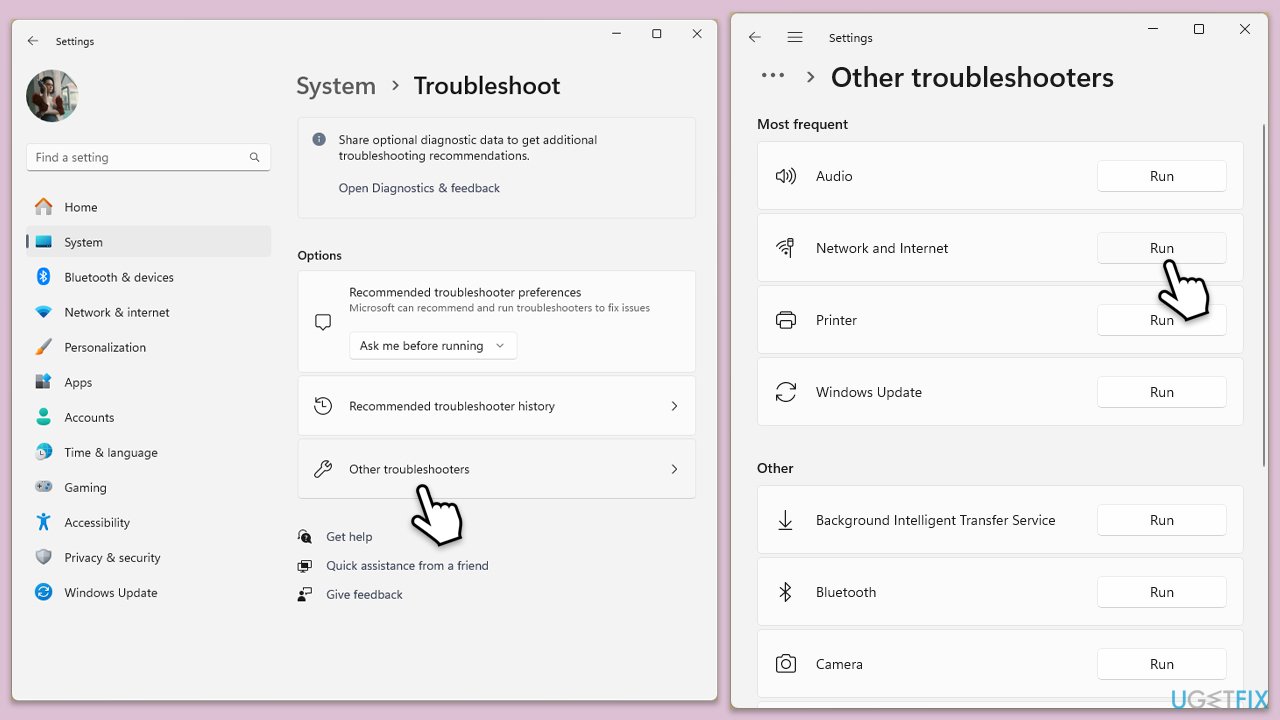
Make sure that your network is stable. Running a network troubleshooter is the easiest way to check for connection problems.
- Type troubleshoot in Windows search and press Enter.
- Click on Troubleshoot settings from the search results.
- Go to Additional troubleshooters/Other troubleshooters.
- Scroll down and click on Network and Internet troubleshooter.
- Click on Run the troubleshooter/Run and wait for the process to complete.
To run Network troubleshooter in Windows 10, follow these steps:
- Right-click on Start and pick Settings.
- Go to Network & Internet section.
- On the right side, find the Advanced network settings section.
- Click Network troubleshooter and wait.
- The fixes will be automatically applied.
Fix 6. Repair Office installation
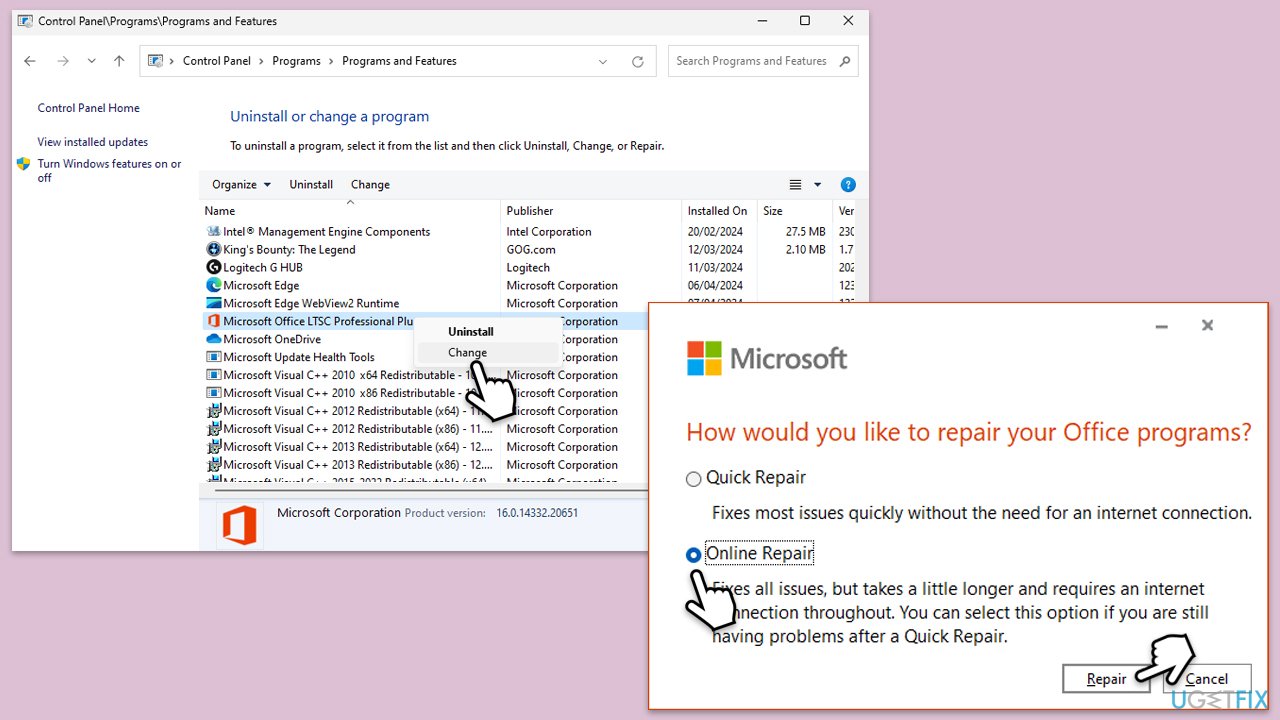
Office has a built-in repair tool, which can be used to address various issues.
- Type Control Panel in Windows search and press Enter.
- Select Programs > Programs and Features.
- Select Microsoft Office and click on Change.
- Choose the option for Quick Repair and click Repair.
- Follow the prompts to finish the process.
- If the issue persists, select Online Repair for a more thorough fix.
Fix 7. Restart Windows Installer service
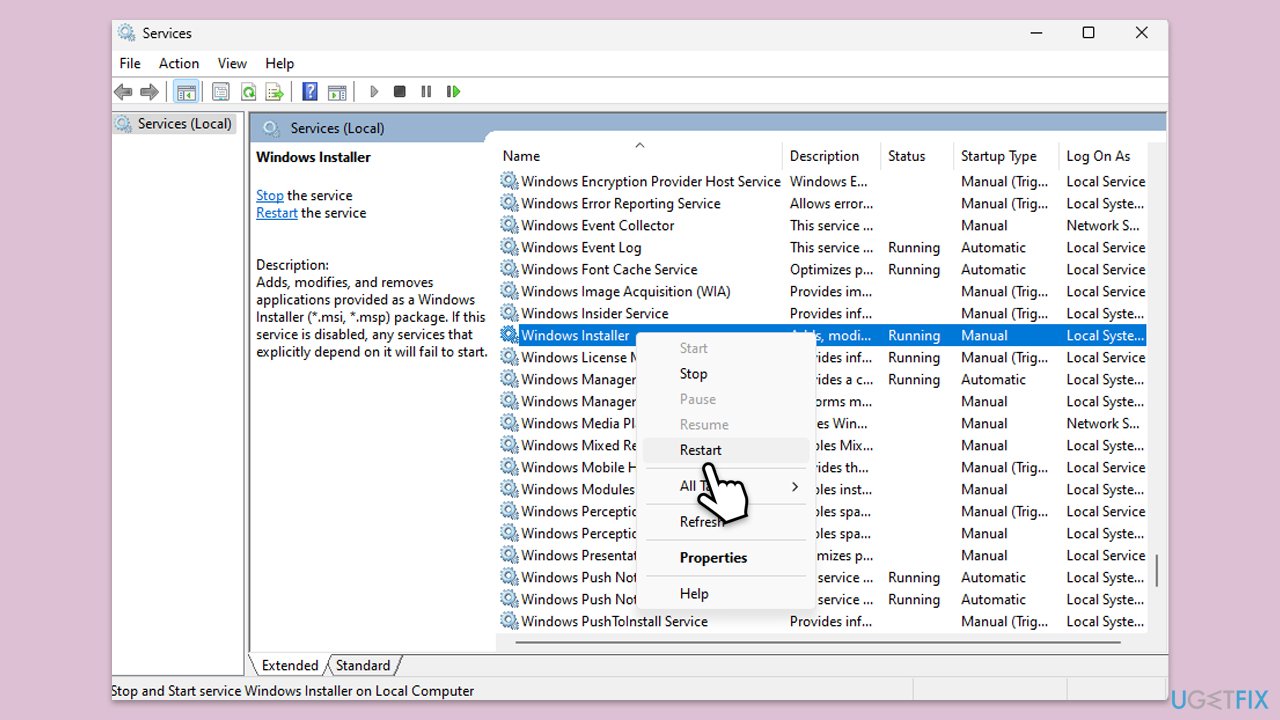
A stalled Installer service can clash with Office updates, and restarting it refreshes its functionality.
- Type Services in Windows search and hit Enter.
- Scroll down to find Windows Installer services.
- Right-click on it and select Restart.
- If it is grayed out, double-click the service to open its Properties.
- Under Startup type, select Automatic from the drop-down menu.
- Click Start, Apply, and OK.
Bottom line
To resolve Microsoft Office error 30088-26, you can try ending Office-related processes, updating Windows, and ensuring a stable network connection. If these methods do not work, consider repairing Office files or seeking additional tools to address potential Windows issues.
Frequently asked questions
This error typically arises due to issues with the Office installation, such as corrupted files or conflicts with existing software on your system.
You can repair Microsoft Office by going to Settings > Apps > Apps & features, selecting Microsoft Office, and then choosing the 'Modify' option to initiate a repair.
Uninstalling Office is usually a last resort; try repairing the installation first before considering a complete uninstall and reinstall.




Report an issue
What's wrong with this guide? We review every report and update or remove content.
Report received — thank you. We'll review and fix it.
You need a free account to submit a report.
Be the first to comment