How to fix
Microsoft Office keeps asking to sign in
on Windows
Resolve the annoying Microsoft Office sign-in prompt on Windows 10 and 11 easily. Get expert-tested solutions to fix it in minutes!

What causes How to fix Microsoft Office keeps asking to sign in in Windows?
- Corrupted login credentials stored in Windows Credential Manager
- Incorrect account settings
- Issues with the Office activation process
- Conflicts with OneDrive
- Using Office on multiple devices exceeding allowed sign-ins
Repairs Windows system files, removes malware, and restores a clean OS state — without reinstalling.
Every day when I launch my PC and try to open Excel for work, I am always asked to re-enter my Microsoft account information. This is rather annoying and I think is unnecessary. Is there a way to not make me have to enter my login info every single time I restart Windows?
Microsoft Office frequently asking users to sign in can be an annoying issue, particularly when using Office on Windows. This problem can occur across different versions of Office and may persist even after restarting the device or application. Users have reported that this issue may be triggered by a variety of factors, such as corrupted credentials, incorrect account settings, or issues with the Office activation process.
One common cause is corrupt login credentials stored in the Windows Credential Manager. When these credentials are not updated correctly or get corrupted, Office apps may repeatedly prompt you to sign in.
Another potential cause is conflicts with OneDrive, especially if there are syncing issues or misconfigured settings that link Office to OneDrive. Additionally, using Office on multiple devices can sometimes cause the system to request sign-ins more frequently if you've exceeded the number of allowed sign-ins.
For users experiencing this issue, potential solutions involve removing corrupted credentials from the Credential Manager, adjusting OneDrive sync settings, and ensuring Office and Windows are fully updated. Resetting Office to default settings or repairing the Office installation may also help, particularly if the issue is tied to damaged program files or configuration errors.
For those seeking a more automated and efficient way to resolve underlying system issues that may be causing Office to repeatedly ask for sign-ins, using a trusted [d1] repair tool can help fix these problems, ensuring smoother performance and login stability.
Fix 1. Remove corrupted credentials from Credential Manager
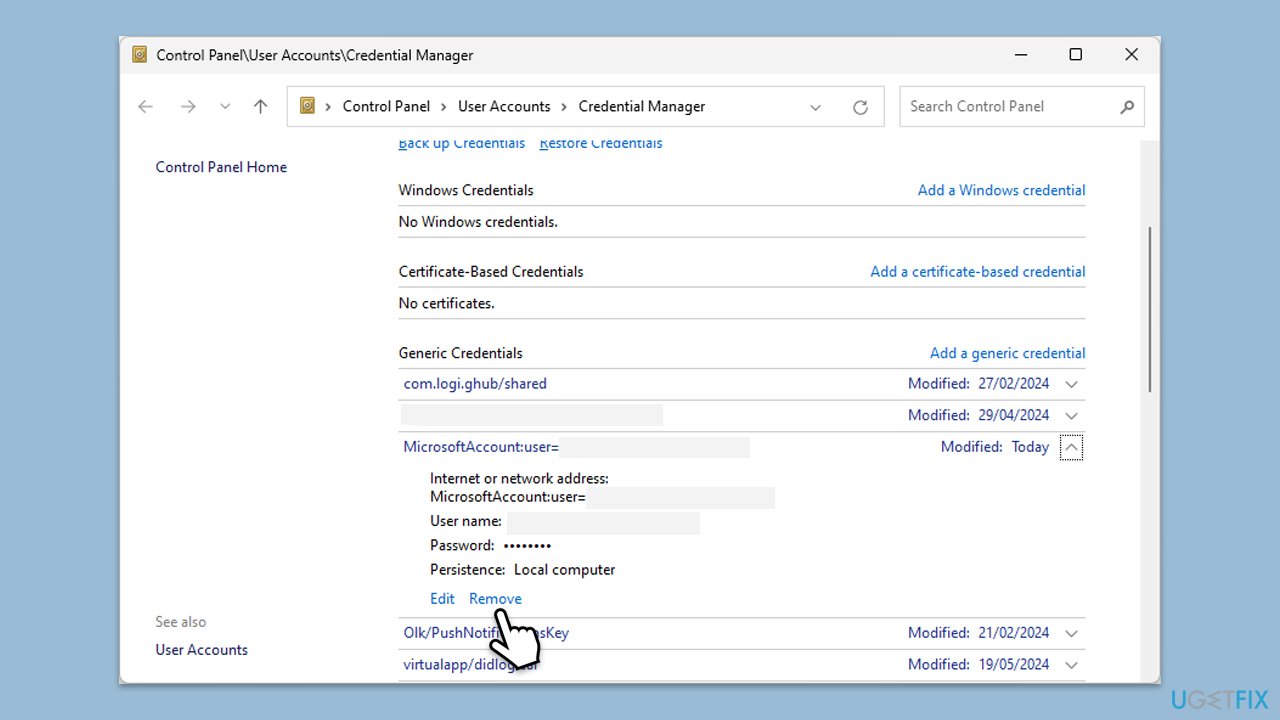
Corrupted or outdated credentials stored in the Windows Credential Manager can cause Microsoft Office to continuously ask for sign-ins. Removing these credentials can resolve the issue.
- In Windows search, type Credential Manager and press Enter.
- Select Windows Credentials.
- Look for any Office-related credentials, such as MicrosoftOffice15, MicrosoftOffice16, or OneDrive, and remove them.
- Restart Office and sign in again.
Fix 2. Update Office and Windows
Outdated Office versions or Windows components can cause compatibility issues, leading to frequent sign-in prompts. Keeping both up to date ensures a smoother experience.
Update Office:
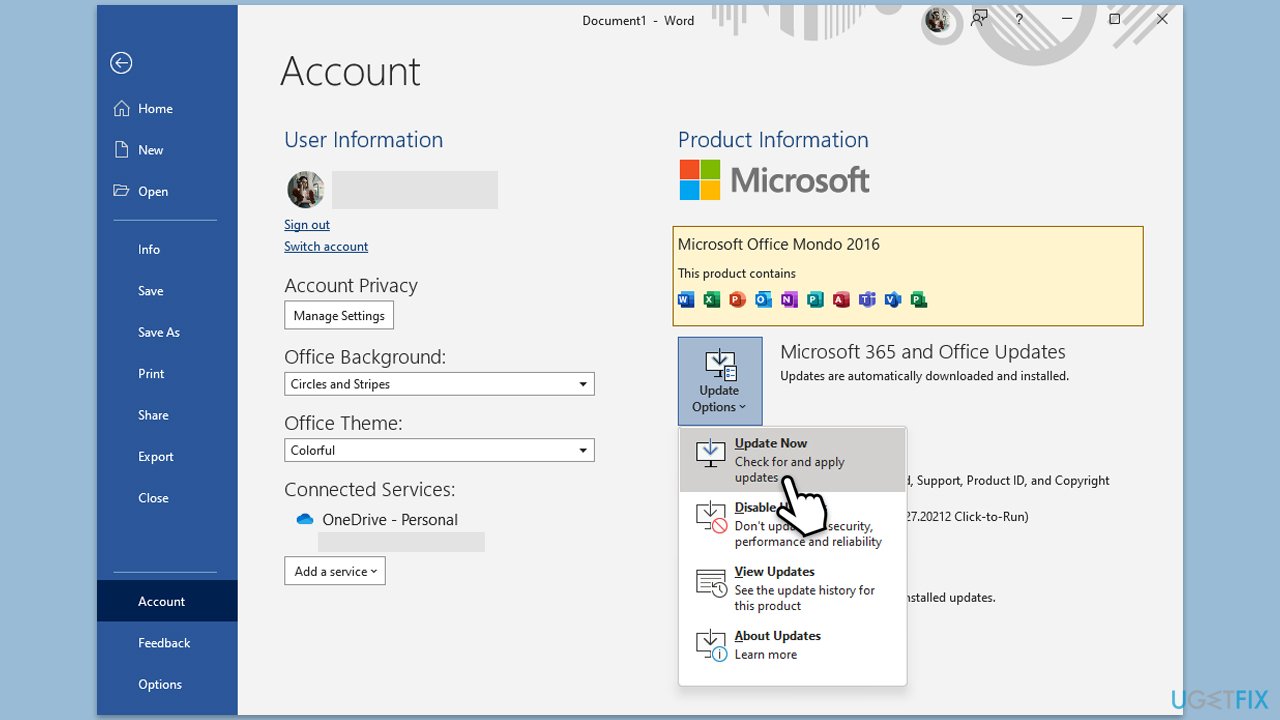
- Open Microsoft Word or any other Office app.
- Click on the File tab in the top-left corner.
- Select Account from the menu.
- Under the Product Information section, click on Update Options.
- Choose Update Now to check for and install any available updates.
- Restart the Office application after the update is complete to see if the issue is resolved.
Update Windows:
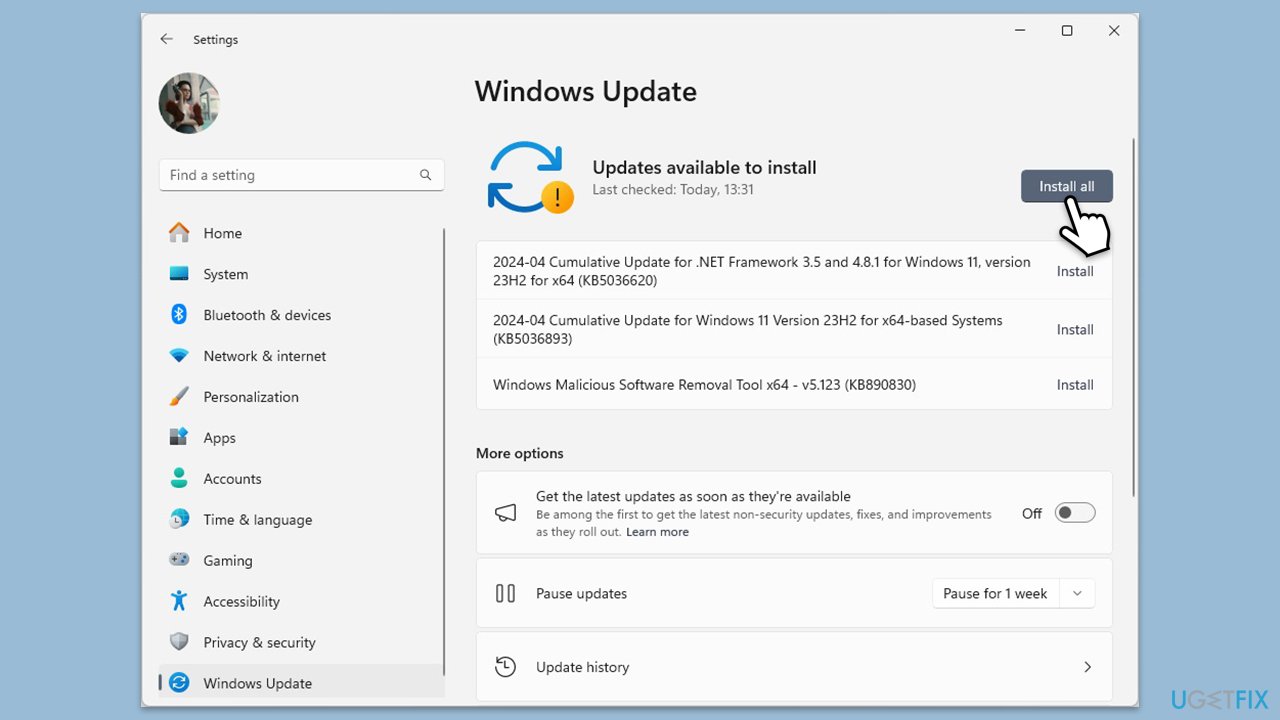
- Type Updates in Windows search and press Enter.
- When the new window opens, click Check for updates (or Install all if pending) and wait.
- If there are optional updates available, install them as well.
- After updating, restart your computer.
Fix 3. Unlink OneDrive
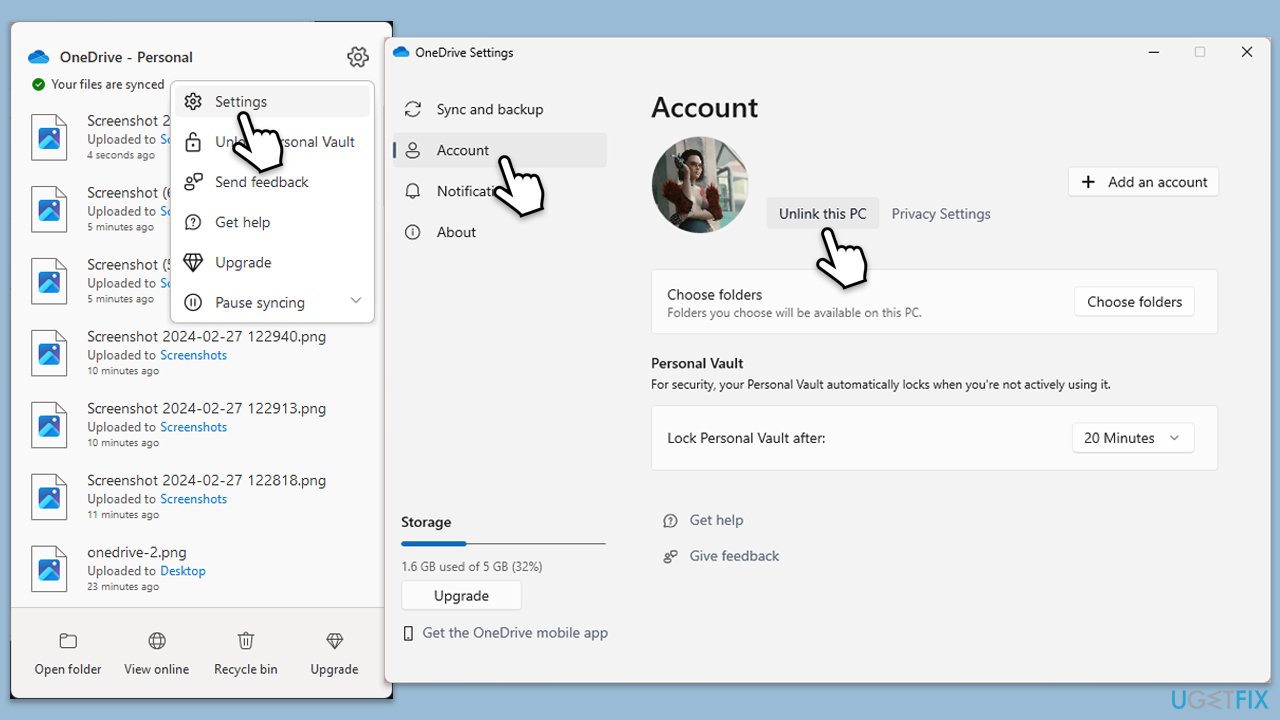
OneDrive syncing issues can trigger sign-in requests if your Office files are being stored in OneDrive. Resetting these settings can help.
- Right-click the OneDrive icon in the taskbar.
- Select Settings.
- Go to the Account tab.
- Click Unlink this PC.
- Sign in again with your Microsoft account.
Fix 4. Sign out and sign back in to your Office account
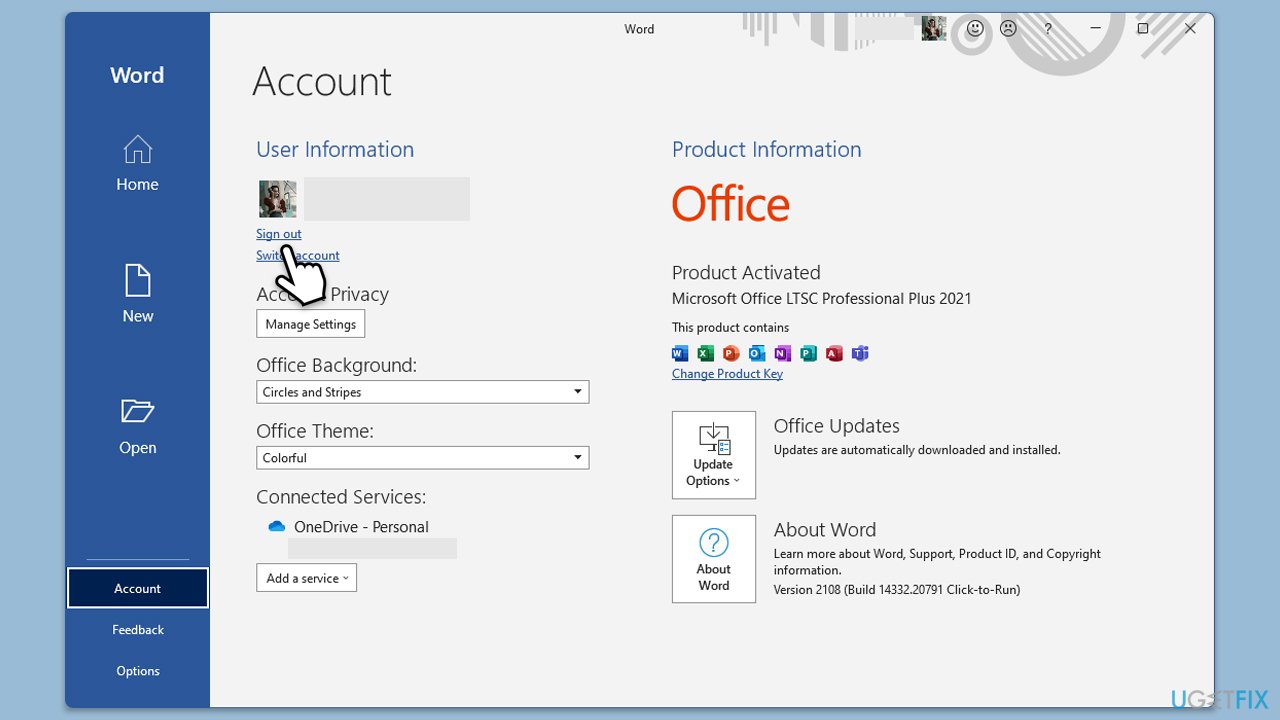
Sometimes, signing out of your Office account and signing back in can refresh your session and fix repeated sign-in requests.
- Open any Office app, go to File, and click Account.
- Select Sign out from your account settings.
- Restart the app and sign back in with your Microsoft credentials.
Fix 5. Disable multiple account sign-ins
If you use multiple Microsoft accounts, conflicting credentials can trigger sign-in loops. Removing unnecessary accounts from Office can help resolve the issue.
- Open any Office app, go to File, then select Account.
- Remove any additional accounts under the Connected Services section, leaving only the primary account.
Fix 6. Repair Microsoft Office
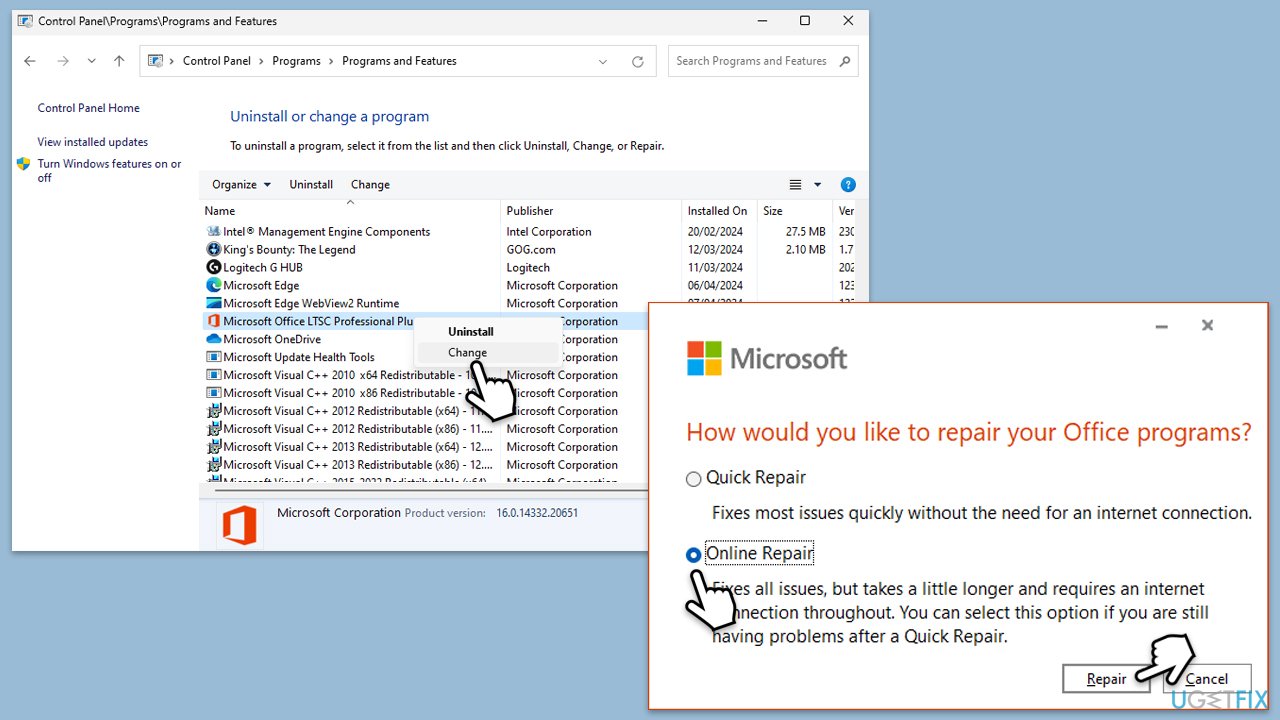
If Office files are corrupted or damaged, repairing the installation can resolve login issues.
- Type Control Panel in Windows search and press Enter.
- Select Programs > Programs and Features.
- Select Microsoft Office and click on Change.
- Choose the option for Online Repair and click Repair.
- Follow the prompts to finish the process.
Fix 7. Check for conflicting Office installations
Sometimes, having multiple versions of Office installed on the same system can cause issues. Removing older installations may resolve sign-in problems, and Clean Boot can help you with that.
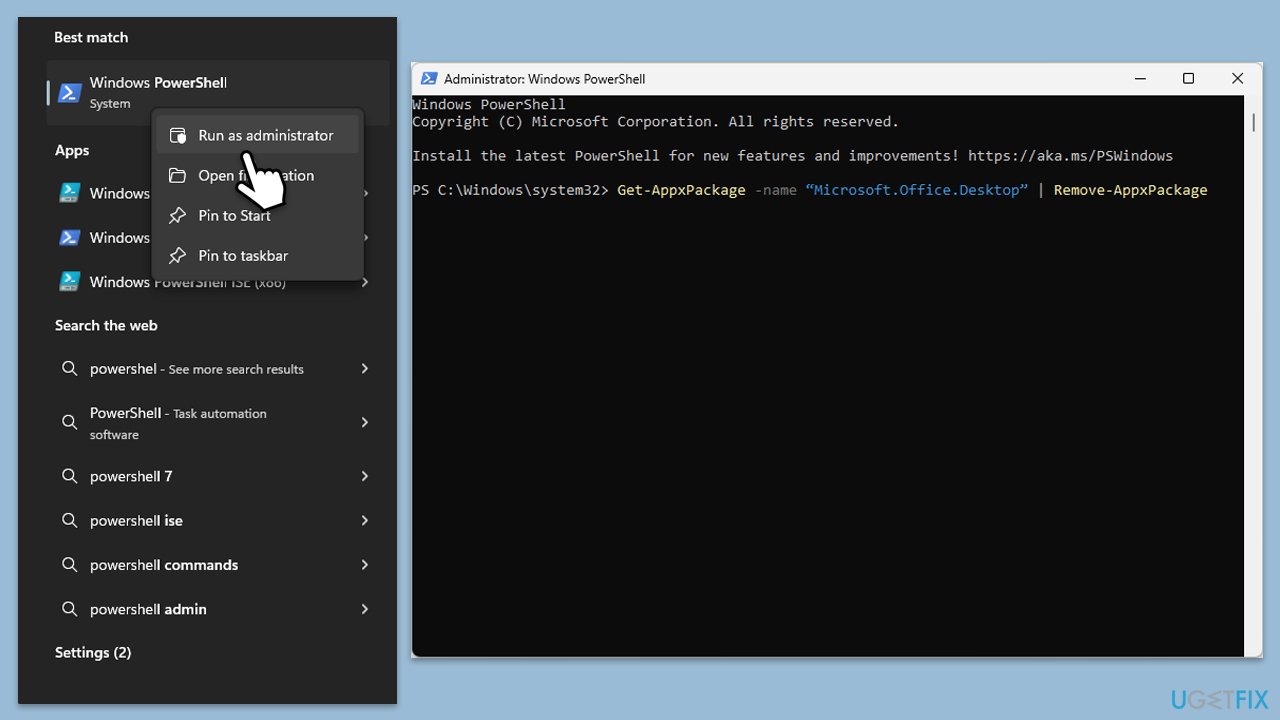
- Type PowerShell in Windows search.
- Right-click on the result and pick Run as administrator.
- When UAC shows up, click Yes.
- In the new window copy and paste the following command, pressing Enter after:
Get-AppxPackage -name “Microsoft.Office.Desktop” | Remove-AppxPackage - Restart your system.
- Download the adequate version of MS Office and install it.
Fix 8. Clear the Office cache
Clearing the Office cache can remove corrupted temporary files that may be causing Office to repeatedly ask for sign-ins.
- Press Win + E to open File Explorer.
- Navigate to the following location:
C:\Users[YourUserName]\AppData\Local\Microsoft\Office\16.0\Licensing. - Delete the files in this folder, then restart Office and check if the sign-in prompts have stopped.
Bottom line
To resolve the issue of Microsoft Office repeatedly asking for sign-ins, you can remove corrupted credentials from the Credential Manager, adjust OneDrive sync settings, and ensure that both Office and Windows are fully updated. Additionally, resetting Office to default settings or repairing the Office installation may help. If none of these solutions work, consider using a trusted repair tool to address underlying system issues.
Frequently asked questions
This issue usually occurs due to account authentication problems or corrupted Office settings. You can resolve it by clearing the cached credentials and updating your Office applications.
To stop the sign-in prompts, try disabling the 'Office Account' settings in the application options and ensure your Office is fully updated. You may also need to sign out and re-sign into your account.
If the problem persists, consider repairing your Office installation through the Control Panel, or resetting your Windows credentials in the Credential Manager.




Report an issue
What's wrong with this guide? We review every report and update or remove content.
Report received — thank you. We'll review and fix it.
You need a free account to submit a report.
Be the first to comment