How to fix
Microsoft Store error 0x8004E103
on Windows
Resolve Microsoft Store error 0x8004E103 on Windows 10 and 11 with easy fixes. Get your apps back in action, expert-tested solutions await!

What causes How to fix Microsoft Store error 0x8004E103?
- System file corruption
- Connectivity problems
- Microsoft servers issues
- Cached data
- Incorrect date and time settings
- Malware infections
Repairs Windows system files, removes malware, and restores a clean OS state — without reinstalling.
In the past couple of weeks, I am suddenly not able to use Microsoft Store. Every time I attempt to update or download new apps, I always am shown the error code 0x8004E103. I restarted my computer and tried to log out of my account, but it didn't help. Could you provide any other solutions for this error?
Microsoft Store has been extremely well-received since its implementation with Windows 8.[ref en-1] With Microsoft Store, users can download, update and uninstall plenty of approved applications without having to resort to third-party sources, which increases the credibility and security of the applications. In general, security professionals always suggest picking reputable sources instead of less known ones.
While the Store is a welcome addition to any user, it cannot guarantee success. Users have recently complained about an irritating 0x8004E103 error, which might occur in a variety of circumstances. Some people claimed that certain applications were not able to be updated or downloaded, and the problem occurred on occasion. Meanwhile, other people said that the malfunction makes the MS Store practically unusable since it appears every time they try to use the app.
0x8004E103, similar to other Microsoft Store errors, can arise from several potential issues, such as system file corruption, connectivity problems, Microsoft servers, cached data[ref en-3], incorrect date and time settings, malware[ref en-2] infections, and other issues.
Therefore, there are several things you could do in order to attempt to fix the 0x8004E103 error in Microsoft Store. We start from troubleshooting using built-in tools and then proceed to more complex solutions. If you are not so keen on spending a lot of time finding what's causing your particular issue, we recommend you try resolving it automatically with the [d1] PC repair and maintenance app.
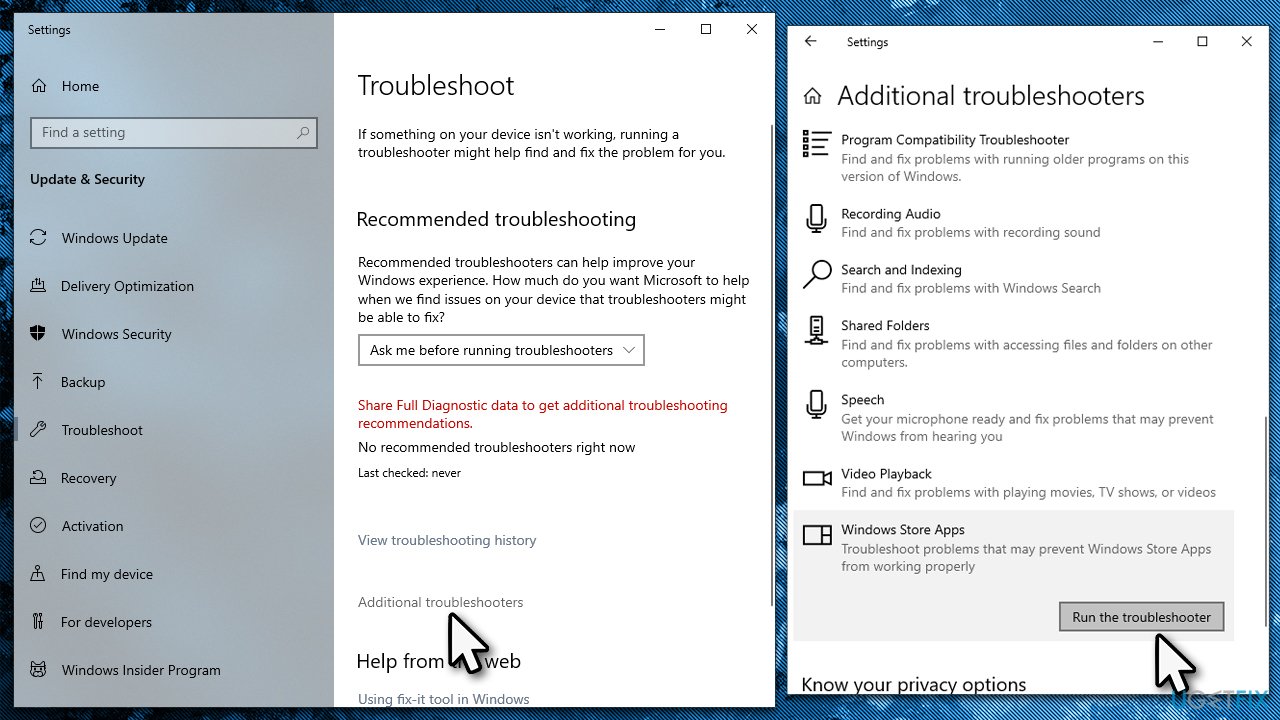
Fix 1. Run the troubleshooter
Troubleshooters are great built-in tools that could help you resolve a myriad of issues in some cases, so we recommend starting from this option if you haven't tried it already.
- Type Troubleshoot in Windows search and press Enter
- Click Additional troubleshooters if you can't see them listed
- Scroll down to find Windows Store Apps
- Click and select Run the troubleshooter
Fix 2. Run SFC and DISM
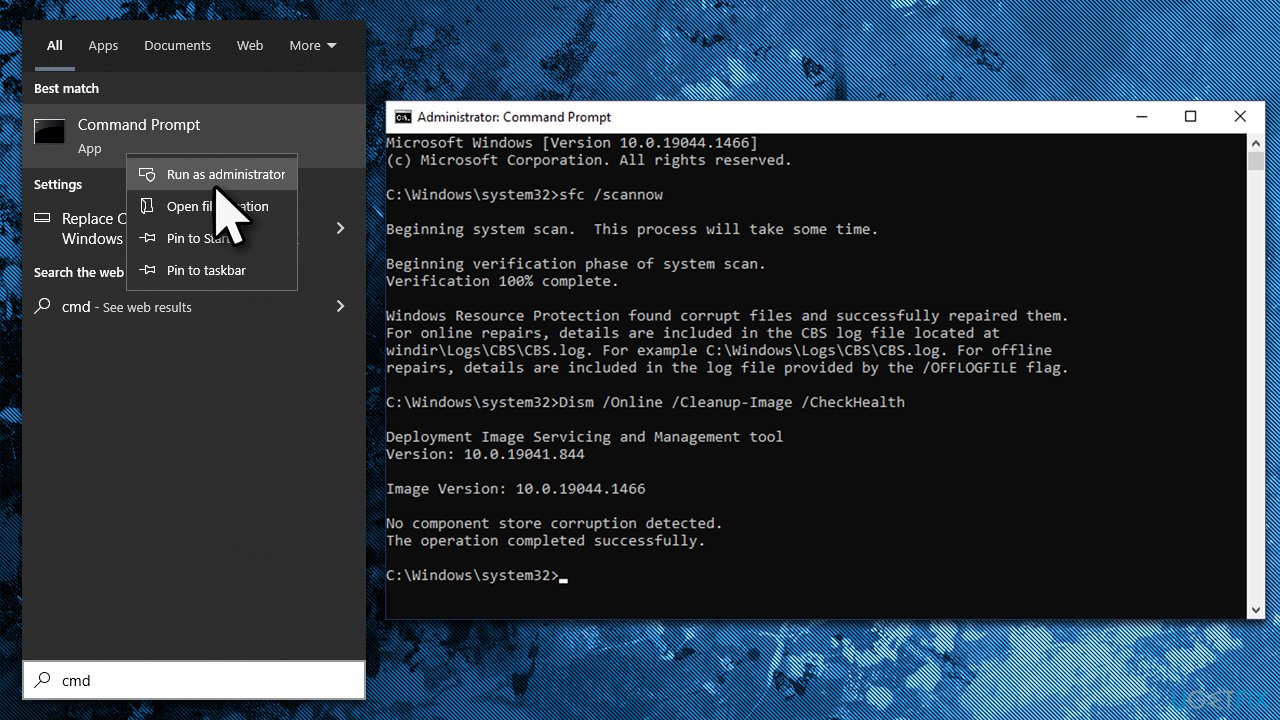
- To run elevated Command Prompt, type in cmd in Windows search
- Right-click the Command Prompt result and pick Run as administrator
- When User Account Control shows up, click Yes
- Type this command and press Enter:
sfc /scannow - Wait for the scan to finish
- Then, use the following commands, pressing Enter after each:
Dism /Online /Cleanup-Image /CheckHealth
Dism /Online /Cleanup-Image /ScanHealth
Dism /Online /Cleanup-Image /RestoreHealth - Restart your computer.
Fix 3. Reset Microsoft Store cache
If the application cache is bugged, you might receive the 0x8004E103 error. You can reset it by following these steps:
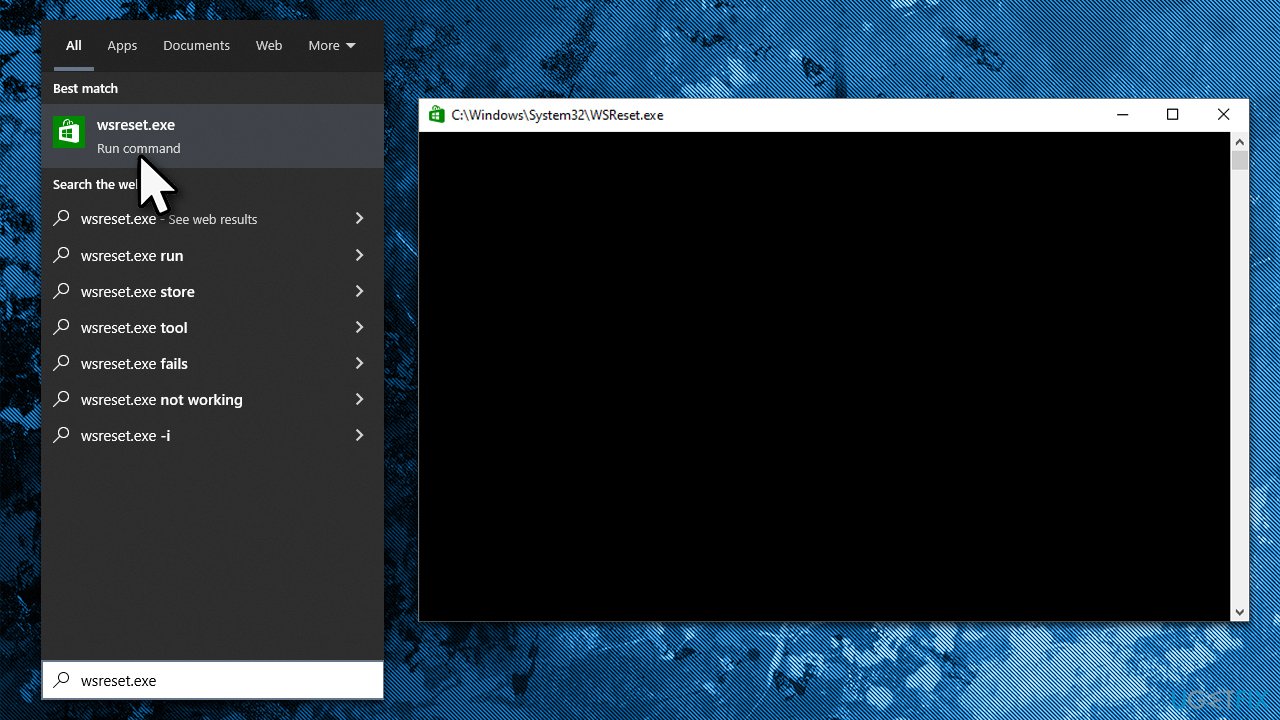
- In Windows search, type wsreset.exe and press Enter
- Wait till a black window shows up – do not close it
- Once it's gone, Microsoft Store should restart
- Try using the Store again.
Fix 4. Repair or reset the Store
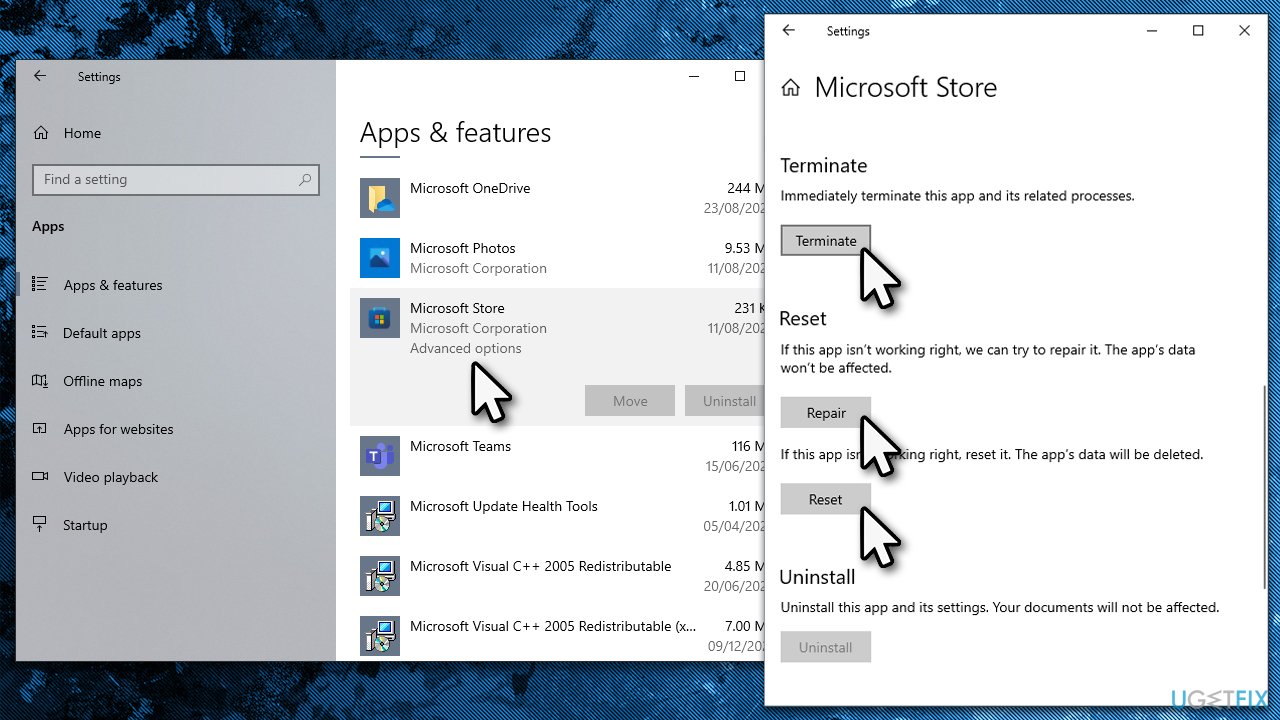
- Right-click on Start and pick Apps & Features
- Scroll down to locate Microsoft Store and click Advanced options
- Click Terminate and Repair
- If that does not help, try the Reset option instead.
Fix 5. Reinstall Microsoft Store
- Make sure your Microsoft Store is closed and not running in the background
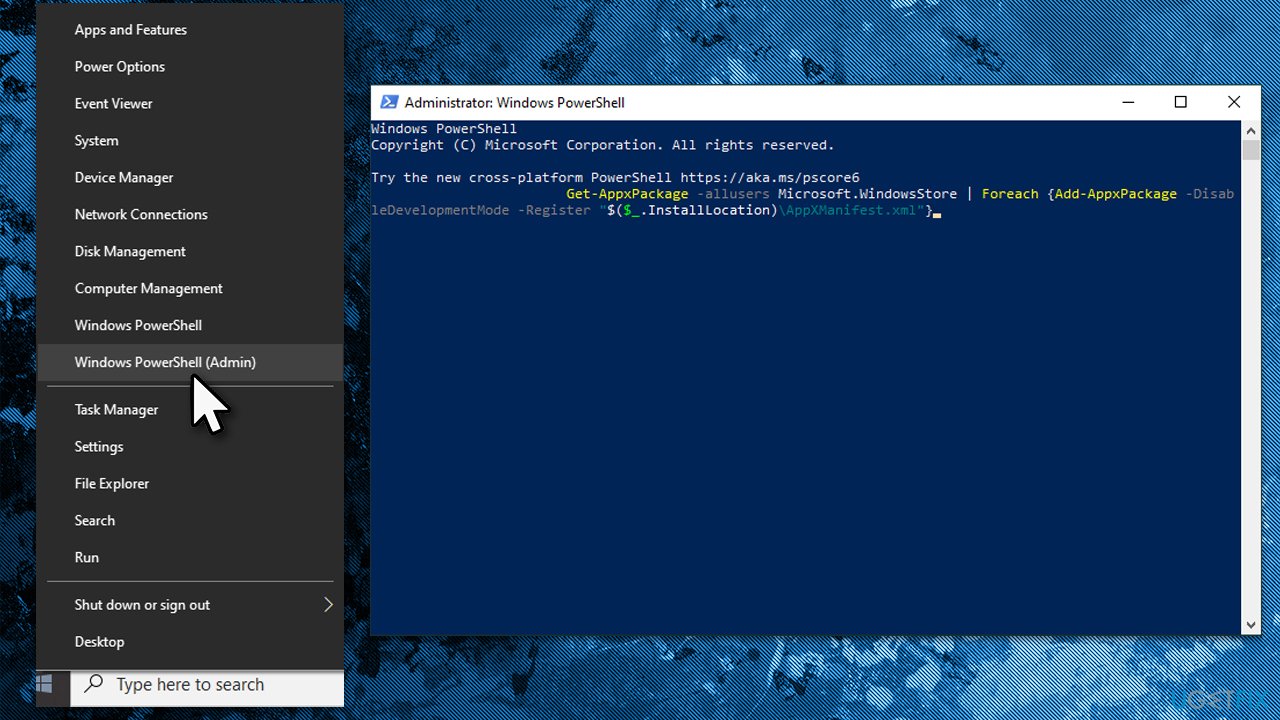
- Right-click on Start and select PowerShell (Admin)
- Paste the following command and press Enter:
Get-AppXPackage *Microsoft.WindowsStore* | Foreach {Add-AppxPackage -DisableDevelopmentMode -Register “$($_.InstallLocation)\AppXManifest.xml”} - Close Powershell.
Fix 6. Use Media Creation Tool to reinstall Windows
If none of the solutions above worked, you should reinstall Windows. You will be given an option to save all your files during this process, but we recommend making a copy just as a precautionary measure. Also, make sure you disconnect all the external devices that are not necessary for the operation, such as printers or cameras.
- Visit the official Microsoft website and download Windows 10 installation media (Windows 11 version)
- Double-click the installer and select Yes when UAC shows up
- Agree to terms
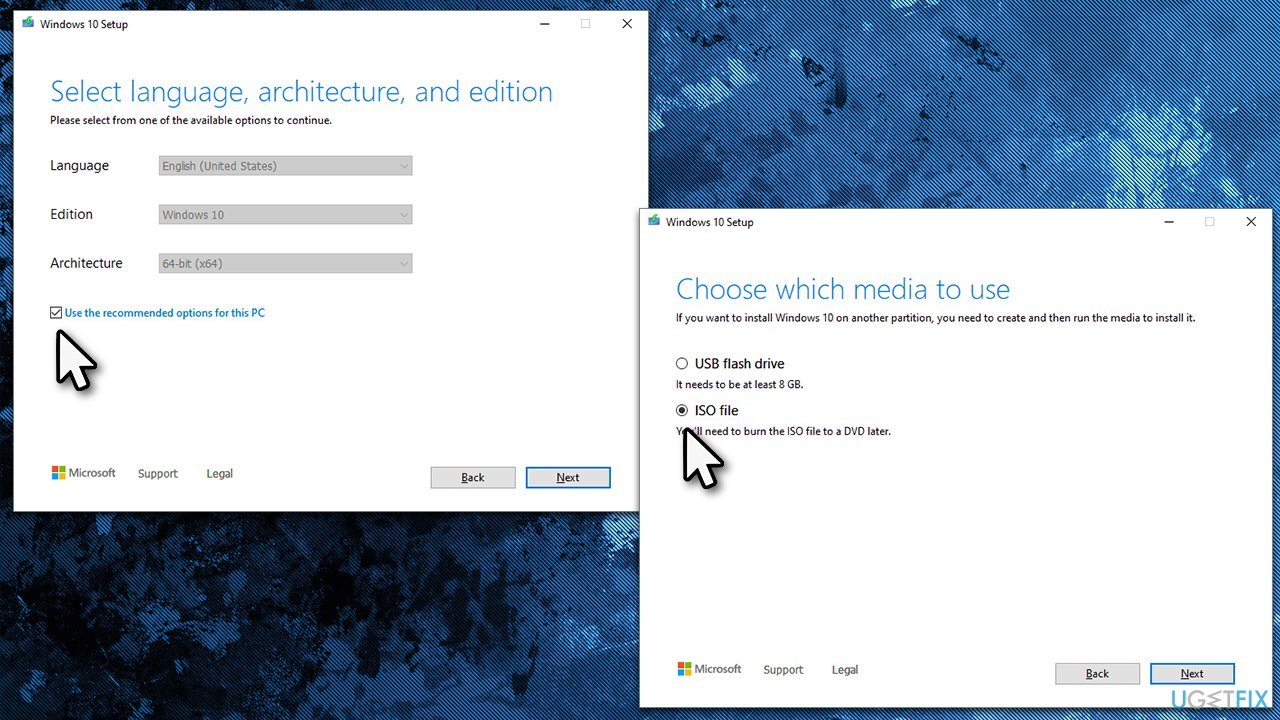
- Pick Create installation media (USB flash drive, DVD or ISO file) for another PC option and click Next
- Select the Use Recommended options for this PC checkbox and click Next
- Choose the ISO file and click Next
- Once you have prepared the ISO, put it into the malfunctioning PC
- Restart your machine and rapidly press F8, F10, F12, Del, or another button that would let you load into BIOS
- Here, go to the Boot section and set the boot priority to Flash drive
- Restart your system, and then proceed with on-screen instructions to reinstall Windows.
Bottom line
To fix the 0x8004E103 error in Microsoft Store, you can start by running the built-in troubleshooter, which may resolve the issue. If that doesn't work, consider using a PC repair and maintenance app for automatic resolution. If none of these solutions help, further investigation may be needed to identify the specific cause.
Frequently asked questions
The error 0x8004E103 typically occurs due to issues with the Microsoft Store cache, corrupted system files, or problems with your Microsoft account settings.
To clear the cache, press Windows + R, type 'wsreset.exe', and hit Enter. This will reset the Microsoft Store cache and may resolve the error.
Windows 11 users can try running the Windows Store Apps Troubleshooter from Settings > System > Troubleshoot > Other troubleshooters, which can help identify and fix issues related to the Microsoft Store.




Report an issue
What's wrong with this guide? We review every report and update or remove content.
Report received — thank you. We'll review and fix it.
You need a free account to submit a report.
Be the first to comment