How to fix
Mozilla Firefox Critical ERROR
on Windows
Resolve Mozilla Firefox critical errors on Windows 10 and 11 quickly and easily. Expert-tested solutions ensure smooth browsing with zero traces left.

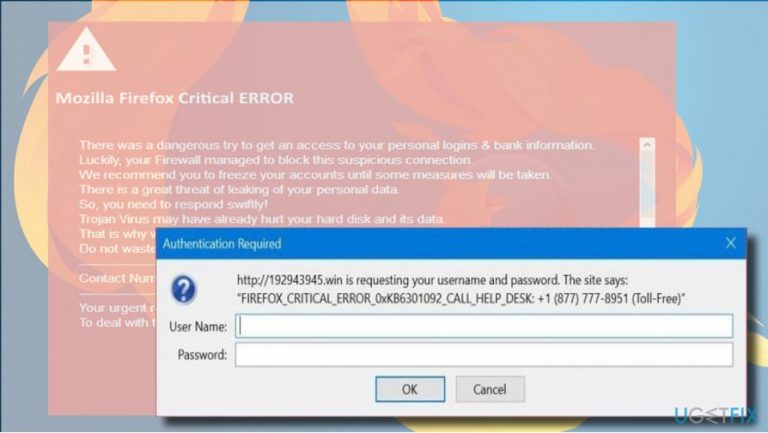
What causes How to Fix Mozilla Firefox Critical ERROR?
- Accessing a compromised website infected with malicious code
- Installing adware
- Malicious code injected into Mozilla Firefox
- Receiving fictitious information about personal data theft
- Authentication Request pop-up asking for username and password
Repairs Windows system files, removes malware, and restores a clean OS state — without reinstalling.
For the last couple of days, I am getting a solid red screen alert on Mozilla Firefox, which says FIREFOX CRITICAL ERROR and says that someone tried to get access to my personal account. It also says that the data on my hard disk is in danger and that I have to call help desk to fix the problem. I ran a scan with Windows Defender, but it did not fix the problem. Please help!!
Mozilla Firefox Critical ERROR is a red screen alert showing up on Mozilla Firefox web browser exceptionally. The emergence of this pop-up does not mean that the PC is targetted by hackers or that the system is infected with a Trojan horse.[ref en-1] Mozilla Firefox Critical ERROR is a scam alert, which is distributed by cyber criminals who try to trick people into calling for tricksters and revealing their personal information or installing doubtful third-party apps.
The emergence of Mozilla Firefox Critical ERROR scam requires one of the two conditions: the PC’s owner either access a compromised website infected with a malicious code or installs an adware.[ref en-2] Once the malicious code is injected into Mozilla Firefox, the Mozilla Firefox Critical ERROR pop-up shows up and freezes the screen, so that the user can neither close the current tab nor the web browser itself. That’s one of the reasons why less experienced PC users fall into believing that the system is really in danger.
The Mozilla Firefox Critical ERROR scam[ref en-3] contains fictitious information. It reports an attempt to steal people’s personal information and claims that a Trojan horse has started compromising the information stored in a hard disk. On top of the red screen, people receive an Authentication Request pop-up, which indicates an error code (0xKB6301092, 0xKB1546764, 0xKB3078168 or others) and provides a technical support number.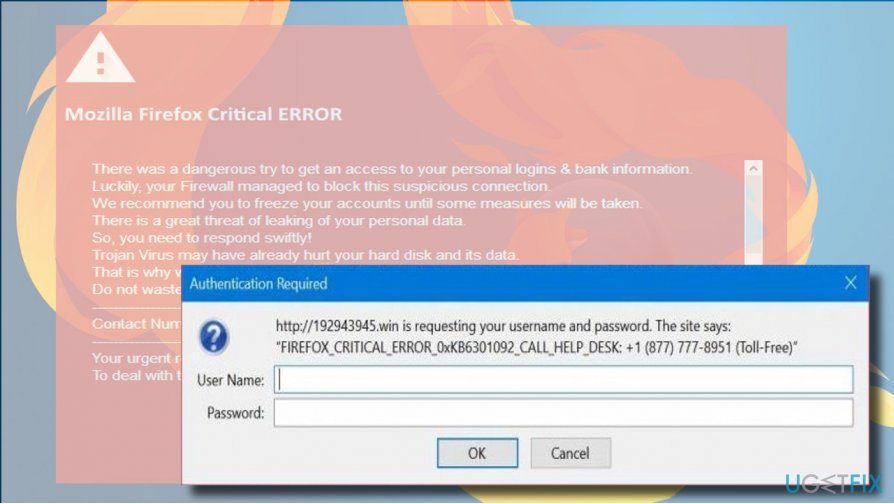
The Authentication Request pop-up asks for the username and password. That’s a tricky way to get access to personal people’s accounts. However, calling for the support is dangerous as well. The scammers on the other side of the handset employ psychological persuasion strategies and may trick gullible users into giving away their logins or allow hackers to connect to their PCs remotely.
Therefore, it’s very important to ignore the information on the Mozilla_Firefox_Critical_ERROR_0xKB6301092 and fix your PC to prevent the pop-up from reoccurring.
A Guide on How to Fix Mozilla Firefox Critical ERROR
As we have already pointed out, the Mozilla Firefox Critical ERROR scam won’t let you to close the web browser by clicking on the X button. Therefore, to terminate the pop-up, press Ctrl + Alt + Delete and open Windows Task Manager. Find Mozilla Firefox on the list and click on it. Select End Task.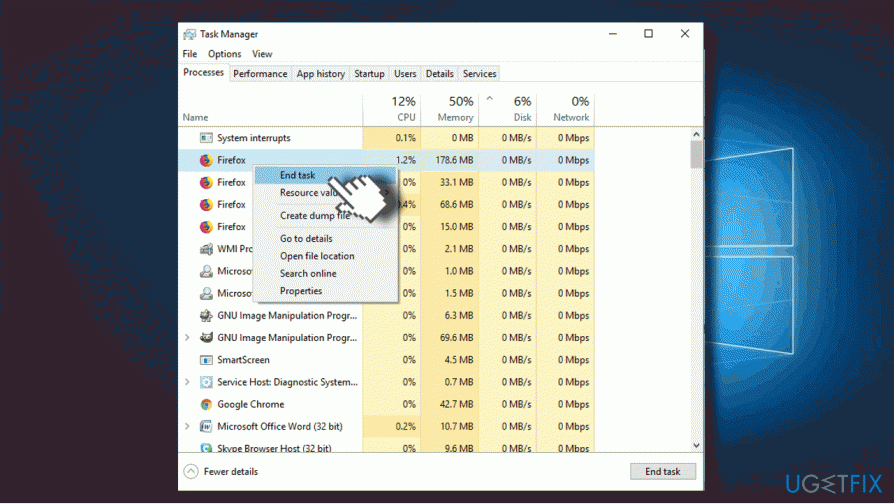
Once Mozilla Firefox is closed, you’ll have to remove the Mozilla Firefox Critical ERROR adware. You can do that with a powerful anti-malware tool or manually by accessing Programs & Features. We would strongly recommend using [d1].
If the Critical Error is triggered by a recent adware, which hasn’t yet been added to virus database, anti-malware may fail to recognize it. In this case, check the list of programs manually:
- Press Windows key + I and open Apps section. (Windows 10)
- In earlier Windows versions you should navigate to Control Panel -> Programs & Features.
- Carefully check the list of installed programs. If you detected a suspicious one, you can search for it online to find out if it falls for the PUP category.
- Click on the unwanted program and select Uninstall.
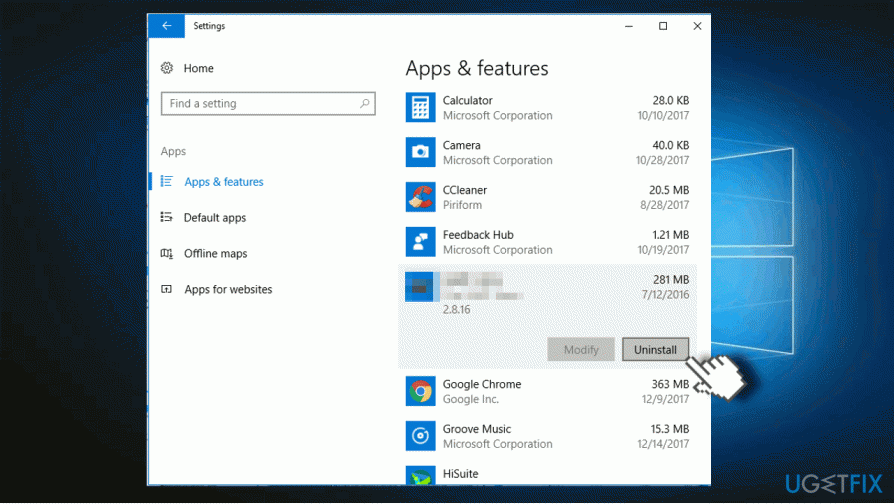
Check the date of recently installed programs and if it coincide with the emergence of the Mozilla_Firefox_Critical_ERROR, make sure to remove them all. Finally, don't forget to reset Mozilla Firefox. Otherwise, the pop-up will keep showing up.
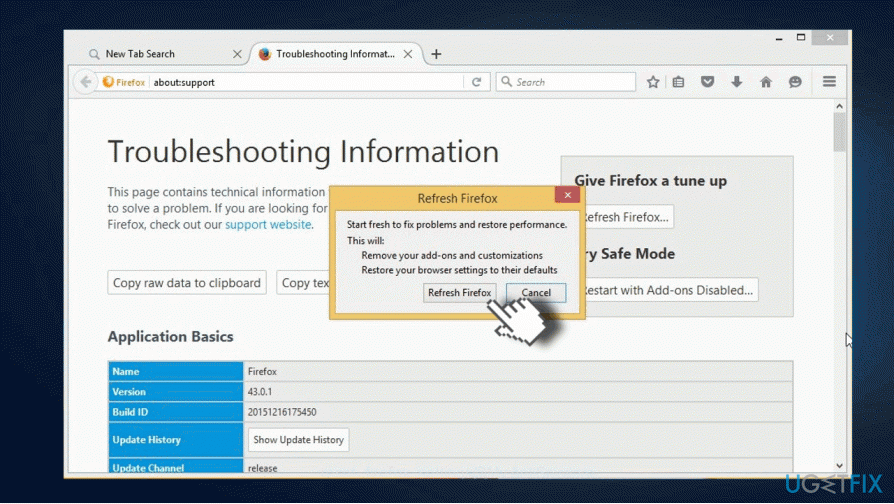
The fastest way to reset Mozilla Firefox is to open the official Mozilla Firefox's website by clicking on this link and press Refresh Firefox button. Alternatively, you can do the following:
- Open Mozilla Firefox and click on menu icon (three horizontal lines at the top right corner of the window).
- Type about:support in the address bar and press Enter to open Troubleshooting information page.
- Now click Refresh Firefox button and Refresh Firefox again on the confirmation window.
- Finally, click Finish and restart the browser.
Bottom line
To fix the Mozilla Firefox Critical ERROR, users should run a full system scan with antivirus software, avoid calling the provided support number, and clear browser cache and cookies. If these steps do not resolve the issue, consider reinstalling Mozilla Firefox or seeking professional technical support.
Frequently asked questions
Try restarting your computer and then launching Firefox again. If the problem persists, consider reinstalling Firefox to ensure you have the latest version.
You can fix this issue by ending the Firefox process in Task Manager and then restarting the browser. Additionally, check for any updates or extensions that may be causing conflicts.
Clear your browser cache and cookies, then restart Firefox. If the problem continues, consider resetting Firefox to its default settings.




Report an issue
What's wrong with this guide? We review every report and update or remove content.
Report received — thank you. We'll review and fix it.
You need a free account to submit a report.
Be the first to comment