How to fix
Nom001.site error
on Windows
Resolve the nom001.site error on Windows 10 and 11 effortlessly. Get expert-tested solutions that fix issues in minutes, with clear screenshots!

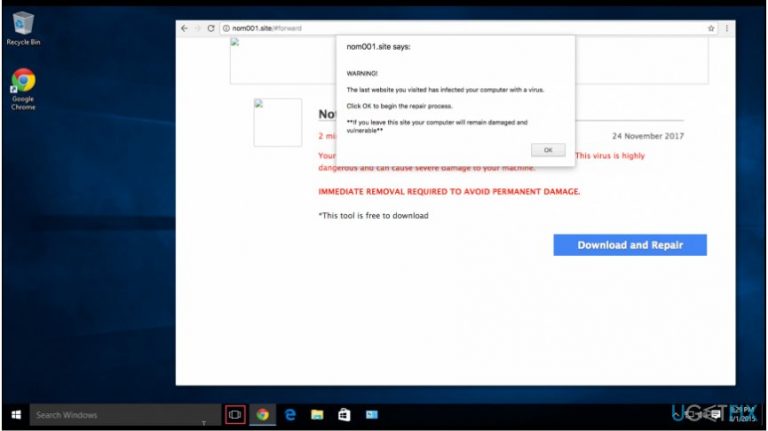
What causes How to fix nom001.site error?
- Fake alert designed to trick users
- Potentially unwanted program (PUP) infiltration
- User neglecting to de-select adware during installation
- Malicious programs generating false alerts
- Scam sites like Nom001.site targeting unsuspecting users
Repairs Windows system files, removes malware, and restores a clean OS state — without reinstalling.
Hello. While browsing the Internet, I encountered a nom001.site error message. It claims that my Mac is infected with a virus and offers to download a free removal tool. It doesn’t seem very reliable. Should I believe it?
Nom001.site error is nothing else but a fake alert which is used to trick gullible people into installing malicious programs on their MacOS X systems. There are several versions of this Apple scam, such as Nom002.site and Nom003.site. Beware that each of them might show on Google Chrome, Mozilla Firefox, Internet Explorer, Safari and other browsers.
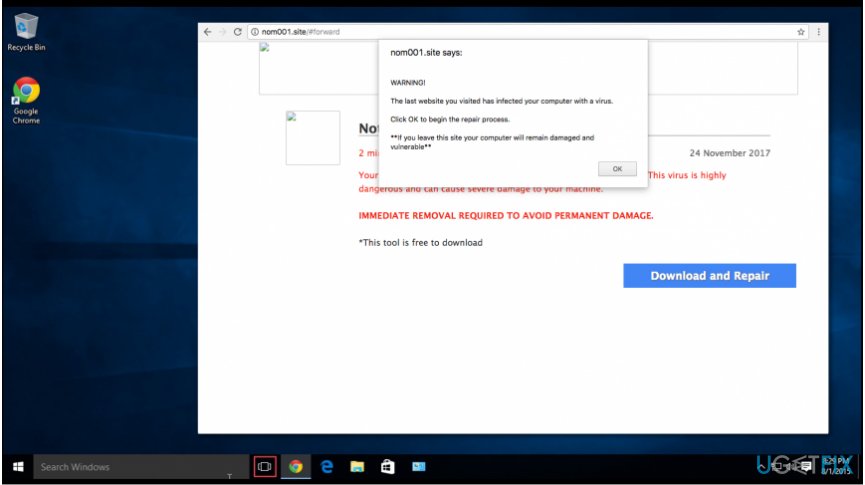
Typically, Nom001.site scam shows up when you least expect it. You may be shopping online or reading some news when you can notice this alert message telling you that you are in a great danger. Unfortunately, people naturally click "OK" because they think that they are in a great danger.
In reality, they almost are at the risk of malware as they agree to download a malicious program to their systems. Besides, this Nom001.site error is usually displayed by the potentially unwanted program (PUP)[ref en-1] which can infiltrate the system undetected. Once user skips important installation steps, he or she forgets to de-select the ticks permitting adware programs.[ref en-3]
As a result, the unwanted applications generate continuous Apple virus alerts such as Nom001.site while browsing the Internet. They are designed either to swindle money by offering expensive and useless security software or help high-risk computer infections infiltrate computer systems.[ref en-2]
Fixing Nom001.site error
First of all, we want to assure you that your Mac device is safe and you shouldn’t trust Nom001.site scam. However, note that exiting the browser will not fix the problem and remove infections hiding in your computer.
Therefore, we recommend you to remove Nom001.site error either automatically or manually. [rev id=”MacKeeper”] and [rev id=”Reimage”] are our top picks which will help you get rid of all suspicious entries that cause the annoying pop-up to appear.
Additionally, you can follow the guide below to fix Google Chrome browser from Nom001.site alert manually.
Step 1. Unlock your browser
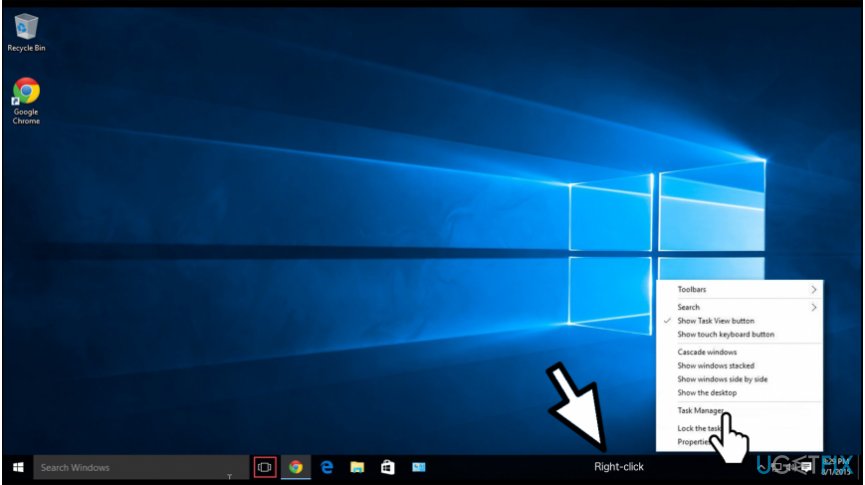
- Navigate to the bottom-right corner of your desktop and right-click on Windows Task Bar;
- Select Task Manager.
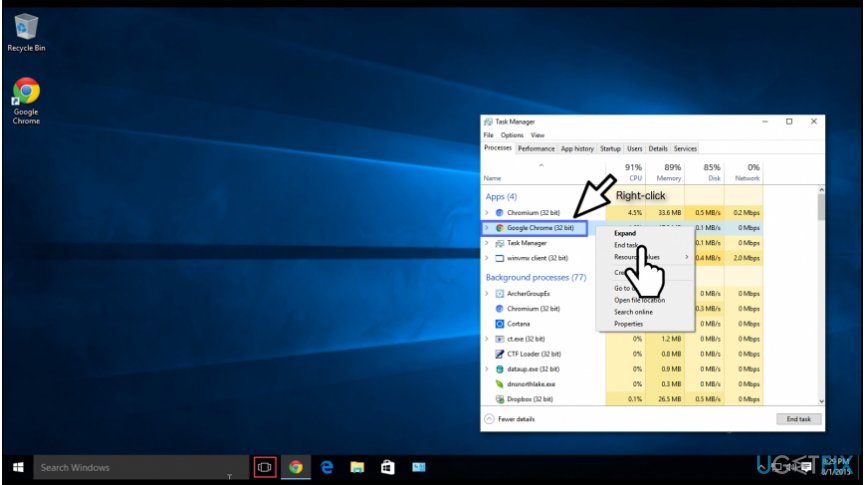
- Find Google Chrome and right-click on it;
- Select End Task.
NOTE: If you use a different browser, you should apply the guidelines above to your regular browser instead of Chrome.
Step 2. Delete the PUP from Google Chrome and other infected browsers
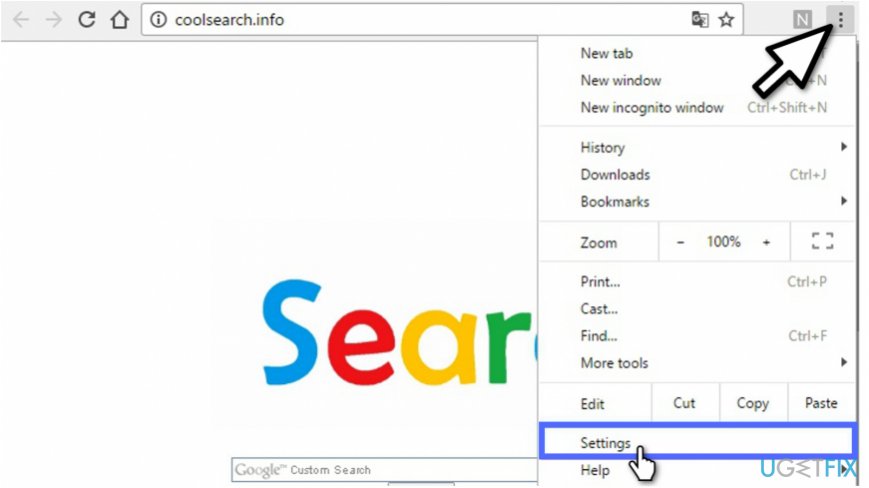
- Open Google Chrome and navigate to the top-right corner of the window;
- Click on the button containing three vertical dots (Settings button);
- Select Settings.
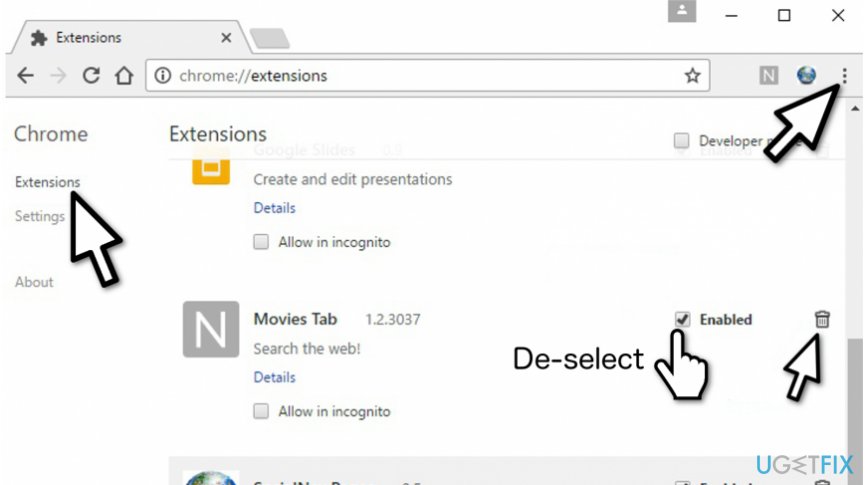
- Search for the Extensions column in the panel on the left;
- Find all suspicious extension names you are not aware;
- Un-tick the boxes which support their activity;
- Click on the Trash button afterward.
NOTE: You can apply the instructions mentioned above to other browsers you want to clean from the potentially unwanted programs as well.
Step 3. Reset Chrome and remaining browsers
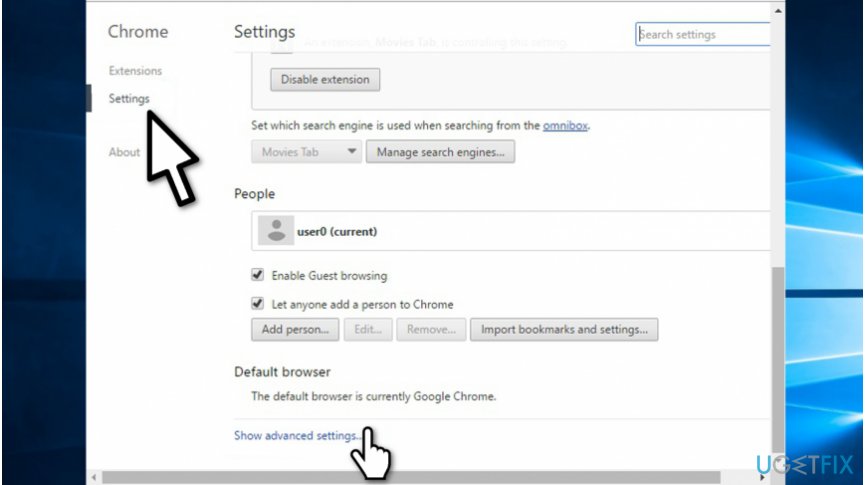
- Navigate to the panel on the left and click Settings button;
- Select Show Advanced Settings;
- Click Reset Settings and Reset button afterward.
Bottom line
To fix the Nom001.site error, you can remove it either automatically using tools like MacKeeper or Reimage, or manually by following specific browser instructions. If these methods do not resolve the issue, consider seeking further assistance or professional help.
Frequently asked questions
The nom001.site error is typically caused by malicious browser extensions or adware that redirects your web traffic. It can also be triggered by compromised system files or incorrect DNS settings.
To remove the nom001.site error, reset your browser settings and remove any suspicious extensions. Additionally, run a full system scan with a reputable antivirus program to eliminate any malware.
To prevent the nom001.site error, keep your operating system and antivirus software updated, and avoid downloading untrusted applications. Regularly clearing your browser cache and cookies can also help maintain browser health.




Report an issue
What's wrong with this guide? We review every report and update or remove content.
Report received — thank you. We'll review and fix it.
You need a free account to submit a report.
Be the first to comment