How to fix
NVIDIA GeForce experience error 0x0003
on Windows
Resolve the NVIDIA GeForce Experience error 0x0003 on Windows 10 quickly and efficiently. Expert-tested solutions ensure a smooth gaming experience, fix…

What causes How to fix NVIDIA GeForce experience error 0x0003 on Windows 10?
- Corrupted drivers
- Glitched adapters
- NVIDIA Telemetry Container not permitted to interact with the desktop
- Certain services not running
- Program or OS updates interfering with functionality
Repairs Windows system files, removes malware, and restores a clean OS state — without reinstalling.
Hello. I receive the NVIDIA GeForce experience error 0x0003 on Windows when trying to use various software related to NVIDIA experience. It is a fresh install of OS. The full error comes up on a pop-up: “Something went wrong. Try rebooting your PC and then launch GeForce Experience. Error Code: 0x0003”. I tried a few things I found on the web. Nothing is helping. What can I do?
NVIDIA GeForce experience error 0x0003 is the issue that appears on various Windows devices. Users[ref en-1] complain about the particular error and inability to use certain programs. Unfortunately, looking through reports, online forum posts, and so on, seems that there are various reasons that trigger the error message.
The NVIDIA GeForce experience 0x0003 error is mainly related to drivers, so you should check them via Device Manager, and locate the error code, get more details regarding the issue. You can find the driver that creates a problem and update or replace the one in particular.[ref en-2]
However, there are other things that can trigger the error message and failure of the program. Nvidia Telemetry Container may not be permitted to interact with the desktop and cause the issue. If so, you can solve the problem by allowing interaction. Also, such NVIDIA GeForce experience error occurs when some particular services are not running.
Once the software crashes and NVIDIA error 0x0003 dialog box shows up, you have no other option but to close the pop-up entirely:
Something went wrong. Try rebooting your PC and then launch GeForce Experience. Error Code: 0x0003
How to fix NVIDIA GeForce experience error 0x0003 on Windows 10
Corrupted drivers or glitched adapters might be the more common reasons behind NVIDIA GeForce experience error 0x0003, but there are instances when a program or OS updates also interfere with the proper functioning. You can set to automatically install the latest drivers, so these updates will not trigger any errors. But we have a few methods for fixing the issue.
We can confirm that this is not a malware[ref en-3] issue or the problem related to dangerous programs of any sort. You don't need to panic at all. There are many errors like this, and it is possible to fix NVIDIA GeForce experience error 0x0003 by altering some settings and fixing corrupted files. The program like [d1] can help with such issues automatically.
Allow the Nvidia Telemetry container to interact with desktop
- Press Windows and R buttons and open the Run window.
- Type services.msc and open Services screen.
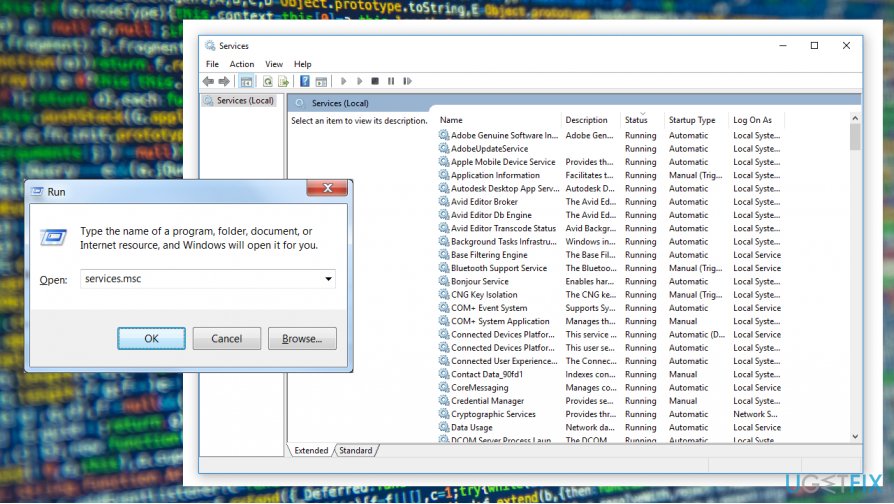
How to fix nvidia geforce experience error 0x0003 on windows 10 services - Locate Nvidia Telemetry Container and right-click on it to choose Properties.
- Then select Log On and make sure that Allow service to interact with desktop box is ith a checkmark.
- Click Apply.
Reinstall or Update drivers to fix NVIDIA Experience 0x0003 error on Windows
- Open the Device Manager and expand the Display drivers.
- Right-click on Nvidia Graphics and choose to update the driver to get the latest one.
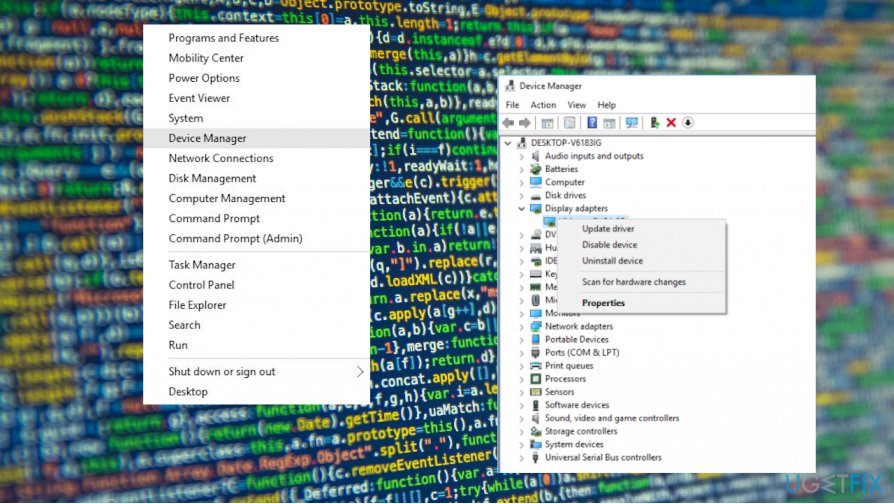
How to fix nvidia geforce experience error 0x0003 on windows 10 device manager
Reset Network Adapter to fix NVIDIA GeForce experience error 0x0003
- Open the Command Prompt.
- Type netsh winsock reset.
- Hit Enter to execute the command and reset the network adapter.
Bottom line
To fix the NVIDIA GeForce experience error 0x0003, check and update your drivers via Device Manager, allow NVIDIA Telemetry Container to interact with the desktop, and ensure all necessary services are running. If these methods do not resolve the issue, consider setting your system to automatically install the latest drivers.
Frequently asked questions
Common causes include outdated graphics drivers, conflicts with antivirus software, or corrupted installation files of the GeForce Experience.
You can update your NVIDIA graphics drivers by visiting the official NVIDIA website, downloading the latest drivers for your graphics card, and installing them manually.
Yes, uninstalling and then reinstalling GeForce Experience can help resolve error 0x0003 by ensuring that you have a clean installation without corrupted files.




Report an issue
What's wrong with this guide? We review every report and update or remove content.
Report received — thank you. We'll review and fix it.
You need a free account to submit a report.
Be the first to comment