How to fix
Oblivion Remastered crashing
on Windows
Resolve Oblivion Remastered crashing issues on Windows 10 and 11 effortlessly. Expert-tested solutions ensure smooth gameplay—fixed in minutes!

What causes How to fix Oblivion Remastered crashing on Windows?
- High-end hardware not optimized for the game
- Incompatibility with certain AMD graphics cards
- Potential issues with Nvidia GPUs
- Overheating due to dust accumulation
- Outdated drivers or software
Repairs Windows system files, removes malware, and restores a clean OS state — without reinstalling.
I was extremely excited when I saw that Oblivion Remastered was released all of a sudden - I've played this game when I was a teen and was keen to come back and relive it once again. To my disappointment, the game continues to crash, and I haven't even been able to play it for that long. As it stands, it's impossible. I have relatively high-end hardware (4070 Ti, 14700K, 32GB RAM), so I am not sure what is going on.
Elder Scrolls IV: Oblivion Remastered has been rumored for several years now since the leak a few years prior. However, the developer of the original, Bethesda, never said a word about it - there were no streams, no release dates, no social media activity, and no other marketing material up until 22 April, 2025.
At this time, to the surprise of nobody who followed the leaks, Bethesta decided to release the game on the same day of the announcement - a process commonly known among gamers as "shadow dropping." This made the fans of the original Oblivion ecstatic, as well as those who wanted to experience the classic for the first time with modern changes. The game was an instant success and reached almost 200k concurrent players on Steam.
Unfortunately for some, Oblivion Remastered started crashing very quickly after they got into the game. Many users described the problem as them playing for several minutes, and then the screen going black, followed by a crash. Some players even had to restart their PCs to recover from it.
Surprisingly, many affected users reported having a relatively high-end gaming PC; predominantly, AMD systems seem to be more affected, with graphics cards like RX 6700 XT, RX 6600, and even 7900 XTX. Nvidia GPU (RTX 4070 or RTX 4090) users were also suffering from the same issue in some cases.
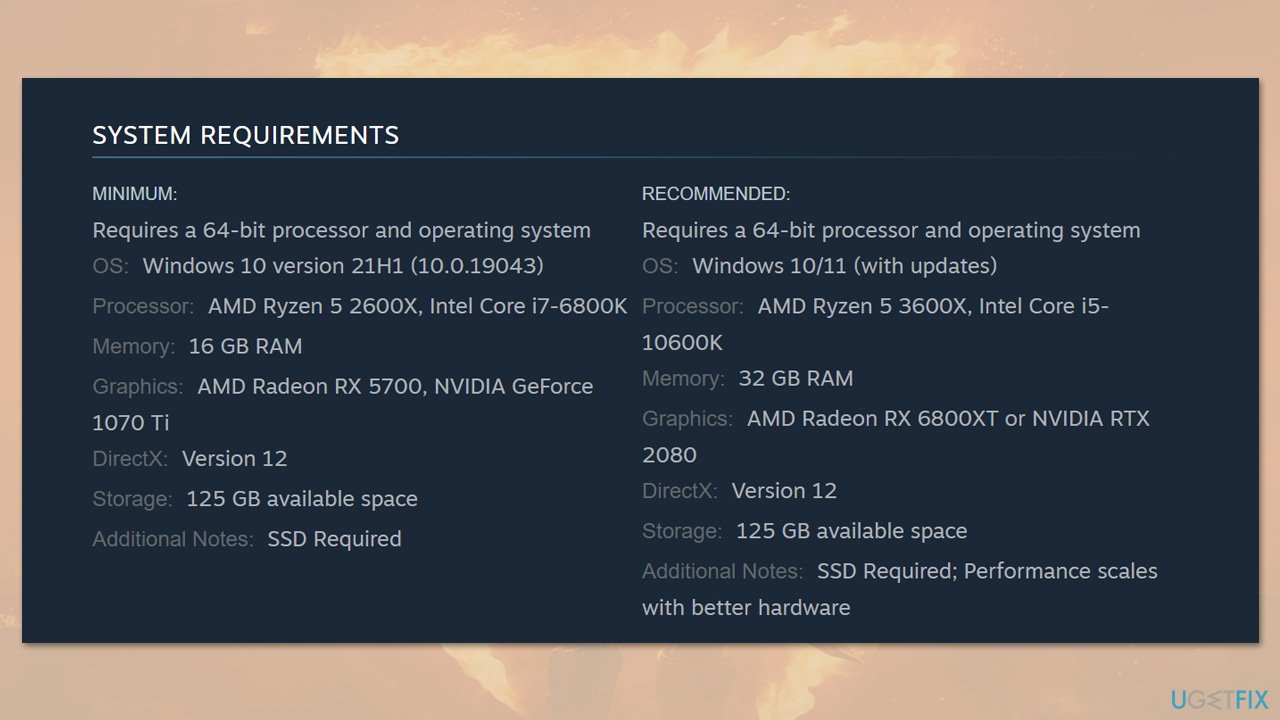
Before trying to fix Oblivion Remastered crashes, you should first make sure that your system meets the minimum requirements, especially if you haven't done any upgrades for a while. Other general checks to make include removing dust from the PC components, scanning for malware, and checking the temperatures before proceeding with other fixes.
If that does not apply to you, there are several other solutions you could try, including disabling overlays, updating or reinstalling GPU drivers, running the game as an administrator, limiting FPS, disabling FSR/DLSS, choosing default options in AMD Adrenalin/Nvidia apps, verifying game files, or launching the game through dedicated GPU software.
To make sure that your Windows does not suffer from problems like corrupted system files or corrupt registries, you can always employ automatic tools like [d1]. Alternatively, check out the guide for each of the solutions below.
Fix 1. Ensure system readiness
Verifying that your PC meets the game’s requirements and is in good health prevents basic hardware or software issues from causing crashes.
- Check that your CPU, GPU, RAM, and storage meet or exceed the game’s minimum specs (you can check them on the official Steam site, for example).
- Remove dust from fans and vents to improve cooling.
- Run a malware scan to rule out infections.
- Monitor your CPU and GPU temperatures to ensure they stay within safe limits.
Fix 2. Disable overlays
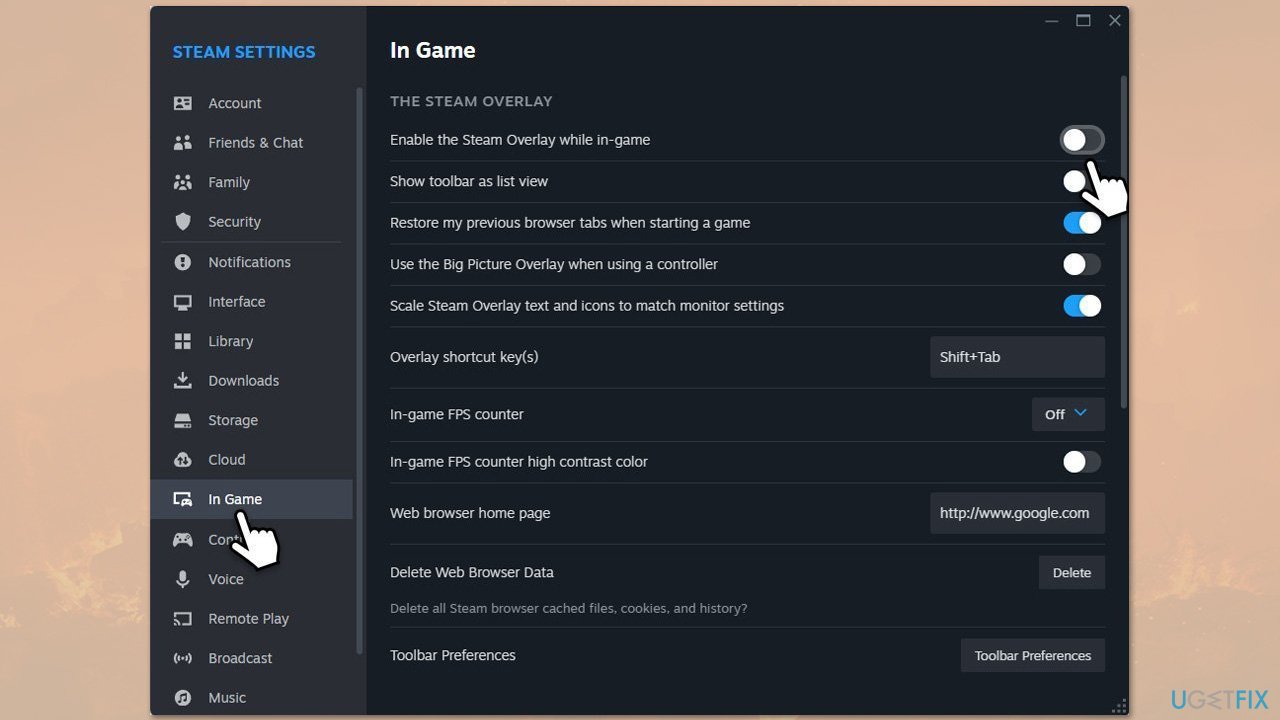
Third-party overlays can conflict with game rendering and trigger crashes. Make sure you also disable any overlays in your Adrenalin or Nvidia app.
Steam
- Open your Steam client.
- Go to your game library and right-click on FF16.
- Select Properties.
- Disable the Enable the Steam Overlay while in-game option in General settings.
Discord
- Open Discord and click on the gear icon next to your username.
- Scroll down to the Activity Settings section and click on Game Overlay.
- Toggle off the switch next to Enable in-game overlay.
- Restart Discord to ensure the changes take effect.
Game Bar
- Right-click on Start and select Settings.
- Go to Gaming.
- Under Xbox Game Bar, toggle off Enable Xbox Game Bar for things like recording game clips, chatting with friends, and receiving game invites.
- Restart your computer to ensure the overlay is completely disabled.
Fix 3. Update or reinstall GPU drivers
Some users said that they managed to fix Oblivion Remastered crashes by updating their GPU drivers to the latest version. This is not surprising, as both Nvidia and AMD release game-ready drivers to ensure maximum compatibility.
Update drivers
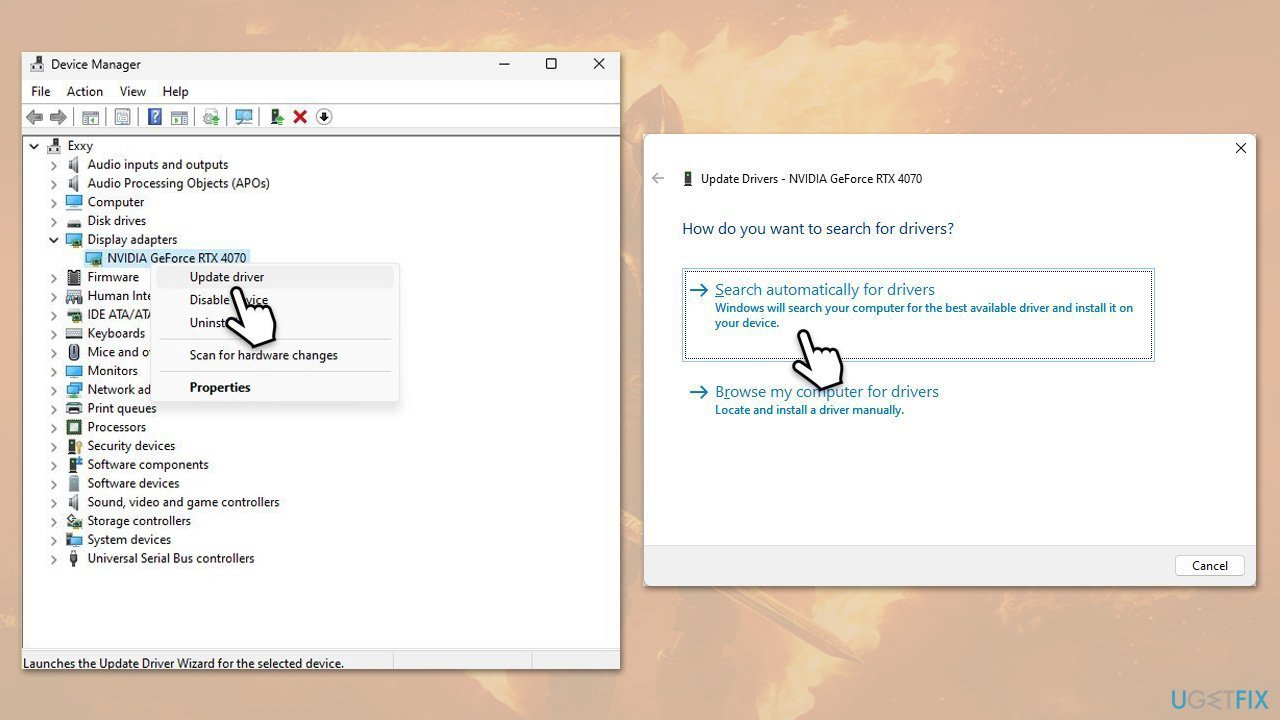
- Right-click on the Start button and select Device Manager from the menu.
- Expand the Display adapters section.
- Right-click on your graphics card and select Update driver.
- Pick Search automatically for drivers.
- If updates are found, allow them to install.
- Restart your computer after updating all necessary drivers.
- To ensure that you are installing the correct drivers, use automatic tools like [rev id="DriverFix"] or dedicated software for your GPU.
Reinstall drivers
- Download DDU from the official website.
- Extract the compressed file, you should find the installer inside.
- Next, while holding the Shift button, click on Start > Restart.
- After a reboot, go to Troubleshooter > Advanced options > Startup settings > Restart.
- Press 4 or F4 to access Safe Mode.
- After a restart, go to the location where you downloaded DDU.
- Click on Display Driver Uninstaller.exe to open the program.
- Close the Options window.
- Under Device type, pick GPU from the drop-down menu.
- Click Clean and restart.
- Your PC will reboot.
Fix 4. Run the game as administrator
Elevated permissions can solve file-access issues that lead to sudden crashes.
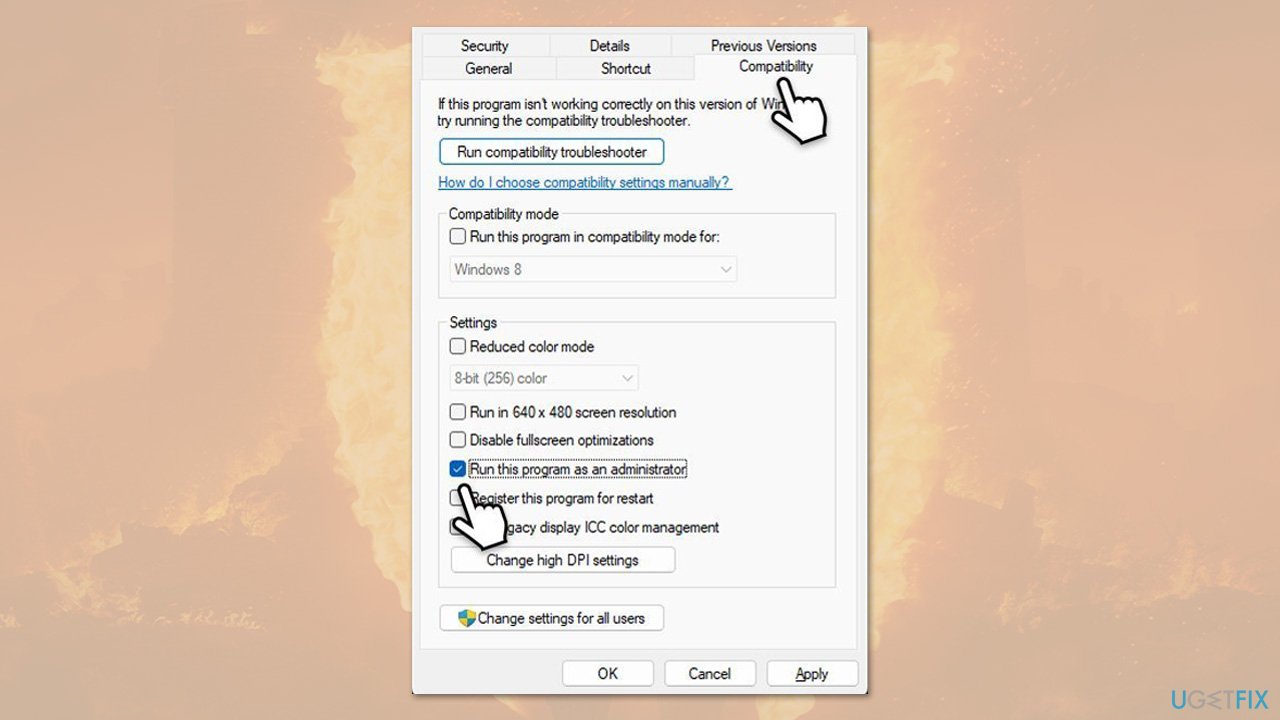
- Right-click on the game's shortcut on your desktop.
- Select Properties from the context menu.
- Go to the Compatibility tab.
- Check the box next to Run this program as an administrator.
- Click Apply and then OK.
- Double-click on the Steam shortcut to run it as an administrator.
Fix 5. Limit FPS
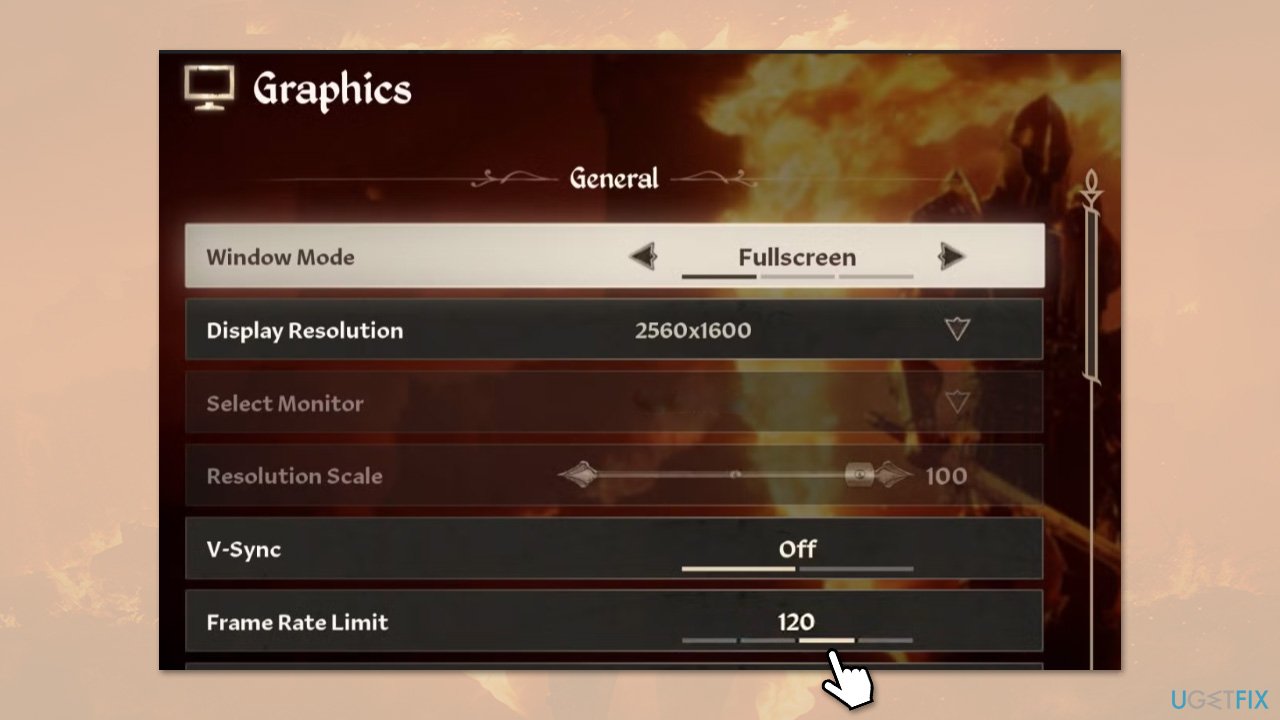
Capping frame rate reduces GPU load spikes that can destabilize the game.
- Open the game's Graphics Settings.
- Set a Maximum FPS limit (for example, 60 FPS).
- Save changes and restart the game to test.
Fix 6. Disable FSR/DLSS
Upscaling features like FSR or DLSS can sometimes introduce instability on certain hardware.
- Open the in-game Graphics Menu.
- Turn off FSR (AMD) or DLSS (Nvidia).
- Apply settings and relaunch the game.
Fix 7. Reset GPU Control Panel settings
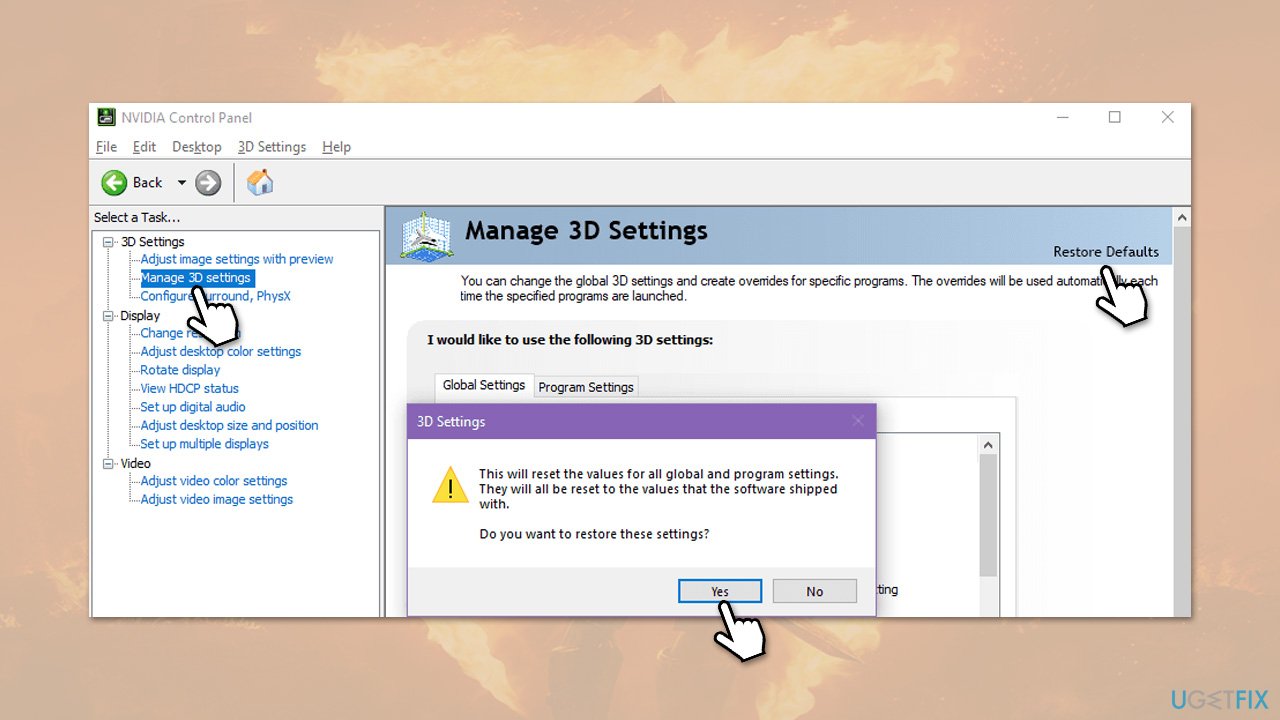
Custom GPU profiles can conflict with the game’s rendering pipeline.
- Open AMD Radeon Software or Nvidia Control Panel.
- Navigate to the profile for Oblivion Remastered.
- Select Default Settings or delete the custom profile.
- Restart the game.
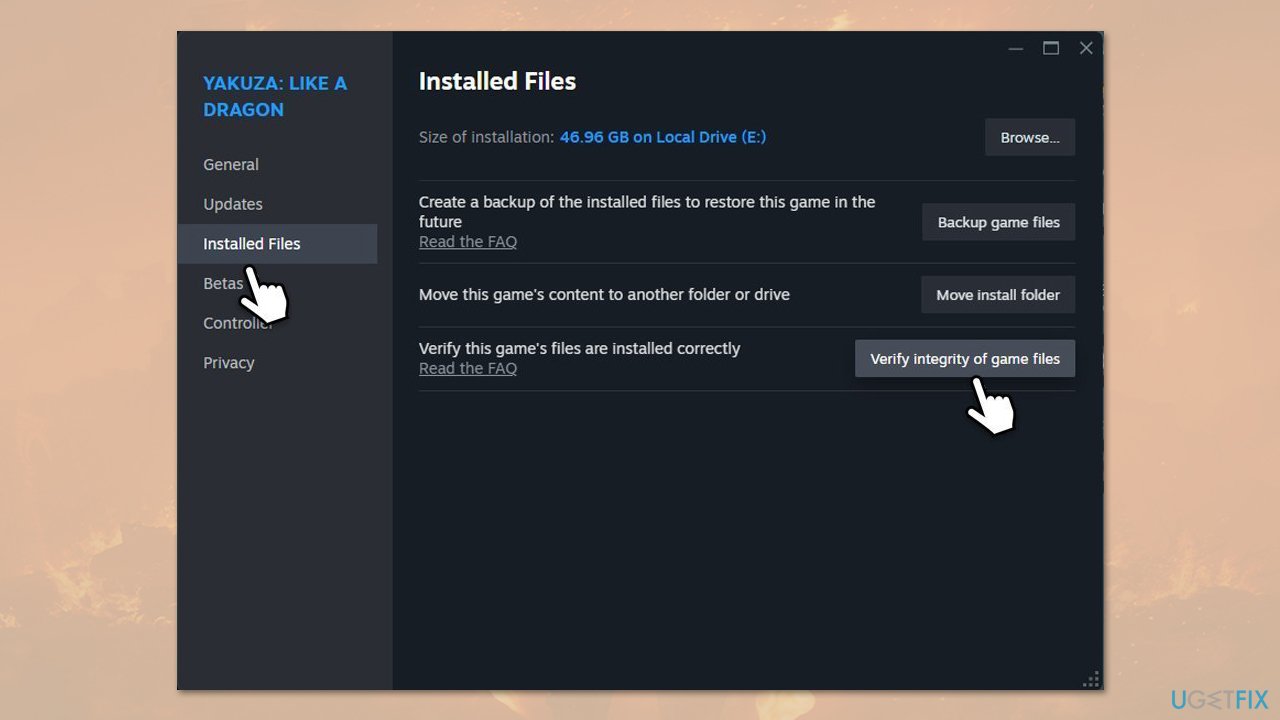
Fix 8. Verify game files
Missing or corrupted game files downloaded by Steam can cause crashes after launch.
- Open Steam and go to your Library.
- Right-click on Elder Scrolls IV: Oblivion Remastered and pick Properties.
- Go to Installed Files and click Verify integrity of game files.
- Allow the process to complete and then start the game.
Fix 9. Launch through dedicated GPU software
Forcing the game to run on your discrete GPU ensures optimal performance and stability.
- Open AMD Radeon software (Adrenalin) or Nvidia software (Nvidia app).
- Locate Oblivion Remastered under Games or Favorites.
- Launch the game directly from the utility.
Bottom line
To fix the crashing issue in Oblivion Remastered, ensure your system meets the minimum requirements, clean your PC components, and update your drivers. If the problem persists, consider checking for compatibility issues with your graphics card or reinstalling the game.
Frequently asked questions
Common reasons include outdated graphics drivers, compatibility issues with the game settings, and missing game files. Ensuring your system meets the game's requirements and updating drivers can help resolve these crashes.
Right-click the game executable, select 'Properties,' go to the 'Compatibility' tab, and check 'Run this program in compatibility mode' for Windows 7 or 8. You can also try running the game as an administrator to see if that resolves the crashing issue.
Yes, certain mods may conflict with the game or each other, leading to crashes; it's best to check compatibility lists on modding forums and avoid mods known for causing instability. Additionally, ensure that all installed mods are updated to their latest versions.




Report an issue
What's wrong with this guide? We review every report and update or remove content.
Report received — thank you. We'll review and fix it.
You need a free account to submit a report.
Be the first to comment