How to fix
Openload Pair Kodi Authorisation error
on Windows
Resolve the Openload Pair Kodi Authorization error on Windows 10 or 11 effortlessly. Follow expert-tested tips for quick fixes and seamless streaming!


What causes How to fix Openload Pair Kodi Authorisation error?
- IP address not paired
- Streaming from certain Kodi add-ons
- Numerous requests sent at the same time
- Openload not earning revenue from service
Repairs Windows system files, removes malware, and restores a clean OS state — without reinstalling.
Hello, today I discovered a weird error message while using Kodi for streaming a TV show. When I was trying to watch this show, a popup appeared on my computer screen requesting for Openload Stream Authorization. What does this all mean? How can I bring my Kodi back to normal to use it as previous?
Openload Pair Kodi Authorisation error is the most popular error in Kodi[ref en-2] which has been bothering numerous users. It requests visiting a specific site on your web browser what sometimes can be unsafe. However, the good news is that this type of issue can be fixed very easily.
Openload is one of the most familiar and common file hosts in Kodi where the provider stores media files. Having in mind that the file host hadn't been earning any revenue from the service, Kodi and Openload decided to set up a temporary pairing code to users to generate some ad revenue. For that, they have been required to visit an openload site and select the “pair” button, which is SAFE.
Pair error in Kodi has mostly been appearing for those who have been trying to play stream (videos, podcasts, music) from certain Kodi add-ons that request authorization. It is clear that the Openload.co/Pair Kodi can provide such error if your IP address[ref en-1] is not paired while you are streaming content. Openload does not allow you to stream your wanted movies and shows that are put up on the Web if the pairing is not completed. The pairing works for 4 hours.

You can also run into similar errors related to this issue which can also be caused by numerous requests sent at the same time:
- olpair;
- tvad.me/pair;
- thevideo.me/pair;
- vidup.me/pair;
- vshare;
- etc.
A guide for the Olpair Kodi error fix
To fix the Olpair Kodi error, use steps that we provided below. You may need to remove all streams that require authorization. However, we should also add that streaming free content online can be unsafe for your device and personal information stored on it in general. If you have even the slightest thought about malware's presence on your computer, try performing a full system scan with [rev=id"Reimage"] to find malware and eliminate errors caused by it. Maybe errors that you are dealing with occurred because of a silent computer virus infiltration that you did not see.
Pairing the IP is the only way to fix the Olpair Kodi error
As we have already mentioned, the Olpair Kodi error might have appeared because you did not pair the IP address to your device. Try doing so and maybe you will be able to continue watching your liked movies and TV shows.
- Launch your browser and type in this URL address: https://olpair.com/;
- When your IP address appears on the home screen, click Activate Streaming;
- Furthermore, confirm that you are not a robot and then click on the Pair option to complete the pairing process:
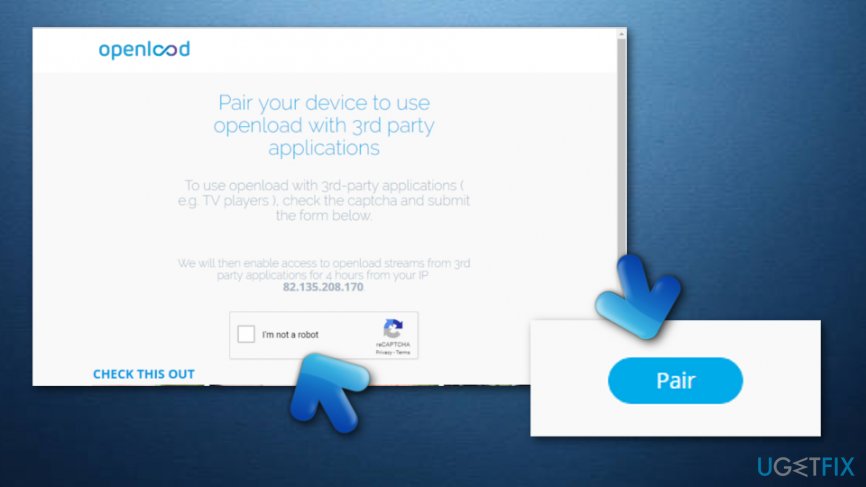
Fix olpair kodi error - Once you have completed these steps, you should be good to go and successfully stream movies!
At the moment, pairing the IP to the used device seems to be the only good option for fixing the Olpair Kodi error. If this method did not work for you and you still cannot stream any movies on your Kodi, this type of error might be a result of a computer virus that might have installed into the system without your notice. If you want to check such possibility, you should download and install our beforementioned anti-malware software[ref en-3]. Good luck!
Bottom line
To fix the Openload Pair Kodi Authorisation error, you may need to visit the Openload site and select the 'pair' button. Additionally, consider removing all streams that require authorization. If these steps do not resolve the issue, further investigation into potential malware on your device may be necessary.
Frequently asked questions
To fix the Openload Pair error on Kodi in Windows 10, you can clear the cache and cookies of your web browser or use a VPN to access the Openload content without pairing.
Yes, Windows 11 users can resolve the Openload Pair error by ensuring their Kodi is updated and disabling any conflicting add-ons that may interfere with streaming.
If the error persists, consider reinstalling Kodi or checking your network settings to ensure a stable internet connection on your Windows device.




Report an issue
What's wrong with this guide? We review every report and update or remove content.
Report received — thank you. We'll review and fix it.
You need a free account to submit a report.
Be the first to comment