How to fix
Operation is not supported error
on Windows
Resolve the "Operation is not supported" error in Windows 10 and 11 effortlessly. Expert-tested solutions to get you back on track in minutes!

What causes How to fix Operation is not supported error in Windows?
- Language packs installed from a local source
- Features on Demand (FoD) installed from a local source
- Issues with the installation of KB5043080
- Problems with manual updates from the Microsoft Update Catalog
Repairs Windows system files, removes malware, and restores a clean OS state — without reinstalling.
I have an issue where I can no longer install the newest Windows updates, and I keep getting the Operation is not supported error each time I true. I am not quite sure when or why this started happening but I know that I'd want it to be resolved as soon as possible. Thanks.
Windows 11 24H2 updates failing after KB5043080: causes and solutions
The KB5043080 update is part of the recent Windows 11 24H2 release, designed to streamline the update process by reducing the size of future monthly updates through checkpoint cumulative updates. This feature allows updates to only download necessary files rather than the entire package, improving efficiency.
However, users have reported encountering the "Operation is not supported" error when attempting to install subsequent updates, particularly when manually downloading them from the Microsoft Update Catalog.
This issue appears to be related to language packs and Features on Demand (FoD) that were installed from a local source rather than directly from Microsoft's servers. These additional components can interfere with the installation process of newer updates, leading to the "Operation is not supported" error and preventing the system from being updated properly. The error disrupts the update cycle, leaving users unable to apply critical patches and improvements.
One of the suggested fixes for this issue is to manually reinstall KB5043080 or the most recent update from the Microsoft Update Catalog. Doing so allows the system to bypass the errors caused by local FoD or language packs, ensuring a clean installation.
Another potential solution is to remove or reinstall any problematic language packs or features before attempting the update again. For users who rely on manual updates, ensuring the system's components are sourced correctly can help prevent these kinds of issues.
If these issues persist, utilizing a PC repair tool like [d1] can be an effective solution for addressing errors related to system updates, file corruption, and installation conflicts. This tool can automatically resolve the underlying problems, ensuring smoother updates and system stability.

Fix 1. Reinstall KB5043080 manually
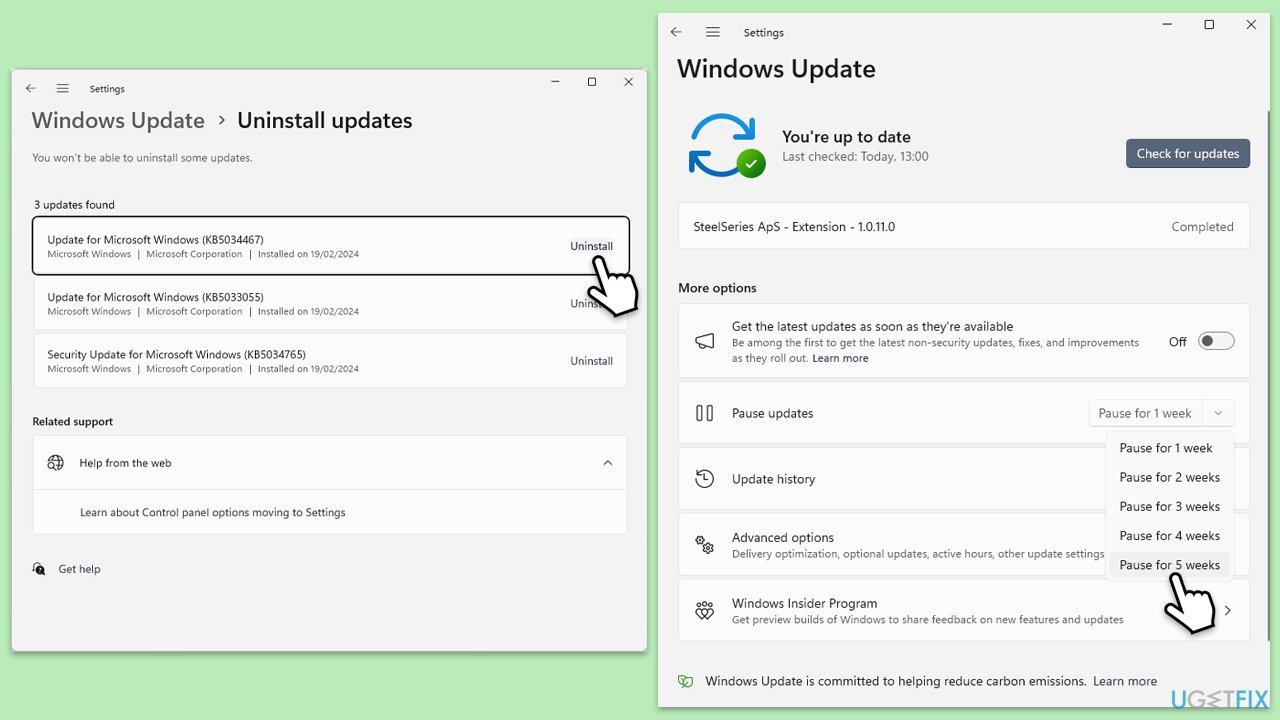
Uninstall the update:
- Type Control Panel in Windows search and press Enter.
- Select Programs > Uninstall a program.
- Click on View installed updates on the left side of the window.
- Uninstall KB5043080 update from the list.
- Proceed with on-screen instructions.
- Restart the device as required.
Install the update manually:
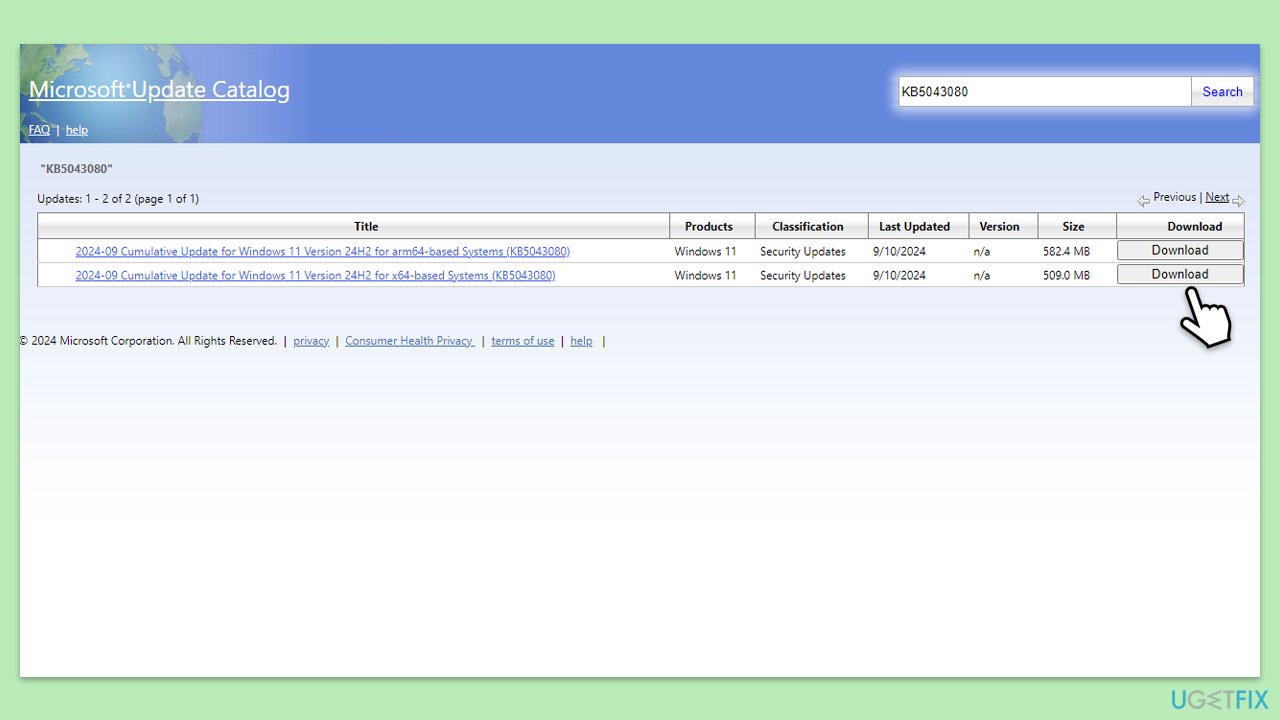
- Open your web browser and visit the Microsoft Update Catalog.
- In the search bar, type KB5043080 and press Enter.
- Locate the correct version of the update for your system and click Download.
- A pop-up window will appear. Click on the .msu file link to begin downloading the update.
- Once the download is complete, navigate to your Downloads folder and locate the .msu file for KB5043080.
- Double-click the file to start the installation process.
- Follow the on-screen instructions to install the update. Wait for the process to complete and restart your computer if prompted.
- After rebooting, press Win + I to open Settings.
- Go to Windows Update and click on Update history to confirm that KB5043080 is listed as successfully installed.
Fix 2. Uninstall and reinstall language packs or Features on Demand (FoD)
This step removes and reinstalls problematic language packs or FoD, which may be causing the update error.
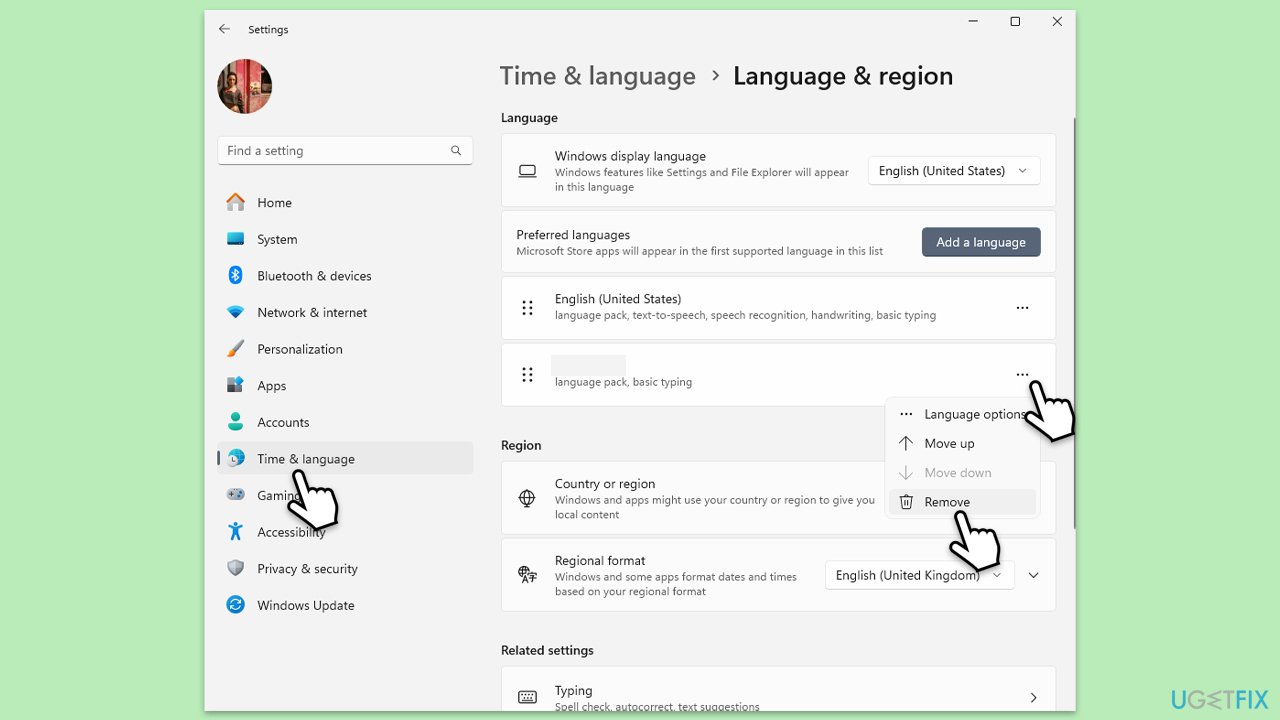
- Press Win + I to open Settings.
- Go to Time & language, then click on Language & region.
- Under Preferred languages, select the language you want to remove, then click the three dots next to it.
- Click Remove to uninstall the language pack.
- After removing the language pack, click Add a language under Preferred languages.
- Search for the same language you previously removed and select it.
- Follow the prompts to download and reinstall the language pack.
- Open Settings and go to Apps.
- Scroll down and click on Optional features.
- Find any FoD you added manually and click on it to reveal the Uninstall option. Remove the feature.
- To reinstall, click View features and search for the feature you just removed.
- Select and reinstall the FoD from Microsoft’s servers.
- Go to Settings > Windows Update and click Check for updates.
- Install the update again to verify that the error has been resolved.
Fix 3. Reset Windows update components
If reinstalling the update or language packs doesn’t work, resetting Windows Update components can clear potential conflicts.
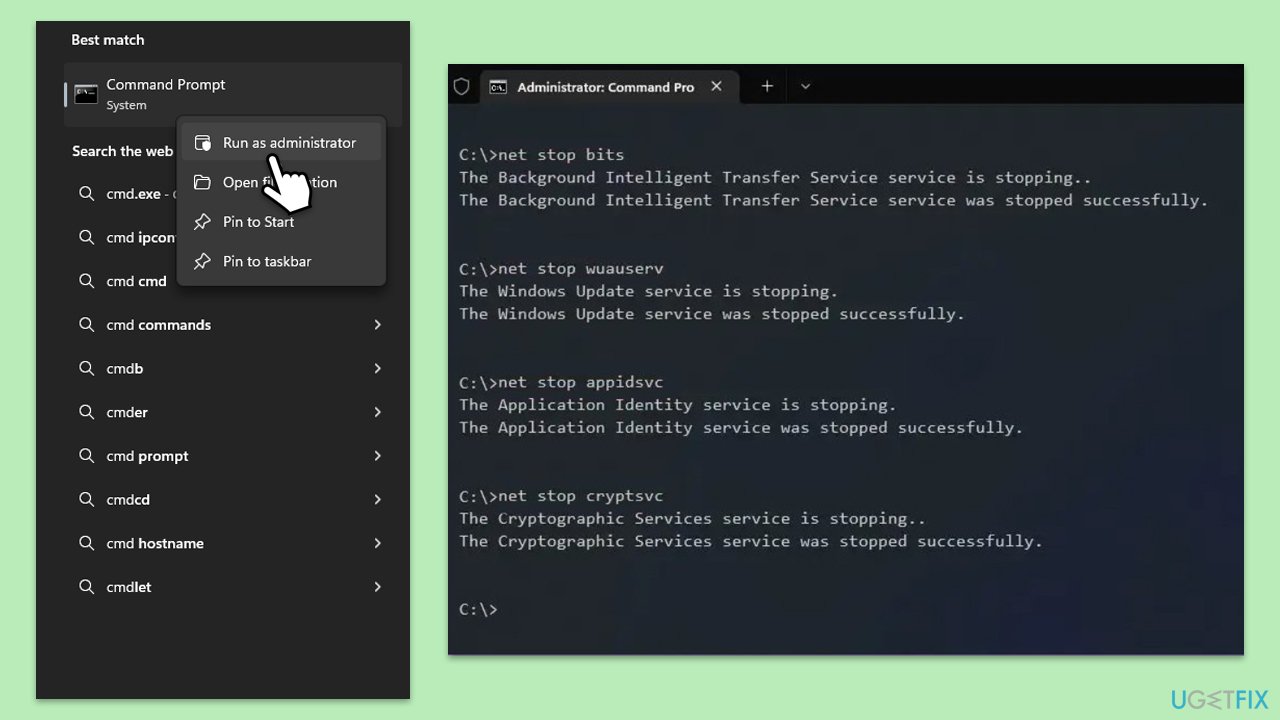
- Type cmd in Windows search.
- Right-click on the Command Prompt result and select Run as administrator.
- When the UAC window pops up, click Yes.
- Paste in each of these commands, pressing Enter every time:
net stop bits
net stop wuauserv
net stop appidsvc
net stop cryptsvc
Del “%ALLUSERSPROFILE%\Application Data\Microsoft\Network\Downloader\*.*”
rmdir %systemroot%\SoftwareDistribution /S /Q
rmdir %systemroot%\system32\catroot2 /S /Q
regsvr32.exe /s atl.dll
regsvr32.exe /s urlmon.dll
regsvr32.exe /s mshtml.dll
netsh winsock reset
netsh winsock reset proxy
net start bits
net start wuauserv
net start appidsvc
net start cryptsvc - Restart your computer.
Bottom line
To resolve the 'Operation is not supported' error, you can manually reinstall KB5043080 or remove and reinstall any problematic language packs or features. If these solutions do not work, consider using a PC repair tool to address underlying issues.
Frequently asked questions
This error can occur due to issues with file permissions, corrupted system files, or attempting to perform an unsupported action on a file or folder.
To fix this, check the file permissions, ensure you have the necessary rights, and try running the Windows File Checker tool to repair any corrupted files.
Yes, you can try reconnecting the device, updating its drivers through Device Manager, or checking for Windows updates that might address compatibility issues.




Report an issue
What's wrong with this guide? We review every report and update or remove content.
Report received — thank you. We'll review and fix it.
You need a free account to submit a report.
Be the first to comment