How to fix
Right-click not working in Outlook
on Windows
Resolve the right-click issue in Outlook on Windows 10 or 11 easily with expert-tested solutions. Get back to productive emailing in minutes!

What causes How to fix right-click not working in Outlook?
- Conflict with hardware acceleration
- Corrupted installation of the Office suite
- Conflicting add-ins within Outlook, Excel, or Word
- Launching Outlook in Safe Mode
Repairs Windows system files, removes malware, and restores a clean OS state — without reinstalling.
I had to reset Windows due to problems I had with it, so I also had to reinstall all my apps. After this, I've noticed a weird bug when using Outlook: right-click menu doesn’t show up at all. Any idea what I should do to fix this?
Microsoft Office is an essential software suite used in various professional and personal settings across the globe. Within this suite, Outlook has become a vital tool for managing emails, scheduling appointments, and maintaining contact information. Its compatibility with other Office products, such as Word and Excel, further enhances its utility.
However, a concern that has arisen for some users is the malfunctioning of the right-click menu in Outlook. This seemingly minor issue can create significant inconvenience, hampering productivity by restricting quick access to key functions. Even more disconcerting, this problem isn't confined solely to Outlook but has also been reported in other Office applications like Excel and Word.
Several factors could be causing the right-click menu not to appear. One possible cause is a conflict with hardware acceleration within the system, which may interfere with this specific function. Disabling this feature could rectify the problem. Another possible reason is a corrupted installation of the Office suite, which may necessitate repairing the entire Office software package.
Thirdly, conflicting add-ins within Outlook, Excel, or Word may be the culprit. These add-ins might have to be identified and disabled to restore the right-click functionality. Lastly, launching Outlook or other affected Office apps in Safe Mode may help identify and alleviate the issue by temporarily bypassing the features causing the conflict.
Addressing these problems may require some technical know-how, and solutions may vary based on individual system configurations. Following a step-by-step approach - disabling hardware acceleration, repairing Office, disabling conflicting add-ins, and launching in Safe Mode - could be an efficient way to tackle this issue.
While the above solutions are directed specifically at the described problem, it's worth noting that applications like [d1] PC repair tools are designed to handle various underlying Windows issues. Though not a targeted fix for the right-click problem in Office apps, it can be a general asset in maintaining a healthy and responsive computer system.
Fix 1. Disable hardware acceleration in Windows
Hardware acceleration is a feature that offloads certain computing tasks from the CPU to the GPU, enhancing performance. However, it may conflict with certain functions, like the right-click menu in Office apps.
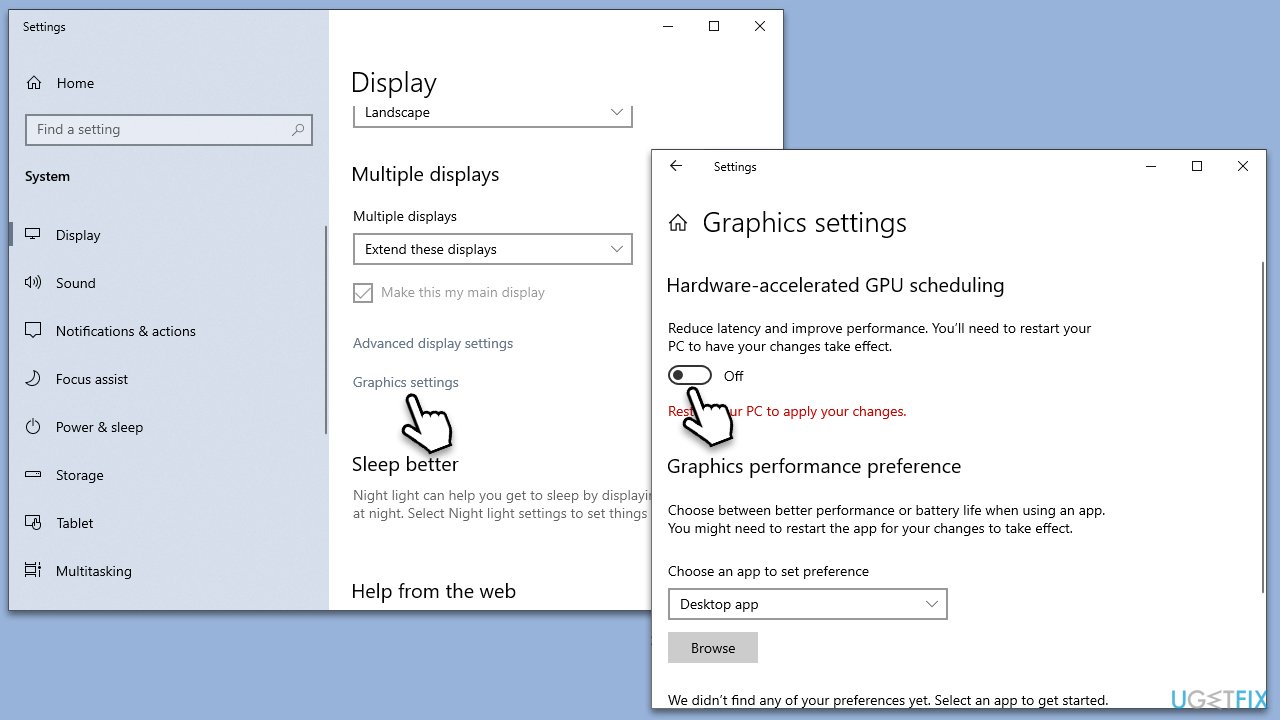
- Right-click on the desktop and select Display settings.
- Scroll down and click on Graphics settings.
- Turn off the option for Hardware acceleration.
- Restart your computer.
Fix 2. Start Outlook in Safe Mode
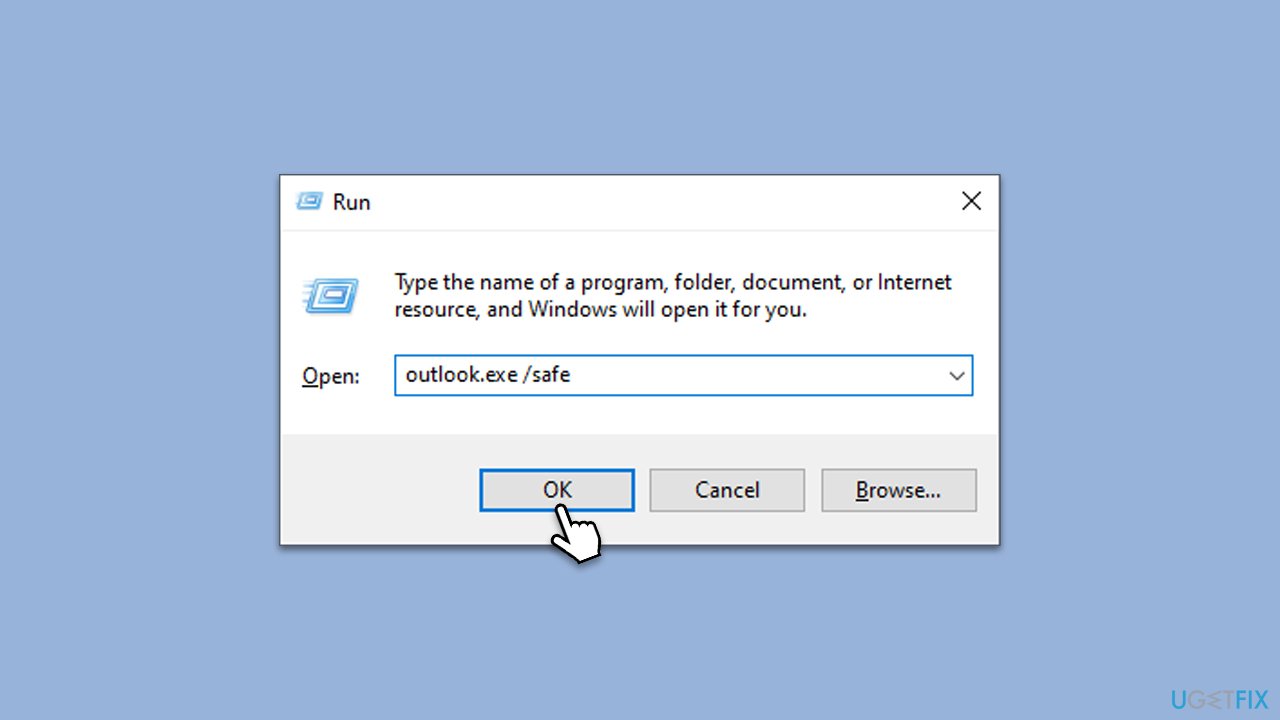
Safe Mode allows you to run Outlook without any add-ins or extensions, which might be causing the right-click issue.
- Press Win + R keys on your keyboard simultaneously.
- Type outlook.exe /safe and press Enter.
- If the problem is resolved, it indicates an issue with add-ins.
Fix 3. Disable add-ins
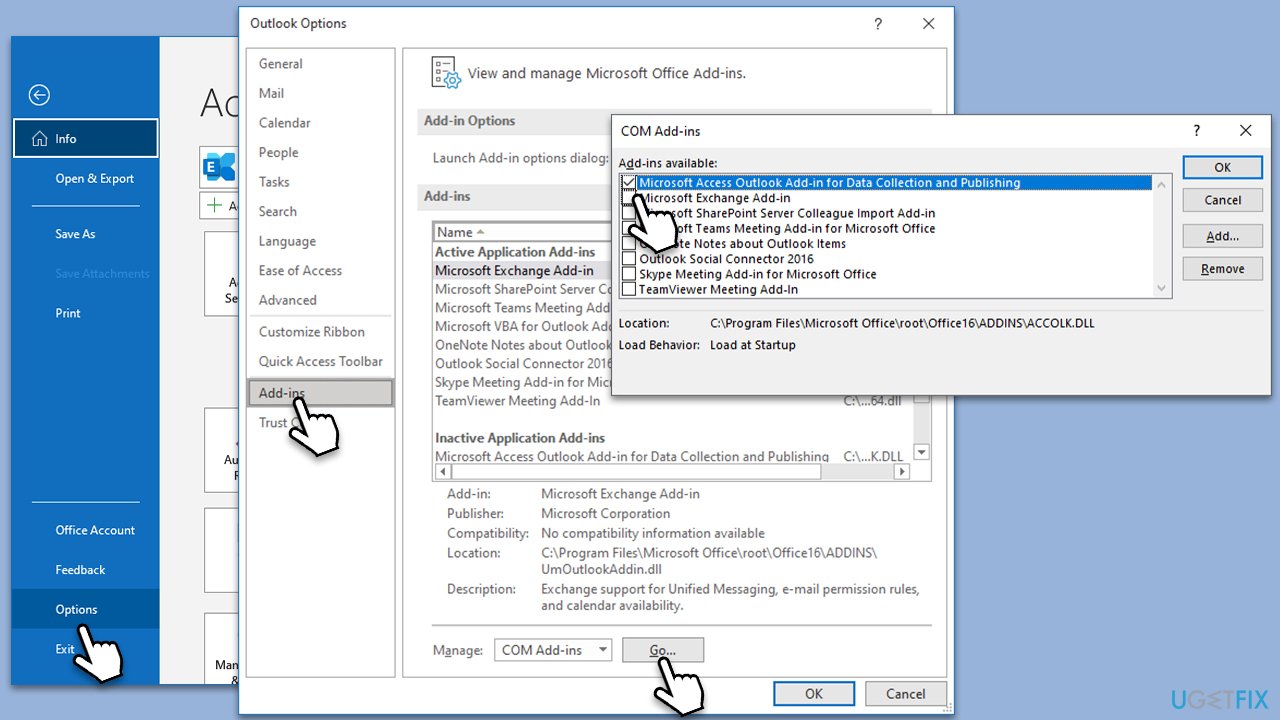
If the problem disappeared after accessing Outlook in Safe Mode, it is likely that it is caused by an add-in. We recommend disabling them all:
- Open Outlook and go to File > Options.
- Go to the Add-ins section.
- At the bottom, on the right side, select COM Add-ins from the drop-down menu and pick Go.
- Here, untick all the add-ins, and click OK.
- See if the problem still persists.
Fix 4. Clear Outlook's cache files
Cached files might become corrupted, causing problems like the right-click menu not appearing. Clearing the cache can resolve this.
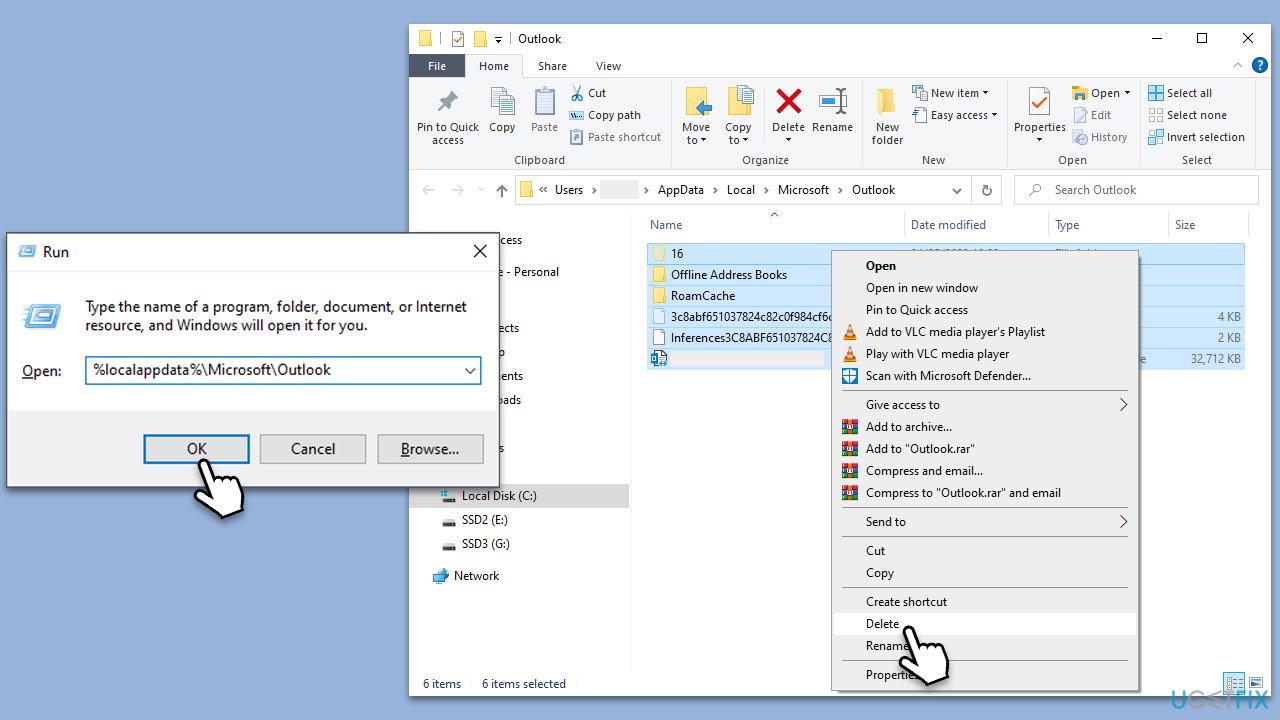
- Close Outlook.
- Press Win + R on your keyboard.
- Type %localappdata%\Microsoft\Outlook and press Enter.
- Delete all the cache files located there and then restart Outlook.
Fix 5. Repair Microsoft Office
Repairing the app may come in handy - many people managed to fix right-click not working in Outlook by doing so.
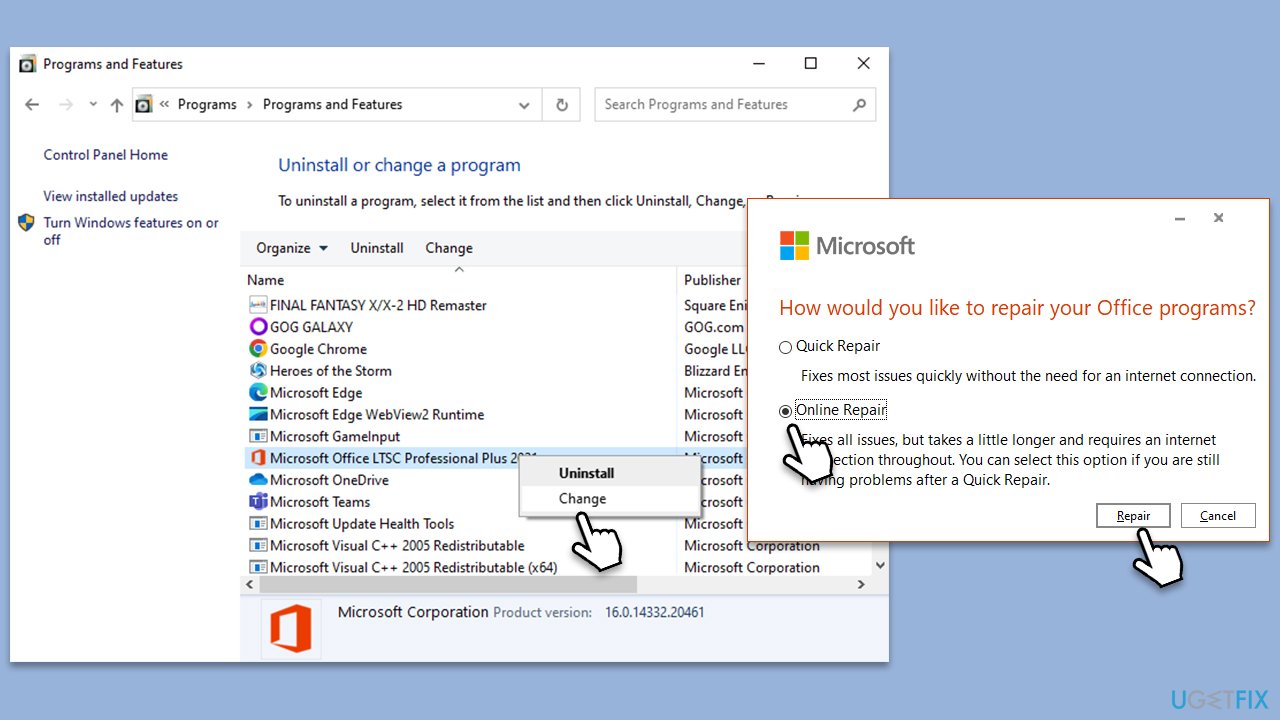
- Type Control Panel in Windows search and press Enter.
- Select Programs > Programs and Features.
- Select Microsoft Office and click on Change.
- Choose the option for Online Repair and click Repair.
- Follow the prompts to finish the process.
Fix 6. Create a new Outlook profile
A corrupted profile can cause issues in Outlook, including the right-click menu problem.
- Before proceeding, make sure Outlook is closed.
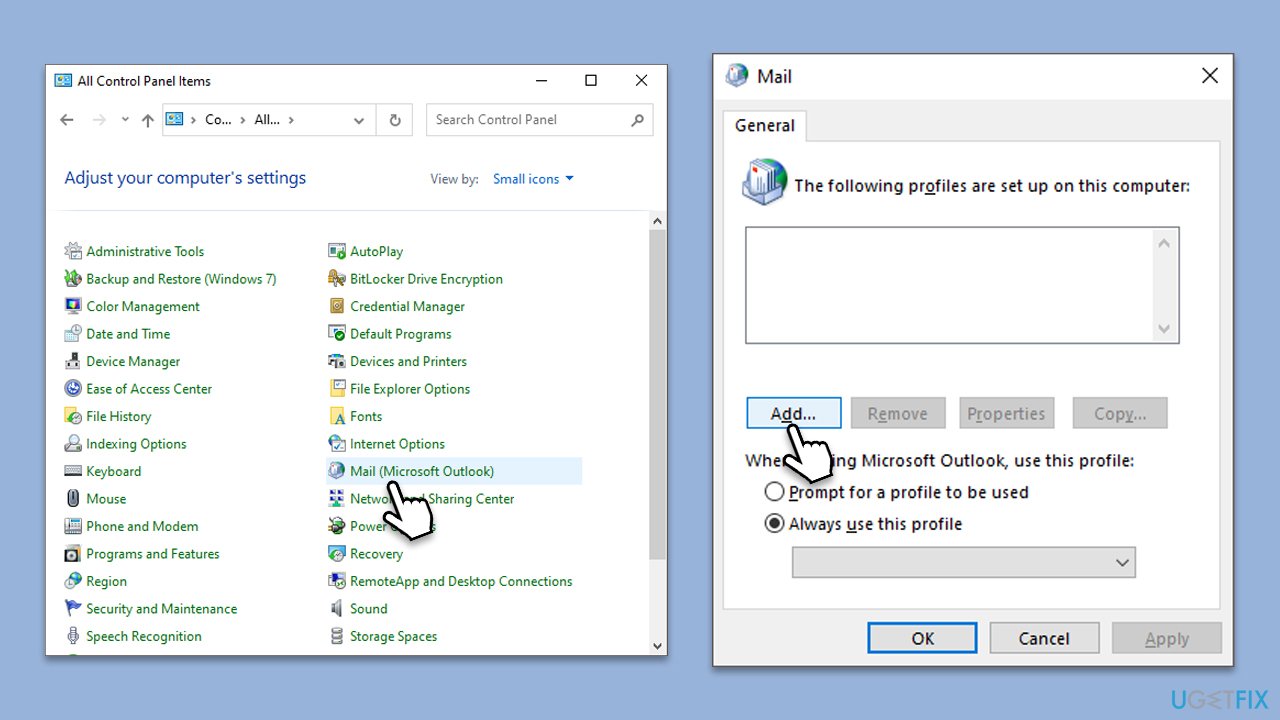
- Open Control Panel, select Small icons at the top-right of the window and select Mail.
- Click on Show Profiles.
- Click on Add to create a new profile.
- Enter a name for your new profile.
- Set up your email account.
- Test the account settings.
- Set the new profile as default.
- Open Outlook and start using your new profile.
Fix 7. Reinstall Office
If none of the solutions above were fruitful, you could reinstall MS Office and see if that helps to solve the issue.
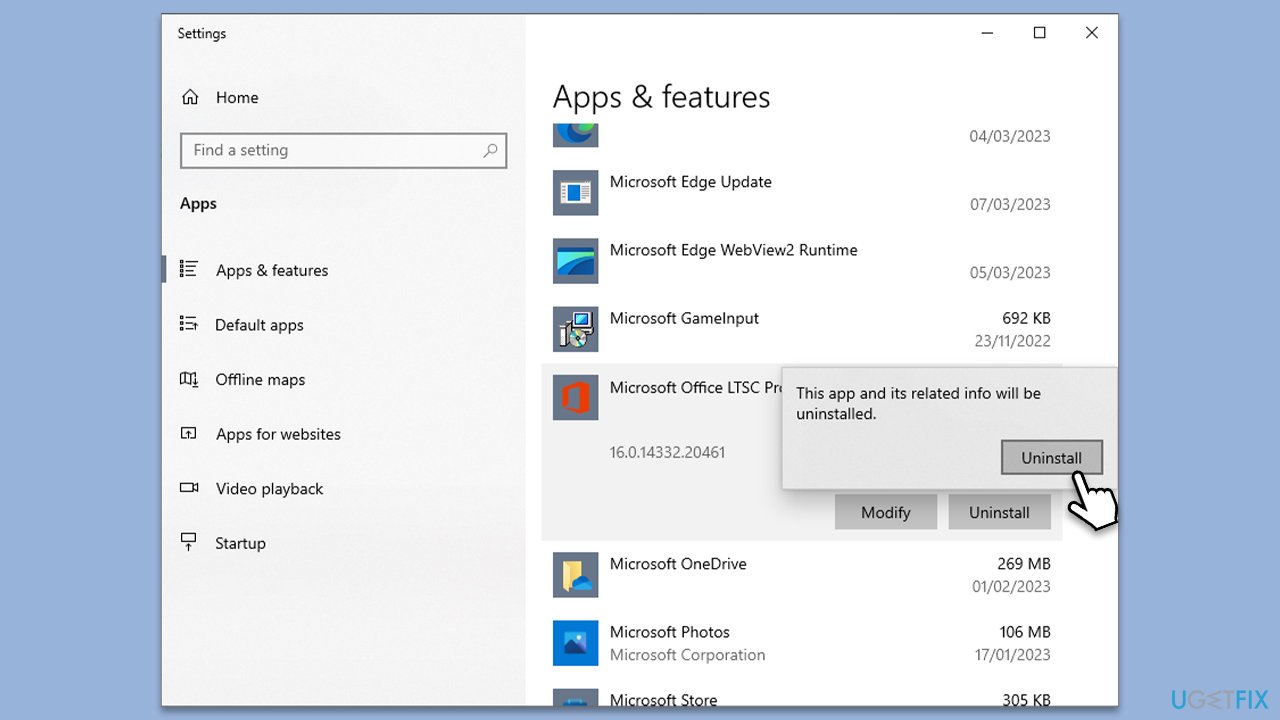
- Right-click on Start and pick Apps and Features.
- Scroll down to find the MS Office installation.
- Click Uninstall and confirm with Uninstall.
- Follow on-screen instructions to remove the app completely.
- Press Win + E to open File Explorer.
- Navigate to the following location and delete its contents:
C:\Program Files\Microsoft Office - Next, type regedit in Windows search and press Enter.
- Go to the following locations in the Registry Editor and delete these items:
Computer\HKEY_LOCAL_MACHINE\SOFTWARE\Microsoft\AppVISV
Computer\HKEY_LOCAL_MACHINE\SOFTWARE\Microsoft\Office\ClickToRun
Computer\HKEY_CURRENT_USER\Software\Microsoft\Office - Reboot your device and then reinstall Microsoft Office.
Bottom line
To fix the right-click not working issue in Outlook, you can disable hardware acceleration, repair the Office installation, disable conflicting add-ins, or launch Outlook in Safe Mode. If none of these solutions work, consider using PC repair tools to address underlying Windows issues.
Frequently asked questions
Try restarting Outlook and your computer first. If the issue persists, check for any pending Windows updates and ensure that your Outlook application is fully updated.
You can reset Outlook settings by navigating to File > Options > Advanced, and then clicking on 'Reset' under 'General'. This may restore the right-click functionality.
Yes, third-party add-ins can interfere with Outlook's functionality; try disabling them by going to File > Options > Add-Ins and unchecking any suspicious add-ins.




Report an issue
What's wrong with this guide? We review every report and update or remove content.
Report received — thank you. We'll review and fix it.
You need a free account to submit a report.
Be the first to comment