How to fix
Run-time error 3048
on Windows
Resolve Run-time error 3048 in Windows 10 and 11 effortlessly. Get expert-tested solutions that fix the issue in minutes for a smoother experience.


What causes How to fix Run-time error 3048 in Windows?
- Too many open database objects
- Exceeding maximum limit of database connections
- Poor coding practices in managing database connections
- Not closing objects after use
- Overload of tables, queries, forms, or modules
Repairs Windows system files, removes malware, and restores a clean OS state — without reinstalling.
Whenever I attempt to open a database I need for my work, I get Run-time error 3048. Any things I can do?
Run-time error 3048 is an issue that Windows users encounter, particularly when running database-related applications or programs like Microsoft Access. This error typically occurs when there are too many database objects or connections being opened simultaneously. When an application exceeds the maximum limit of database objects that it can handle, the system generates this error, preventing the program from running as expected.
Users who experience Run-time error 3048 often report that the error appears when they try to run queries or reports within applications that rely heavily on database connections, especially in environments where multiple users or processes are interacting with the database at once. It can be particularly frustrating as it may cause the application to crash, halt operations, or lose unsaved data.
This error is generally caused by an overload of open database objects, which could include tables, queries, forms, or modules. If too many of these objects remain open at the same time, the application exceeds its resource limit, resulting in an error. Additionally, poor coding practices that don’t efficiently manage database connections or close objects after use can also contribute to the issue.
To fix Run-time error 3048, users can close any unnecessary objects within the application, ensure that their code properly disposes of database connections, or increase the memory allocation for the application. In some cases, compacting and repairing the database or splitting large databases into smaller, more manageable files may also help prevent this error.
For those looking for an automated and efficient solution, using a trusted [d1] repair tool can assist in identifying and resolving underlying system issues that contribute to Run-time error 3048, ensuring smoother application performance.
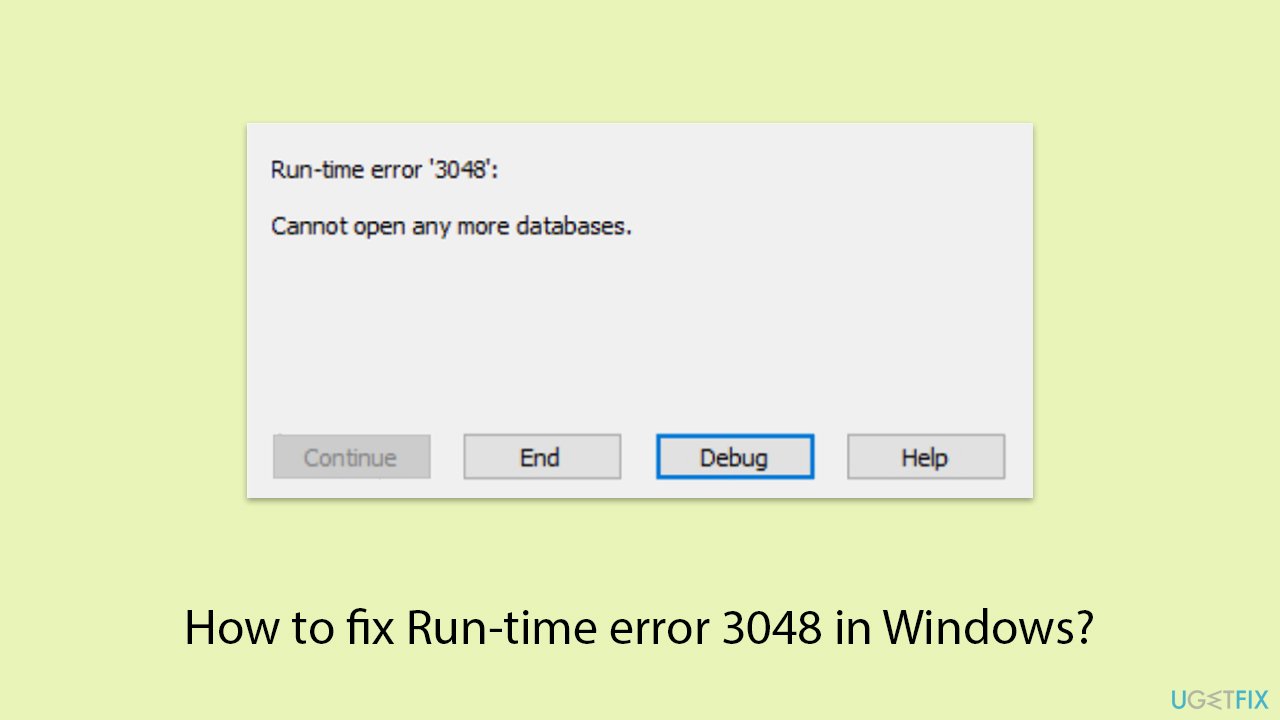
Fix 1. Close unused database objects
Having too many open database objects can trigger Run-time error 3048. Closing any unused objects such as tables, queries, or forms helps free up system resources and prevent the error.
- In your application, review all open database objects.
- Close any objects not currently in use.
- Restart the application and check if the error persists.
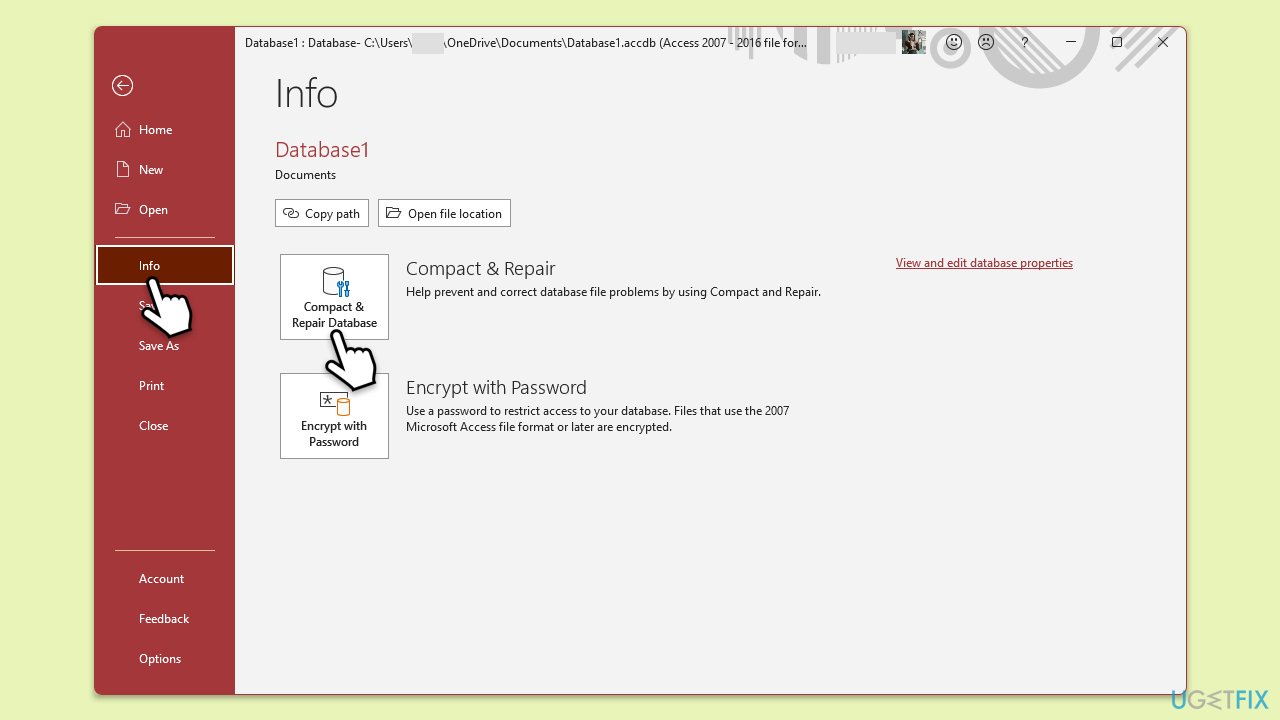
Fix 2. Compact and repair the database
Corrupt or bloated databases can contribute to this error. Compacting and repairing the database reduces its size and eliminates corruption, helping to resolve the issue.
- Open Microsoft Access.
- Go to File, then Info, and select Compact & Repair Database.
- Follow the prompts to complete the process.
Fix 3. Increase the database object limit
Some applications have limits on the number of database objects that can be opened simultaneously. Increasing this limit allows the program to handle more objects without triggering the error.
- Open your application's configuration or settings file (depending on the app).
- Look for an option to increase the object limit or memory allocation for database objects.
- Adjust the setting and restart the application.
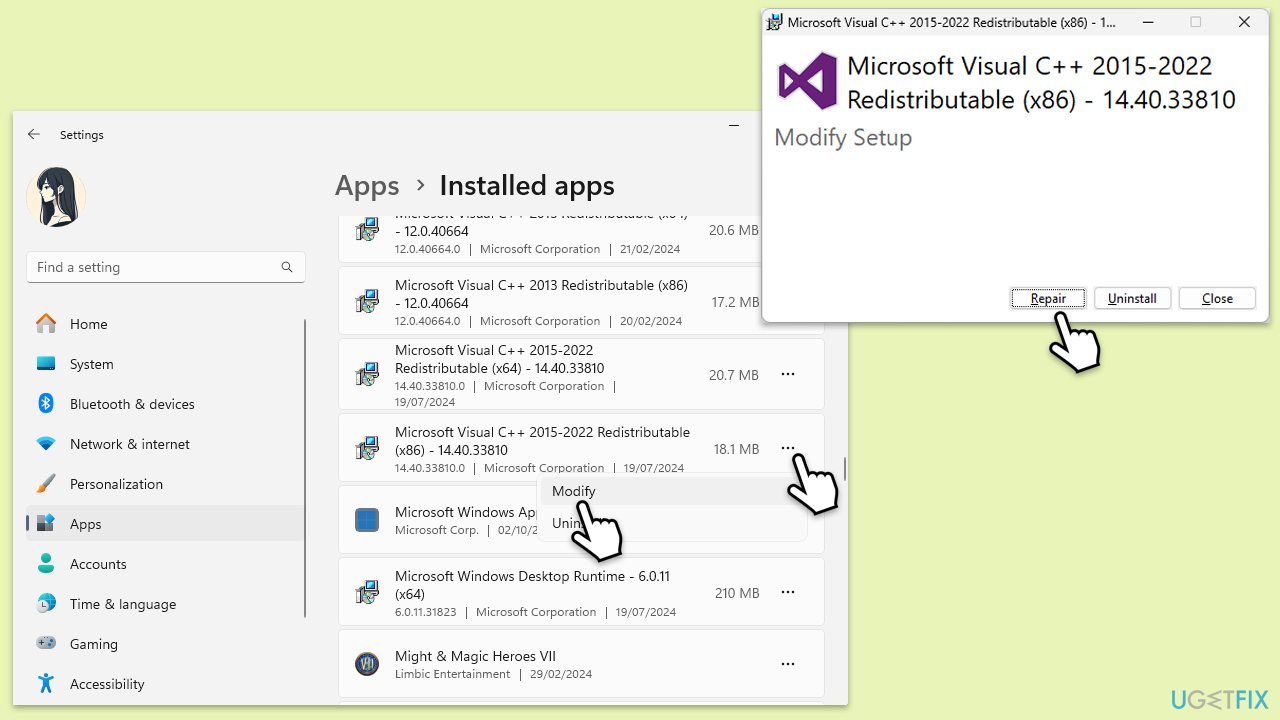
Fix 4. Repair or reinstall Microsoft Visual C++ Redistributables
Corrupted or missing Visual C++ Redistributables can cause runtime errors like Run-time error 3048, as these components are necessary for many Windows applications to function properly. Repairing or reinstalling them can resolve the issue.
- Right-click on Start and pick Apps & Features or Installed apps.
- Scroll down to find Microsoft Visual C++ Redistributables.
- Click each version or click three dots, select Modify, and choose Repair.
- If repairing doesn’t work, uninstall each version and download the latest ones from the official Microsoft website.
- Reinstall the redistributables and restart your computer.
Fix 5. Optimize your VBA code
Inefficient VBA code that leaves database objects open or doesn’t properly dispose of them can lead to resource overload and trigger this error. Ensuring that your code closes connections properly can help resolve the issue.
- Review your VBA code to check if any database objects, such as Recordsets, are left open.
- Add code to close these objects using
.Closeand set the objects toNothingafter use.
Fix 6. Reduce concurrent database connections
When multiple users or processes are accessing the database at the same time, it can overload the system, resulting in Run-time error 3048. Limiting the number of concurrent connections can alleviate this issue.
- Review the number of users or processes accessing the database at the same time.
- If possible, reduce the number of concurrent connections or stagger their access to avoid resource overload.
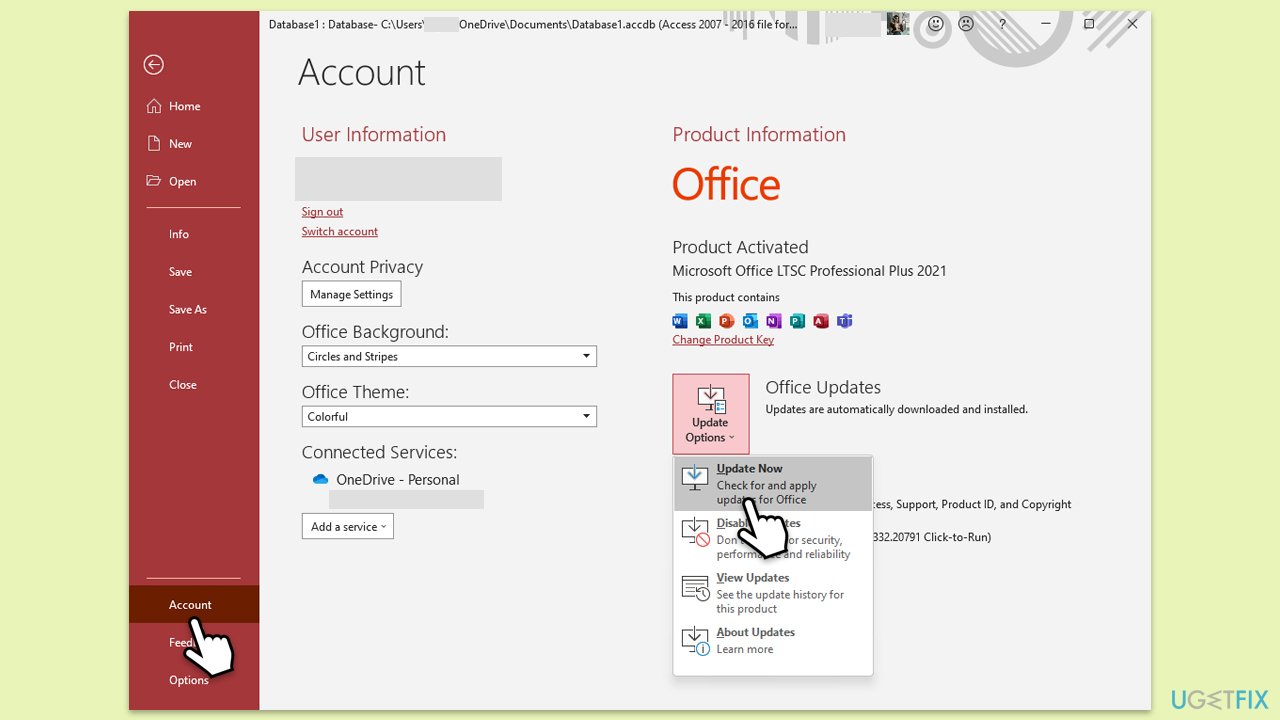
Fix 7. Update Microsoft Access or the database management system
Using an outdated version of Microsoft Access or the database management system may contribute to the error due to compatibility or performance issues. Keeping the software updated ensures better performance and fewer errors.
- Open Microsoft Access or your database management system.
- Check for any available updates under the Help or About section.
- Download and install the latest updates, then restart your system.
Bottom line
To fix Run-time error 3048, users can close any unnecessary database objects, ensure proper disposal of database connections, or increase memory allocation for the application. Compacting and repairing the database or splitting large databases into smaller files may also help. If these solutions do not work, consider using a trusted repair tool to identify and resolve underlying system issues.
Frequently asked questions
Run-time error 3048 typically occurs due to issues with database connections or corrupted files in Microsoft Access on Windows 10. Ensuring that your database is not in use by another process can also help resolve this error.
To repair corrupted files, you can use the built-in System File Checker tool by running 'sfc /scannow' in the Command Prompt as an administrator on Windows 11. This will scan and restore any corrupted system files that may be causing the error.
To prevent Run-time error 3048, ensure that all database connections are properly closed and regularly back up your databases to avoid corruption on Windows 10 and Windows 11. Keeping your software updated can also minimize such errors.




Report an issue
What's wrong with this guide? We review every report and update or remove content.
Report received — thank you. We'll review and fix it.
You need a free account to submit a report.
Be the first to comment