How to fix
Safari can’t establish a secure connection
on Windows
Resolve Safari's secure connection issues on Windows 10 and 11 effortlessly. Our expert-tested guide ensures quick fixes for smooth browsing.

What causes How to fix Safari can’t establish a secure connection?
- Website server doesn't meet cryptographic standards
- Unsecured site loading prevention
- Suspicious extensions, plug-ins, or add-ons
- Corrupted website data
- Cookies causing conflicts
Repairs Windows system files, removes malware, and restores a clean OS state — without reinstalling.
I am unable to open Facebook, Google, and even Apple sites on my browser as it shows Safari can't establish a secure connection error. Although, other websites work just fine and I can access the pages on another browser as well. Is there a way how I could fix this problem?
Safari is the browser that iOS and macOS users can rely on while browsing online. It has some security features and built-in functions that stop the unsecured site from loading. It is a way to remind people about possible security issues and malware. You can be careful online when Safari reminds you to check the connection.
However, when Safari can't verify this fact it automatically calls the site dangerous and loads a warning message on the browser. Encryption is important here because protecting your privacy and security is crucial if you want to avoid such issues as Safari errors.
Safari can't establish a secure connection is an error that might prevent you from accessing the most popular websites, such as Youtube, Facebook, Twitter, Apple, etc. Usually, users encounter this problem on the Safari browser. Although, there are multiple reports about the same issue on Google Chrome, Mozilla Firefox, and others.
According to the experts, Safari can't establish a secure connection is the website you are trying to access is using a server that doesn't meet the necessary cryptographic standards[ref en-1]. In other terms, this a precautionary measure designed to protect your security and privacy[ref en-2].
Usually, IT specialist suggest performing the following actions to fix Safari can't establish a secure connection error:
- Remove all website data;
- Uninstall suspicious extensions, plug-ins, and add-ons;
- Clear Cookies[ref en-3];
- Reset Safari;
- Change Permissions.
However, users say that none of the methods mentioned above helped them to fix Safari can't establish a secure connection bug. Likewise, our experts have designed multiple other more advanced techniques that should help you eliminate this problem and successfully access the most popular websites.
Ways to fix Safari can't establish a secure connection error on Mac
Before you start reading the support steps presented down below, you must ensure that your Mac is clean from potentially unwanted programs (PUPs). In case it is infected, various cyber threats might be blocking access to the most popular sites on Safari.
Likewise, you can try to fix Safari can't establish a secure connection bug automatically by installing a professional system optimization software. It will perform an entire system scan to detect potentially unwanted programs (PUPs) that may be interfering with Safari. We suggest using [d1].
Set the correct date and time to fix Safari can't establish a secure connection
- Go to the Apple menu and find System Preferences.
- Then go to Date & Time.
- Unlock the changes and then turn on the Set date time automatically options.
On iOS
- Go to Settings and then select General.
- Find Date & Time options and turn on the Set Automatically function.
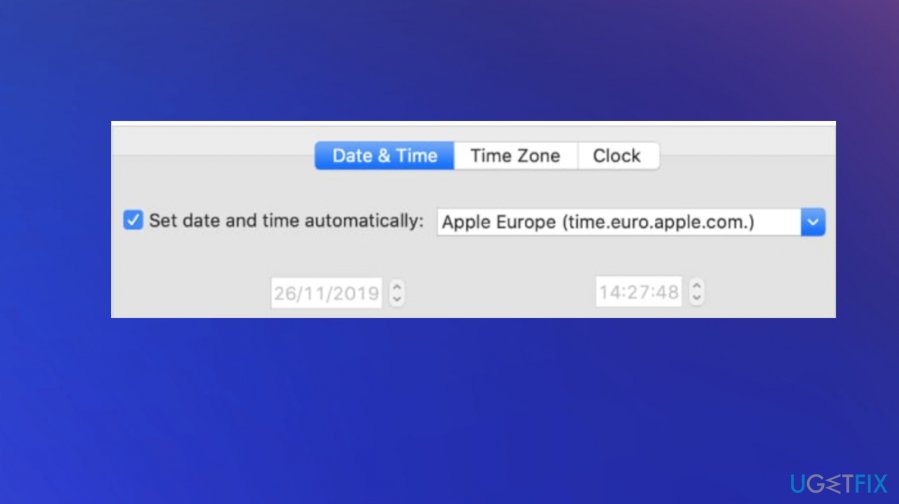
Fix safari secure connection date
Adjust your DNS settings
- Open System Preferences and go to Network;
- Click Advanced;
- Navigate to the DNS tab and click + button;
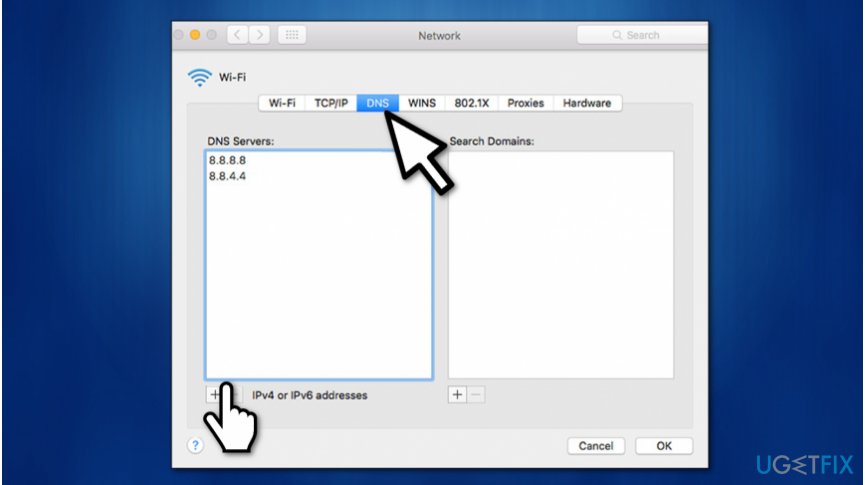
Adjust dns settings to fix safari - Enter 8.8.8.8 and hit Enter;
- Once again, click + button;
- Submit 8.8.4.4 and click Enter afterward;
- Hit Ok and Apply buttons.
Ensure that the website's certificate is trusted
- Open the site which shows Safari can't establish a secure connection error;
- Navigate to the address bar and click the (Lock icon) Secure button;
- Select More information;
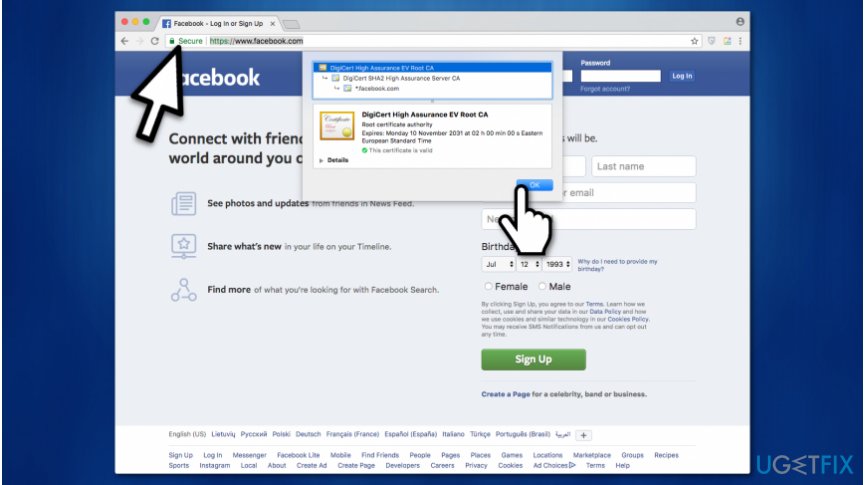
Check website certificate to fix safari - Click on View Certificate and check which certificate is in use;
- Go to Details tab and click Command + Space buttons at the same time;
- In the Spotlight Search enter Keychain;
- On the left panel select System Roots;
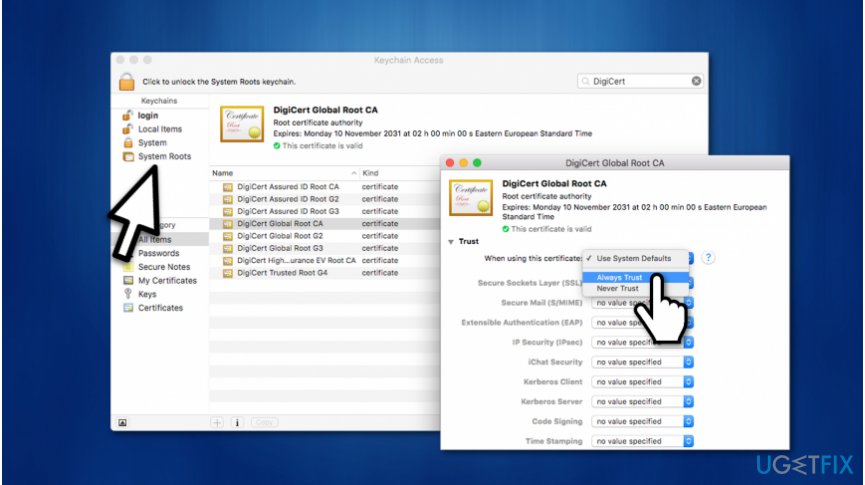
Trust website certificate to fix safari error - Search for the website's certificate;
- Click on it and expand Trust section;
- On When using this certificate section select Always trust.
Disable Internet Protocol version 6 (IPv6) on your Mac
- Go to System Preferences;
- Open Network;
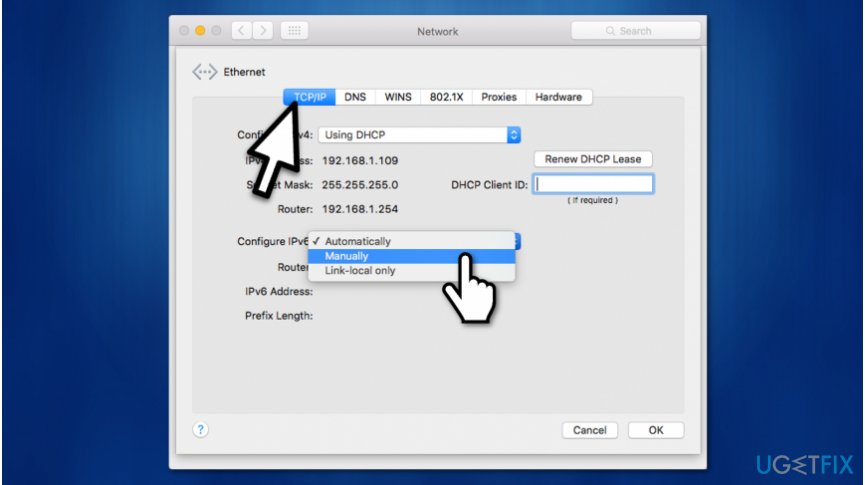
Configure ipv6 to fix safari - Select Ethernet and click on Advanced button;
- Pick Manually on Configure IPv6;
- Hit Ok and click Apply.
Bottom line
To fix the 'Safari can't establish a secure connection' error, you can try removing all website data, uninstalling suspicious extensions, clearing cookies, resetting Safari, and changing permissions. If these methods do not resolve the issue, consider exploring more advanced techniques or seeking professional assistance.
Frequently asked questions
This error may occur due to incorrect date and time settings on your Windows 10 system or outdated security certificates. Ensure your system time is accurate and try updating your Safari browser.
Check your internet connection and firewall settings, as they might be blocking Safari's access. Additionally, resetting your network settings can help resolve this issue.
Yes, keeping your Windows 10 or Windows 11 updated can improve security and compatibility, which may resolve connection issues in Safari.




Report an issue
What's wrong with this guide? We review every report and update or remove content.
Report received — thank you. We'll review and fix it.
You need a free account to submit a report.
Be the first to comment