How to fix
Safari opening by itself
on Windows
Discover effective solutions to stop Safari from opening automatically on your Windows 10 or Windows 11 device. Expert-tested for quick fixes!

What causes How to fix Safari opening by itself?
- Suspicious program installed on the Mac
- Adware-type virus
- Potentially unwanted program (PUP)
- Software bundling for distribution of PUPs
- Presence of more unwanted programs
- Intrusive ads displayed on browsers
Repairs Windows system files, removes malware, and restores a clean OS state — without reinstalling.
Hello. I need help with my browser. My Safari browser keeps opening by itself and constantly opens up new pages. I have MacBook Pro. Right now it is running on Yosemite 10.10.3. Why this is happening and how to stop this?
On various IT forums, users reported[ref en-1] Safari browser opening by itself. The problem seems to cause lots of frustration because Safari opens a new window every few minutes continuously. Even when you force quit the application, it reopens itself and does the same thing when you launch the device in the first place.
The Safari opening itself issue appears on various versions of Mac devices regardless of the particular OS version, among which are Yosemite and El Capitan. It is possible to encounter the issue on other operating system versions too, so there is no particular update that could be causing this intrusive Safari behavior.
The Safari opening by itself issue can be caused by the suspicious program installed on the Mac computer.[ref en-2] Usually, it is an adware-type virus that can also be called a potentially unwanted program. Users install these applications unintentionally, as developers often use software bundling for distribution of PUPs.
Since there are tons of adware-type programs that could be affecting your system, you need to scan the device thoroughly to make sure that the presence is detected. Additionally, once such applications enter the machine, there is a high chance that more unwanted programs will be installed, and exceptionally intrusive ads will be displayed on Google Chrome, Mozilla Firefox, Safari, or another browser.
Solutions for Safari opening by itself issue on Mac
Since the new category of malware emerged, Apple devices became no longer immune to cyber threats, as people thought it was before. Mac virus is the new category of cyber threats containing various types of malware that exceptionally targets only macOS supporting machines.[ref en-3] For that reason you need a reputable anti-malware program like [d1] to check the system entirely and remove all malicious programs that might have settled on the system. In addition to the system cleanse, you may also benefit from the manual guide that provides a few methods of fixing the issue with rogue Safari and its unwanted behavior.
Change Safari Preferences to fix the issue with Safari opening by itself
- Go to Safari browser and choose Preferences at the top-left menu.
- The choose Extensions and turn off all of them.
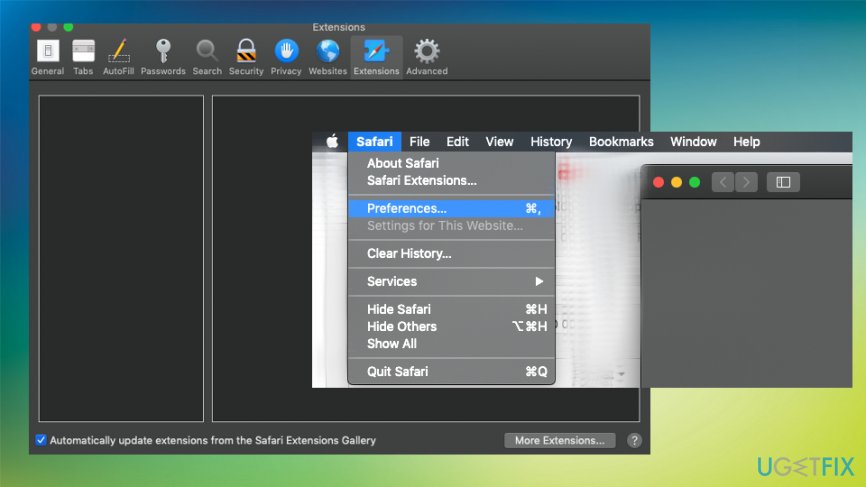
How to fix safari opening by itself extentions - Relaunch the browser and turn on extensions one by one.
- This way you can test them.
Get rid of additional Push notifications to end Safari reopening itself issue
- When on the Safari browser, go to Preferences and int the Websites window choose Notifications on the left menu.
- There you need to locate unwanted pages that have the permission to send intrusive notifications to your screen and make sure any questionable page is Blocked from this function.
Remove potentially unwanted programs from Mac OS
- Go to Applications folder
- Find suspicious or unfamiliar programs and drag them to Trash.
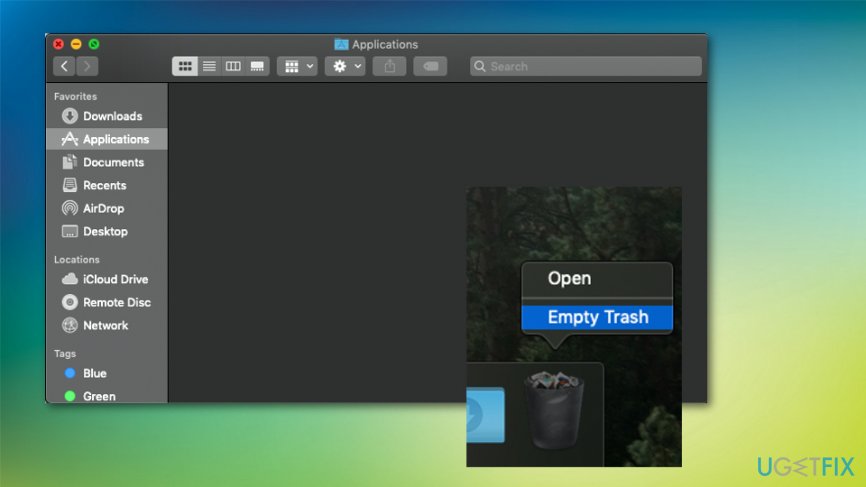
How to fix safari opening by itself applications - Make sure to Empty Trash after that.
Check for adware-related files in system folders
- Click the Finder icon ant the bottom menu bar and launch Go to Folder function.
- In the following folders search for suspicious or possibly PUP-related files:
/Library/LaunchAgents
/Library/Application Support
~/Library/LaunchAgents
/Library/LaunchDaemons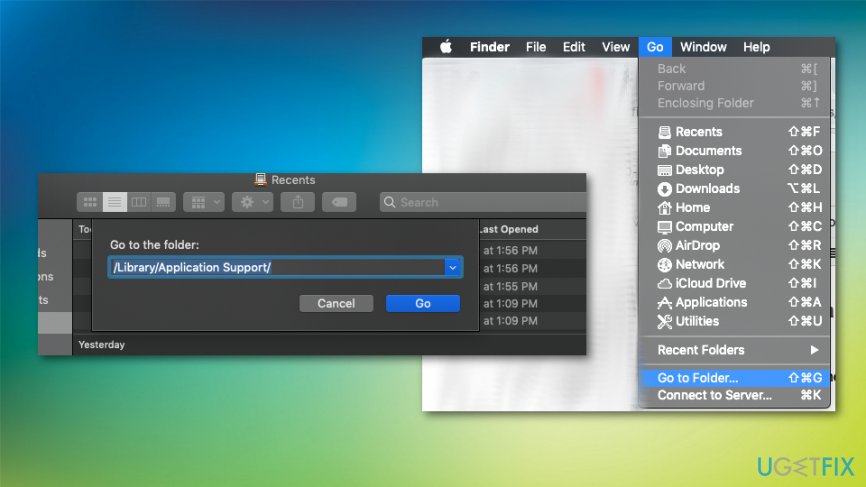
How to fix safari opening by itself library
Make sure to clean other browsers from the intrusive and unwanted content
Locate to the menu of the browser and make sure to choose Advanced options. Then find suspicious extensions and remove them, uninstall any questionable toolbars or applications. You may also benefit from resetting the Google Chrome or Mozilla Firefox browser to Default.
Bottom line
To resolve the issue of Safari opening by itself, it is recommended to scan the device with a reputable anti-malware program and remove any detected malicious programs. Additionally, users should consider manually checking for and uninstalling any suspicious applications. If these solutions do not work, further investigation into the system may be necessary.
Frequently asked questions
Safari may be opening by itself due to a malware infection or an application misconfiguration. It's important to run a full system scan using Windows Defender or a trusted antivirus program.
To stop Safari from launching automatically, check your startup programs in Task Manager and disable any unwanted applications related to Safari. Additionally, ensure that your web browser settings are not configured to open Safari by default.
If Safari keeps reopening, try resetting your default browser settings and clearing any saved data related to Safari. You may also want to uninstall Safari if it continues to cause issues.




Report an issue
What's wrong with this guide? We review every report and update or remove content.
Report received — thank you. We'll review and fix it.
You need a free account to submit a report.
Be the first to comment