How to fix
SESSION_HAS_VALID_POOL_ON_EXIT error
on Windows
Resolve the SESSION_HAS_VALID_POOL_ON_EXIT error in Windows 10 quickly and easily. Expert-tested solutions ensure a smooth experience, fixed in minutes.

What causes How to fix SESSION_HAS_VALID_POOL_ON_EXIT error in Windows 10?
- Lack of space on the hard disk
- Issues with program and OS compatibility
- Device driver issues
- Update requirements
- Damaged or deleted files
Repairs Windows system files, removes malware, and restores a clean OS state — without reinstalling.
Hey. I don't know what to do. When my computer shutdown, I receive the SESSION_HAS_VALID_POOL_ON_EXIT error. It appeared to me as an error, not a blue screen, but I also talked with a friend that receives the same issues with BSoD. Is that something completely different? Can you help me fix this problem?
SESSION_HAS_VALID_POOL_ON_EXIT error is the problem that can cause frustration and scare users of the Windows 10 devices. These reports[ref en-1] and your question show that the issue is common. The solution for the issue might include updating or rolling back the OS updates because it shows that the problem is related to Windows upgrades.[ref en-2]
Another error indication for this SESSION_HAS_VALID_POOL_ON_EXIT error is the code 0x000000AB, but not all of the errors with this code are the same issue related to the Session Valid Pool. However, most of the Windows errors show the code or the particular stop message that indicates what the root cause of the system failure is.
Primary causes of the error include lack of space on the hard disk for the proper system operations and issues with program and OS compatibility. Another trigger for this problem can be device driver issues and update requirements, damaged, deleted files on the system.
So users might want to update such pieces or repair damage and other alterations in the system to fix the SESSION_HAS_VALID_POOL_ON_EXIT error in Windows 10 properly. Tools like [d1] can do the job quickly since the application can repair Windows Registry entries, clear DLL issues, and replace altered files with compatible versions from the Windows file database.
Other issues related to malware[ref en-3] or accidental file damage can create additional problems with the machine. However, this particular error is not related to cyber intruders. Read more and make sure to try a few solutions so the problem is properly fixed and you don't need to encounter the SESSION_HAS_VALID_POOL_ON_EXIT error in Windows 10.
1. Rely on Safe Mode
- Go to Settings.
- Find Update & Security menu and choose the Recovery tab.
- In the Recovery find Advanced startup.
- Then click the button Restart now.
- As your Windows restarts, it will ask you to choose the next step.
- Choose Troubleshoot.
- In the Troubleshoot menu, click on Advanced Options and then on Startup Settings.
- Then Windows will inform you that the computer can be restarted with the method list.
- Choose Enable Safe Mode.
- Press Restart.
- After restarting choose Enable Safe Mode by pressing F4.
2. Update drivers to fix SESSION_HAS_VALID_POOL_ON_EXIT error
You can do that automatically with a tool like [rev id="DriverFix"].
- Right-click on the Windows Start and select Device Manager.
- Expand the chosen section.
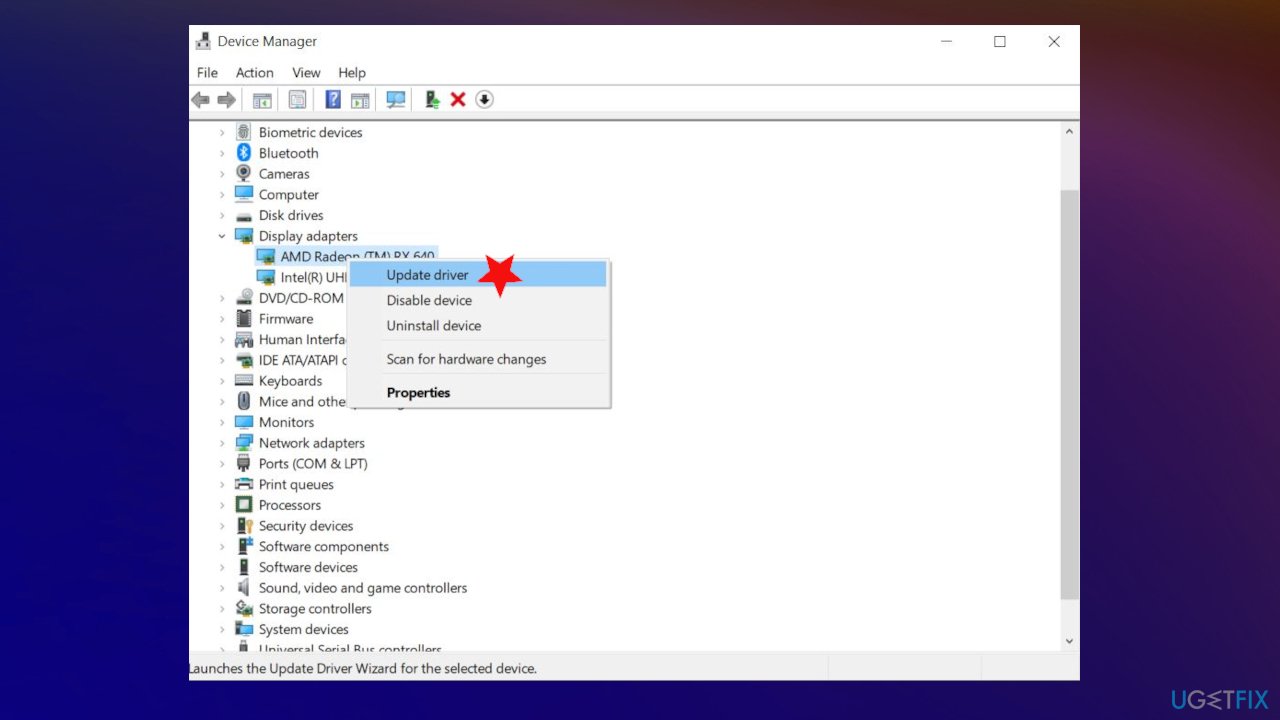
Session has valid pool on exit error fix driver update - Right-click on the particular driver and select Update Driver.
- Select Search automatically for updated driver software.
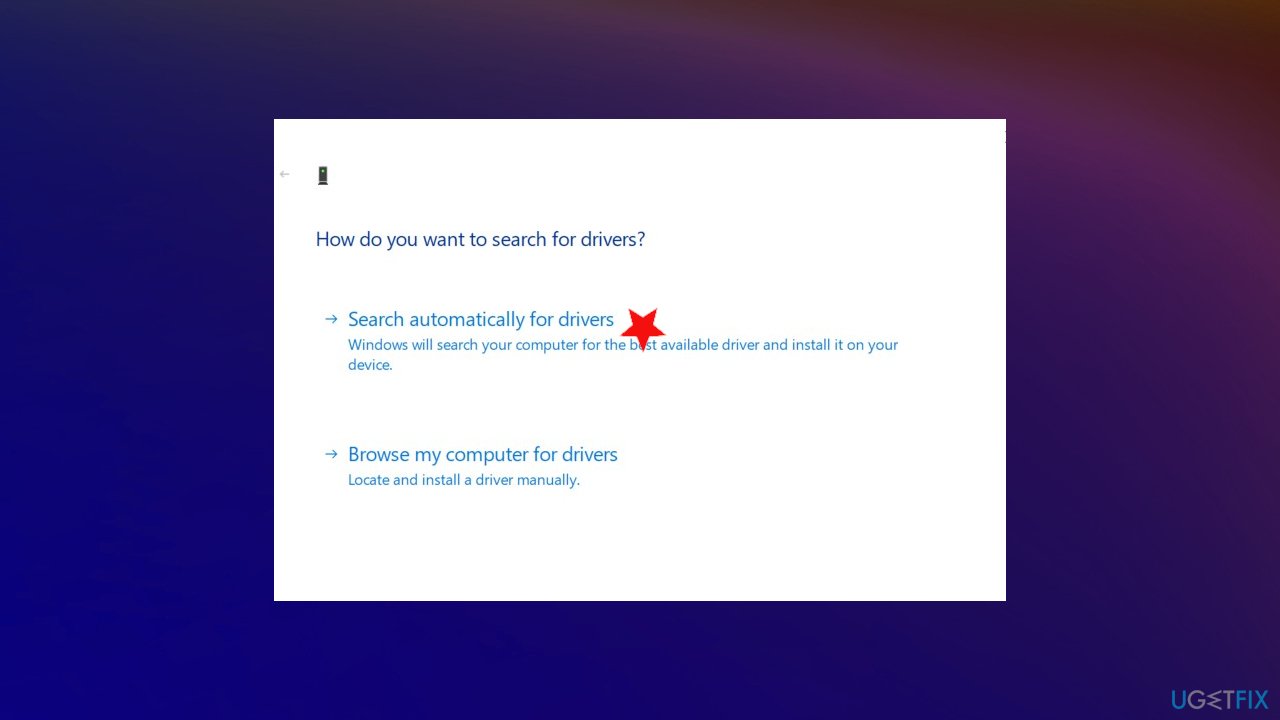
Session has valid pool on exit error fix driver options - Wait for the update process to be finished.
3. Use SFC scan
- Press the Windows button and enter cmd from the keyboard.
- Launch it as administrator.
- Type in sfc /scannow and press Enter.
- The process is automatic and should be quick.
4. Troubleshoot compatibility issues
If the error occurs when you try to launch a program:
- Find a program executable file right-click on it.
- Select Troubleshoot compatibility.
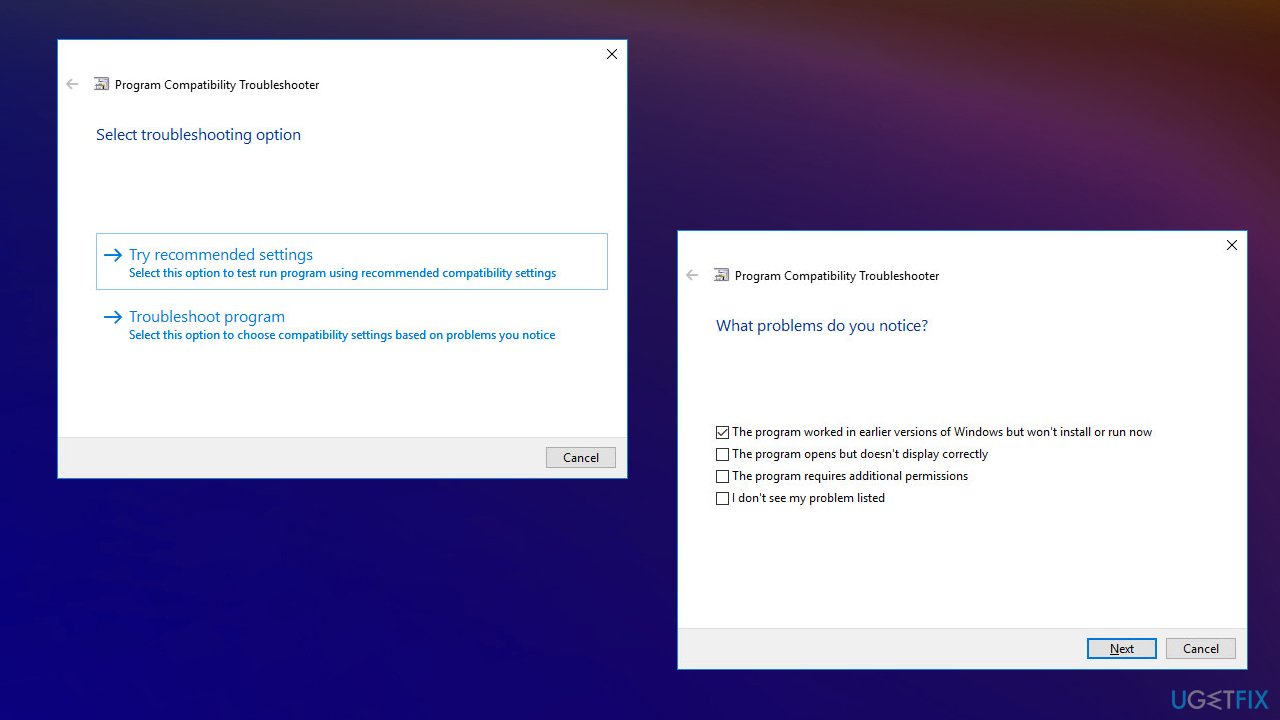
Session has valid pool on exit error fix compatibility troubleshoot - The window opens and you see the Program Compatibility Troubleshooter.
- You will have two troubleshooting options:
Try recommended settings.
Troubleshoot program. Select this variant to choose compatibility settings based on what problems you have encountered.
5. Check for latest OS updates to fix SESSION_HAS_VALID_POOL_ON_EXIT error
- Go to Start menu and select Settings.
- In the Settings window go to Update and Security tab.
- To install the latest Windows updates click on Check for updates and wait until they are found and installed.
6. Test your RAM
- Go to Control Panel.
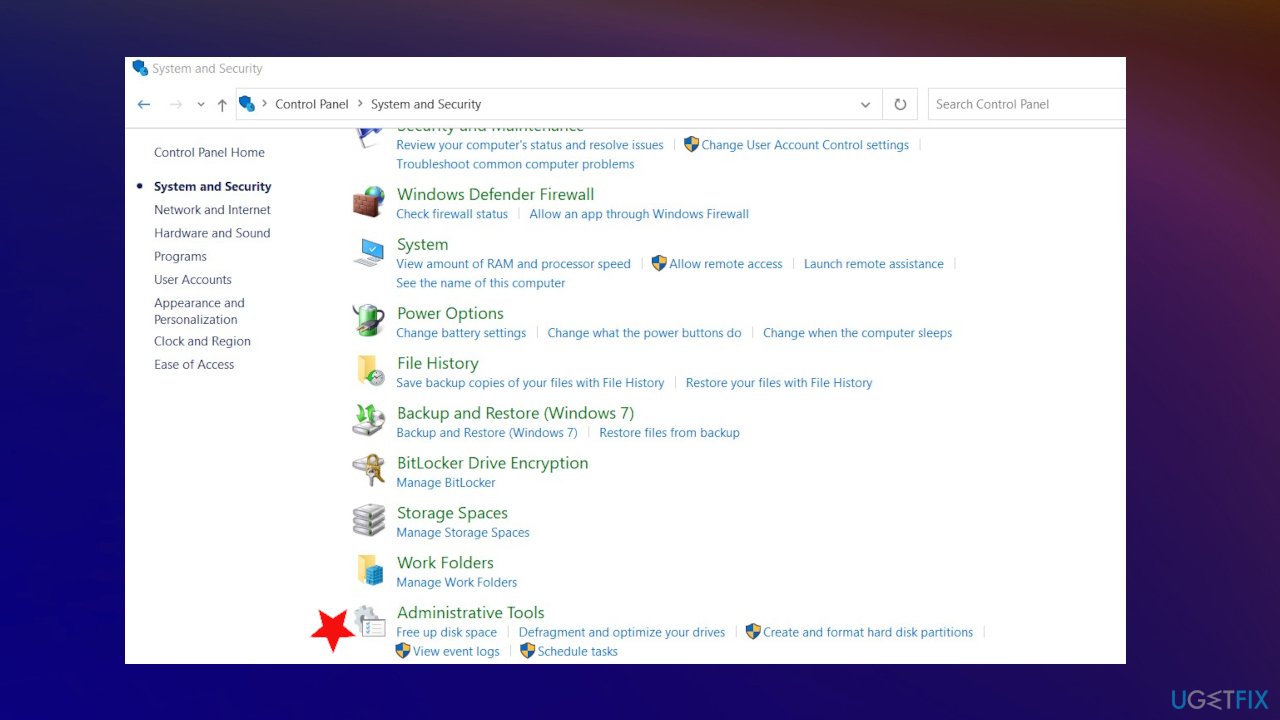
Session has valid pool on exit error fix administrative tools - Find System and Security and Administrative Tools.
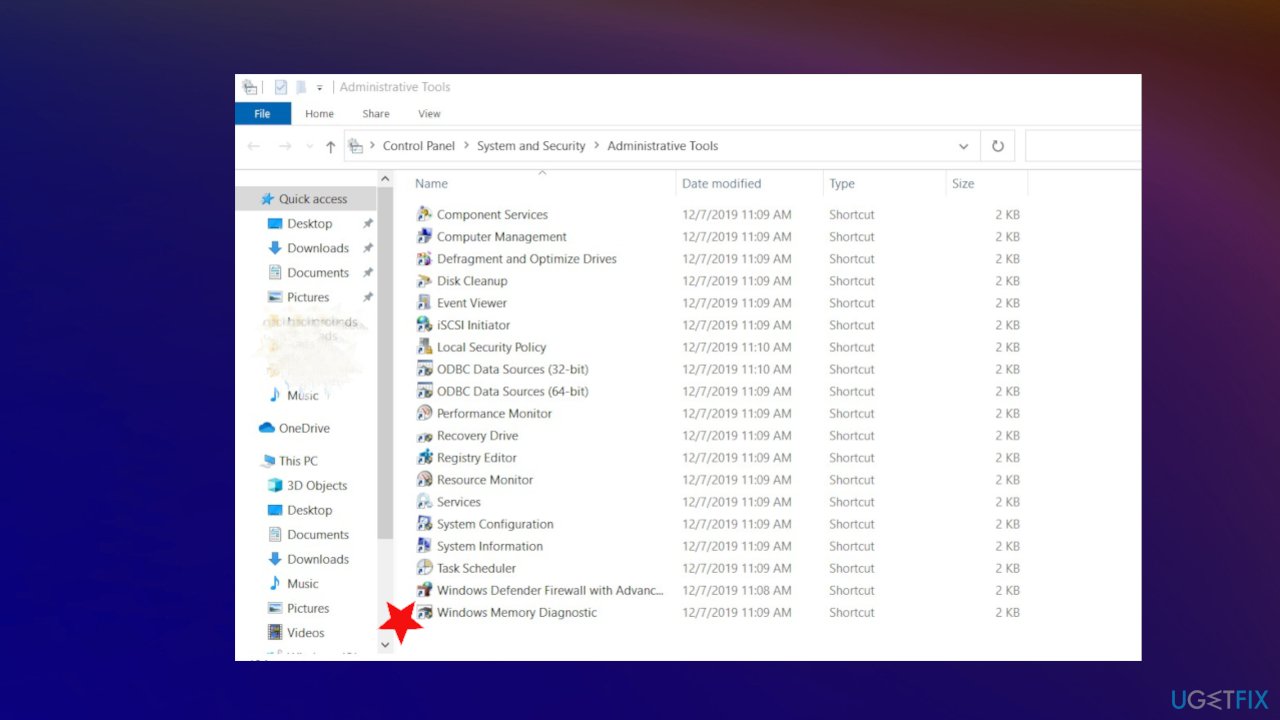
Session has valid pool on exit error fix memory tool - Launch the application Windows Memory Diagnostic.
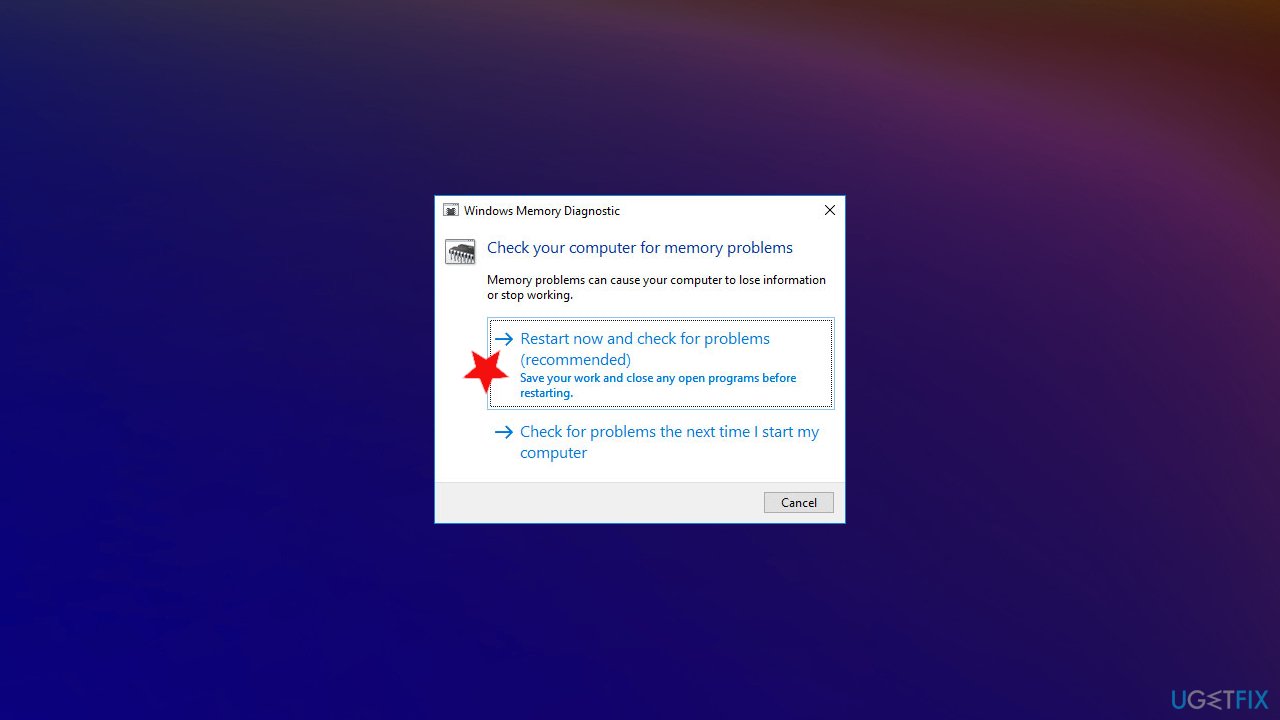
Session has valid pool on exit error fix memory options - Choose the Restart now and check for the option of the problem.
7. Restore the system to a previous point to fix SESSION_HAS_VALID_POOL_ON_EXIT error in Windows 10
- Click the Windows Start button.
- Type System Restore in the search and hit Enter.
- Click System Restore.
- Follow steps in the system restore wizard and choose a relevant restore point.
- Restore your computer.
Bottom line
To fix the SESSION_HAS_VALID_POOL_ON_EXIT error in Windows 10, consider updating or rolling back OS updates, repairing damaged files, and ensuring compatibility of programs and drivers. If these solutions do not resolve the issue, try using tools that can repair Windows Registry entries and clear DLL issues.
Frequently asked questions
This error typically occurs due to faulty drivers, corrupted system files, or issues with installed software that conflict with Windows 10's operations.
You can start by updating your device drivers, running the System File Checker tool, and checking for any recent software installations that may be causing the issue.
Using the Windows 10 built-in tools like DISM and System File Checker (SFC) can help repair corrupted files that may be triggering this error.




Report an issue
What's wrong with this guide? We review every report and update or remove content.
Report received — thank you. We'll review and fix it.
You need a free account to submit a report.
Be the first to comment