
How to fix "Sign in with a local account instead" is missing in Windows?

Prefer to fix it yourself? The manual steps follow.
- 5methods
- 2 to 60 minutes
- Easy
Applies to Windows 11 and Windows 10, Home and Pro, signed in with a Microsoft, local, or work or school account
5 methods in this guide
I want to get rid of my Microsoft account and use the local one instead. However, when I go to settings and try to do so, the "Sign in with a local account instead" is missing. How can I do this without it or, maybe there's a way to return it? Thanks.
The link Sign in with a local account instead sits in Settings > Accounts > Your info, and Microsoft shows it only while you are signed in with a Microsoft account. If it is missing, you are on a local or work account already, or Windows does not offer the switch. Check your account type first, then add a local administrator account if needed.
Open Settings > Accounts > Your info. If the link reads Sign in with a Microsoft account instead, you already use a local account. If no link shows and a work or school account is connected, disconnect it (Fix 2). If you are on a Microsoft account and the link is still missing, add a new local administrator account and move your files to it (Fix 3).
| Error | No error message. The link Sign in with a local account instead is not on the Your info page in Settings. |
|---|---|
| Where it appears | Settings > Accounts > Your info in Windows 11 and Windows 10. Shortcut: ms-settings:yourinfo. |
| Main cause | The account is not a Microsoft account. Microsoft says the link appears only while you use a Microsoft account; a local account shows the opposite link instead. |
| Fastest fix | Check which account you are on (Fix 1). If you are on a Microsoft account and the link is gone, create a local administrator account through Other users (Fix 3). |
| Also written as | sign in with a local account instead missing, not showing, no sign in with a local account instead, there is no sign in with a local account instead, sign in with local account not showing. |
| Affects | Windows 11 and Windows 10. Microsoft's switching steps are the same on both. Windows 10 left support on 14 October 2025. |
| Vendor status | Microsoft documents when the link shows, but publishes no known issue for it disappearing. Users on Microsoft Q&A report it missing on Windows 11 Pro with no work account connected. |
| Time to fix | 2 minutes to check the account type. About 5 minutes to switch. 20 to 60 minutes for a new account plus moving files. |
Facts checked on 15 October 2026. Steps written for Windows 11 (25H2 and 26H2) and Windows 10 22H2.
What "Sign in with a local account instead" is and when Windows shows it
Windows has two kinds of personal sign-in. A Microsoft account is an email address and password used with Outlook.com, OneDrive, Xbox and Windows, and it syncs settings between devices. A local account lives only on one PC, needs no internet to sign in and is not connected to the cloud. Microsoft's support page describes both this way.
The link Sign in with a local account instead converts the account you are using now from a Microsoft account to a local one. Your profile, files and apps stay. Microsoft's own wording is precise: "You'll see this link only if you're using a Microsoft account." The reverse link, Sign in with a Microsoft account instead, shows only on a local account.
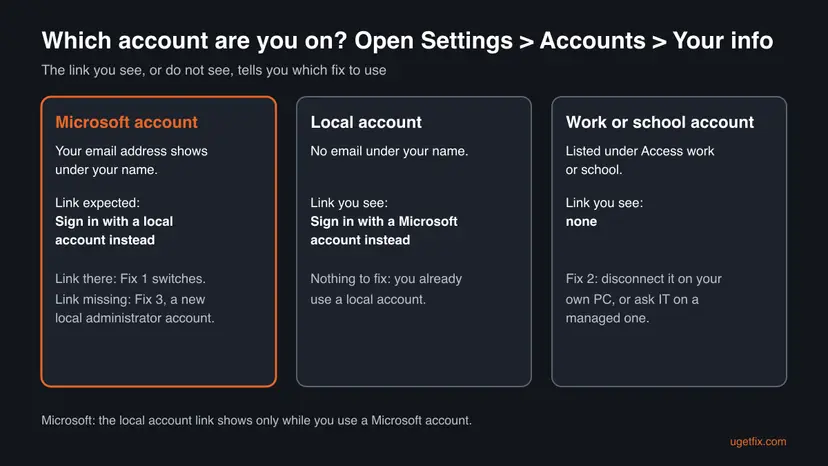
| What you see on Your info | What it means |
|---|---|
| Sign in with a local account instead | You are on a Microsoft account and can switch now. Fix 1. |
| Sign in with a Microsoft account instead | You are on a local account already. Nothing to fix. |
| No link, and an account under Access work or school | A work or school account is in the way. Fix 2. |
| No link, your email under your name, no work account | Windows does not offer the switch for this account. Fix 3. |
| No link and Some of these settings are managed by your organization | The PC is managed. Ask IT, or see Fix 4. |
Why "Sign in with a local account instead" is missing: causes ranked
The order below follows Microsoft's rule for the link and the reports on Microsoft Q&A, where the same question has more than 20 followers. Microsoft has not published a cause for the last case, so treat it as reported, not confirmed.
| How often | Cause | Typical sign | Fix |
|---|---|---|---|
| Most often | You already use a local account | The page offers Sign in with a Microsoft account instead | Fix 1 |
| Often | You sign in with a work or school (Microsoft Entra ID) account, which is not a Microsoft account | An account under Access work or school, often marked Azure AD or Entra ID | Fix 2 |
| Often, reported | A Microsoft account where Windows does not show the switch at all | Your email under your name, no link, nothing under work or school | Fix 3 |
| Less often | A policy on a managed or second-hand PC controls Microsoft accounts | A note that your organization manages some settings | Fix 4 |
| Rarely | The Settings app itself is damaged | Your info opens blank or Settings closes | Fix 5 |
The old version of this page asked you to set a registry value called NoLocalAccount. We could not find that value in any Microsoft documentation, so we removed it. We also dropped Windows Update as a fix: no source ties the link to an update.
How to fix "Sign in with a local account instead" missing in Windows
Fix 1 takes two minutes and solves the case where you are already local or the link is simply on another part of the page. Fixes 2 and 3 cover nearly every other case. Fixes 4 and 5 are for managed PCs and a broken Settings app.
| What you see or have | Start with |
|---|---|
| You are not sure which account you use | Fix 1 |
| The page shows Sign in with a Microsoft account instead | Fix 1: you are local already |
| An account is listed under Access work or school | Fix 2 |
| Your email is under your name and no link shows anywhere | Fix 3 |
| A work, school or second-hand PC with managed settings | Fix 4 |
| Your info is blank or Settings crashes | Fix 5 |
Fix 1. Check which account you are on and switch from Your info
2 to 5 minutesLow riskEveryone, first. It also covers readers who looked for the link in another part of Accounts.
The link is tied to the account type. Microsoft shows it only on a Microsoft account, so reading the Your info page tells you at once whether there is anything to fix.
- Press Win + R, paste the shortcut below and press Enter. It opens Settings > Accounts > Your info on Windows 11 and Windows 10.
ms-settings:yourinfo - Look under your name and picture. An email address there means a Microsoft account. On Windows 11, the link is under Account settings further down the same page.
- If you see Sign in with a Microsoft account instead, you already use a local account. Stop here: there is nothing to switch.
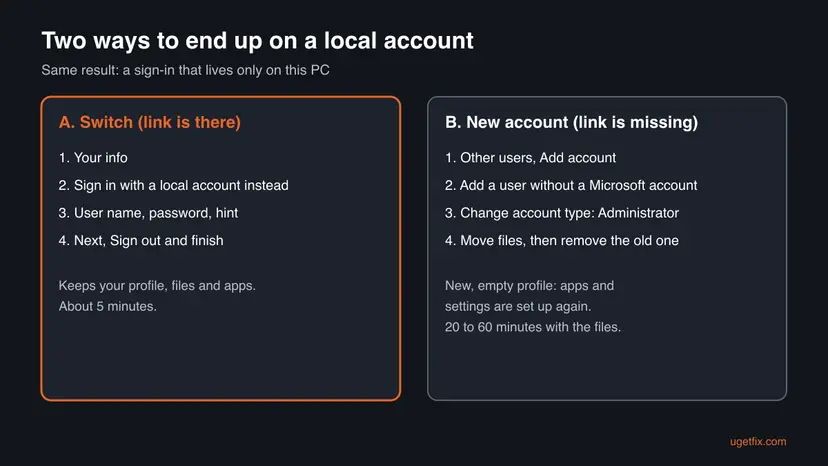
- If you see Sign in with a local account instead, select it. Windows may ask for your PIN or password to confirm.
- Type a user name, a password and a password hint. Microsoft notes the user name must be different from any other account on the device.
- Select Next, then Sign out and finish. Sign back in with the new local user name and password.
Microsoft warns that a forgotten local password cannot be recovered online. After the switch, create a password reset disk on a USB drive, or keep a second administrator account.
It worked if: After you sign in, Your info shows Sign in with a Microsoft account instead and no email under your name.
If not: If no link shows at all, check Access work or school in Fix 2. If nothing is connected there, go to Fix 3.
Fix 2. Disconnect the work or school account that blocks the link
5 minutesRead the warningSomething is listed under Settings > Accounts > Access work or school, and the PC is your own.
A work or school account is a Microsoft Entra ID account, not a Microsoft account. Microsoft offers the local account link only for Microsoft accounts, so a PC tied to an organisation account does not get it.
If you sign in to Windows with the work or school account itself, disconnecting it can lock you out of that profile. Create a local administrator account first (Fix 3) and copy your files. On a PC owned by your employer or school, do not disconnect it: ask IT, because their rules decide the account type.
- Press Win + I to open Settings and select Accounts.
- Select Access work or school.
- Select the connected account to expand it.
- Select Disconnect and confirm with Yes.
- Restart the PC, then open Your info again as in Fix 1.
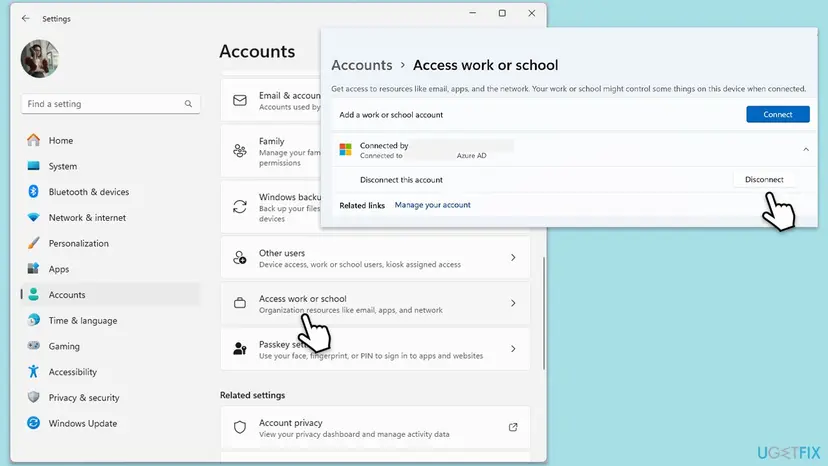
It worked if: Nothing is listed under Access work or school, and Your info shows one of the two switching links.
If not: If the account cannot be disconnected or comes back, the PC is managed: go to Fix 4. If it is gone and no link appears, use Fix 3.
Fix 3. Create a local administrator account when the link does not come back
20 to 60 minutesRead the warningYou are on a Microsoft account, nothing is under Access work or school, and the link is still missing.
Adding a user without a Microsoft account does not depend on the Your info link at all. It is the workaround suggested on Microsoft Q&A for this exact problem, and it gives you a local account even when Windows refuses to convert the old one.
It is a new profile, not a converted one. Your files stay in the old profile until you copy them, and apps that install per user must be set up again. Back up your files first: Back up your files (Windows Backup, File History, Time Machine).
- Press Win + R, run the shortcut below to open Settings > Accounts > Other users (on Windows 10: Family & other users).
ms-settings:otherusers - Next to Add other user, select Add account (Windows 10: Add someone else to this PC).
- Select I don't have this person's sign-in information, then Add a user without a Microsoft account.
- Type a user name and a password, answer the security questions and select Next.
- Select the new account, then Change account type. Choose Administrator and select OK.
- Sign out, sign in to the new account and copy your files from
C:\Users\<old name>into its folders. - When everything is in place, return to Other users, select the old Microsoft account and choose Remove.
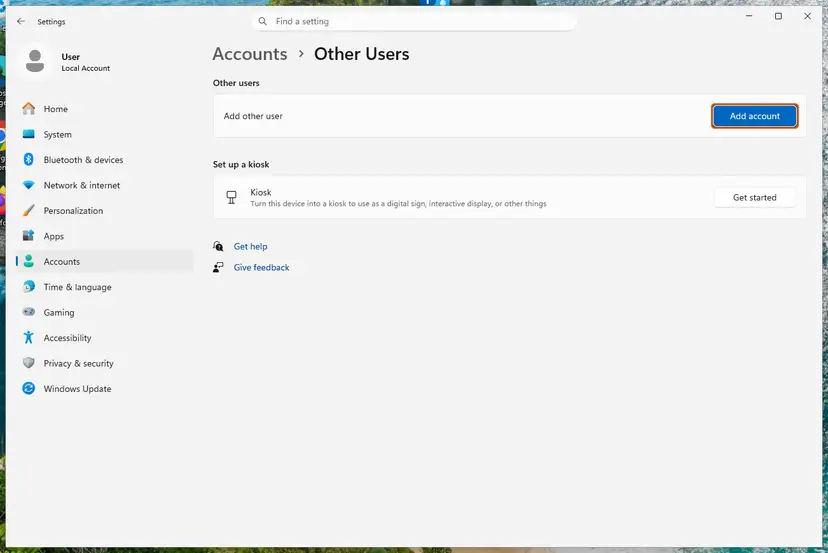
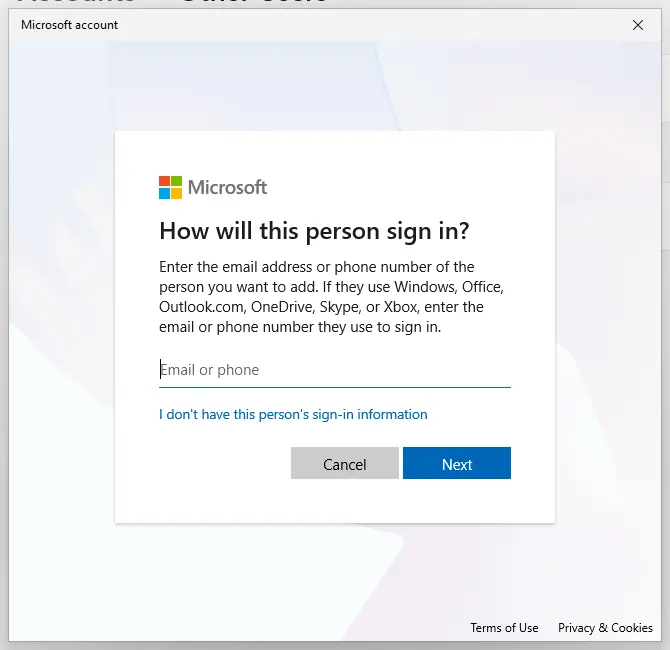
Full steps for Windows 11 and Windows 10, with screenshots: Create a new user account to test a problem. Removing the old account deletes its profile folder, so remove it only after your files are copied.
It worked if: You sign in with a local user name, Your info shows no email, and the old Microsoft account is gone from Other users.
If not: If Add account is greyed out or the local route is missing, a policy is in control: go to Fix 4.
Fix 4. Check the Microsoft accounts policy on a managed or second-hand PC
5 minutesLow riskSettings says some settings are managed by your organization, or the PC came from a company or another owner.
The security policy Accounts: Block Microsoft accounts controls whether accounts can be connected or used through Settings. When it is set, the account links on Your info behave differently from a home PC.
Microsoft documents three values for the policy. This policy is disabled is the default on client PCs. Users can't add Microsoft accounts stops new connections, including turning a local account into a Microsoft one. Users can't add or log on with Microsoft accounts also stops existing connected accounts from being used through Settings.
- On Windows 11 or 10 Pro, press Win + R, type
secpol.mscand press Enter. Home editions do not include this console. - Go to Security Settings > Local Policies > Security Options.
- Find Accounts: Block Microsoft accounts and read its value.
- On your own PC, set it to This policy is disabled and select OK. Microsoft says no restart is needed.
- Open Your info again as in Fix 1.
A policy set by your organisation returns at the next sync, and changing it may break their rules. Ask IT for a local account instead.
It worked if: The policy reads This policy is disabled, and Your info shows the switching link for your account type.
If not: If the value was already disabled, the policy is not your cause. Use Fix 3, or Fix 5 if Settings itself misbehaves.
Fix 5. Repair Windows system files when the Your info page is blank
20 minutesLow riskYour info opens empty, loads forever, or Settings closes when you open Accounts.
A blank page is a different problem from a missing link: the Settings app cannot draw the page at all. System File Checker and DISM replace damaged Windows files that the Settings app depends on.
- Right-click Start and open Terminal (Admin) or Command Prompt (Admin).
- Run the image repair first and wait for it to finish:
DISM /Online /Cleanup-Image /RestoreHealth - Then run the file check:
sfc /scannow - Restart the PC and open Your info again.
Step by step, with what each result means: Run DISM and SFC to repair Windows system files. If the page now loads but the link is still missing, you are back at Fix 1 to Fix 3.
It worked if: Your info loads with your name, picture and one of the two links.
If not: If Settings still fails in your account but works in a new local account from Fix 3, your old profile is damaged: move to the new account.
Still no way to use a local account: what to check next
There is no error log for a link that is not shown. The evidence is what the Settings pages say, so collect it before you ask for help on Microsoft Q&A or from IT.
- Your Windows edition and version: run
winverand note the line, such as Windows 11 Pro 25H2. - What Your info shows under your name, and which link, if any, is on the page.
- Everything listed under Access work or school.
- Whether Settings shows Some of these settings are managed by your organization.
- Whether Add account in Other users works, and whether the local route appears there.
On a PC owned by an employer or school, the account type is their decision, made through Entra ID or policies. No fix on your side lasts there. Ask IT; they can add a local account or release the device.
How to keep your local account working
- Create a password reset disk right after the switch. Microsoft warns that a forgotten local password cannot be recovered otherwise.
- Keep a second local administrator account, so a broken profile never locks you out.
- Do not sign in to Windows itself when an app such as Outlook or the Store asks for a Microsoft account: choose to sign in to that app only, or Windows may switch your sign-in back.
- Before connecting a work or school account to your own PC, read what it asks to manage.
- Keep a list of where your files live, so moving to a new account takes minutes, not an evening.
Windows 10 left support on 14 October 2025. The switching steps there work the same, but the PC no longer gets security updates, which matters more on a local account with no online recovery.
Frequently asked questions
Why can't I see the "Sign in with a local account instead" option?
Because Windows shows it only while you are signed in with a Microsoft account, as Microsoft's support page says. If you use a local account, the page offers Sign in with a Microsoft account instead. If you use a work or school account, no switching link appears. Some users on Microsoft Q&A also report the link missing on a Microsoft account with nothing else connected. In that case, add a new local administrator account under Other users and move your files.
Is "Sign in with a local account instead" missing on Windows 10 a different problem?
No. Microsoft's switching steps apply to Windows 10 and Windows 11 alike, and the link sits in the same place: Settings > Accounts > Your info. The only difference is in the other path: Windows 10 calls the page for new users Family & other users and the button Add someone else to this PC. Windows 10 left support on 14 October 2025, so the PC no longer receives security updates.
What does "Sign in with a local account instead" mean?
It means converting the account you use now from a Microsoft account to a local one. After the switch you sign in with a user name and password stored only on this PC, with no internet needed. Your files and apps stay in the same profile. You lose automatic sync of settings across devices and single sign-in to Microsoft services, though you can still sign in to apps like OneDrive or the Store separately.
Why is "Sign in with a Microsoft account instead" missing?
That link shows only on a local account, so first check that you are not already on a Microsoft account. On managed PCs, the security policy Accounts: Block Microsoft accounts can stop users from connecting a local account to a Microsoft account. Microsoft documents that the setting Users can't add Microsoft accounts blocks exactly this. Fix 4 shows how to read the policy on Windows Pro editions.
How do I force Windows to use a local account?
When the switching link is missing, create a separate local account instead of converting the old one. Open Settings > Accounts > Other users, select Add account, then I don't have this person's sign-in information and Add a user without a Microsoft account. Make it an administrator with Change account type, sign in, copy your files, and remove the old Microsoft account. This route does not depend on the Your info link.
Does going offline bring the local account link back?
We could not confirm it. The earlier version of this page suggested disconnecting from the internet before opening Your info, and some users repeat the tip. Microsoft's documentation ties the link only to the account type, not to the connection. It costs a minute to try, but if the link stays missing offline, use Fix 3. Going offline does help during first setup, by user reports.
Is the registry trick from Microsoft's forum safe to use?
We do not recommend it. A user on Microsoft Q&A describes deleting IdentityCRL keys that hold the Microsoft account in the registry, and another user reports it did not work because the keys sat elsewhere. Microsoft does not document this method. If you try it anyway, create a second administrator account and back up the registry first (Back up the registry before editing it). Fix 3 reaches the same goal without editing the registry.
What do I lose when I switch to a local account?
Microsoft says a local account keeps your settings, files and apps limited to one device. Sync of settings to other PCs stops, and Windows no longer signs you in to Microsoft services automatically. A forgotten local password cannot be reset online, which is why Microsoft advises a password reset disk. Your files stay on the PC; files in OneDrive stay in the cloud and need a sign-in in the OneDrive app.
The option does not appear for me (tidak muncul, không có, não aparece). What now?
This page is in English, but the fix is the same in every language of Windows. Open Settings > Accounts > Your info and read which link is there. If none is, check Access work or school and disconnect anything connected on your own PC. If the link is still missing, add a new user without a Microsoft account under Other users, make it an administrator and move your files to it.
Sources
- Microsoft Support: Change From a Local Account to a Microsoft Account in Windows (both directions, when each link shows) (support.microsoft.com)
- Microsoft Learn: Accounts: Block Microsoft accounts (security policy setting) (learn.microsoft.com)
- Microsoft Q&A: "Sign in with a local account instead" option is missing (user reports and workaround) (learn.microsoft.com)
Did this fix work?
One click, no account. It tells the next reader which guides are worth their time.
Questions and experiences: fix "Sign in with a local account instead" is missing in Windows
Still broken, or found a fix we did not cover? Ask here: members and our editors answer. Reading is open; writing needs a free account.
…