How to fix
SSL_WEAK_SERVER_EPHEMERAL_DH_KEY error in Firefox
on Windows
Resolve the SSL_WEAK_SERVER_EPHEMERAL_DH_KEY error in Firefox on Windows 10 or Windows 11 effortlessly with our expert-tested solutions. Fixed in minutes!

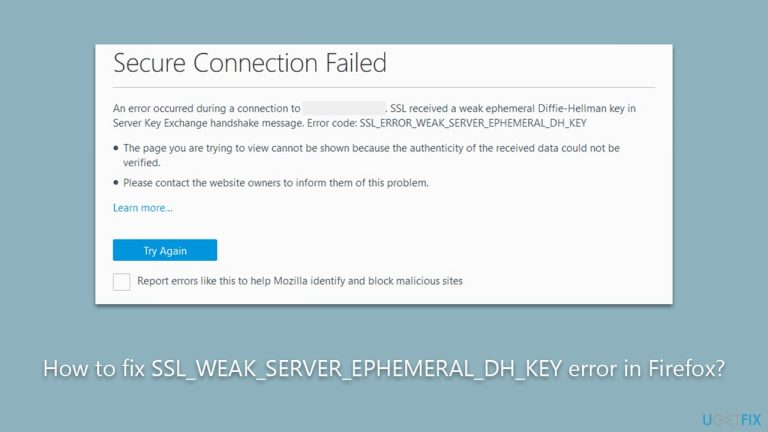
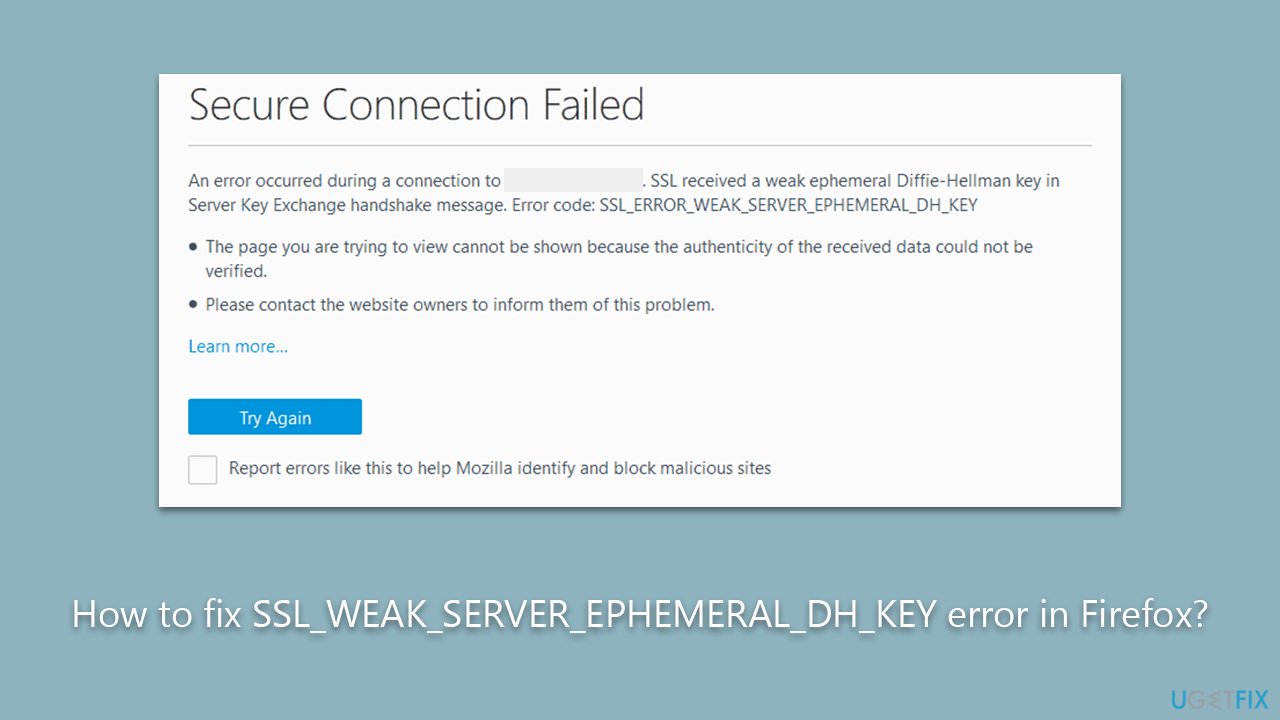
What causes How to fix SSL_WEAK_SERVER_EPHEMERAL_DH_KEY error in Firefox?
- Inherent flaw in the security setup between the server and local machine
- Server's attempt to establish a secure connection using weak Diffie-Hellman parameters
- Server not configured to support strong encryption parameters
- Mismatch between server's encryption standard and Firefox's security protocol
- Potential vulnerability warning from Firefox
Repairs Windows system files, removes malware, and restores a clean OS state — without reinstalling.
So, I've been trying to access a video available on a particular website, but I keep getting the SSL_WEAK_SERVER_EPHEMERAL_DH_KEY error. I'm using the Mozilla Firefox browser.
Firefox, developed by the non-profit organization Mozilla Foundation, has been a steadfast favorite among web users since its inception in 2002. With a reputation for privacy, flexibility, and a library of powerful extensions, Firefox provides an intuitive user experience that makes it a compelling choice for many individuals. However, despite its excellent performance and vast features, some users may encounter issues, one such being the SSL_WEAK_SERVER_EPHEMERAL_DH_KEY error.
The SSL_WEAK_SERVER_EPHEMERAL_DH_KEY error in Firefox typically arises when trying to access specific or sometimes even all websites. This issue primarily stems from an inherent flaw in the security setup between the server you're trying to access and your local machine. In technical terms, this error is linked to a server's attempt to establish a secure connection using the Diffie-Hellman (DH) key exchange protocol, but it employs weak parameters that make this exchange vulnerable to potential attacks. The error is essentially Firefox's way of warning users about this potential vulnerability.
The SSL_WEAK_SERVER_EPHEMERAL_DH_KEY error usually occurs when servers are not appropriately configured to support strong encryption parameters. The mismatch between the server's encryption standard and the security protocol used by Firefox leads to this error. Thus, the issue is not with the browser itself but more often lies within the server's configuration. It's crucial to note that despite the error appearing on the client side, the problem typically needs to be resolved at the server end.
However, it's not completely out of the user's hands. Certain adjustments to your browser settings, such as enabling or disabling specific protocols or tweaking advanced SSL settings, may mitigate the issue, although these solutions require a technical understanding of the browser's internals.
Finally, an application like the [d1] PC repair tool could be beneficial in resolving related issues. While it may not directly address the SSL_WEAK_SERVER_EPHEMERAL_DH_KEY error, this tool can handle a variety of tasks, such as fixing corrupted system files, resolving registry issues, and cleaning up system junk. Thus, it could contribute towards maintaining the overall health of your computer, aiding in a smoother and more secure browsing experience.
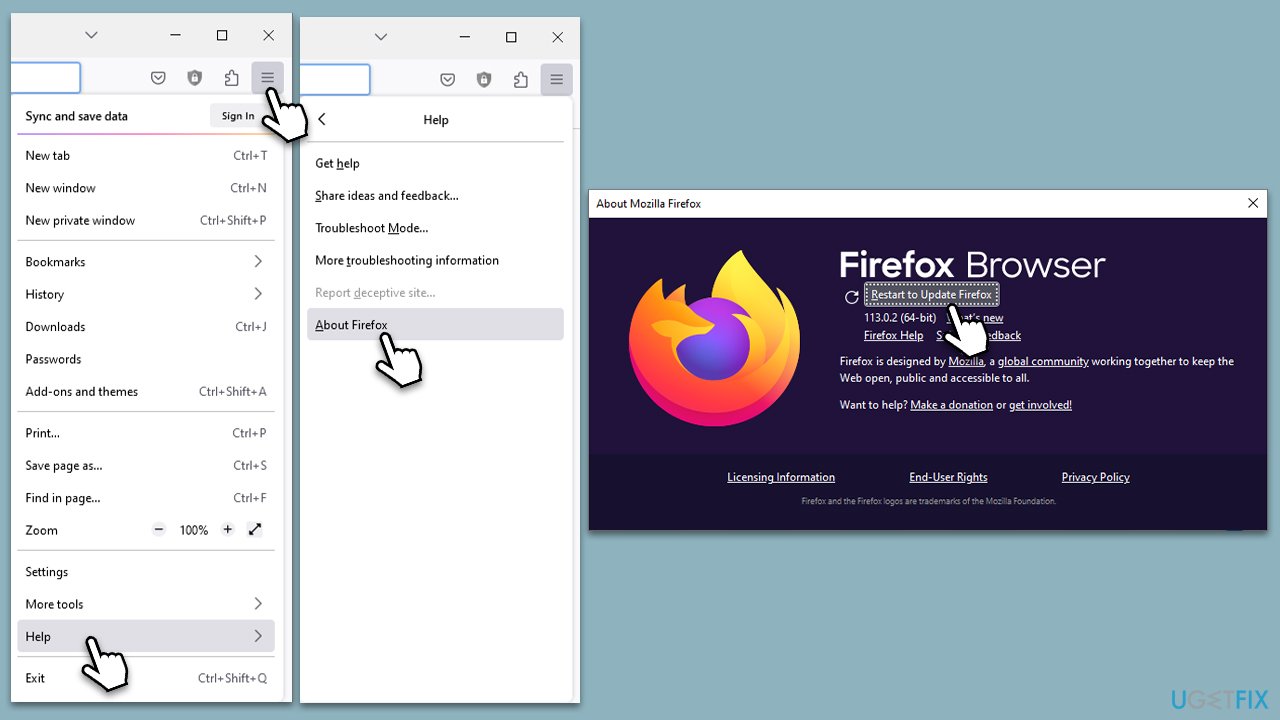
Fix 1. Update Firefox
Keeping your Firefox browser updated ensures that you're running the latest version with all the recent security patches and fixes. This could help resolve the SSL_WEAK_SERVER_EPHEMERAL_DH_KEY error if it is linked to an outdated version of Firefox that's not compatible with certain server configurations.
- Open Firefox and click on the menu button (three horizontal lines) in the upper-right corner of the window.
- Select Help from the drop-down menu, which is represented by a question mark symbol.
- In the Help menu, select About Firefox.
- Firefox will automatically check for updates and download them. If an update is available, click on Restart to update Firefox.
Fix 2. Enable SSL3 preferences
Enabling SSL3 preferences in Firefox can sometimes help bypass the error. This fix essentially allows your browser to use the SSL3 protocol when establishing a secure connection with the server, potentially working around any mismatch in security settings.
- Type about:config into the Firefox address bar and press Enter.
- If you see a warning message, click on Accept the Risk and Continue.
- In the search bar at the top, type security.ssl3 and press Enter.
- Look for entries that are set to false. To enable them, double-click each entry.

Fix 3. Clear browsing data and cache
Sometimes, the issue might be linked to old or corrupt data stored in your browser's cache. Clearing your browsing data and cache may resolve the SSL_WEAK_SERVER_EPHEMERAL_DH_KEY error.
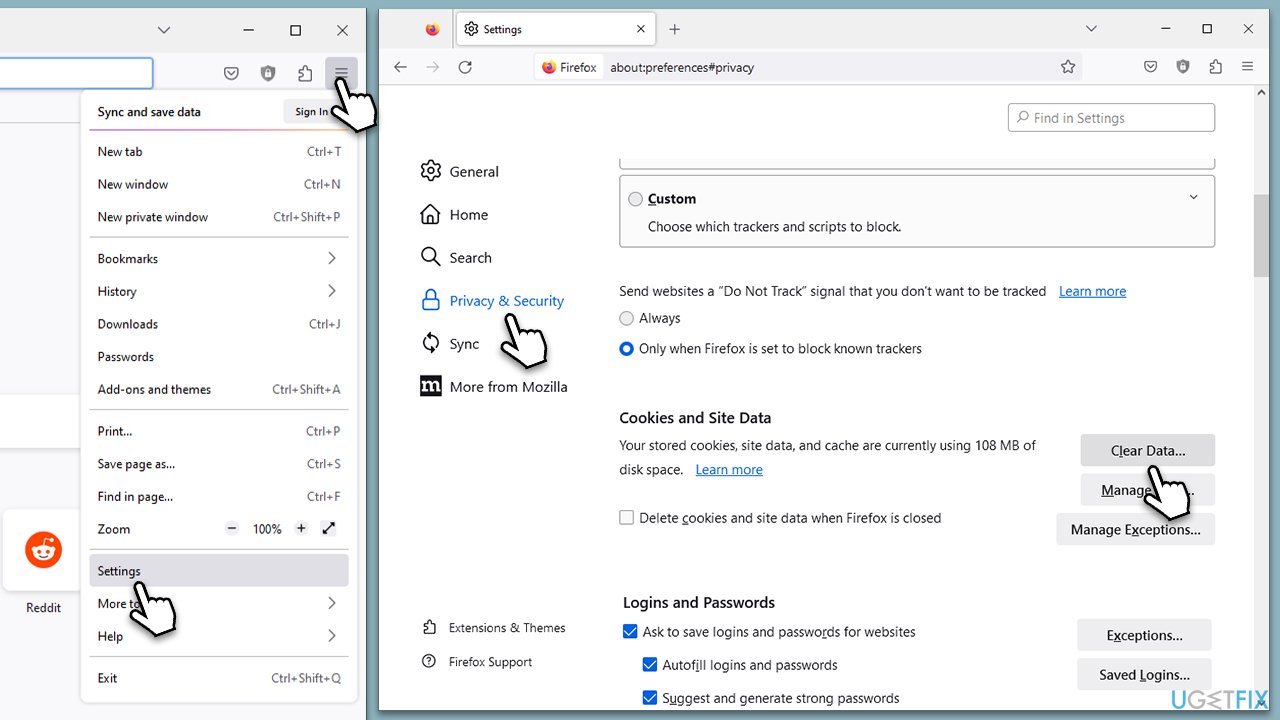
- Click on the menu button (three horizontal lines) in the upper-right corner of the Firefox window.
- Select Settings from the drop-down menu.
- From the panel on the left side, click on Privacy & Security.
- Scroll down to the Cookies and Site Data section, and click on Clear Data.
- Ensure both boxes for Cookies and Site Data and Cached Web Content are checked, and then click on Clear.
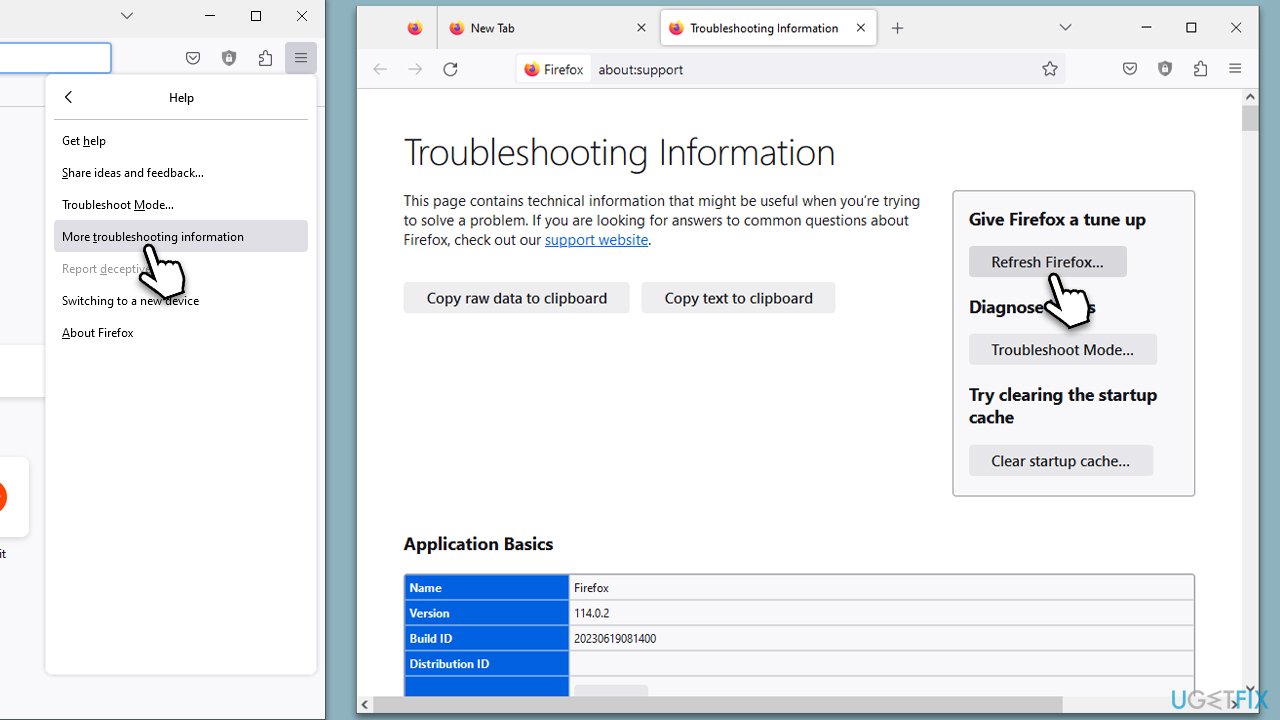
Fix 4. Refresh Firefox
Refreshing Firefox can resolve the error by restoring the browser to its default state while saving your essential information.
- Click on the menu button in the upper-right corner of the Firefox window.
- Select Help from the drop-down menu.
- In the Help menu, select More troubleshooting information.
- Click on Refresh Firefox on the right side of the page.
Fix 5. Contact the Website Administrator
If the above solutions don't work, the issue might lie on the server side, and the website administrator may need to update their server configuration to support strong encryption parameters.
- You can usually find contact information for the website administrator in the website's Contact or About Us section.
- Explain the error you're encountering and kindly request they check their server's security configuration.
Fix 6. Modify security preferences
You can configure Firefox to ignore certain security checks and establish a connection with the server despite the error. However, this should be done with caution, as it could potentially expose your system to security risks.
- Type about:config into the Firefox address bar and press Enter.
- Type security.ssl3.dhe_rsa_aes_128_sha in the search bar.
- If the value is set to True, click the toggle button on the right to change it to False.
- Restart your Firefox browser for the changes to take effect.
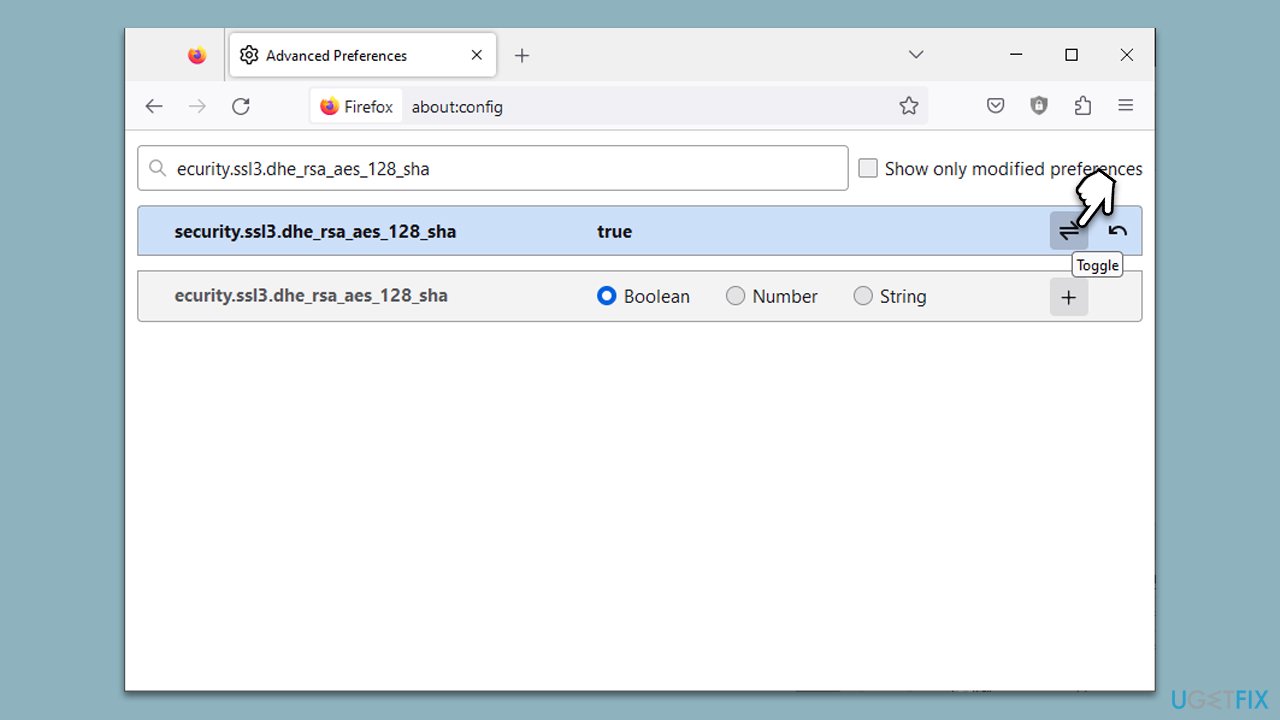
Please note, however, that this method reduces the level of security for your browsing and should only be used temporarily or in trusted environments. It's highly recommended to revert this change (by setting the value back to true) as soon as the original issue has been resolved.
Bottom line
To mitigate the SSL_WEAK_SERVER_EPHEMERAL_DH_KEY error, users can adjust browser settings, enable or disable specific protocols, or tweak advanced SSL settings. If these solutions do not resolve the issue, consider using a PC repair tool to address related system problems.
Frequently asked questions
This error typically occurs due to weak Diffie-Hellman key exchange settings on the server side, which Firefox identifies as a security risk. Users on Windows 10 may encounter this when trying to access websites that do not support strong encryption.
To fix this error on Windows 11, try updating Firefox to the latest version or changing your connection settings to use a different protocol. You can also contact the website administrator to inform them about their weak security settings.
Yes, you can enter 'about:config' in the Firefox address bar and search for 'security.ssl3.dhe_dss_aes_128_gcm_sha256' and similar settings to disable weak encryption methods. However, be cautious as this may affect your overall browsing security.




Report an issue
What's wrong with this guide? We review every report and update or remove content.
Report received — thank you. We'll review and fix it.
You need a free account to submit a report.
Be the first to comment