How to fix
System error 109: ERROR_BROKEN_PIPE
on Windows
Resolve System Error 109 (ERROR_BROKEN_PIPE) on Windows 10 and 11 quickly. Get expert-tested fixes and restore your system's performance today!


What causes How to fix System error 109: ERROR_BROKEN_PIPE on Windows?
- Malware infection
- Background service shutdown via Task Manager
- Launching an application
- Broken connection between file descriptors
- Corrupted Windows components
Repairs Windows system files, removes malware, and restores a clean OS state — without reinstalling.
Hello, I need help with System error 109 - ERROR_BROKEN_PIPE with the description "The pipe has been ended." It shows up randomly when I use my PC. Any ideas of how to get rid of it?
ERROR_BROKEN_PIPE can occur on all Windows operating systems at any time, for example, when an application is about to be launched. To be more precise, the error shows up when users try to shut down a background service via a Task Manager or in other ways.
In some cases, errors can be devastating for a computer, e.g., Blue Screen[ref en-2] errors can interrupt users' work and indicate something serious. When it comes to System error 109, it is not a very significant issue, hence you can simply ignore it most of the time. However, if the problem persists, it might indicate that something is seriously wrong, therefore fixing it becomes a priority.
To understand the error, it is important to understand the terminology. In this case, a "Broken pipe" indicates that a connection between file descriptors of two processes running was broken. If that explains little, there is nothing to worry about because we provide ways to fix System error 109 - ERROR_BROKEN_PIPE fully below.
Possibly the most concerning reason for this error to occur is malware[ref en-3] infection. Computer threats can be obtained everywhere on the internet, for example, when downloading a program crack[ref en-1] or after opening an attachment of a spam email received into a mailbox.

Malware can cause serious damage to Windows and begin causing errors, hence the first step should be to eliminate this possibility and scan the machine with anti-malware software. You can try running a scan with the [d1] repair tool also, which is designed to locate broken Windows components can repair them, automatically resolving the issue the causes the error in the first place.
Solution 1. Scan your PC from malware
As already mentioned, malware could be the leading cause you see error messages on your PC. Any reputable third-party security software can be used for this purpose, although a built-in Microsoft Defender can be just as good as finding malicious software. Running an offline scan is something that you should go for:
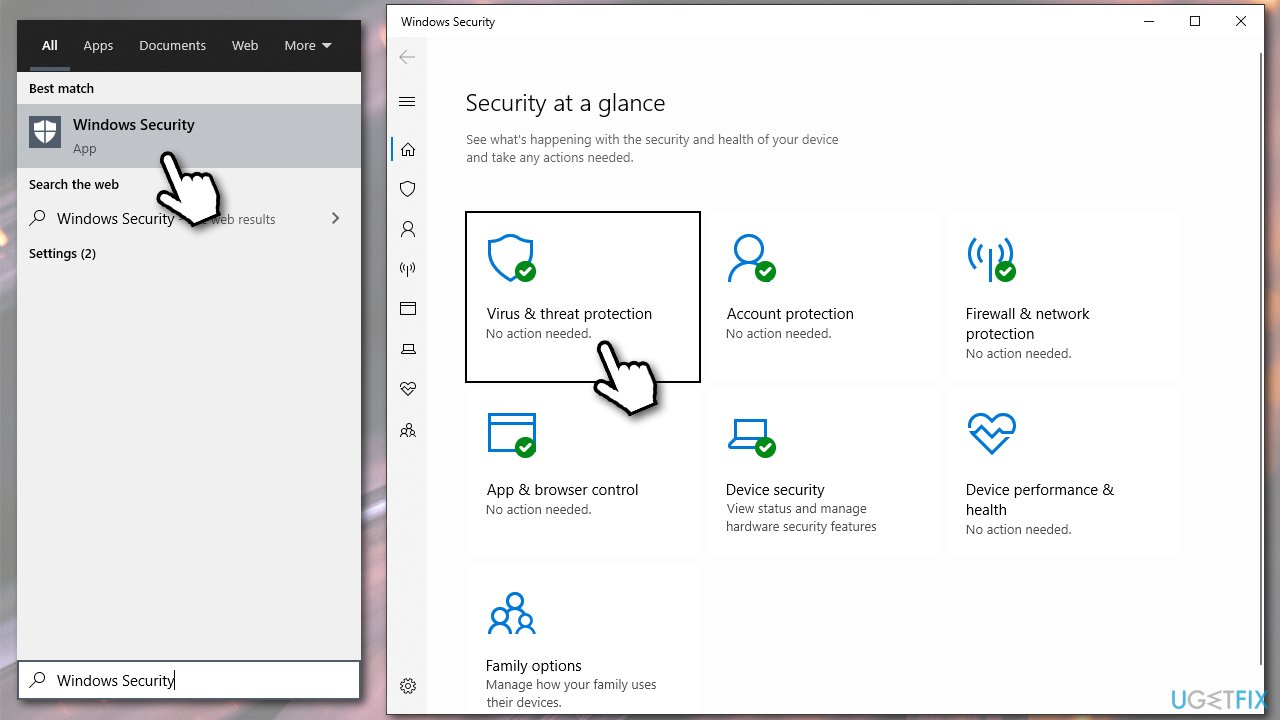
- Type Windows Security in Windows search and press Enter
- Select Virus & threat protection and pick Scan options
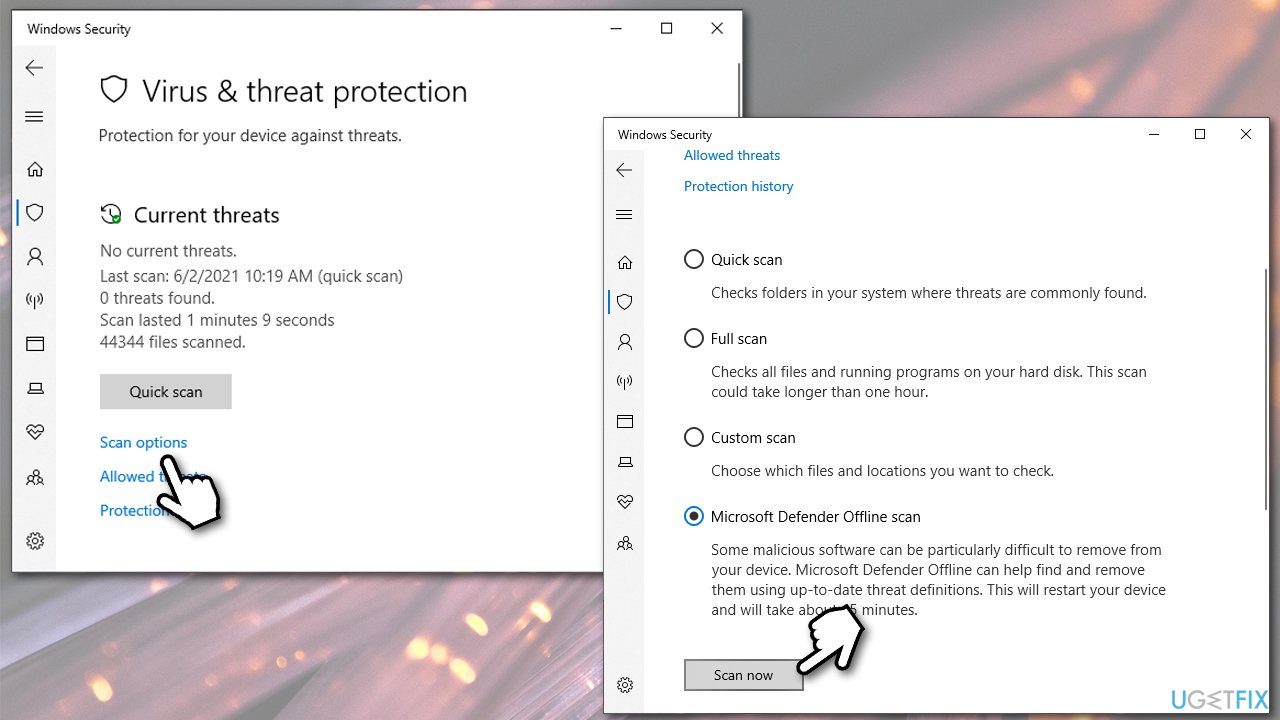
How to fix system error 109 error broken pipe on windows scan your pc for malware - Choose Microsoft Defender Offline scan and click Scan now
- Your computer will immediately reboot and begin a deep scan.
How to fix system error 109 error broken pipe on windows scan your pc for malware2 - If nothing was detected and removed, proceed with the next step.
Solution 2. Roll back system drivers
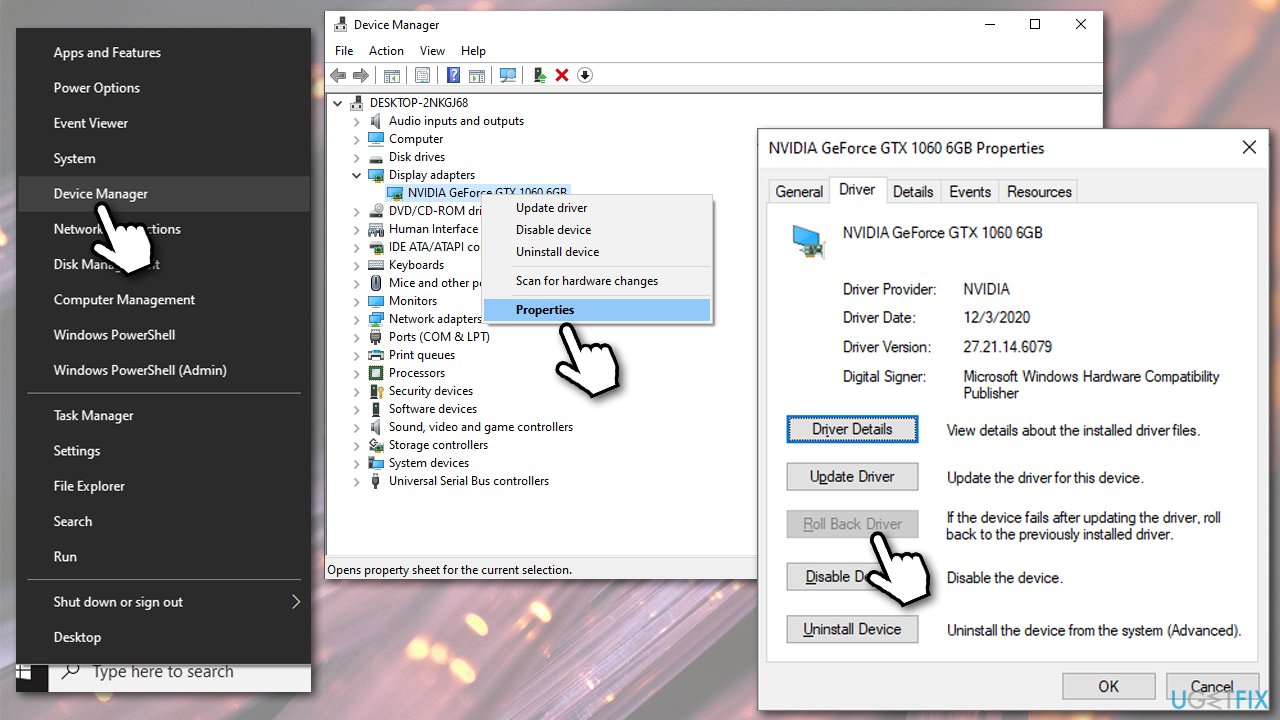
- Right-click on Start and pick Device Manager
- Here, right-click on the problematic driver and select Properties
- Go to Driver tab
- In here, click on Roll back driver
How to fix system error 109 error broken pipe on windows roll back driver - Choose a reason why you are doing so and
If this method did not help stop the error from occurring, try updating all your drivers instead. Keep in mind that this process might be lengthy, so we recommend using [ref id="DriverFix"] for the process to be more convenient.
Solution 3. Update Google Chrome
If the error is browser-based, you should make sure that you are running the latest version of Google Chrome:
- Open Google Chrome
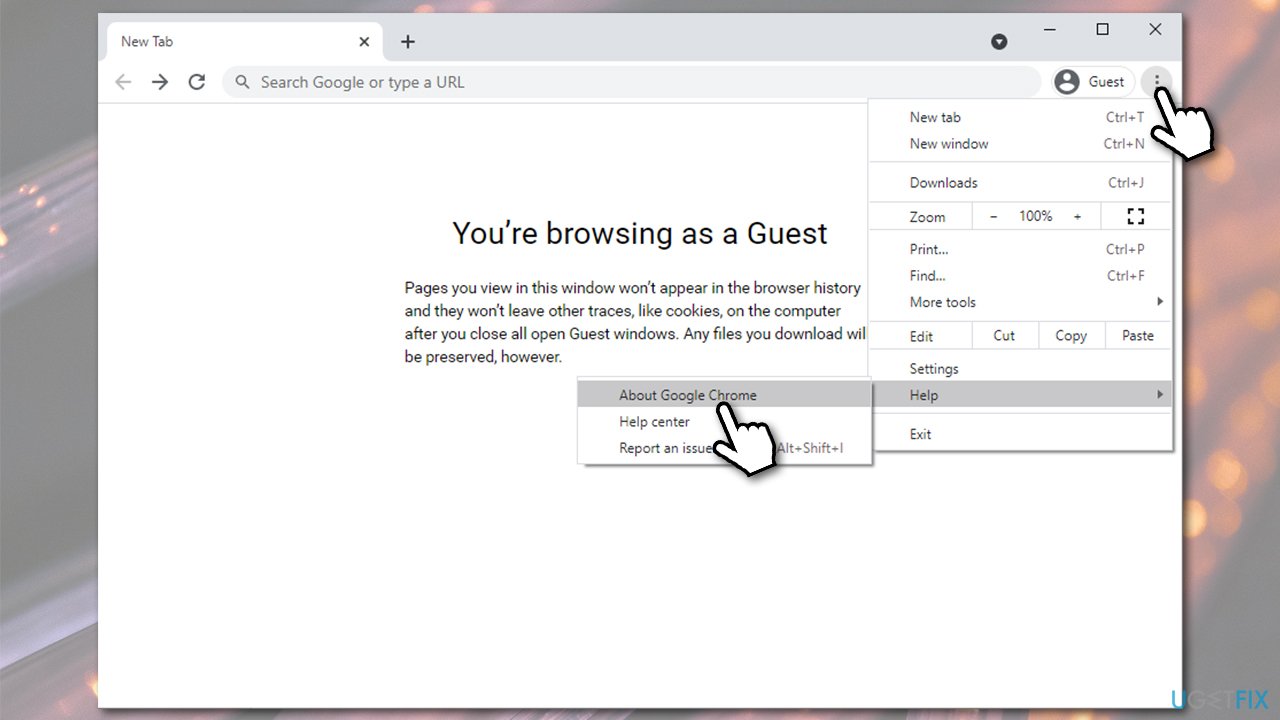
- Click on three vertical dots to open the Menu
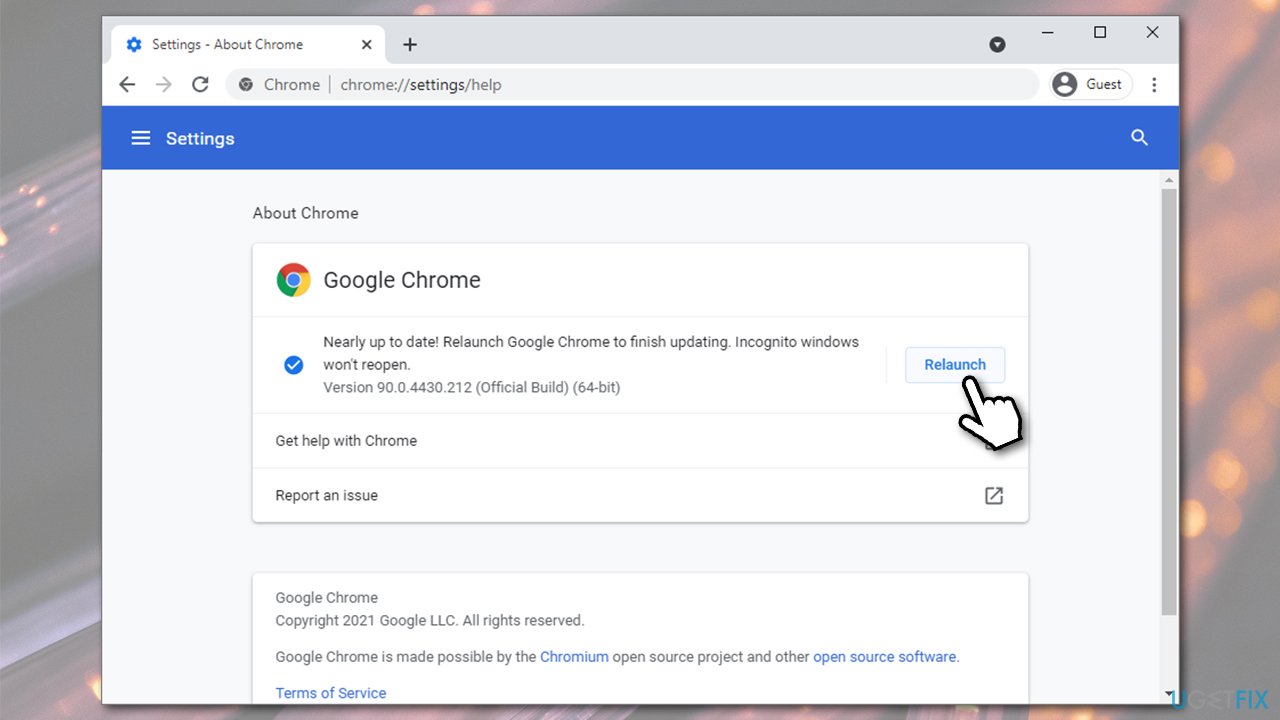
- Select Help > About Google Chrome
How to fix system error 109 error broken pipe on windows update google chrome - Chrome will automatically apply the found updates
- After it's done, click Relaunch.
How to fix system error 109 error broken pipe on windows update google chrome2
Solution 4. Run SFC and DISM
System file corruption might be the reason for System error 109: ERROR_BROKEN_PIPE to occur. Thus, you should try running a System File Checker:
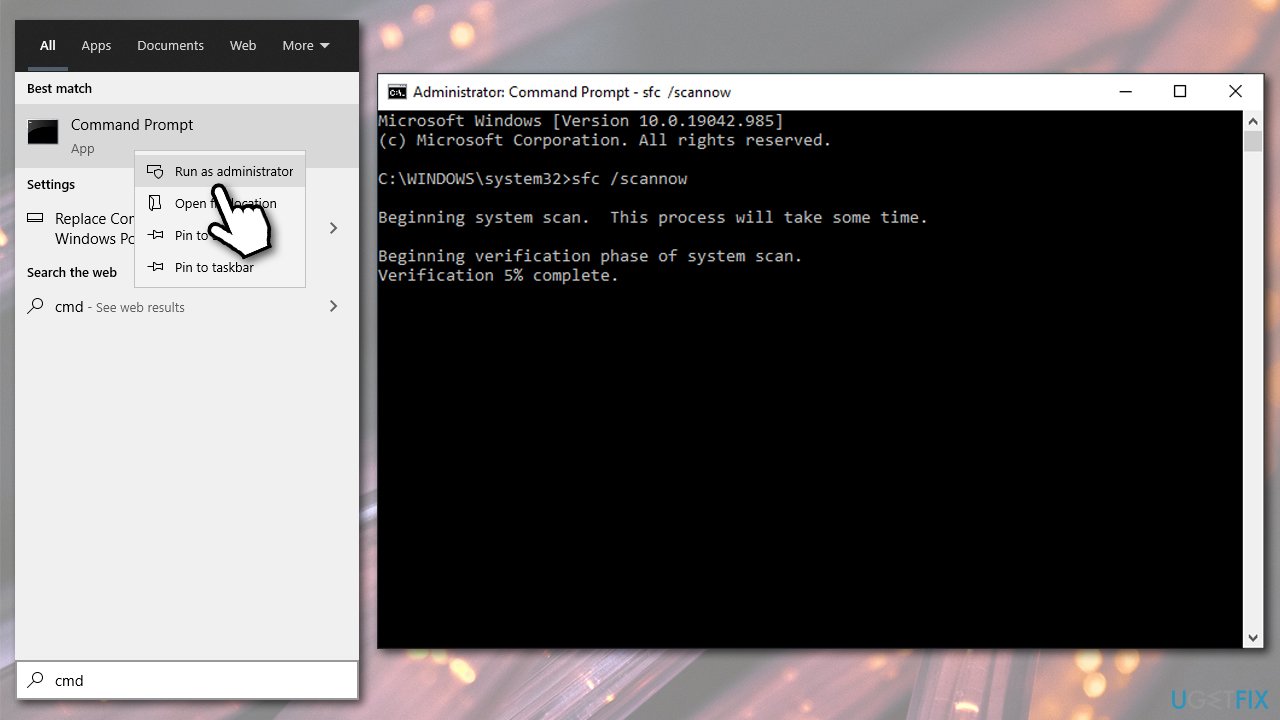
- Type cmd in Windows search
- Right-click on Command Prompt and select Run as administrator
- When User Account Control shows up, click Yes
- In the new window, type in the following commands, pressing Enter after each:
sfc /scannow
DISM /Online /Cleanup-Image /CheckHealth
DISM /Online /Cleanup-Image /ScanHealth
DISM /Online /Cleanup-Image /RestoreHealth - Restart your PC.
How to fix system error 109 error broken pipe on windows run sfc scan
Solution 5. Find software conflicts with Clean Boot
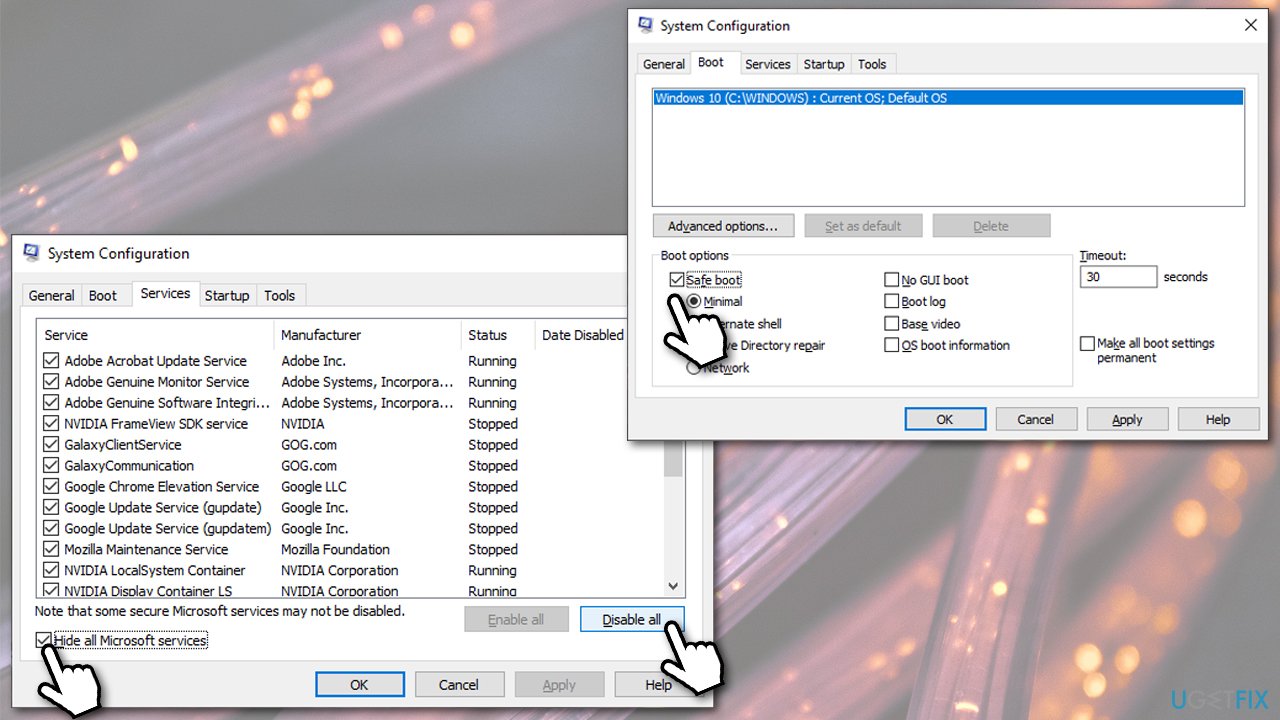
- Type msconfig in Windows search and press Enter
- Go to Services tab
- Tick Hide all Microsoft services option and then select Disable all
- Go to Startup tab and select Open Task Manager
- Right-click on every entry and pick Disable
- Close the Task Manager
- Go back to System Configuration Window and select Boot tab
- Mark the Safe Boot option, click Apply and OK
How to fix system error 109 error broken pipe on windows try safe boot - Restart your PC.
Check if the problem persists in this mode. If it doesn't, it means that there is software conflict on your PC. To remediate that, you should uninstall the most recently installed applications and see if the issue is resolved.
Bottom line
To fix System error 109 - ERROR_BROKEN_PIPE, you should first scan your PC for malware using reputable security software or Microsoft Defender. Additionally, consider using a repair tool to locate and fix broken Windows components. If these solutions do not resolve the issue, further investigation may be necessary.
Frequently asked questions
This error typically occurs when a program tries to write to a pipe that has been closed by another process. It can also happen due to issues with system files or conflicts between applications.
You can start by running the built-in Windows Troubleshooter for applications, or check for corrupted system files using the Command Prompt with the 'sfc /scannow' command.
Yes, ensure that all relevant applications are up to date and check the settings of any third-party firewall or antivirus software that may be interfering with the connection.




Report an issue
What's wrong with this guide? We review every report and update or remove content.
Report received — thank you. We'll review and fix it.
You need a free account to submit a report.
Be the first to comment