How to fix
Technical Support Scam Pop-Up Error # SL9DW61
on Windows
Resolve the Technical Support Scam Pop-Up Error # SL9DW61 on Windows 10 or 11 effortlessly. Quick solutions with expert-tested tips!

What causes How to Fix Technical Support Scam Pop-Up Error # SL9DW61?
- Technical Support Scam
- Ad-supported web browser extension
- Malicious code in web browser
- Pop-up designed to scare users
- Fake tech support message
Repairs Windows system files, removes malware, and restores a clean OS state — without reinstalling.
I‘m dealing with an error Sl9dw61 for a couple of weeks already. It doesn‘t seem a standard error as it shows on Google Chrome only and appears on casual occasions. I tried to find out when does it occur and what performances trigger it but did not notice any patterns. Could you please tell me how to fix this Chrome error? Thanks in advance!
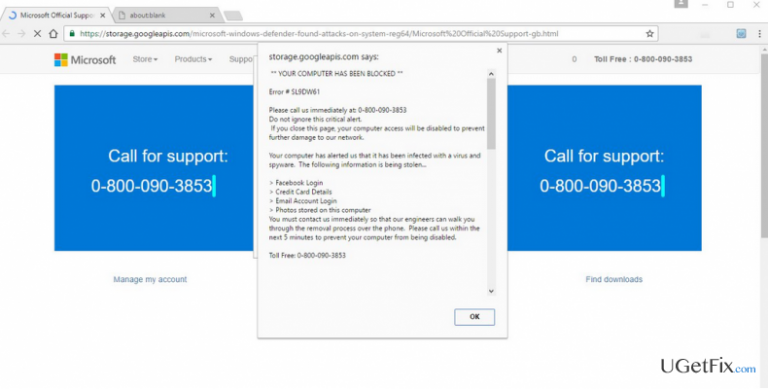
Error Code # Sl9dw61 is not a Google Chrome error. It‘s yet another Technical Support Scam, which can show up on Mozilla Firefox, Intenet Explorer, Microsoft Edge, Safari, and other web browsers. Often people search for the sequence of numbers 0-800-090-3853 in Google search. It‘s a telephone number provided on the Error Code # Sl9dw61 pop-up alert, which is presented as a toll-free number owned by Microsoft certified technicians. In some of the instances, the number may be replaced by 1-877-227-0785.
The message starts with a warning ** YOUR COMPUTER HAS BEEN BLOCKED ** and then provides a whole list of personal information that hackers are supposedly targeting (e.g. Facebook account, email account login, photos, documents, etc.). Error # SL9DW61 fake tech support pop-up typically shows up in a new tab window and freeze web browser instantly. Sometimes the pop-up may emerge on the website that the user is currently visiting. The content and design of the pop-up have been developed in a very convincing and frightening manner to make people fall for believing in it and prompt to call the telephone number provided.
BUT: do not take the information provided on the # SL9DW61 error seriously. It has been invented by scammers, what means that neither your Facebook account nor photos are going to be stolen, at least not now. This error message is a result of an ad-supported web browser extension, which apparently has dropped a malicious code into your web browser. This way, scammers seek to make people call a number provided on the alert and ask for help. At this point, it‘s very important to stress the fact that people on the other side of a handset are not working for Microsoft. They are frauds who may try to trick you into installing a malicious program on the system or provide your system‘s credentials, which are requisite for establishing remote access to your PC. Having this in mind, you should remove the malware that triggers # SL9DW61 tech-support-scam alerts and reset web browsers afterward. If you don‘t know how to do that, here‘s the guide:
How to Fix Technical Support Scam Pop-Up Error # SL9DW61?
Step 1. Remove malware from the system using a professional anti-malware
The easiest way to fix #SL9DW61 error is to perform a full scan of the system using a professional anti-malware. It will recognize and remove malicious and potentially unwanted programs from the system without leaving leftovers. For this purpose, you can use [d1].
In case you opt for removing # SL9DW61 virus manually, you should perform these steps:
- Right-click on the Win key and select Control Panel.
- Open Programs and Features.
- Carefully check the list of programs and delete the ones that you are not familiar with. NOTE: check the installation date and if it concise with the emergence of # SL9DW61 scam, it's advisable to delete it either.
- To remove the program, you have to click it and select Uninstall.
- Once done, reboot the system.
Step 2. Reset web browsers
As we have pointed out earlier, # SL9DW61 related malware carries a malicious code and injects it into each web browser. This code is responsible for the display of the error message, so without resetting web browser, the irritating pop-up will not be terminated. Therefore, reset your web browsers by following these instructions:
Bottom line
The # SL9DW61 error is a scam pop-up that can be resolved by removing any ad-supported browser extensions and running a malware scan. Users should also avoid calling the provided phone numbers, as they are not affiliated with Microsoft. If these fixes do not work, consider resetting your browser settings or seeking professional help.
Frequently asked questions
To remove the SL9DW61 scam pop-up, run a full system scan using Windows Defender or a reputable antivirus program, and clear your browser cache and cookies afterward.
To prevent the SL9DW61 scam pop-up, ensure that your Windows 10 or Windows 11 system is updated, avoid clicking on suspicious links, and consider using an ad blocker or a browser with built-in security features.
If the SL9DW61 pop-up persists, check for any unwanted programs in the Control Panel and uninstall them, or consider performing a system restore to a point before the issue began.




Report an issue
What's wrong with this guide? We review every report and update or remove content.
Report received — thank you. We'll review and fix it.
You need a free account to submit a report.
Be the first to comment