How to fix
“This file does not have a program associated with it for performing this action” error
on Windows
Resolve the "This file does not have a program associated with it" error on Windows 10 and 11 effortlessly. Expert-tested solutions for quick fixes!


What causes How to fix “This file does not have a program associated with it for performing this action” error on Windows?
- Missing program associated with a file type
- Outdated operating system
- Issues with the Windows registry
- Incorrect file associations
- Corrupted application installation
Repairs Windows system files, removes malware, and restores a clean OS state — without reinstalling.
Sometimes, when I open any application, in some cases, “This file does not have a program associated with it for performing this action. Please install a program or, if one is already installed, create an association in the Default Programs Control panel.” error. The issue occurs in many different applications, and I don't know what to do. I’d be grateful for your advice.
"This file does not have a program associated with it for performing this action" is a pop-up that users may encounter at any time when they are using their Windows computers - the error is not tied to up application startup or shut down. Nevertheless, the explanation within it says that a program associated with a particular file is missing.
While there are many different files that the "This file does not have a program associated with it for performing this action" error may be associated with, most commonly, users encounter issues with pictures, Windows Explorer, MS Office documents, archived files, etc.
The error states the following:
This file does not have a program associated with it for performing this action. Please install a program or, if one is already installed, create an association in the Default Programs control panel.
The cause of the "This file does not have a program associated with it for performing this action" error is usually associated with an issue where Windows cannot find a program on the system in order to open the associated file type. However, there might be other reasons, such as an outdated operating system or issues with the Windows registry.[ref en-3]
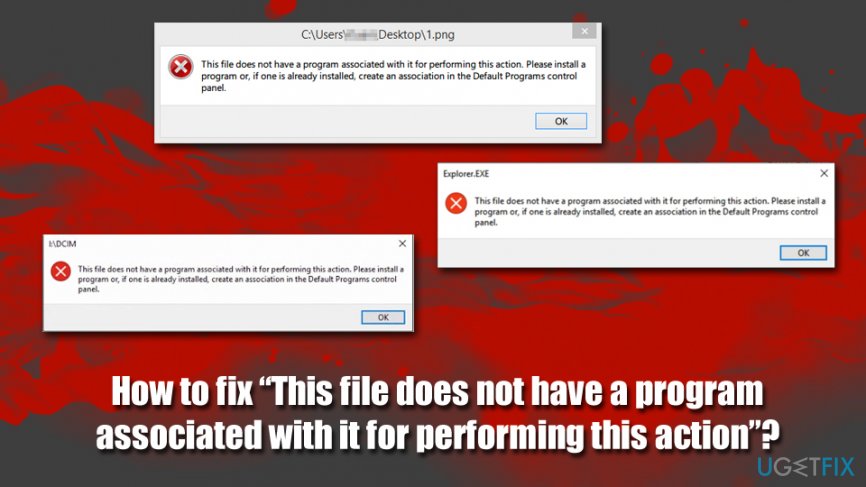
Due to different reasons why the issue occurs, "This file does not have a program associated with it for performing this action" error fix varies from machine to machine, as each Windows configuration is different. Below you will find several methods that will most likely help you fix "This file does not have a program associated with it for performing this action" error, although you should for it carefully.
Before you proceed, however, we would like to offer you fix the issue with the help of [d1] - a PC repair tool that finds and fixes Windows issues automatically. If no luck, however, proceed with the solutions for the "This file does not have a program associated with it for performing this action" error below.
Fix 1. Scan your computer for malware
Spora ransomware is known to sometimes cause the "This file does not have a program associated with it for performing this action" error. It triggers UAC messages to ask for users’ permission to execute the file-encrypting threat. Such commands are disguised under Microsoft processes, so unsuspecting users enable the command. Thus, scan your machine for malware as a first step - you can use the built-in Windows Defender for that.
- Type in Security into Windows search and pick Windows Security
- Select Virus & Threat protection
- Choose Scan options
- Select Full scan and then Scan now
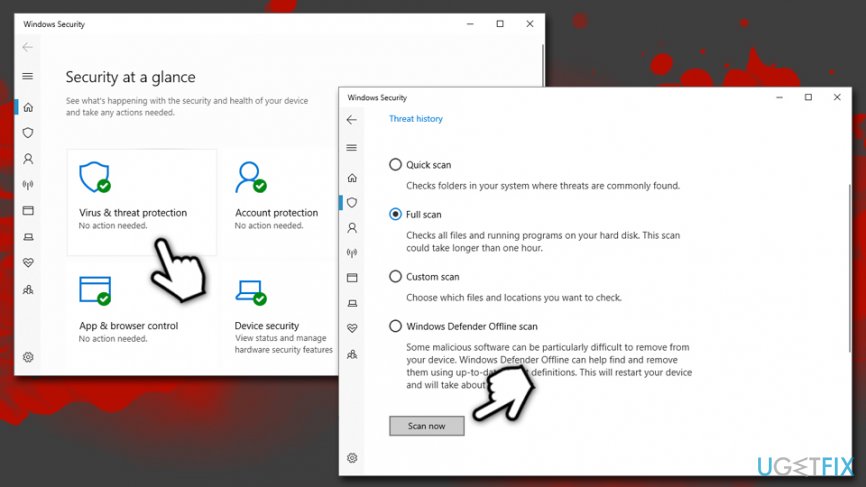
Fix this file does not have a program associated with it for performing this action error scan for malware
Fix 2. Run System File Checker via Command Prompt
System File Checker can be accessed via Command Prompt - it is essentially a pop-up window that you can input commands into. While it might seem not user-friendly, using it is rather easy as long as the correct command is pasted into it. Therefore, follow these steps to check for corrupted system files:
- Type in cmd in Windows search
- Right-click on Command Prompt result and select Run as administrator
- In case User Account Control pops up, click Yes
- In the newly opened window, type in the following command and hit Enter:
sfc /scannow
- Wait till Windows completes the scan and fixes errors automatically
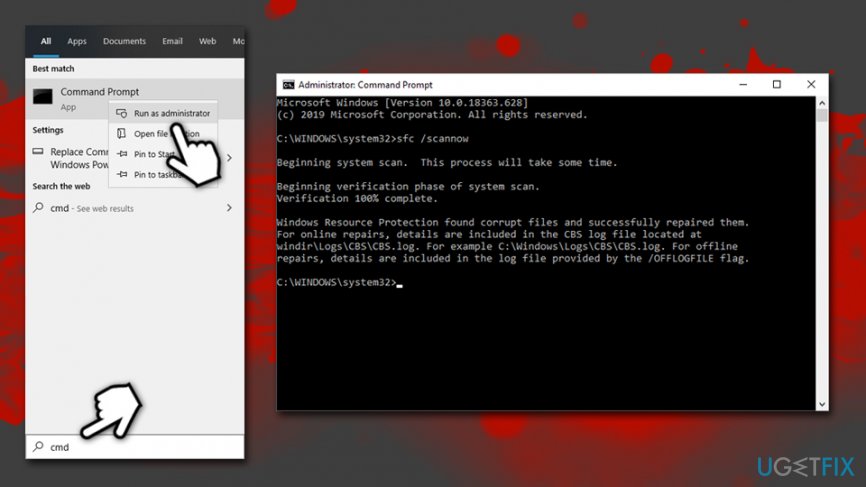
Fix this file does not have a program associated with it for performing this action error run sfc scan
Fix 3. Use files and folders troubleshooter
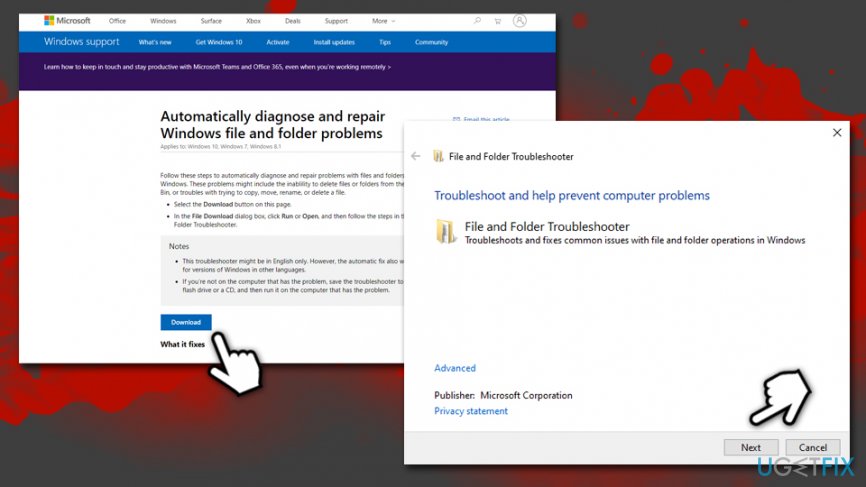
Microsoft provided a hotfix[ref en-2] for errors such as "This file does not have a program associated with it for performing this action." Go to the following website and download Windows file and folder troubleshooter by clicking on the Download button.
Once downloaded, double-click the file - the Troubleshooter will show up. Merely click Next and proceed with the provided on-screen instructions.
Fix 4. Update Windows
Windows updates are crucial for every computer running this operating system. Updates not only provide users with improved functionality but also fix bugs,[ref en-1] improve stability, and prevent malware attacks. Thus, ensure that your Windows is running the latest version:
- Right-click on Start and pick Settings
- Go to Updates & Security
- On the right side of the window, click on Check for updates
- Wait till Windows downloads and installs new updates
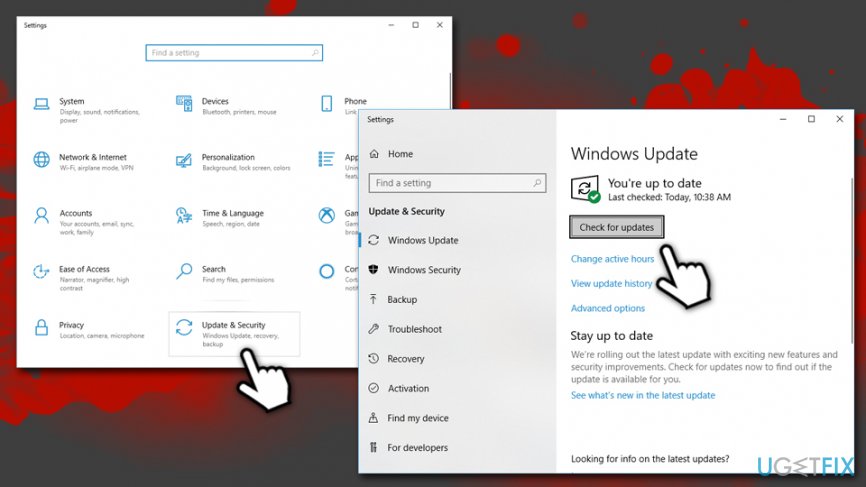
Fix this file does not have a program associated with it for performing this action error update windows - Reboot your machine and check if the problem persists
Fix 5. Choose a default app for the problematic file
Because the issue lies within file associations, choosing a default program for the problematic file might fix the "This file does not have a program associated with it for performing this action" error. Here's how to do it:
- Right-click on Start and pick Settings
- Select Apps
- On the left side, pick Default apps option
- Here, scroll down and click on Choose default apps by file type
- Fine the associated file type
- Select the plus (+) button and choose the appropriate program to open the file with
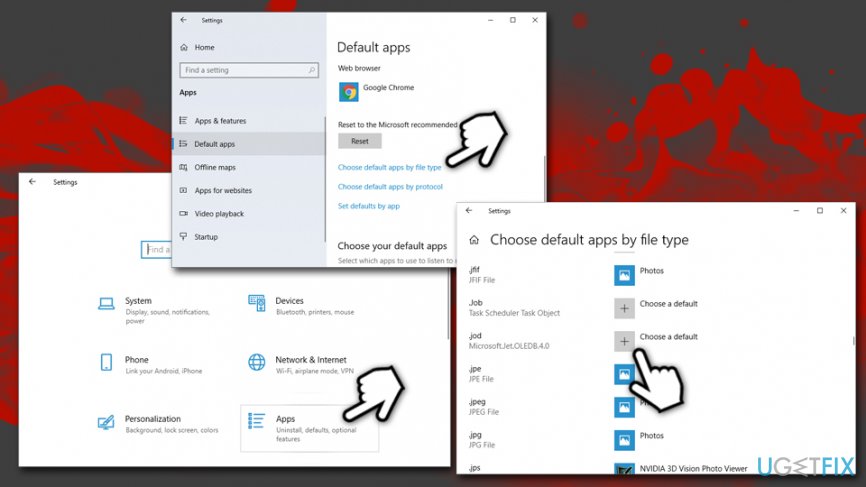
Fix this file does not have a program associated with it for performing this action error choose default app
Fix 6. Modify Windows registry
This method is highly likely to work for most. However, please note that incorrect Windows registry modification might result in system malfunction. Therefore, you should first back it up.
- Type regedit in Windows search and hit Enter
- If UAC shows up, click Yes
- Once Registry editor opens, click on File > Export
- Select the location for the backup of you Registry
- Make sure Export range is set to All and then click Save
Now, perform the following steps to fix "This file does not have a program associated with it for performing this action" error:
- Go to the following key: HKEY_CLASSES_ROOT\\Lnkfile
- On the right side, click on the empty space and select New > String Value
- Name it IsShortcut and close the Registry editor
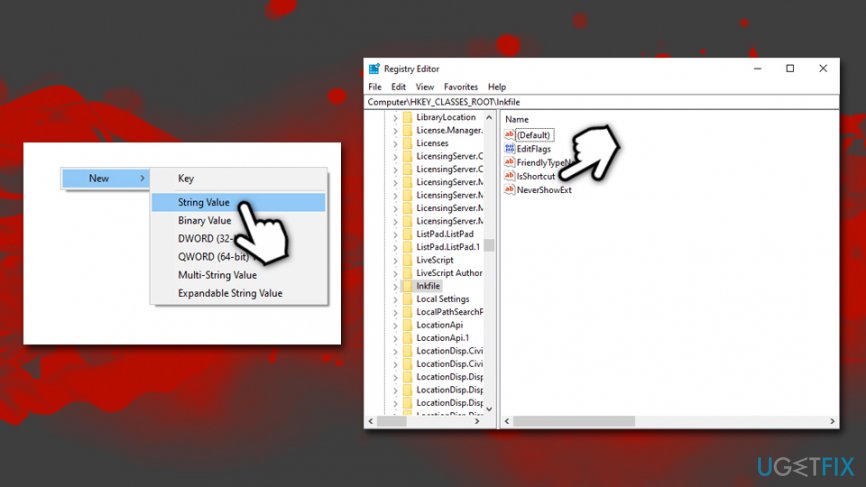
Fix this file does not have a program associated with it for performing this action error modify windows registry
Bottom line
To fix the error, you can try reinstalling the associated program, updating your operating system, or checking the Default Programs Control panel for correct file associations. If these methods do not resolve the issue, consider seeking further technical assistance.
Frequently asked questions
You can fix this error by right-clicking the file, selecting 'Open with,' and then choosing the appropriate program or setting a default program for that file type.
Go to Settings > Apps > Default apps, then search for the file extension and select the program you want to use as the default.
You can use the 'Settings' app to reset the default apps or run the command 'sfc /scannow' in Command Prompt to repair any corrupted system files.




Report an issue
What's wrong with this guide? We review every report and update or remove content.
Report received — thank you. We'll review and fix it.
You need a free account to submit a report.
Be the first to comment