How to fix
“Windows can’t activate. Try again later. Error code: 0xC004FC03” error
on Windows
Resolve the "Windows can't activate" error code 0xC004FC03 quickly. Get effective solutions for Windows 10 and 11, with expert-tested methods.

What causes How to fix “Windows can’t activate. Try again later. Error code: 0xC004FC03” error?
- Problems related to the network connection
- Inadequately configured Firewall settings
- Unstable Internet connection
- Microsoft's servers experiencing troubles
Repairs Windows system files, removes malware, and restores a clean OS state — without reinstalling.
I got the message saying that my “Windows is not activated. Try again later." The error code is 0xC004FC03. I entered the product key again, nothing worked. Until now everything worked fine. Been struggling to find the solution. I’d appreciate your advice.
Windows can't activate. Try again later. Error code: 0xC004FC03 is an error that users might encounter when trying to activate Windows license - more precisely, after entering the Windows activation key. The key is usually obtained as soon as the official license is purchased, and it needs to activate by entering it into the OS that is tied to a particular PC.
Once encountered, users can see a pop-up message of Error code: 0xC004FC03, which states that Windows can't activate. In most of the cases, this error arises due to problems related to the network connection or the inadequately configured Firewall[ref en-3] settings. In other words, constantly interrupted and unstable Internet connection is one of the reasons for the 0xC004FC03 error to appear.
While the error message itself says that you could wait and try again later (which might be a completely valid solution to fix 0xC004FC03 error, as Microsoft's servers might be experiencing troubles), there are are several methods you could try before that. Down below, we provide you with a few techniques that could help you in some cases.
Before you proceed with 0xC004FC03 error fixes, you should be aware that error codes are highly abused by cybercriminals. They compile fraudulent websites that pretend to be legitimate and represent fake Microsoft messages. This scheme is known as a tech support scam,[ref en-2] and there are numerous ones created. While many of them are shut down by appropriate parties, the problem is that the scam can be hosted on hundreds, if not thousands of websites, which usually cannot be disabled straight away.
To avoid 0xC004FC03 scam, you should be more aware of how crooks operate it. First of all, the malicious destination website can be reached in two different ways: you either get redirected from another site, or you have an adware application installed on your computer.
The fake alert states:
Windows Security
Microsoft Edge
The server *** is asking for your user name and password.
That server also reports: "Suspicious activity detected due to harmful virus installed in your computer. Call Microsoft Toll Free now @ +1-833-292-1252 for any assistance. Your data is at a serious risk. There is a system file missing due to a harmful virus error, causing system failure. Please contact technicians at Microsoft Toll Free Helpline at @ +1-833-292-1252. PLEASE DO NOT SHUT DOWN OR RESTART YOUR COMPUTER, DOING THAT MAY LEAD TO DATA LOSS AND FAILURE OF OPERATING SYSTEM, HENCE NON BOOTABLE SITUATION RESULTING IN COMPLETE DATA LOSS. CONTACT MICROSOFT TO RESOLVE THE ISSUE ON TOLL FREE NUMBER: +1-833-292-1252".
Claiming fake virus infections or "suspicious activity" is very typical of online scams, as it tries to abuse human emotions to make them act quicker - these are all social engineering tricks you should never fall for. The alerts that claim malware infections or other similar things are all bogus, as there is no way a browser-based scanner could identify such threats. Besides, Microsoft would never provide contact information on their BSOD[ref en-1] or other warnings/error messages.
If you encountered this bogus 0xC004FC03 error, you do not need to do anything, apart from closing the malicious website. Never call the provided number, as crooks will try to extort money from you after getting remote access to your machine. Besides, they might also install malware on your computer that could steal sensitive data via keystroke recording or similar ways.
Nevertheless, if you encounter 0xC004FC03 and similar scams often, you should check your computer for adware.[ref en-4] To fully find out how to eliminate the adware that redirects to tech support scam sites, please visit an article about similar fake error: rundll32.exe. You will find detailed instructions on how to deal with adware and its aftermath.
If you are dealing with a real 0xC004FC03 error, however, proceed with the instructions provided below.
Option 1. Run built-in troubleshooters
As we already mentioned, 0xC004FC03 error mostly indicates problems with networking on your Windows computer. Let's run the troubleshooters first:
- Right click on Start and select Settings
- Click Update & Security
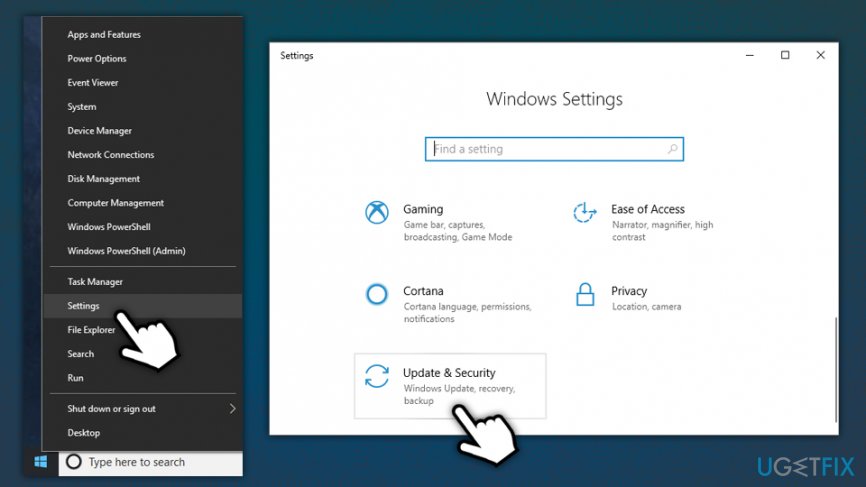
Error code 0xc004fc03 fix go to settings update and security section - On the left side, select Troubleshoot
- Pick Internet Connections > Run the troubleshooter
- Wait till the scan finishes
- Scroll down and select Network Adapter > Run the troubleshooter
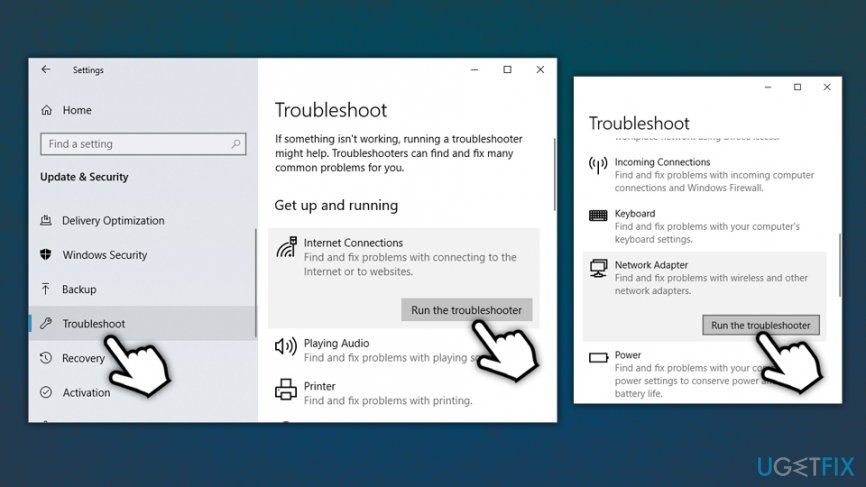
Error code 0xc004fc03 fix run troubleshooter - Troubleshooters should help you identify issues with your connection and offer solutions to fix them
Option 2. Renew your IP address via Command Prompt
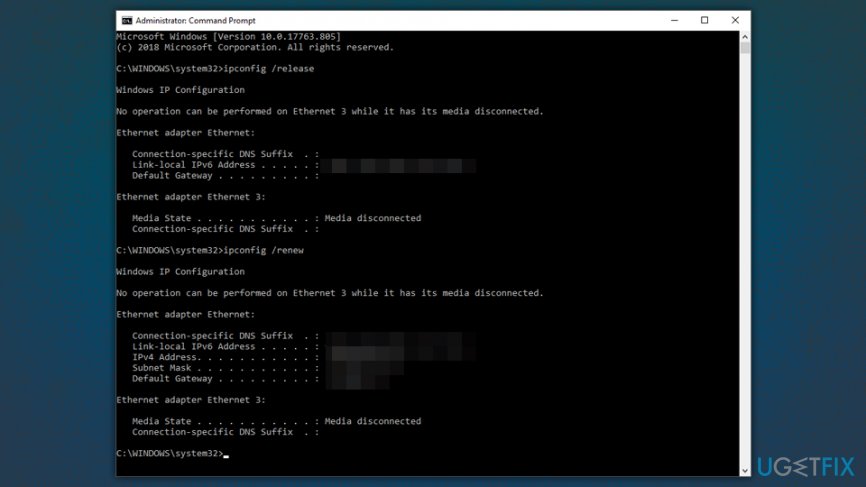
Renewing your IP address might be another way to fix 0xC004FC03 error. For that, access Command Prompt as administrator:
- Type in cmd or Command Prompt into Cortana's search box
- From search results, pick Command Prompt, right-click and select Run as administrator
- If User Account Control prompt shows up, click Yes
- In the new window, paste the following line and hit Enter:
ipconfig /release
- Next, type in the following and press Enter once again:
ipconfig /renew
Option 3. Activate Windows via Command Prompt
Use Command Prompt to register Windows key:
- Type in cmd or Command Prompt into Cortana's search box
- From search results, pick Command Prompt, right-click and select Run as administrator
- Paste the following entry ad press Enter:
slmgr.vbs /ato
This command will make Windows attempt to activate the OS online.
Option 4. Activate Windows via the phone
- Press Win key + R and type in SLUI 4
- Select the country you are from and then pick Next
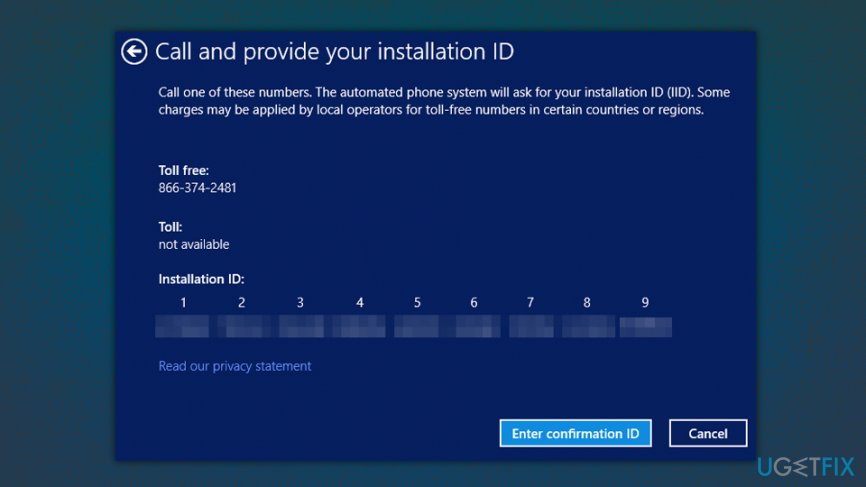
Error code 0xc004fc03 fix activate windows via the phone - You will be provided with a local contact number you can call to activate Windows via the phone
- The automated response will ask you if you need more assistance - you should answer Yes
- Wait till you can talk to an operator who will guide you through the activation process
Option 5. Temporarily turn off Windows Firewall
Windows Firewall can sometimes block the activation of Windows. Follow these steps to temporarily disable it:
- Type in Control Panel into Cortana's search box and hit Enter
- In the Control Panel, click System and Security
- Click Windows Defender Firewall
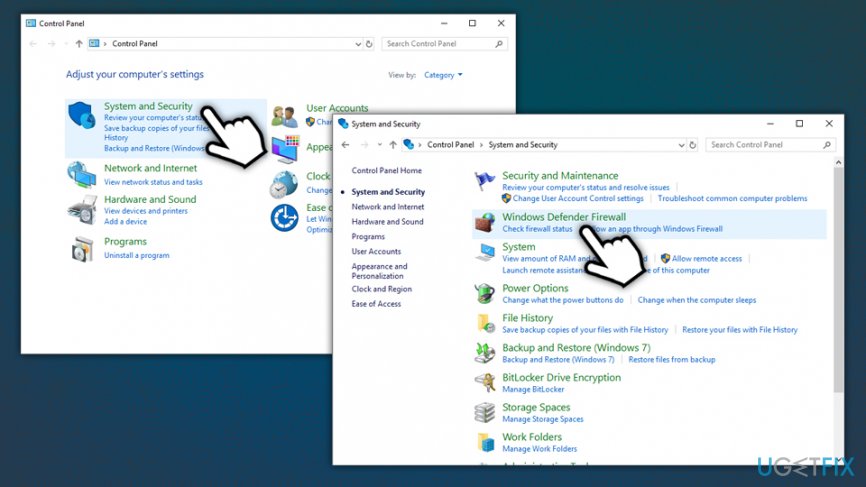
Error code 0xc004fc03 fix go to control panel firewall - On the left pane, click Turn Windows Defender Firewall on or off
- Turn off the Firewall for Private and Public networks and click OK
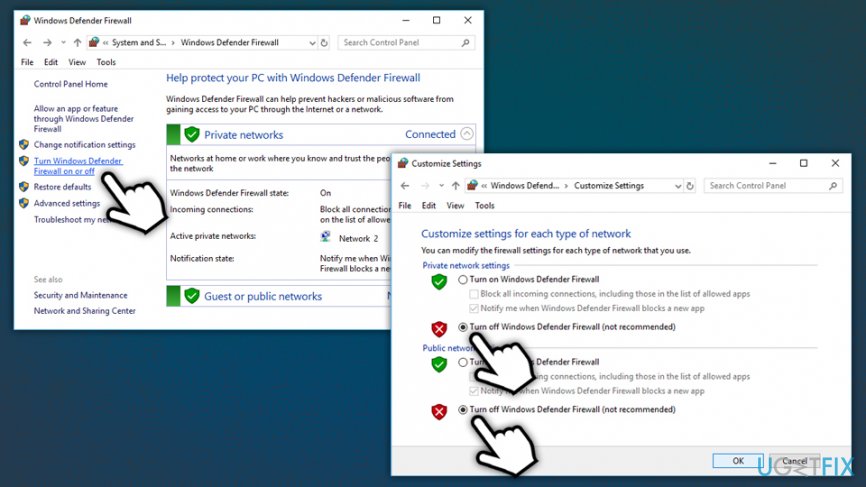
Error code 0xc004fc03 fix turn off firewall - Try activating Windows again
- Do not forget to turn the Firewall back on!
To fix Windows errors automatically and also deal with the aftermath of malware infections, we highly recommend downloading and installing [d1]. This software might not only help you fix 0xC004FC03 error automatically but will also deal with Windows problems that might arise in the future.
Bottom line
To fix the 0xC004FC03 error, you can try waiting and attempting activation later, checking your network connection, or adjusting your Firewall settings. If these methods do not resolve the issue, consider seeking further assistance or checking for potential scams related to the error.
Frequently asked questions
The error code 0xC004FC03 indicates that the Windows activation service cannot verify your product key, often due to issues with the key itself or the activation server.
To fix the 0xC004FC03 error on Windows 11, try running the Windows Activation Troubleshooter found in Settings under Update & Security, or ensure your product key is entered correctly.
Reinstalling Windows 10 may help if the installation is corrupted, but it's better to first troubleshoot the activation issue using the built-in tools before considering a reinstall.




Report an issue
What's wrong with this guide? We review every report and update or remove content.
Report received — thank you. We'll review and fix it.
You need a free account to submit a report.
Be the first to comment