How to fix
Windows Defender Definition Update Error Code 0x80072af9
on Windows
Resolve Windows Defender Definition Update Error Code 0x80072af9 quickly and easily with expert-tested solutions and clear screenshots.

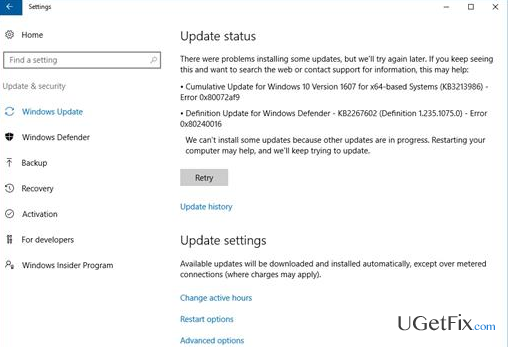
What causes How to Fix Windows Defender Definition Update Error Code 0x80072af9?
- Third-party anti-virus software interference
- Leftover files from uninstalled anti-virus programs
- Incompatibility with Norton or McAfee applications
- Failure to download definition updates
- Security breaches due to outdated definitions
Repairs Windows system files, removes malware, and restores a clean OS state — without reinstalling.
When I check for updates in Windows Defender, I receive an error message, which declares that the definition updates cannot be checked or installed. The error code is 0x80072af9. What should I do?
Windows Defender is a signature-based anti-virus owned by Microsoft, which comes by default with Windows 10 operating system. While it was first used as a free antispyware tool for Windows XP, 7, and Vista, it has been improved significantly and made into a full anti-virus program built into Windows 8 and 10. AV-TEST revealed that Windows Defender is capable of recognizing and eliminating 94.5% of PC threats, meaning that it's sufficient to protect the system from both minor and severe computer threats. However, if Windows Defender lacks for the latest definitions, it may fail in detecting the newest cyber threats. Therefore, running definition updates on a regular basis is very important to prevent security breaches. The problem is that sometimes Windows Defender definition updates fail to download due to various reasons. One of the current Windows Defender definition update errors is 0x80072af9. Usually, it shows up immediately when a PC’s owner opens Windows Defender or attempts to check for updates. The error won’t let to install the latest definition update, what means that your operating system may have some security breaches. To fix Windows Defender error code 0x80072af9, you should try the following methods.
How to Fix Windows Defender Definition Update Error Code 0x80072af9?
Method 1. Disable third party anti-virus or remove its leftovers
Some Windows experts claim that the culprit of the Error Code 0x80072af9 may be the Norton or McAfee applications or their file leftovers. Therefore, make sure to disable any third-party anti-virus (or even remove it). If you have run any of these tools before, but they are long gone from your PC, it’s advisable to perform a full scan with [d1] and make sure that all file leftovers have been removed successfully. It has been noticed that McAfee and Norton tools are quite notorious for not uninstalling cleanly, which is why Windows Defender may be colliding with their remnants. This tool additionally checks the system for malware, delete corrupted files, remove other junk files, and ensure the full system’s optimization.
Method 2. Install all available Windows Updates
Microsoft developers are aware of most of the Windows 10 bugs and are working hard to release fixes ASAP. To get support and keep the system working smoothly, it’s vital to install Windows Updates regularly. Therefore, to fix the 0x80072af9 bug, it’s advisable to run Windows Updates:
- Press Windows key + I and select Update & Security.
- Click Check for Updates and wait until the system performs a scan.
- If you have some updates available, install them and check if Windows Defender definition update error 0x80072af9 vanished. If not, move on to the next fix.
Method 3. Update Windows Defender from within its interface
- Right-click on an empty space on the desktop and select New -> Shortcut.
- Create a shortcut for %SystemRoot%\System32\Cmd.exe /c Cleanmgr /sageset:35 & Cleanmgr /sagerun:35 command.
- Right-click the shortcut and run it as an administrator.
- The press Windows key + X and select Command Prompt (Admin).
- If a UAC shows up, click OK to proceed.
- Type Dism /Online /Cleanup-Image /StartComponentCleanup command and hit Enter.
- Once done, try to install Windows Defender definition update.
Please let us know if these methods helped you to fix Definition Update Error Code 0x80072af9 successfully.
Bottom line
To fix the Windows Defender error code 0x80072af9, you should disable any third-party anti-virus software or remove its remnants. Additionally, performing a full scan to eliminate leftover files may resolve the issue. If these methods do not work, further troubleshooting may be necessary.
Frequently asked questions
The error code 0x80072af9 usually indicates that Windows Defender is unable to download definition updates due to network connectivity issues or server-related problems. This can occur on both Windows 10 and Windows 11 systems.
To resolve the 0x80072af9 error, check your internet connection and ensure that your system's date and time are correct. Additionally, try resetting the Windows Update components and running the Windows Update Troubleshooter.
Yes, you can manually download the latest Windows Defender definition updates directly from the Microsoft website and install them on Windows 10 or Windows 11. This method can help bypass the error if the automatic updates are failing.




Report an issue
What's wrong with this guide? We review every report and update or remove content.
Report received — thank you. We'll review and fix it.
You need a free account to submit a report.
Be the first to comment