How to fix
Window’s Defender Error Code: 0x80016CFA
on Windows
Resolve Windows Defender error code 0x80016CFA quickly and easily. Get expert-tested solutions to keep your Windows 10 or 11 secure. Fixed in minutes!

What causes How to Fix Window’s Defender Error Code: 0x80016CFA?
- Fake pop-ups from scammers
- Ad-supported extensions and plug-ins
- Downloading third-party software
- Frequent virus infections
- System malfunctions due to malware
Repairs Windows system files, removes malware, and restores a clean OS state — without reinstalling.
Hello. I need some help in removing Window's Defender Error Code: 0x80016CFA pop-up page from Edge. It keeps reoccurring numerous times when I browse. Each time it shows up I have to force my web browser to close, but when I open it again, it shows up randomly, so it’s not possible to browse the Internet regularly. I tried using Chrome, and it’s OK, but I got used to Edge, so I would like it to be clean. Please help.
Have you heard about Tech-Support-Scam alerts? These are fake pop-ups distributed by scammers and displayed within web browsers. Typically they inform people about serious system malfunctions, such as virus infections, malware or system errors due to which the system is about to crash. Indeed, these days virus infections are very common, as well as the occurrence of BSOD, stop errors, and pop-up error messages are very frequent. Scammers took advantage of these things and developed fake pop-up alerts that seek to trick people into believing that their PCs need professional maintenance so that they have to call for “professional technicians.” However, it’s vital to stress the fact that neither Microsoft nor Apple or another legitimate company is not sending warnings about virus or system malfunctions via web browsers.
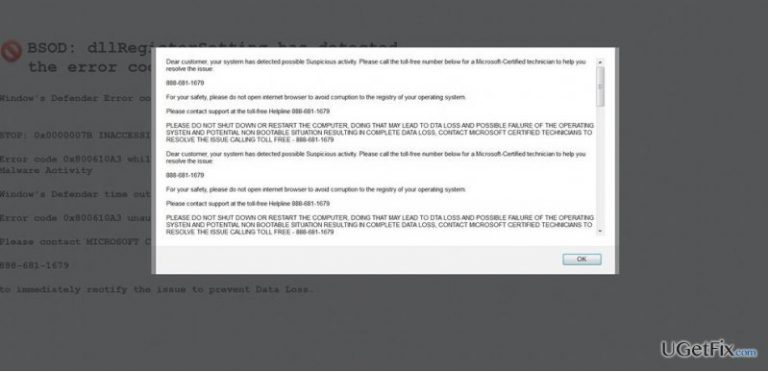
One of the current Tech-Support-Scam alerts is Window's Defender Error Code: 0x80016CFA. It tends to occupy Microsoft Edge web browsers and is limited (but not restricted) to Windows 10 OS. Usually, it shows up on the system a couple of days after downloading third-party software, such as download manager, media player or PDF converter. That’s because Window's Defender Error Code: 0x80016CFA fake alert is triggered by ad-supported extensions and plug-ins that spread as third-party software attachments. The pop-up takes up a full screen of web browser and freezes it, so the blue screen environment cannot be exited by pressing the X or OK buttons.
The message contains several bug check values, including 0x80060402, 0x80060402 and 0x0000007B. Besides, it includes the INACCESSIBLE_BOOT_DEVICE BSOD error name and dllRegisterSetting file name. Such technical information refers to the current Windows bugs, so typing any of these codes will in Google search deliver a sufficient amount of information. However, these error codes are have been taken by scammers with a particular purpose, which is to convince people that the situation is dangerous and that they need the help of professionals.
In case the user gets caught in the trap, scammers provide the number of a “Windows-certified technician.” Here where the danger lies. The given number does NOT belong to the IT specialists, at least not for the trusted ones. Window's Defender Error Code: 0x80016CFA scam provides a telephone number of frauds who attempt to swindle people’s money or trick them into giving a full control of their PCs remotely. All in all, if you have started receiving a threatening "Window's Defender Error Code: 0x80016CFA" or BSOD: dllRegisterSetting pop-up alerts within your web browser, you’ll have to remove malware from the system and reset web browser’s settings. These are the steps:
Step 1. Scan the system with a professional anti-malware
To fix Window's Defender Error Code: 0x80016CF pop-up, you have to terminate the malware that has dropped a malicious code on your web browser. For this purpose, you have to arm your PC with a reputable anti-malware, such as [d1]. Malware detection and removal is not the only advantage of this utility. After initiating a scan with it, you will notice an improved Windows performance as it's capable of fixing system errors, cleaning registries, removing duplicate files, and similar.
While automatic malware removal is the best choice, the culprit of Window's Defender Error Code: 0x80016CF error may be eliminated manually as well:
- Click Win key and find Control Panel.
- Open Programs and Features (Add/Remove Programs on Windows XP).
- Check the list of installed programs and find the ones that look suspicious or you are not familiar with.
- Click them and select Uninstall.
- After that, reboot your PC.
Step 2. Reset web browser
If you remove malware without resetting web browser's settings, the malicious code will be left active and the Window's Defender Error Code: 0x80016CF message will keep occurring. However, before you reset web browser's settings, check for unknown add-ons, plug-ins or extensions and disable them. Once done, reset web browsers and check if the tech-support-scam message still occurs.
Bottom line
To fix the Window's Defender Error Code: 0x80016CFA, remove any suspicious extensions from Microsoft Edge, avoid downloading unverified third-party software, and ensure your antivirus is up to date. If these steps do not resolve the issue, consider seeking professional help.
Frequently asked questions
This error typically arises due to corrupted system files, conflicts with third-party antivirus software, or misconfigured settings in Windows Defender.
To fix this error, try running the Windows Security Troubleshooter, resetting Windows Defender settings, or performing a system file check using the 'sfc /scannow' command in the Command Prompt.
Yes, keeping Windows 10 or Windows 11 updated can resolve compatibility issues and bugs that may contribute to the 0x80016CFA error.




Report an issue
What's wrong with this guide? We review every report and update or remove content.
Report received — thank you. We'll review and fix it.
You need a free account to submit a report.
Be the first to comment