How to fix
Windows Update Error 0x8e5e0147
on Windows
Resolve Windows Update Error 0x8e5e0147 quickly and effectively. Follow our expert-tested guide to restore your system's updates effortlessly. Fixed in …

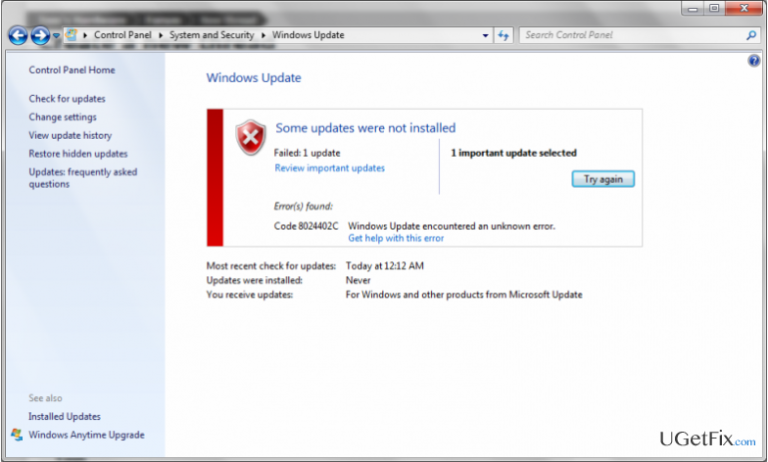
What causes How to Fix Windows Update Error 0x8e5e0147?
- Incompatibility within Internet proxy configuration
- Damage of temporary files location due to malware infection
- Antivirus software causing conflicts
- Issues with Windows Update service
- Corrupted system files
Repairs Windows system files, removes malware, and restores a clean OS state — without reinstalling.
I can’t use Windows Update service. Whenever I try to install a cumulative update, Office Update or any other update that is detected by Windows Update, I receive an error code 0x8e5e0147, and further actions are not allowed.
0x8e5e0147 is a Windows 10 Update Error (some cases on Windows 7 and Vista), which shows up when trying to install updates via Windows Update service. Typically it prevents people from installing cumulative updates, for example, KB3081444, KB3081441, KB960225 OR kb959772, but sometimes Windows Updates service refuse to install any available updates. This issue has already been included in the list of errors within official Microsoft support page, so the company has already acknowledged the problem and provided a couple of fixes. As usually, Windows engineers recommend running Windows Update Troubleshooter and disable anti-virus software. Those who have tried these Windows Update 0x8e5e0147 error fixes declared that they are not working, but, nevertheless, give them a try as you can never know what exact problems have aroused on your device. Some IT specialists suggest the idea that this bug check may occur due to the incompatibility within Internet proxy configuration or the damage of temporary files location due to malware infection. Therefore, we will try to provide as many 0x8e5e0147 error fixes as we come up with, so try each of them one by one, and we hope that your problem will be solved.
How to Fix Windows Update Error 0x8e5e0147?
Fix 1. Run Windows Update Troubleshooter
As Microsoft suggests, your starting point in 0x8e5e0147 error removal should be automatic problem search using Windows Update Troubleshooter. To launch the utility, please do the following:
- Click Win key + X and select Control Panel.
- Type Troubleshooter and select Troubleshooting from the search results.
- Select System and Security and click on Fix problems with Windows Updates.
- Wait for the process to complete and then check if the error reoccurs on Windows Updates.
Fix 2. Disable Antivirus and check Windows Firewall Settings
Antivirus programs are often the culprit of Windows bugs due to incompatibilities. This fix should mostly draw the attention of those who are using Norton or McAfee anti-virus as the two appeared to be causing the 0x8e5e0147 error. In general, disable any antivirus software running on your machine and navigate to Windows Updates. If the problem is still there, do not enable your antivirus. Before doing so, check the settings of Windows Firewall:
- Click Win key + R, type Firewall.cpl, and press OK.
- Select Turn Windows Firewall On or Off option.
- Go to Private Network Settings and select Turn off Windows Firewall (not recommended).
- Once done, navigate to the Public Network Settings and select Turn off Windows Firewall (not recommended).
- Click OK to save the changes and check if these steps helped to solve 0x8e5e0147 error code on Windows Update. If you have successfully installed Windows Updates, make sure to Turn on Windows Firewall both in Private and Public.
Fix 3. Remove malware
Virus/malware infection may cause system crashes, errors, and various malfunctions due to which it may be difficult to use a PC. Thus, whenever a problem arises, arm your PC with [d1] or an alternative program and initiate a thorough system scan.
By the way, Microsoft has a Microsoft easy fix solution, which has been developed to scan and fix system errors automatically. While this utility may not solve all the problems, it’s certainly worth given a try. You can download it here.
Bottom line
To fix the Windows Update error 0x8e5e0147, you can start by running the Windows Update Troubleshooter and disabling your antivirus software. If these solutions do not resolve the issue, consider checking your Internet proxy settings and scanning for malware.
Frequently asked questions
This error typically occurs due to corrupted system files, issues with the Windows Update service, or conflicts with third-party software. Ensuring that your system is up-to-date and running a System File Checker scan can help resolve this issue.
You can troubleshoot this error by running the Windows Update Troubleshooter, resetting the Windows Update components, or checking for any pending updates manually. It's also advisable to disable any antivirus software temporarily to see if it resolves the issue.
Yes, you can manually download and install the latest cumulative update from the Microsoft Update Catalog website, which may bypass the error. Additionally, performing a clean boot can help identify if background services are interfering with the update process.




Report an issue
What's wrong with this guide? We review every report and update or remove content.
Report received — thank you. We'll review and fix it.
You need a free account to submit a report.
Be the first to comment