How to fix
Windows update standalone installer error 0x800b0101
on Windows
Resolve the Windows update standalone installer error 0x800b0101 effortlessly. Expert-tested solutions for Windows 10 and 11, fixed in minutes!


What causes How to fix Windows update standalone installer error 0x800b0101?
- System file corruption
- Missing update components
- Outdated Windows elements
- Invalid certificate validity period
- Issues with the current system clock
Repairs Windows system files, removes malware, and restores a clean OS state — without reinstalling.
Hey. I tried to install a pending update via the Windows Update Standalone installer, and I received an error 0x800b0101. Please help me resolve this if that's possible.
Windows updates can include multiple components in them - updates for security, features, and built-in elements such as PowerShell. Some of these components can be downloaded in a preview build, but they are only available within the Insider program.[ref en-1] Nonetheless, it seems like people are getting the 0x800b0101 update error in both cases.
The issues with outdated Windows elements might not necessarily be apparent, but it all comes down to the security and stability of the system. While preview builds would definitely not affect these aspects, major update releases would. Thus, finding ways how to fix the 0x800b0101 error is rather important - better sooner than later.
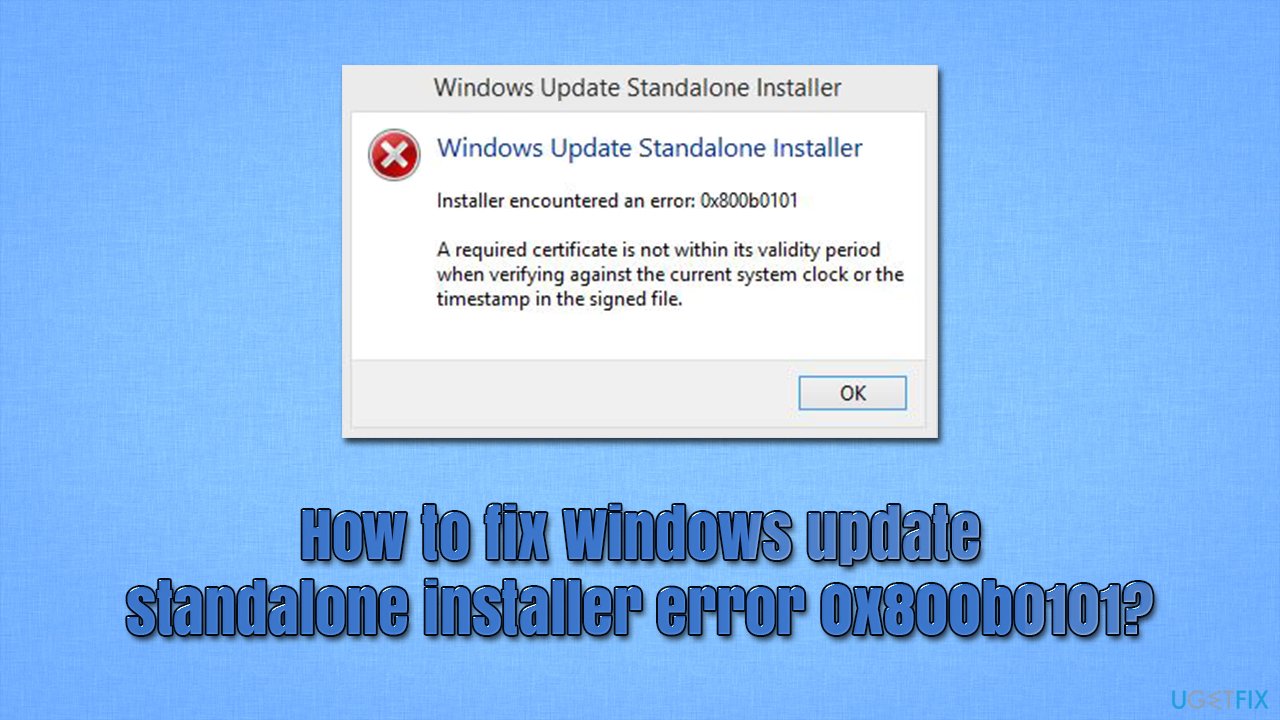
Users are receiving this error when they are trying to use Windows Standalone installer, and the message reads as follows:
Installer encountered an error: 0x800b0101
A required certificate is not within its validity period when verifying against the current system clock or the timestamp in the signed file.
Errors such as this one point directly to what is causing the problem - the validity of certain certificates within the system. The reasons for this issue to occur are, unfortunately, several so there can't be a universal fix that works for everybody. For example, system file corruption or missing update components might be the reason why you encounter the issue.
In this article, we will provide several methods that should help you fix the error once and for all. Go through the steps one by one and you'll find the solution that would work for you. Before you proceed with manual fixes, we recommend you run a scan with an automatic PC repair tool [d1] that would find and replace damaged system components for you. It can be also useful for later if you have to deal with BSODs,[ref en-2] missing DLLs, registry[ref en-3] issues, and similar errors.
Method 1. Run Windows Update troubleshooter
Windows update troubleshooter can find common issues that might result in the occurrence of error 0x800b0101, so we recommend running it as a first measure.
- Right-click on Start and select Settings
- Pick Update & Security
- Select Troubleshoot
- If you can't see troubleshooters listed on the right, click Additional troubleshooters
- Locate Windows Update and click Run the troubleshooter.
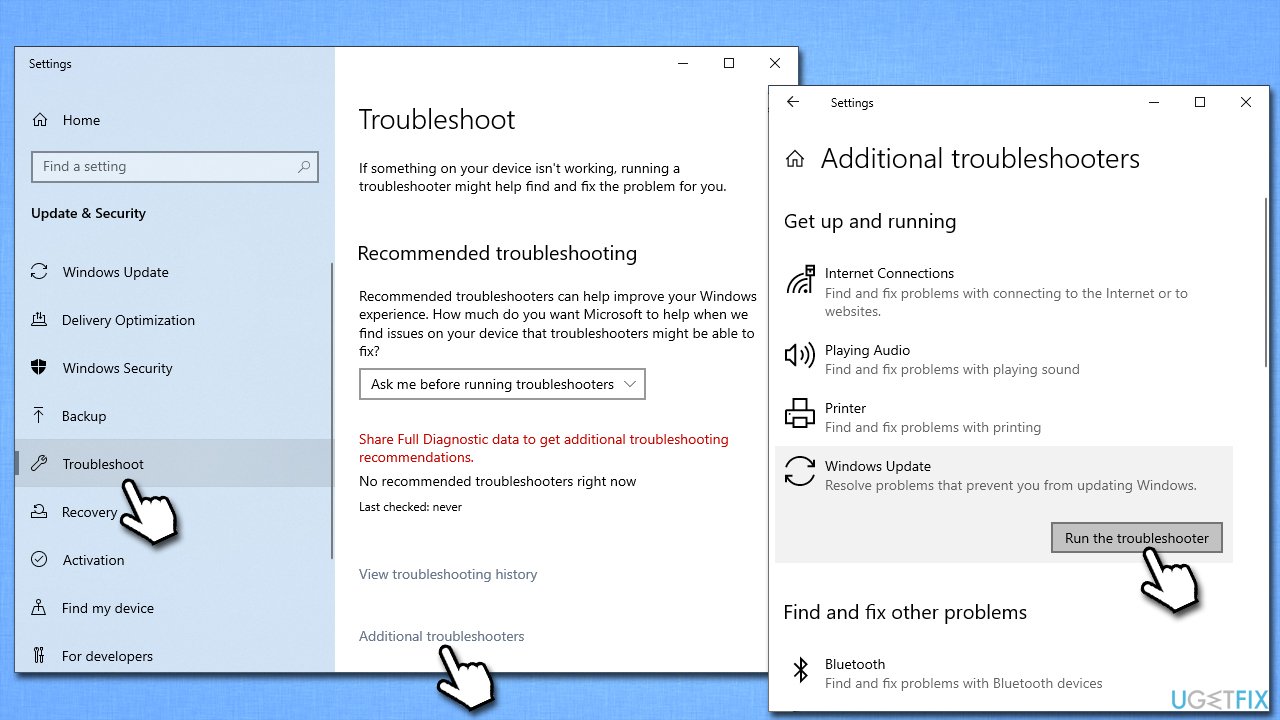
How to fix windows update standalone installer error 0x800b0101 run the troubleshooter
Method 2. Run SFC and DISM
To fix corrupted files, please refer to the following:
- Type cmd in Windows search
- Right-click on Command Prompt and select Run as administrator
- When the User Account Control shows up, click Yes
- Use the following command and press Enter:
sfc /scannow - Reboot your system
- If SFC returned an error or nothing was found, use the following command lines, pressing Enter after each:
DISM /Online /Cleanup-Image /CheckHealth
DISM /Online /Cleanup-Image /ScanHealth
DISM /Online /Cleanup-Image /RestoreHealth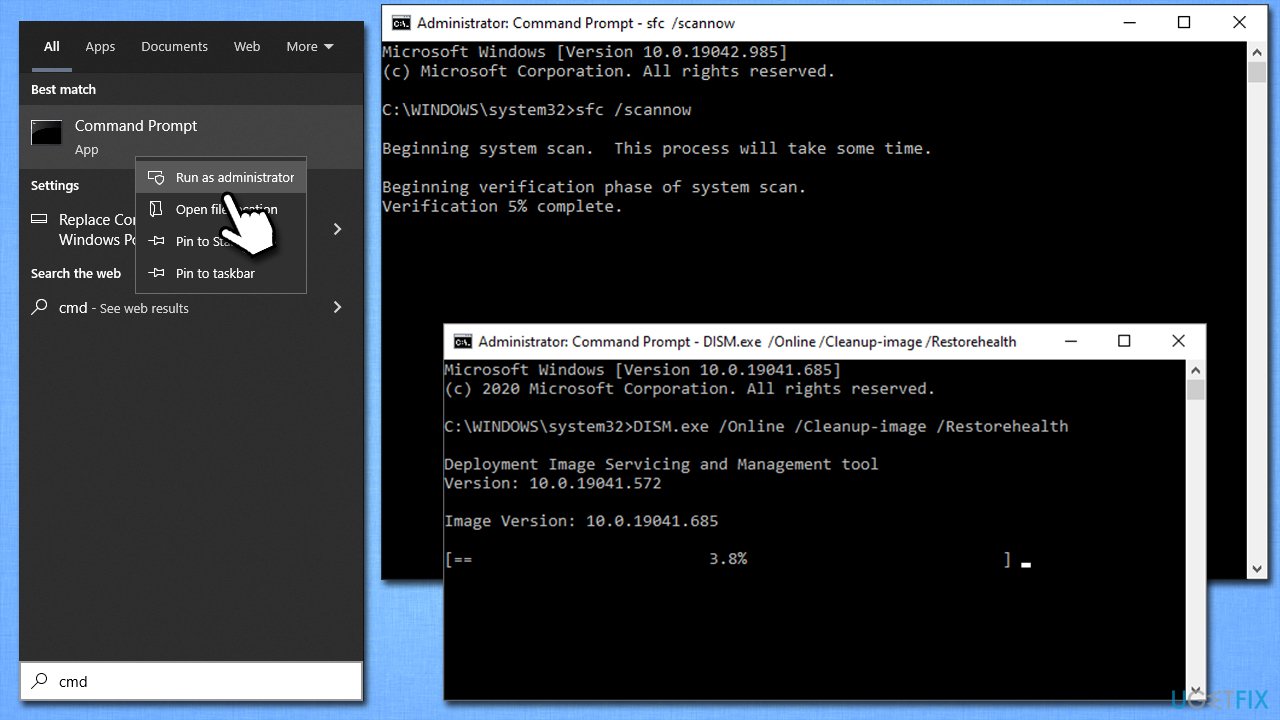
How to fix windows update standalone installer error 0x800b0101 run sfc dism
Method 3. Check your time and date settings
The error message claims that the validity period of certain certificates might be expired. To address this, make sure that your time and date are properly synchronized and correct:
- Type in Control Panel in Windows search and press Enter
- Go to Clock and Region and click on Date and Time
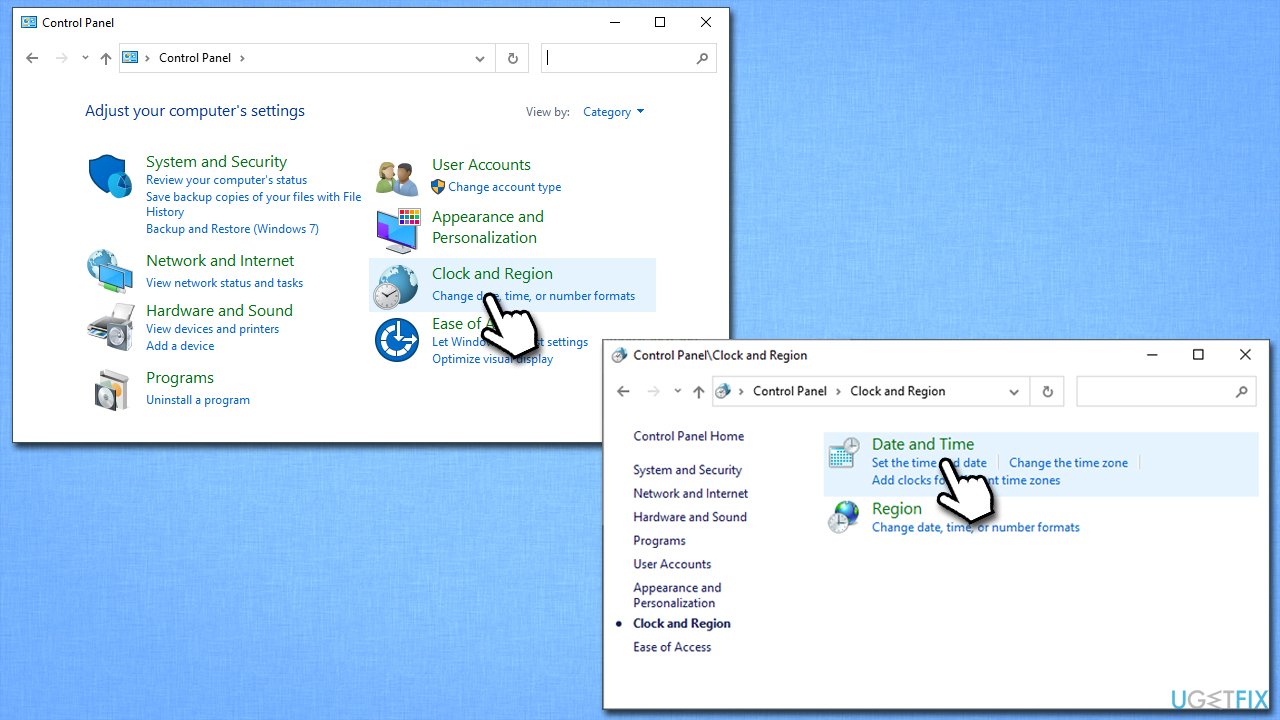
How to fix windows update standalone installer error 0x800b0101 check time and date - Pick the Internet Time tab and select Change Settings
- Make sure that Synchronize with an Internet time server box is ticked
- Click Update now and OK.
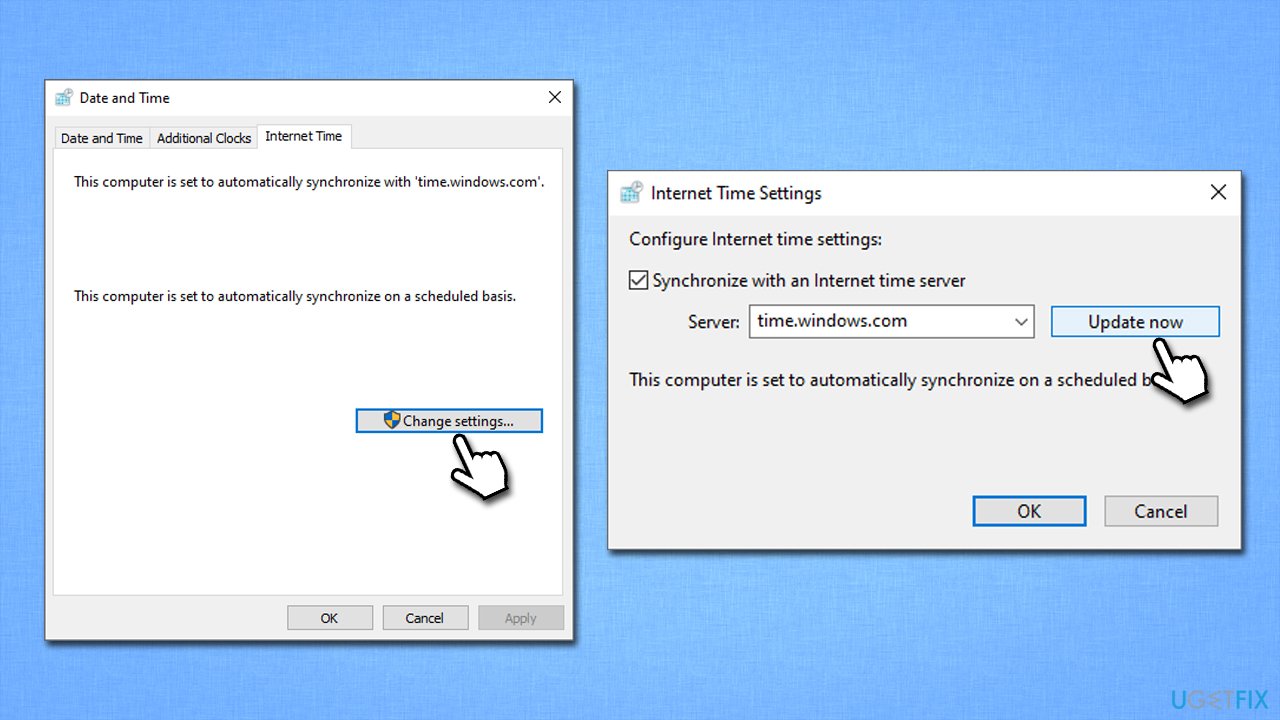
How to fix windows update standalone installer error 0x800b0101 check time and date2
Method 4. Remove expired certificates
The problem could be caused by one of the expired certificates. You can go through the list of the installed certificates and remove the outdated ones as follows:
- Type inetcpl.cpl in Windows search and hit Enter
- Go to the Content tab and click Certificates
- Go through all the tabs at the top (Personal, Other People, etc.) by checking the expiration date on all of them
- Select the expired certificate and click Remove below
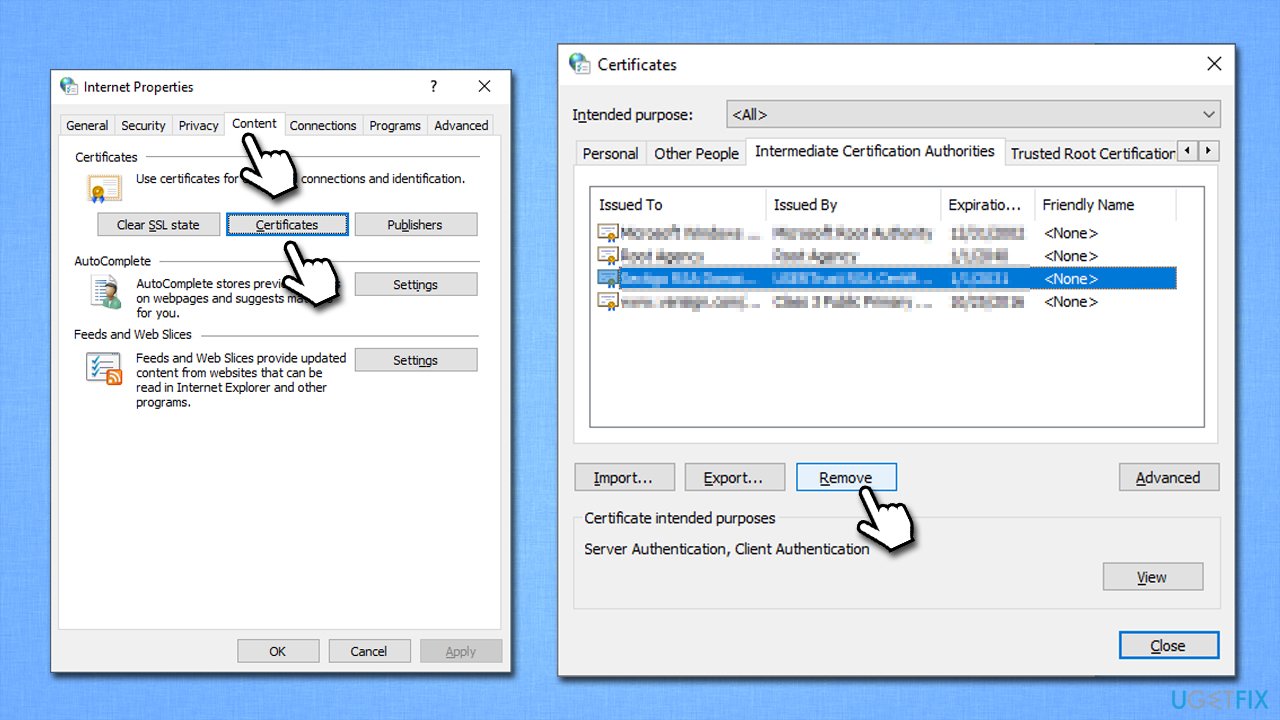
How to fix windows update standalone installer error 0x800b0101 remove expired certificates - Reboot the system and check if that helped.
Method 5. Download the update manually
In some cases, you could download and install the update manually through Microsoft Update Catalog. In particular, you might want to find and install updates KB2756872 and KB2749655.
Note: this solution only works for Windows 8 users.
- Open your browser and go to the official Microsoft Update Catalog webpage
- Here, type in the KB2756872 into the search box and click Search
- Find the appropriate version and click Download
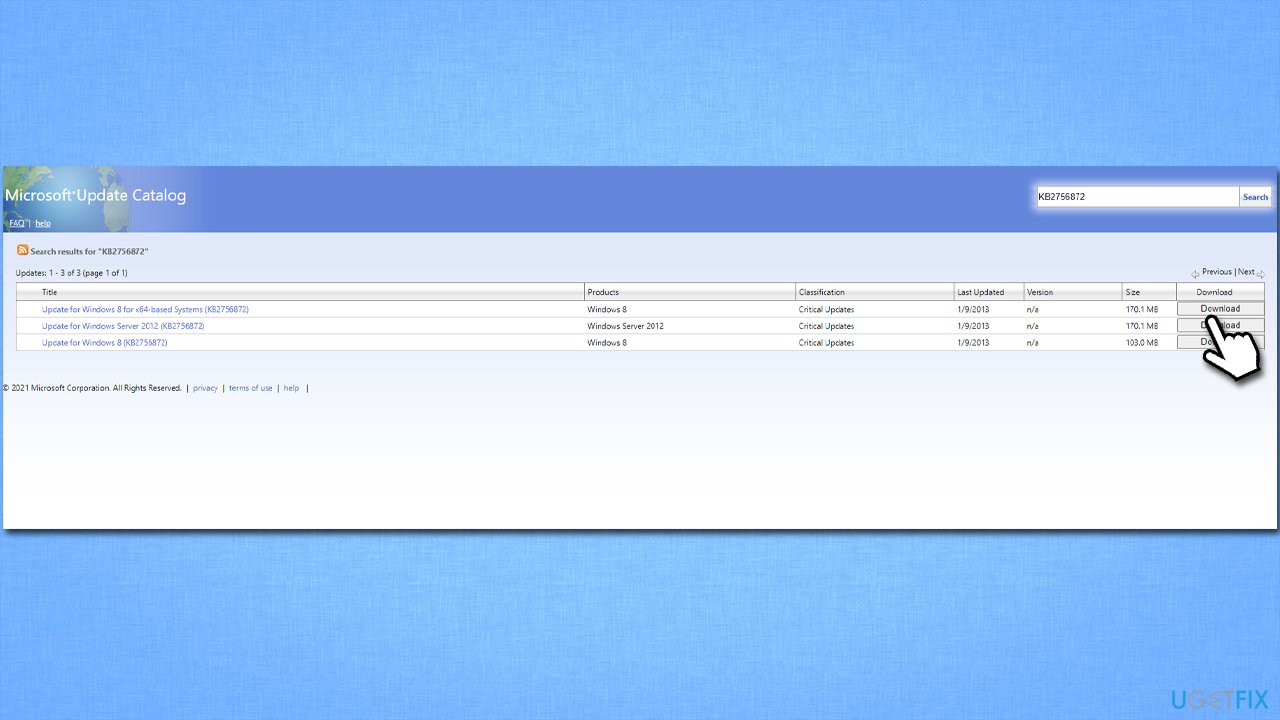
How to fix windows update standalone installer error 0x800b0101 install manually - Follow on-screen instructions to install the update and then do the same with KB2749655
- Once done, restart the system.
Bottom line
To resolve the error 0x800b0101, you can run the Windows Update troubleshooter, scan for system file corruption, or use an automatic PC repair tool. If these methods do not work, consider checking for additional updates or reinstalling the Windows Update Standalone installer.
Frequently asked questions
This error typically occurs due to a missing or corrupted Windows update component or when the system cannot find the required files to complete the update process.
You can resolve this error by running the Windows Update Troubleshooter and ensuring that your system files are intact using the System File Checker tool.
Yes, you can manually download and install the updates from the Microsoft Update Catalog website, which can help you bypass the error.




Report an issue
What's wrong with this guide? We review every report and update or remove content.
Report received — thank you. We'll review and fix it.
You need a free account to submit a report.
Be the first to comment