How to fix
WMI Provider Host (WmiPrvSE.exe) high CPU usage
on Windows
Resolve high CPU usage by WMI Provider Host (WmiPrvSE.exe) on Windows 10 quickly and efficiently. Expert-tested solutions ensure zero traces left.

What causes How to fix WMI Provider Host (WmiPrvSE.exe) high CPU usage on Windows 10?
- High CPU usage from another software or script requesting information from WMI
- Malware infection affecting WMI Provider Host
- WmiPrvSE.exe located outside of C:\WINDOWS\System32\Wbem
- Corrupted WMI repository
- Issues with installed applications that utilize WMI
Repairs Windows system files, removes malware, and restores a clean OS state — without reinstalling.
Hello. I recently ran into a laptop overheating problem. When I checked my task manager, I noticed three WMI Provider Host sessions. Two of them are taking 1% - 2% of CPU, and the third one is devouring out to 30% CPU. I tried to end the process, but it immediately restarts by itself. This problem is causing overheating and lag issues, and my laptop is forced to reboot sometimes. What is this process and why is it taking so much of my CPU power? Is there any solution for this, please? Thanks in advance.
WMI Provider Host is a vital process for Windows operating systems and can be seen running on the Task Manager frequently. WMI stands for Windows Management Instrumentation and, while it is possible to disable the process completely, it should not be touched, or the operating system might encounter severe malfunctions.
Therefore, it is important not to disable the service altogether. If you are having problems with WMI Provider Host (WmiPrvSE.exe) high CPU usage, it is essential to identify the root cause of such behavior and eliminate it. We prepared a guide that can help you fix the problem.
WMI Provider Host process is a Windows feature that enables other software and scripts to request information about the OS, as well as data kept on it. This provides excellent functionality for software interaction and is extremely useful for corporations that centrally manage computers. However, not all applications use WMI Provider Host.
Initially, the process should not use a lot of CPU[ref en-1] or Memory. It can occasionally spike when another software or script is requesting information from the WMI. If the high usage is consistent, there is a problem that needs to be addressed.
In some cases, high CPU usage of WMI Provider Host (WmiPrvSE.exe) can be related to malware[ref en-2] infection. WmiPrvSE.exe should reside in C:\\WINDOWS\\System32\\Wbem subfolder, and nowhere else. If it is located in Windows/System32, it is a trojan horse[ref en-3] that needs to be eliminated. We recommend using [d1], or any other reputable security software that can detect and get rid of cyber infections.
Please proceed with the following steps to fix WMI Provider Host (WmiPrvSE.exe) high CPU usage on Windows 10.
Solution 1. Run anti-malware software
Before you do anything, you should scan your system using anti-malware software. We recommend using [d1], but any other reputable security tool will do. Before you perform the scan, enter Safe Mode with Networking the following way:
- Right Click on Start button and select Settings
- Then go to Update & Security > Recovery
- Under Advanced Setup, click on Restart now
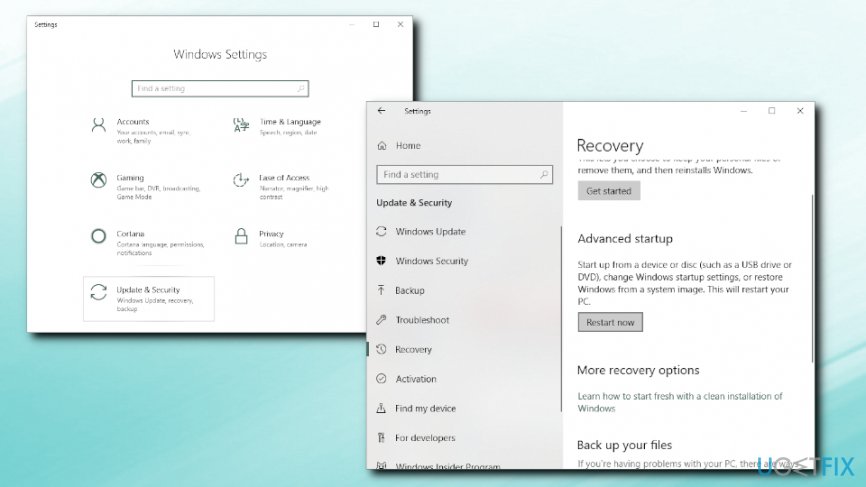
Wmi provider host wmiprvse exe high cpu usage enter safe mode with networking2 - After reboot, select the following: Troubleshoot > Advanced options > Startup Settings > Restart
- After another reboot, you will see a list of options. Press 5 or F5 to enter Safe Mode with Networking
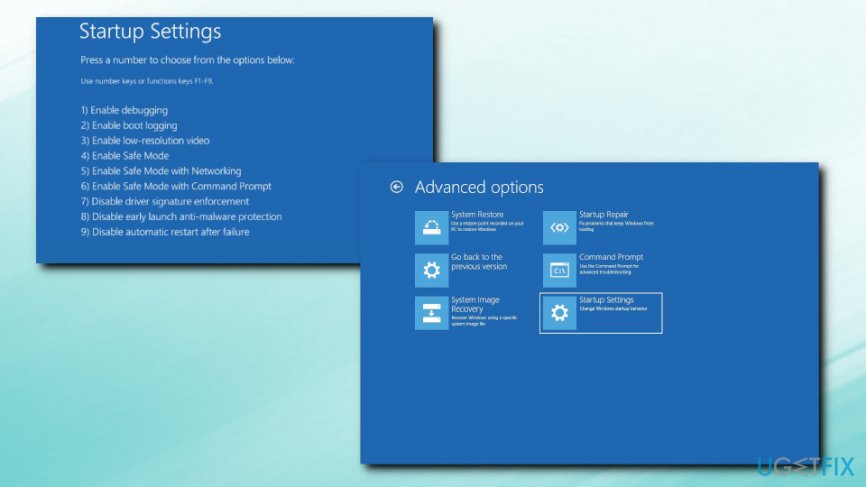
Wmi provider host wmiprvse exe high cpu usage enter safe mode with networking
Launch anti-virus software and run full system scan.
Solution 2. Fix WMI Provider Host via Event Viewer
- Right-click on Start button and select Event Viewer
- Go to Applications and Service Logs > Microsoft > WMI Activity
- Look for errors and note down the ClientProcessID
- Now, open Task Manager by pressing CTRL + SHIFT + ESC
- Go to Services and locate the process with the same ID
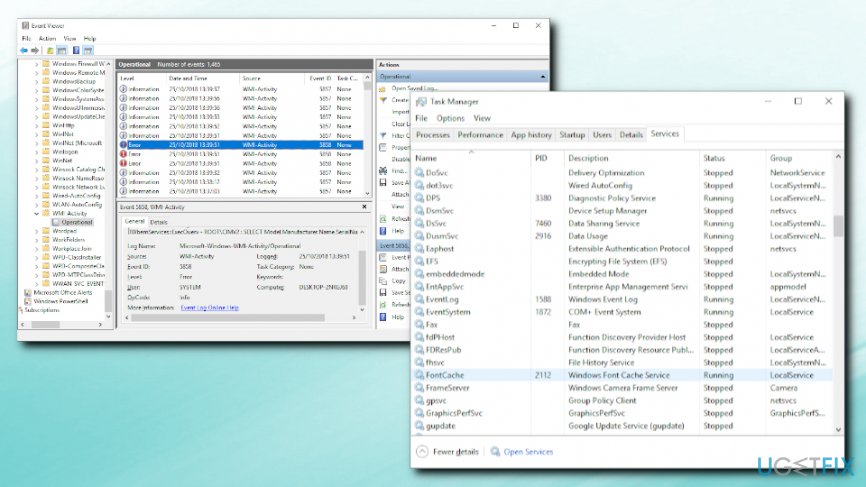
Wmi provider host wmiprvse exe high cpu usage enter event viewer - Shut the problematic process down by right-clicking and pressing Stop
Solution 3. Restart Windows Management Instrumentation service
In some cases, a simple restart of the service might do the trick. Follow these steps to do so:
- Press Windows key + R
- Enter services.msc and click OK
- Locate Windows Management Instrumentation process
- Right-click and pick Restart
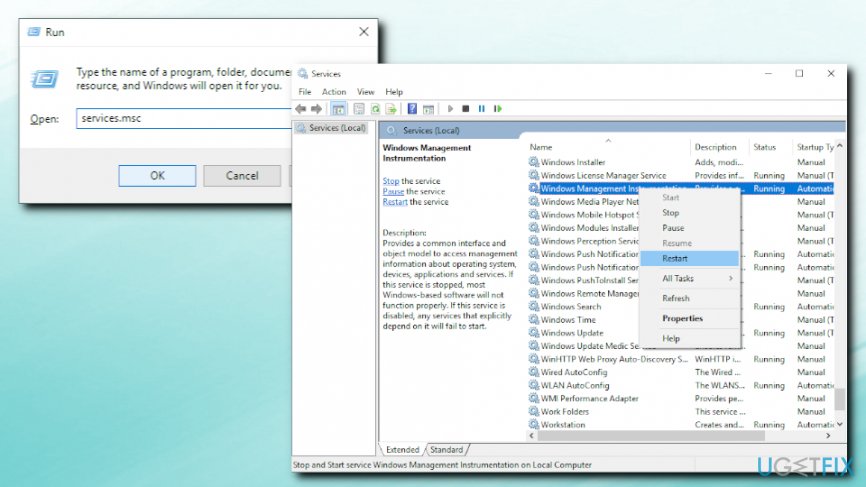
Wmi provider host wmiprvse exe high cpu usage restart windows management instrumentation service - In Cortana's search box, type in cmd
- Right-click on search results and select Run as administrator
- Next, type in the following commands, pressing Enter after each one of them:
net stop iphlpsvc
net stop wscsvc
net stop Winmgmt
net start Winmgmt
net start wscsvc
net start iphlpsvc
- Restart your machine
Bottom line
To fix high CPU usage of WMI Provider Host, identify the root cause, check for malware, and ensure WmiPrvSE.exe is in the correct directory. If the problem persists after these steps, consider using reputable security software or further troubleshooting methods.
Frequently asked questions
You can try restarting the WMI service or running the Windows Management Instrumentation (WMI) Diagnostic Utility to identify the root cause of the issue.
You can use the Task Manager to monitor processes and check the Event Viewer for WMI-related errors that might indicate which application is causing the high CPU usage.
Disabling WMI Provider Host is not recommended as it can lead to system instability and prevent essential Windows services from functioning properly.




Report an issue
What's wrong with this guide? We review every report and update or remove content.
Report received — thank you. We'll review and fix it.
You need a free account to submit a report.
Be the first to comment