How to fix
Xbox Live sign in error 0x87DD000F
on Windows
Resolve the Xbox Live sign-in error 0x87DD000F on Windows 10 or 11 quickly and easily. Expert-tested solutions ensure a seamless gaming experience, fixe…

What causes How to fix Xbox Live sign in error 0x87DD000F?
- Server connectivity issues
- Servers being down
- Servers being overloaded
- Network connection instability
- Corrupted system cache
- Invalid Xbox Live membership status
Repairs Windows system files, removes malware, and restores a clean OS state — without reinstalling.
Every time I attempt to sign in to my account on Xbox, it says, "We could not sign you in. Try again in a few minutes, or check your account by signing in to account.live.com Sign in: 0x87DD000F." Any idea on how do I fix this?
Xbox by Microsoft is a powerful gaming console that has revolutionized the world of interactive entertainment. An integral part of this system is Xbox Live, an online service that not only facilitates multiplayer gaming across the globe but also acts as a platform for digital media content. It weaves the world of gamers into a close-knit community, allowing them to compete or collaborate irrespective of geographical boundaries. However, this robust system is not without occasional technical glitches.
One of the issues Xbox users might face is the Xbox Live sign in error, coded as 0x87DD000F. This error typically crops up when there is a problem with server connectivity, often resulting from the servers being down or overloaded. It is always advisable to first verify the status of the Xbox Live service on the official Microsoft website or their social media handles to ensure the problem isn't on their end.
However, if the server status is operating normally and you are still encountering the 0x87DD000F error, there are several potential solutions that can be tried from your end. These range from resetting your console to check if a fresh start rectifies the issue, examining your network connection to ensure its stability, clearing the system cache to remove potential blocks, verifying your Xbox Live membership status, or even revisiting your Xbox profile details.
Each of these methods requires a specific set of steps to be followed. Below, you can find detailed instructions for each of the potential solutions to address the Xbox Live sign in error code 0x87DD000F. They have been presented in a straightforward manner, designed to be easily understandable even for those who may not be technically inclined.
However, it's important to note that not all solutions may work for every user. If you continue to experience this error, it's advisable to reach out to Microsoft's customer service for further assistance. Their dedicated team is equipped to guide you through the troubleshooting process, ensuring you can return to your gaming experience as quickly as possible.
Fix 1. Checking server status
Sometimes, the issue is not with your Xbox or your network but with the Xbox Live servers themselves. If they are down or undergoing maintenance, you may encounter sign-in errors.
- Visit the Xbox Live Service Status webpage on a different device.
- Look for any notifications or updates related to server downtime or maintenance.
- If there's an ongoing issue, you might have to wait until the server is back up and running before you can sign in again.
- If the servers are running normally, proceed with the other fixes mentioned below.

Fix 2. Fully restarting your console
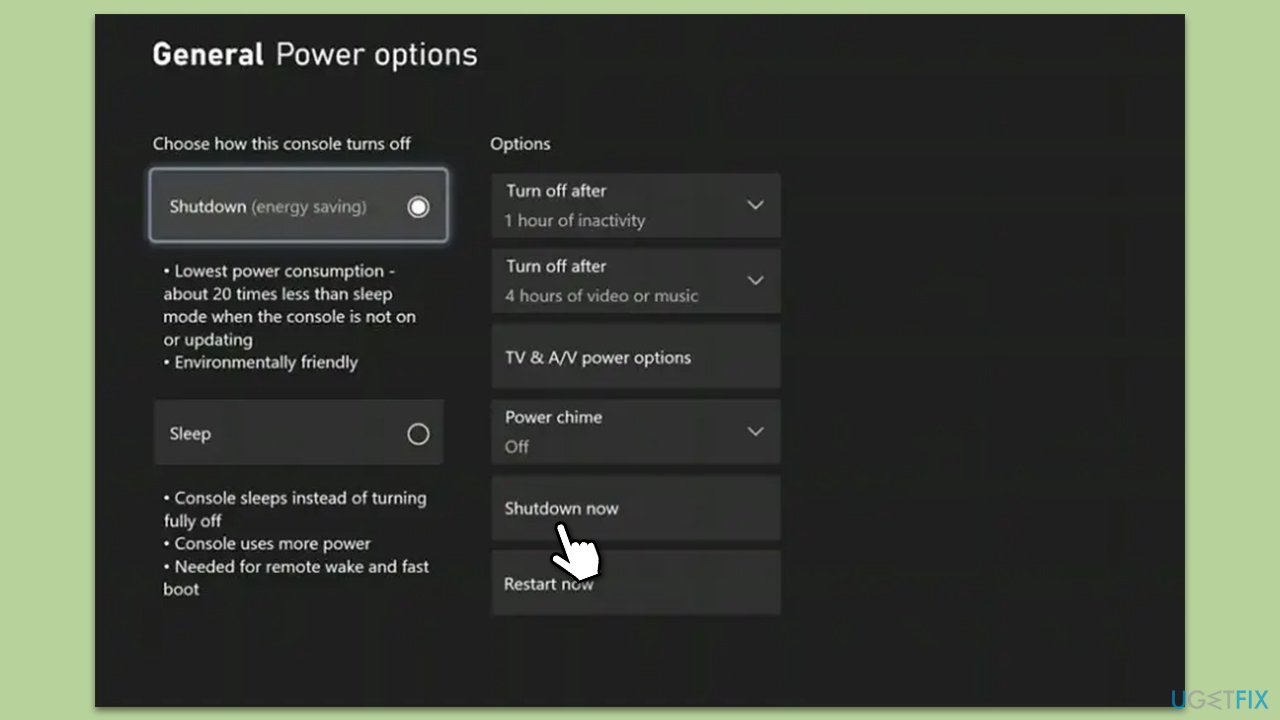
A complete shutdown and restart of your console can often fix minor glitches or bugs that are causing the 0x87DD000F error. This refreshes your system, clears temporary data, and can help in establishing a fresh connection with Xbox Live servers.
- Press the Xbox button to open the guide.
- Go to the General tab.
- Select Power options.
- Click Shudown now under the Options menu.
- Confirm with Shut down.
- Wait for a few minutes and turn your console back on.
Fix 3. Checking your network connection
Network connectivity is crucial for accessing Xbox Live services. A slow or unstable network might cause issues while signing into Xbox Live.
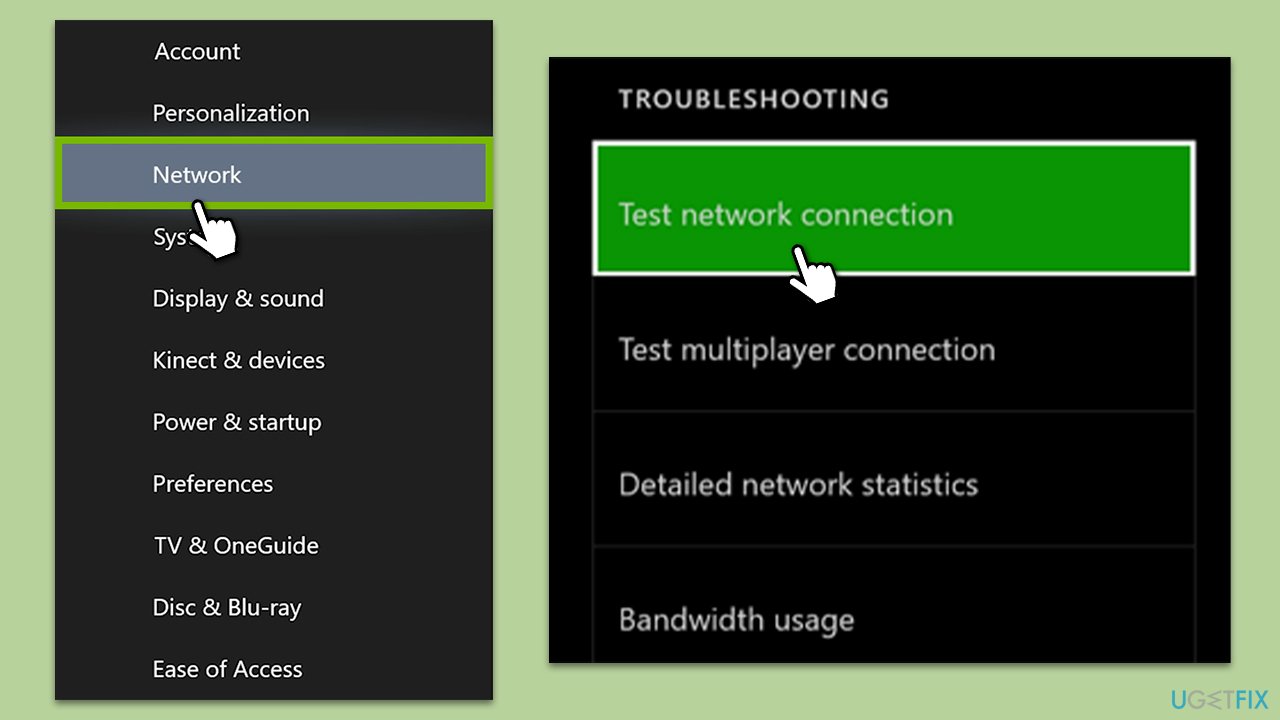
- In your console, open Settings.
- Go to All settings > Network > Network settings.
- Select Test network connection.
- If any issues are detected, consider resetting your router or switching to a wired connection if possible.
Additionally, you could also try to restart your modem or router to see if that helps.
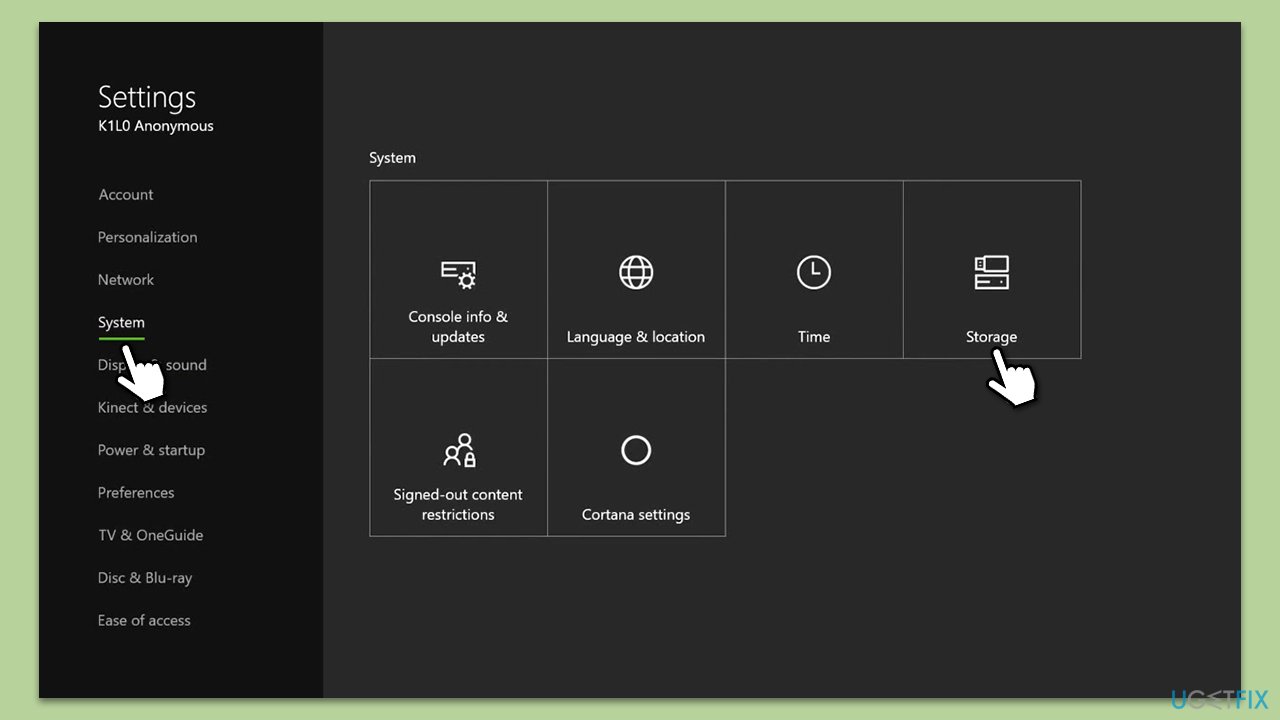
Fix 4. Clearing the system cache
The system cache holds temporary data that helps games and apps load faster. However, over time, corrupt data might accumulate and lead to errors.
- Go to Settings > System > Storage.
- Highlight any storage device and press Y on your controller.
- Select Clear System Cache.
- When prompted, confirm the action.
Fix 5. Verifying Xbox Live Membership status
Your Xbox Live membership might have expired, or there could be issues with your billing information, causing sign-in errors.
- Go to Services & subscriptions in your Microsoft account.
- Verify that your Xbox Live subscription is active.
- If your subscription has expired, renew it.
Fix 6. Re-downloading your Xbox profile
Issues with your Xbox profile might sometimes lead to sign-in errors. Deleting and re-downloading your profile can resolve such issues.
- Go to Settings > General > Personalization > My profile.
- Select Remove accounts and remove your Xbox profile.
- Restart your Xbox and go back to My profile.
- Choose Add & manage and select Add new to download your profile again.
Bottom line
To address the Xbox Live sign in error code 0x87DD000F, you can try resetting your console, examining your network connection, clearing the system cache, verifying your Xbox Live membership status, or revisiting your Xbox profile details. If these solutions do not resolve the issue, it is advisable to reach out for further assistance.
Frequently asked questions
The error 0x87DD000F typically indicates that your Xbox Live account cannot connect to the service, often due to network issues or account authentication problems.
To troubleshoot this error, ensure your internet connection is stable, reset your console or PC, and check for any Xbox Live service outages on Microsoft's official website.
Yes, you should verify that your NAT type is open, ensure that Xbox Live services are allowed through your firewall, and consider disabling any VPN or proxy services that might interfere.




Report an issue
What's wrong with this guide? We review every report and update or remove content.
Report received — thank you. We'll review and fix it.
You need a free account to submit a report.
Be the first to comment