How to fix
Yourphone.exe high CPU usage
on Windows
Resolve Yourphone.exe high CPU usage in Windows 10 or 11 effortlessly. Follow our expert-tested tips for quick fixes and smoother performance.

What causes How to fix Yourphone.exe high CPU usage in Windows?
- High CPU usage by background processes
- Corrupted files
- Registry issues
- Cookies and cache accumulation
Repairs Windows system files, removes malware, and restores a clean OS state — without reinstalling.
Hello. I have been experiencing lagging while gaming on my Windows 10 PC, and when I opened the Task Manager, I noticed that Yourphone.exe is consuming high levels of CPU power. What is it, and how do I get rid of it?
Your Phone is a preinstalled app that comes with Windows 10. It lets people connect their phones to their PCs so they can transfer files easily. However, it does much more than that. Users can also reply to messages, receive notifications, and screen mirroring is one of the newest features of the Your Phone app. Microsoft has been trying to bridge the connection between smartphones and Windows PCs, and since the Windows 10 October update,[ref en-1] they are starting to achieve that.
Unfortunately, some users have noticed that Yourphone.exe has been using up a lot of CPU[ref en-2] power. People can see how much system resources every process consumes by opening the Task Manager. When background processes use high levels of CPU power, it can lead to a couple of issues. First of all, people might notice a decrease in performance and experience lagging, bugs, and crashes. This can prevent them from running software that needs a lot of resources, like games, or photo and video editing programs.
Even though there are a lot of benefits that were introduced with Your Phone, if you experience this problem, you may have to disable the app or uninstall it completely. If the Yourphone.exe process is ruining your work and leisure activities, it would be best to manage without it. High CPU usage for a prolonged period of time, can lead to overheating, hardware failure, and other things. In this guide, we will present you with 2 ways you can take care of this issue.
Although we do not know what exactly could be causing Your Phone app to be consuming this much CPU power, you can try running a maintenance tool like [d1]. It can fix various system errors, corrupted files, registry issues, clear cookies and cache[ref en-3] which could be the culprits of the problem. If you are ready to proceed with the manual guide that will fix Yourphone.exe high CPU usage in Windows, follow the steps below carefully:
Solution 1. Disable YourPhone.exe
- Press the Windows + I keys to open up the Windows Settings menu
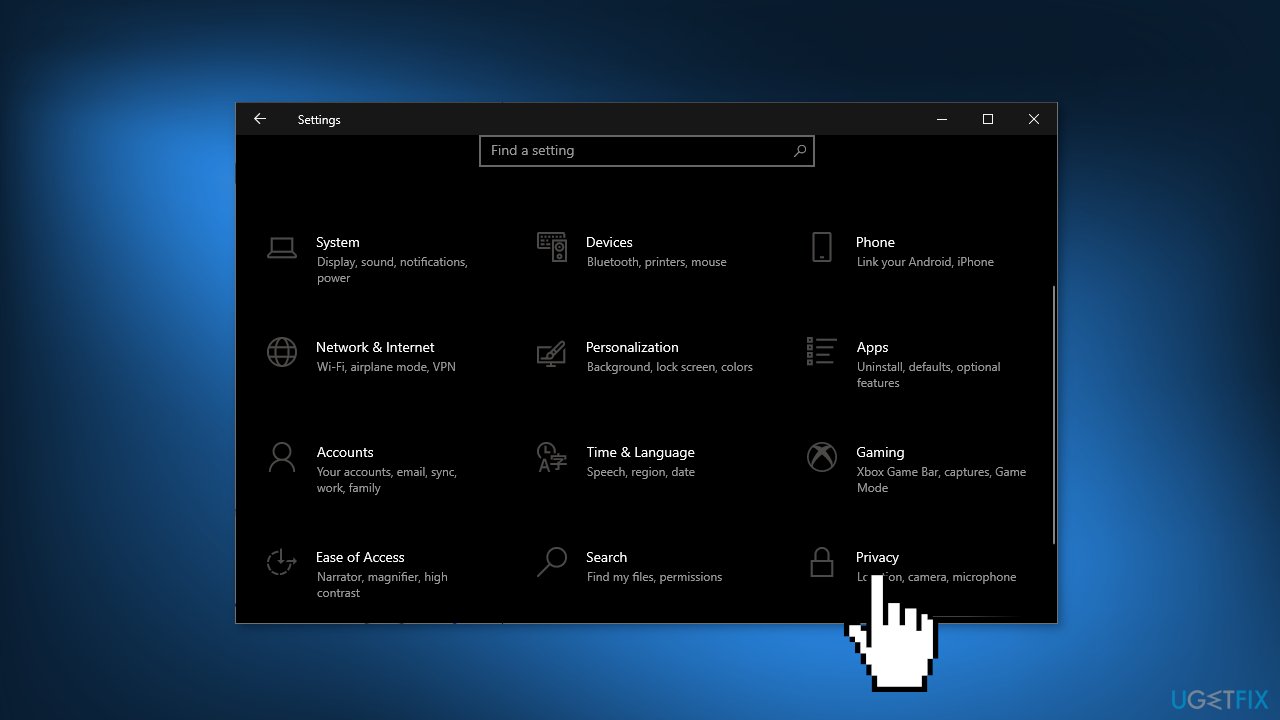
- Click on Privacy and scroll down a bit to find the Background app section
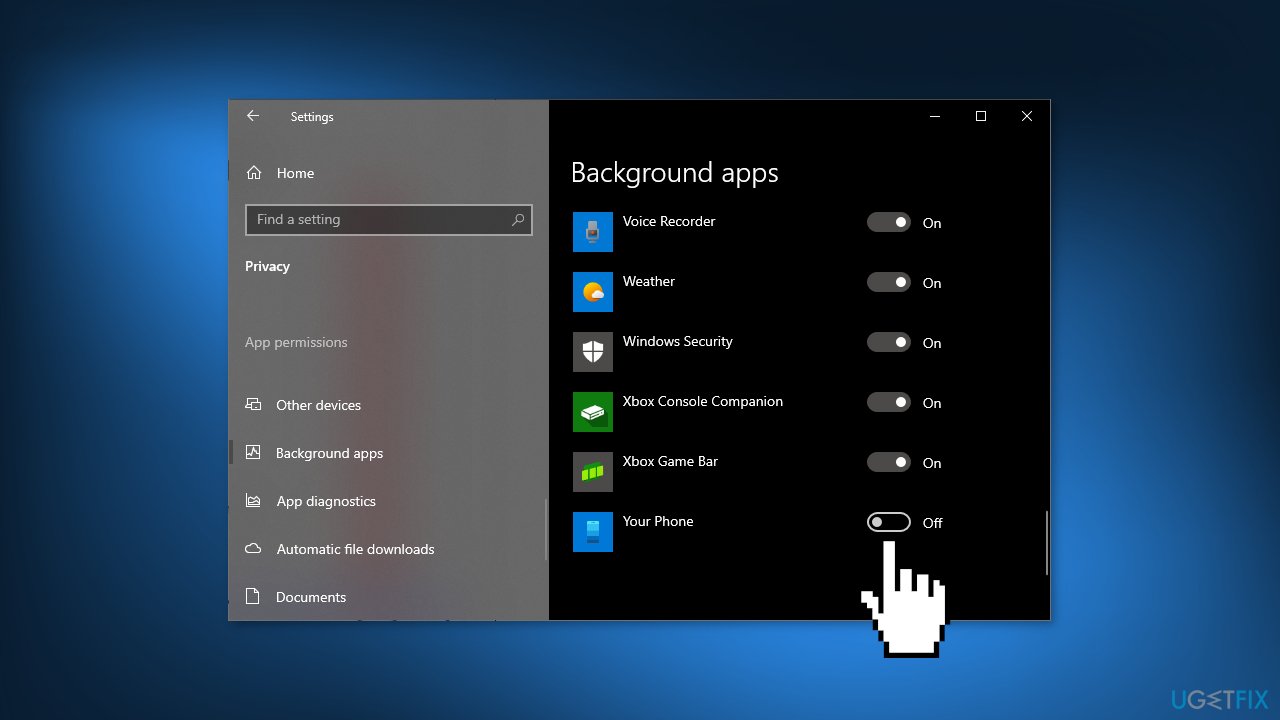
- Look for Your Phone app from the list in the right pane
- Turn Off the toggle to prevent it from running in the background
- Restart your computer to check if the problem has been fixed
Solution 2. Uninstall Your Phone app
- Right-click on the Start Menu to open the Quick Access Menu
- Select Windows PowerShell (Admin) > If prompted by UAC, click on Yes
- Copy and paste the following command then hit Enter:
Get-AppxPackage Microsoft.YourPhone -AllUsers | Remove-AppxPackage
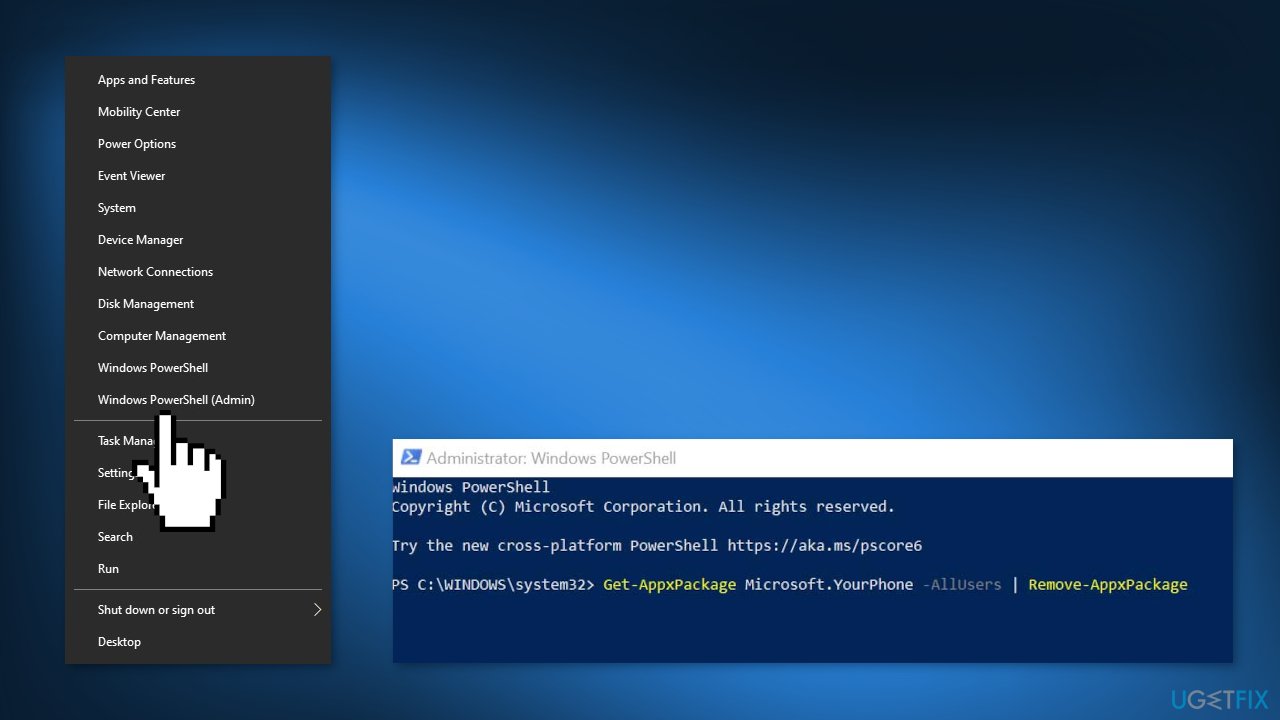
- This will delete the Your Phone app from your PC, If you want to reinstall it, you can find it on the Microsoft Store
Bottom line
To address the high CPU usage of Yourphone.exe, you can try running a maintenance tool to fix system errors, corrupted files, and registry issues, as well as clearing cookies and cache. If these solutions do not resolve the problem, consider disabling or uninstalling the Your Phone app completely.
Frequently asked questions
High CPU usage by Yourphone.exe can be caused by background synchronization processes or conflicts with other applications. Additionally, outdated software or improper settings could also contribute to the issue.
You can reduce CPU usage by disabling unnecessary features in the Your Phone app or by adjusting its settings to limit background activity. Additionally, ensure that both Windows and the Your Phone app are updated to the latest versions.
Yes, it is safe to terminate Yourphone.exe in the Task Manager if it is consuming excessive CPU resources; the process will restart automatically when needed. However, this may temporarily disrupt any ongoing sync activities between your PC and phone.




Report an issue
What's wrong with this guide? We review every report and update or remove content.
Report received — thank you. We'll review and fix it.
You need a free account to submit a report.
Be the first to comment