How to fix
Zlib.dll error
on Windows
Resolve zlib.dll errors on Windows 10 and Windows 11 quickly with our expert-tested solutions. Get back to smooth performance with zero traces left.


What causes How to fix zlib.dll error in Windows?
- Problem with a program update or installation
- Virus corruption of the zlib1.dll file
- Accidental deletion of the zlib1.dll file
- System corruption
- Missing zlib1.dll file
Repairs Windows system files, removes malware, and restores a clean OS state — without reinstalling.
Every time I boot my computer, I always receive the following error: "poclbm.exe - System Error. The program can't start because zlib1.dll is missing from your computer. Try reinstalling the program to fix this problem." I don't even know which program this is.
If you've seen an error message saying "poclbm.exe - System Error. The program can't start because zlib1.dll is missing from your computer. Try reinstalling the program to fix this problem," you might be wondering what it means and how to fix it. Don't worry, we'll break it down for you.
When you turn on your computer, you expect it to run smoothly but occasionally errors like this one show up. This exact problem occurs when Windows is unable to locate a file that is required in order to launch a program, which in this instance is zlib1.dll.
What is zlib1.dll?
In order to comprehend the issue, let's first discuss what zlib1.dll is. A Dynamic Link Library (DLL) is a specific kind of file that has important instructions that may be employed by other applications to perform specific functions. The zlib1.dll file includes data compression instructions, which are used to make files smaller and more manageable.
Programs like poclbm.exe rely on zlib1.dll to work properly. If the file is missing or damaged, the program can't start, and you see the error message.
Why does the zlib1.dll error Occur?
This issue typically occurs when there is a problem with a program update or installation. It may also happen if a virus corrupts the zlib1.dll file or if it is inadvertently deleted. Restarting your computer can sometimes resolve problems, but if they continue, you'll need to take further action.
How to fix the zlib1.dll error
Here are some steps you can try to fix the "poclbm.exe - System Error":
- Reinstall the program
- Repair system corruption
- Update your system
- Scan for viruses
- Use [d1] repair tool.
If you need instructions on how to perform these and other steps, check out the step-by-step guide below.

Fix 1. Run SFC and DISM
System File Checker (SFC) and Deployment Imaging Service and Management Tool (DISM) are built-in utilities in Windows that can fix system file corruption. Running these tools can replace any missing or corrupted system files, including zlib1.dll.
- Type cmd in Windows search.
- Right-click on Command Prompt and pick Run as administrator.
- User Account Control window will show up - click Yes when prompted.
- Then, copy and paste the following command, pressing Enter after:
sfc /scannow - Wait till the scan is finished. If Windows finds system file integrity violations, it will attempt to fix them. After this, use the set of the following commands, pressing Enter each time:
DISM /Online /Cleanup-Image /CheckHealth
DISM /Online /Cleanup-Image /ScanHealth
DISM /Online /Cleanup-Image /RestoreHealth - (Note: if you get an error executing this last command, add /Source:C:\RepairSource\Windows /LimitAccess to it and try again).
- Close down the Command Prompt and restart your system.

Fix 2. Update Windows
Updating Windows ensures that you have the latest system files and security patches, which can help fix issues with missing or corrupted DLL files.
- Type Updates in Windows search and press Enter.
- When the new window opens, click Check for updates (or Install all if pending) and wait.
- If there are optional updates available, install them as well.
- After updating, restart your computer.

Fix 3. Re-register zlib1.dll file
Re-registering the zlib1.dll file can re-establish its connection with the system, fixing the error.
- Open Command Prompt as administrator.
- Type in the following commands and press Enter after each:
regsvr32 /u zlib1.dll
regsvr32 zlib1.dll - Close down everything and restart your computer.
Fix 4. Reinstall affected software
Reinstalling the software that is causing the error can replace the missing or corrupted zlib1.dll file.
- Type Control Panel in Windows search and press Enter.
- Go to Programs > Uninstall a program.
- Select the affected application (e.g., OneDrive).
- Click on Uninstall and follow the prompts.
- Download the latest version of the application from its official website.
- Install the application following the installation prompts.

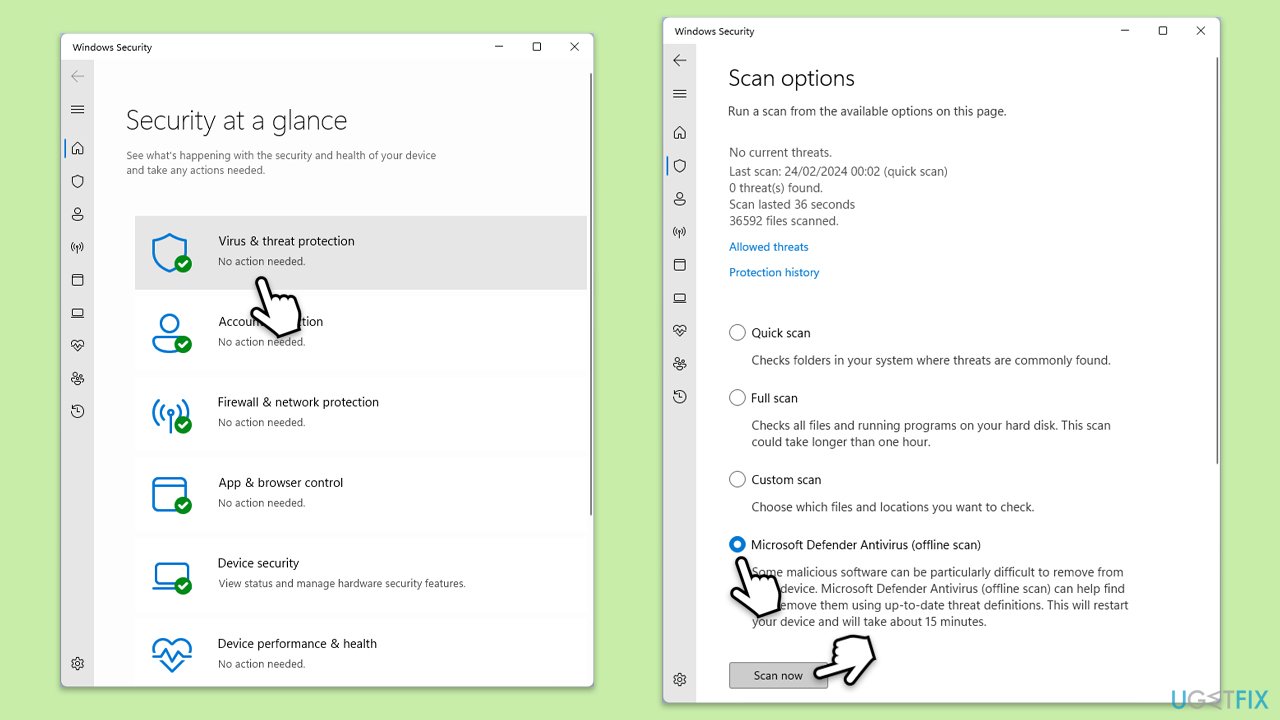
Fix 5. Scan for malware
Malware can corrupt or delete DLL files. Scanning for and removing malware can fix the issue.
You can use Microsoft Safety Scanner or the built-in Windows Defender:
- Type Windows Security in the Windows search bar and hit Enter.
- Select Virus & threat protection.
- Pick Scan options.
- Choose Microsoft Defender Offline scan and click Scan now.
- Your computer will immediately reboot and begin a deep scan.
Fix 6. Use System Restore
Using System Restore can revert your computer to a previous state where the error did not occur.
- Type in Create a restore point in Windows search and hit Enter.
- Go to System Restore and click Next.
- Mark the Show more restore points option (if available).
- Pick the time when the problem did not exist and click Next.
- Finalize the process - your device will restart.

Bottom line
To fix the zlib.dll error, you can try reinstalling the program, repairing system corruption, updating your system, scanning for viruses, or using a repair tool. If these steps do not resolve the issue, further troubleshooting may be necessary.
Frequently asked questions
The zlib.dll error can be caused by missing or corrupted files, improper installation of software, or malware infections on your Windows 10 or Windows 11 system.
You can manually replace the zlib.dll file by downloading a fresh copy from a reliable source and placing it in the appropriate system directory, usually C:\Windows\System32.
Yes, updating Windows can fix the zlib.dll error as it may replace outdated system files and improve overall system stability.




Report an issue
What's wrong with this guide? We review every report and update or remove content.
Report received — thank you. We'll review and fix it.
You need a free account to submit a report.
Be the first to comment