How to fix
Safari cannot be opened because of a problem Check with the developer
on Windows
Resolve the "Safari cannot be opened" issue on Windows 10 or 11 effortlessly. Get expert-tested solutions that fix your problems in minutes.

What causes How to fix Safari cannot be opened because of a problem Check with the developer?
- iTunes update causing compatibility issues
- Specific version of iTunes affecting Safari
- OS X Yosemite 10.10.5 users experiencing problems
- Minor iTunes update breaking Safari functionality
Repairs Windows system files, removes malware, and restores a clean OS state — without reinstalling.
Hello. I ran into a problem that is really annoying to me - I cannot open Safari browser anymore. The error states that Safari cannot open because of a problem and I should check with the developer. I am devastated as Safari is my preferred browser which I have been using for over a decade, and did not have any problems with. Is there any way to fix this problem? At the moment I switched to Google Chrome, but I would want to go back to Safari ASAP. Could you please help?
Safari is the second most used browsers globally, following Google Chrome with 13.9% of market share as of November 2018.[ref en-1] Indeed, many macOS and Mac OS X users prefer this browser because it was designed by Apple and works well with the operating system. Unfortunately, the browser is not immune to problems, and "Safari cannot be opened because of a problem. Check with the developer" error is one of them.
While some users might be blaming the web browser itself, or even consider malware infection, it not Safari to blame here. The culprit is iTunes or, more specifically, Apple itself here. Nevertheless, our team came up with a few solutions that could help you fix "Safari cannot be opened because of a problem. Check with the developer" error.
Most recently, Apple released iTunes 12.8.1 for Yosemite up to High Sierra. The patch was minor and allowed iTunes support the AirPlay 2 multi-room audio and HomePod stereo pairs. For Windows, it included minor performance improvements.
Who would have thought that such a minor update could entirely break the web browser Safari? But that's precisely what happened. Those running OS X Yosemite 10.10.5 should not update iTunes just yet, as it results in "Safari cannot be opened because of a problem. Check with the developer" error. The complains were published on Apple forums,[ref en-2] Twitter, Reddit, and other social network platforms.
Users that run OS X Yosemite 10.10.5 and Safari 10.1.2 claimed that they received the following error:
Safari cannot be opened because of a problem.
Check with the developer to make sure Safari works with this version of Mac OS X. You may have to reinstall the application. Be sure to sure to install any available updates for the application and Mac OS X.
While Apple still did not release the update that would fix "Safari cannot be opened because of a problem. Check with the developer," there are a few workarounds that could help you. Please follow the detailed guide below.
Ways to fix "Safari cannot be opened because of a problem. Check with the developer"
Before you start with the fixes below, we recommend you perform regular checks, such as scanning your machine for malware[ref en-3] infections. We suggest you download [d1] and perform a full scan of your device. Additionally, if there is something wrong with the computer, the PC repair software might be able to fix it automatically.
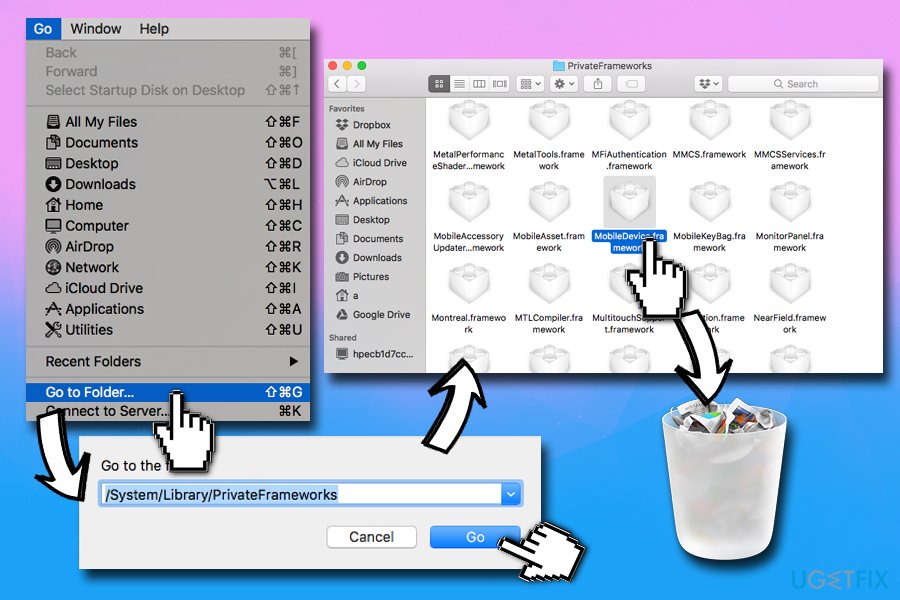
Solution 1. Delete MobileDevice.framework file
iTunes version 12.8.1 is not compatible with the MobileDevice.framework version, causing the "Safari cannot be opened because of a problem. Check with the developer" error on Safari:
- Go to Finder app
- Click on Go > Go to Folder...
- Type in /System/Library/PrivateFrameworks/
- Click Go
- Locate MobileDevice.framework and move it to Trash
Solution 2. Upgrade to Mojave
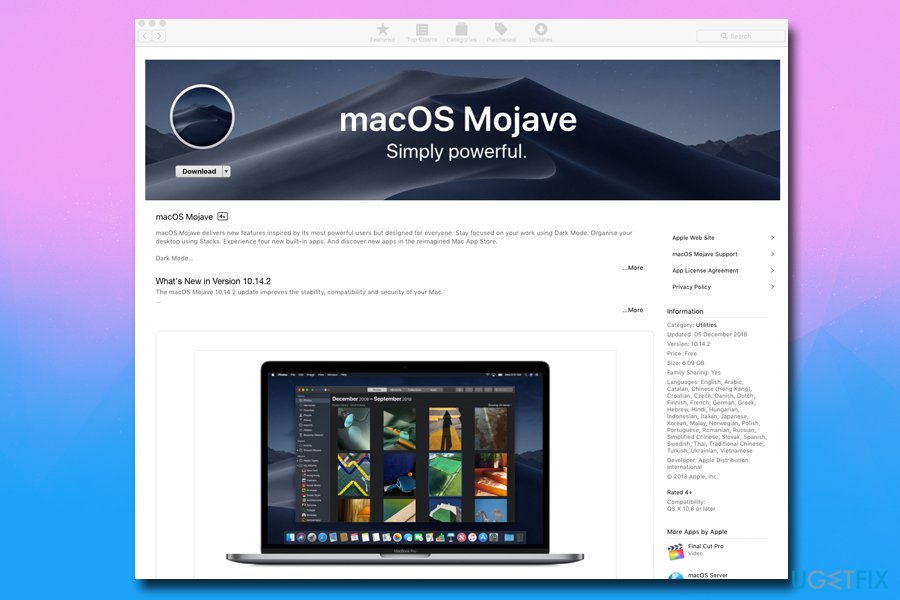
While this solution might not work for some users (for example, outdated machines), those who did not update their Operating system before should try doing it now. To upgrade to Mojave, perform the following steps:
- Open App store by clicking on the icon in the Dock
- Type in Mojave and click Download
- Follow on-screen instructions
Solution 3. Use alternative browser
While it is not a solution for Safari users, it is a temporary workaround until Apple releases the update that will fully fix "Safari cannot be opened because of a problem. Check with the developer" error.
You can try using Google Chrome, Mozilla Firefox, Opera, or any other secure and legitimate browser.
Bottom line
To fix the 'Safari cannot be opened because of a problem' error, users should avoid updating iTunes if they are on OS X Yosemite 10.10.5. Additionally, checking for compatibility between Safari and the installed version of iTunes may help. If none of these solutions work, consider reaching out to Apple support for further assistance.
Frequently asked questions
To resolve this issue on Windows 10, try reinstalling Safari or updating it to the latest version available for Windows. Ensure that your system meets all the necessary requirements for the browser.
If you encounter this issue on Windows 11, consider running Safari in compatibility mode or check for any pending Windows updates that might affect application performance.
Yes, if Safari is not working properly, you can switch to other browsers like Chrome or Firefox on Windows 10 or Windows 11, which often have better support and fewer issues.




Report an issue
What's wrong with this guide? We review every report and update or remove content.
Report received — thank you. We'll review and fix it.
You need a free account to submit a report.
Be the first to comment