New ransomware detected in the wild: Locky virus
Computer security experts claim that 2015 was definitely a year of ransomware, but it seems the growth of these viruses continues into 2016. One of the latest examples of ransomware is Locky virus. In a short time, it has successfully affected thousands of computer users. This virus mostly spreads via malicious emails, and it is worth mentioning that cyber criminals related to Locky are really ambitious – reportedly, the first batch of emails including malicious Locky file was sent to over 400 thousand computer users. We can only wonder how many emails these criminals sent later on. However, Locky is a fearsome virus, which takes user’s personal files hostage, and unfortunately, there is no way to recover them.
How does Locky virus work?
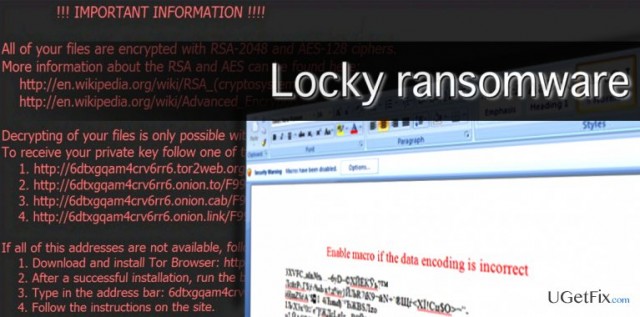
Locky virus spreads as a Word document attached to malicious e-mail letters. This Word file is presented as an invoice when in reality it contains malicious code. This code can be activated with Word Macros. In case Macros are disabled, this document showcases a scrambled text and asks to enable Macros. When the user activates Macros, the malicious code in this fake invoice file downloads and runs Locky executive file, which starts searching for important files on the computer and encrypts them using RSA-2048 and AES-128 encryption algorithms. There is no way to stop Locky once it starts its processes, and unfortunately, there is no way to decrypt files after it locks them. When Locky ransomware finishes the encryption process, it leaves ransom notes informing the victim what happened and says that victim needs to pay up 0.5 – 1.0 Bitcoin (which is approximately 210-418 US dollars) to get a unique key, which can be used to decrypt the encrypted data.
Prevention is better than the cure
As we have already mentioned, it is almost impossible to recover files encrypted by Locky virus, so we strongly advise you to take precautions and secure your PC before such virus attempts to attack it. These tips will help you to prevent ransomware infection:
- Secure your computer by installing a trustworthy anti-malware program.
- Stay away from emails that come from unknown senders, and do not open suspicious attachments! In addition, avoid exploring letters filtered as Spam or Junk.
- Create copies of important data and store them in a safe place, ideally, an external drive.
- Ensure your programs are up-to-date.
- Avoid browsing through suspicious web pages and do not download any content from them if you have even a slightest suspicious that the website is untrustworthy.
If you want to learn more about Locky virus, or if you believe that it has already affected your computer, you might find the information provided in this article useful – Locky virus. How to Remove? (Uninstall Guide)

Report an issue
What's wrong with this guide? We review every report and update or remove content.
Report received — thank you. We'll review and fix it.
You need a free account to submit a report.
Be the first to comment