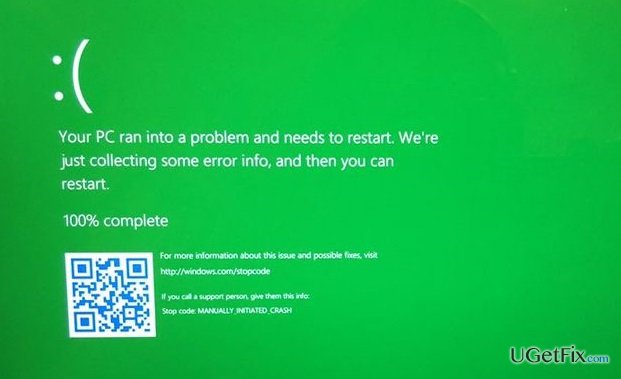
Lots of tweets and rumors related to the leaked Windows 10 build 14997 are circulating around the Internet forums and social networks up to now. Indeed, there comes a significant number of new features and innovations, including blue light settings, Xbox gaming mode, Cortana‘s enabling during the initial PC setup, Microsoft Edge tab changes, app folders, and much more. All these mentioned features have been explicitly indicated and discussed soon after the Windows 10 build 14997 leaked. Nevertheless, The Senior Program Manager of the Microsoft, Matthijs Hoekstra, has decided to increase people‘s curiosity by sharing a post on Twitter, which says:
Cool to read all the new features people discover in the leaked builds, but they missed a big change! Huge change!. curious when its found.
OK, I’ll give 1 hint. Green!
A day after this tweet, Twitter user Chris123NT replied to this report by posting a picture of a Green Screen of Death (GSOD) and wrote: „so on a hunch I tried to force a bug check and well, yeah.“ Once the secret has been revealed, social media and online forums got on a heated discussion why Green Screen of Death (GSOD)??? In old good times, there was a Black Screen of Death, which has been switched to the Blue Screen of Death (BSOD) at the end of the 20th century, and now Microsoft is coloring Windows users‘ life with green. The major question is if the Green Screen of Death (GSOD) (sometimes called Blue Screen of Crash) will replace Blue Screen of Death (BSOD) permanently or maybe they will be used alternatively depending on the bug type?
While it‘s not clear why Microsoft has decided to make the stop error screen green, it has been officially confirmed that the new color scheme will be applied for Windows 10 Insider builds only. The Windows 10 Production will feature the infamous Blue Screen of Death (BSOD), and Microsoft is not planning to change it, at least not now. The reason for this color switch is simple – to distinguish the issues that occur on Insider and Production versions. The common practice shows that many people are sharing their experience about stop errors on Microsoft forum or other IT discussion forums, but they often forget to mention the type of OS they are running and other important system specificities. That‘s why it‘s difficult for Microsoft engineers to set the priorities of customers and their issues. Therefore, if you have installed a Windows 10 build 14997 or 15002, you may experience the new Green Screen of Death (GSOD), don‘t forget to report about it on Microsoft‘s forum, include a screenshot, and provide some Windows 10 specificities that you find necessary for the error‘s investigation.
Quite a few people have already been „greeted“ by a GSOD after the first system restart into the upgrade to 15002 build. The error name DRIVER IRQL NOT LESS OR EQUAL is well-known and widely discussed earlier, but the green color confuses users and prompts them to double-check if the same DRIVER IRQL NOT LESS OR EQUAL BSOD apply to the DRIVER IRQL NOT LESS OR EQUAL GSOD. Beware that despite the color scheme difference, the error codes, types, and fixes coincide, so if you are a Windows Insider user, you may use the fixes that are described for Windows Production users encountering BSOD bugs.

Report an issue
What's wrong with this guide? We review every report and update or remove content.
Report received — thank you. We'll review and fix it.
You need a free account to submit a report.
Be the first to comment