How to fix
Find out your IP address
on Windows
Discover quick methods to find your IP address on Windows 10 and Windows 11. Get expert-tested tips and optimize your network settings in minutes.


Why does How to find out your IP address on Mac occur?
- Not connected to a network
- Using familiar methods from Windows that don't apply to Mac
- Confusion between IP address and MAC address
- Lack of knowledge about how to access network settings
- Misunderstanding the difference between internal and external IP addresses
Repairs Windows system files, removes malware, and restores a clean OS state — without reinstalling.
Hello, I am new to macOS devices. I started using the Mac computer and want to set up a network and share files, so I need to know the IP address of my device. I do not know how to find that out. It may be easy, but can you help me?
Your IP address is an important fact, no matter you run the device that is a Mac or Windows product. Users have more problems when they try familiar methods on Mac that previously worked on Windows machines because operating systems have many differences. Finding out your IP address is also one of them.[ref en-1]
To find out your IP address on Mac you need to be connected to a network because this is how you get the address assigned. The IP address is four sets of digits separated by periods with three numbers per set.[ref en-2] The internal IP address marks the location on the local network, and an external IP is the address of your internet connection. You can find out both.
You can go the more technical way to find out your IP address on Mac and use the GUI and command line. These methods can be the same whether you connect to the internet using the wireless connection or using the cable. Knowing your IP address can be valuable for PUP developers and other malicious actors.[ref en-3] If someone knows your IP address, they can find you via geolocation data and even hack the machine.
Also, it is important to note that the MAC address is different from the IP address. Machine Access Control address is a serial number assigned to every network adaptor and travels the network only until the next device along the way. MAC address is not going further than your router and is not at risk of being hacked. If you are searching for the IP address, you need to secure the network using the IP, not the MAC address. 
How to find out your IP address on Mac
Sometimes the only thing you need to do is to search "how to find out your IP address on Mac," and the address appears at the top. You may need to find out your inner IP address or change the address using a VPN software, so we break some options down for you. Remember about the importance of privacy and security, so you will not need to remove malware and viruses from the machine. Keep in mind that hackers may obtain the IP address and gather some details about your habits, so run [d1] before you go for any changes, so you can see any PUPs or possibly dangerous programs.
Find out your external/public IP address on Mac
- Open System Preferences by clicking on the Apple logo.
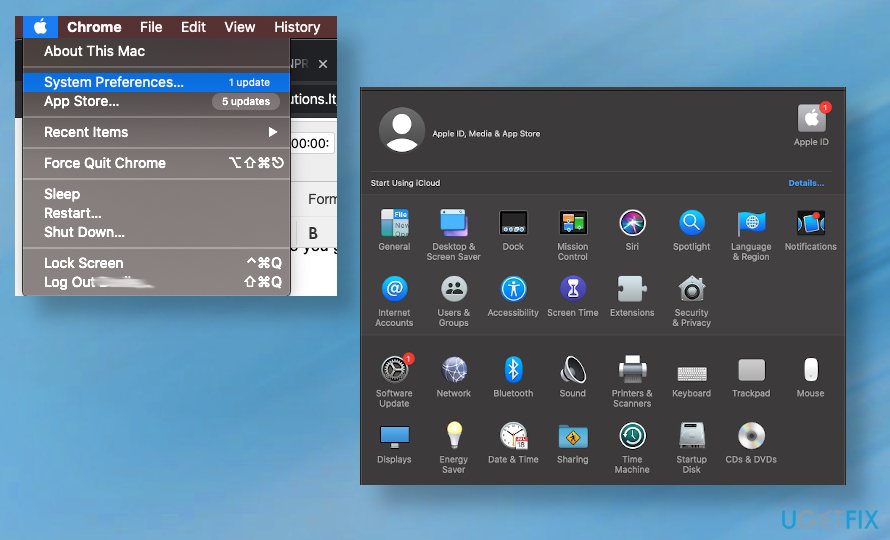
How to find your ip address on mac sys pref - Choose Network.
- Highlight the green-dot option on the left.
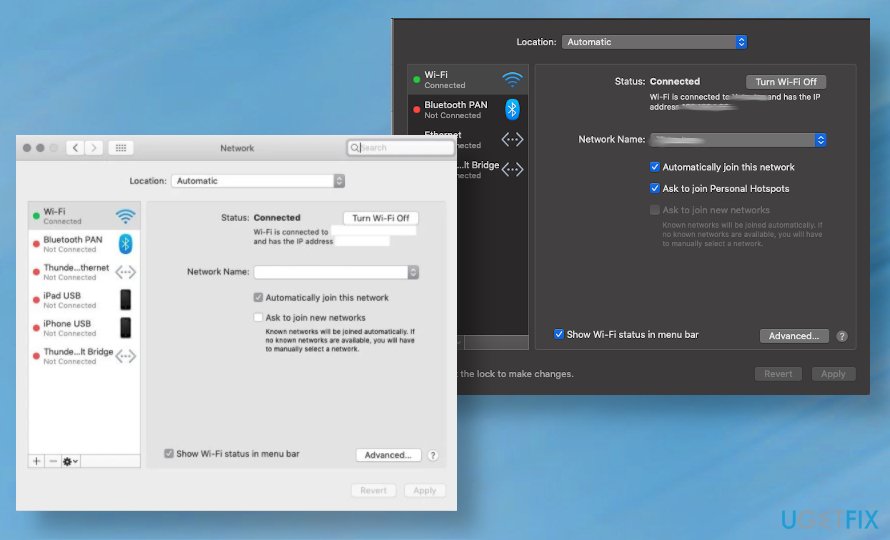
How to find your ip address on mac network - You should see Connected on the right.
- The IP address is shown right under there.
Find out your local IP address on Mac
- If you need to know your IPv4 address, you can also go through the Network section in System Preferences and highlight the green-dot option.
Use Terminal to find out your IP address on Mac
- Click ⌘ + Space on the keyboard and search for the terminal.
- Once the system opens Terminal, type ipconfig getifaddr en0 and hit Enter.
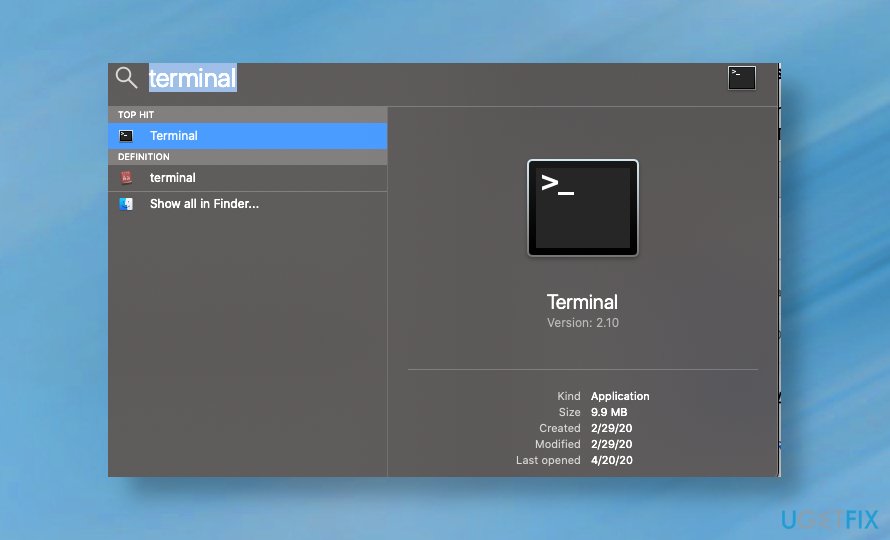
How to find your ip address on mac terminalf
Bottom line
To find your IP address on a Mac, you can use the GUI or command line methods. Ensure you are connected to a network and follow the appropriate steps to access your network settings. If these methods do not work, consider seeking further assistance or checking online resources.
Frequently asked questions
No, to find your IP address, you need to check the settings on your Mac directly, as Windows settings are not applicable.
You cannot directly view your Mac's IP address from a Windows device; however, you can check your router's connected devices list if both are on the same network.
You can use your router's web interface to view all connected devices, including your Mac's IP address, if you have access to the router's settings.




Report an issue
What's wrong with this guide? We review every report and update or remove content.
Report received — thank you. We'll review and fix it.
You need a free account to submit a report.
Be the first to comment