How to fix
Microsoft Store missing after Windows 10 update
on Windows
Restore the missing Microsoft Store on Windows 10 after an update with proven solutions. Expert-tested fixes ensure a seamless experience!

What causes How to fix Microsoft Store missing after Windows 10 update?
- Botched updates
- Corrupted files
- Incorrectly installed updates
- Power outage
- Missing Microsoft Store icon
Repairs Windows system files, removes malware, and restores a clean OS state — without reinstalling.
Hello. After a recent Windows 10 update, my Microsoft Store is completely missing. If I try to click on the remaining shortcut, it says, "You need a new app to open this ms-windows-store." Please help!
Microsoft Store missing is a weird issue that many users were complaining about for a while now. The problem, however, does not appear out of nowhere but rather occurs after users patch their Windows 10 systems with the most recent updates. Without a doubt, such occurrences should not happen, but they do, unfortunately.
We highly encourage you to keep updating your operating system on a regular basis even if you experience problems after, as an unpatched system might be more prone to bugs,[ref en-1] lack new features, and be vulnerable to cyberattacks.[ref en-2] In the meantime, we will try to help you fix Microsoft Store missing is missing after the Windows update.
Without the Store app (which is previously known as Windows Store), users are unable to download new apps or even update the outdated ones, which to some might be a huge disadvantage. That being said, it is not uncommon for users to experience errors within the store itself, e.g., 0x80131500 or 0x803fb005.
In most cases, users said that the Microsoft Store icon is missing when dealing with this problem, although others claimed that the icon could not be found in Apps & Features, desktop, or anywhere else.
While it may seem like the reason for the missing Windows Store is evident (botched updates), but the underlying reason for it is different since not everybody has to deal with the problem - in other words, it only happens to some users, not everybody. In most cases, this underlying reason is related to corrupted files or incorrectly installed updates, e.g., due to a power outage.
Regardless of the Microsoft Store icon is missing or Microsoft Store is missing, you should take the steps below in order to fix this annoying issue once and for all. Before you start, we highly recommend you try resolving this problem automatically with an advanced PC repair tool [d1].
Fix 1. Run Windows Store App troubleshooter
If you are having some type of issues with the Microsoft Store, you should start with the troubleshooter. Here's how:
- Right-click on Start and click and select Settings
- Go to Update & Security
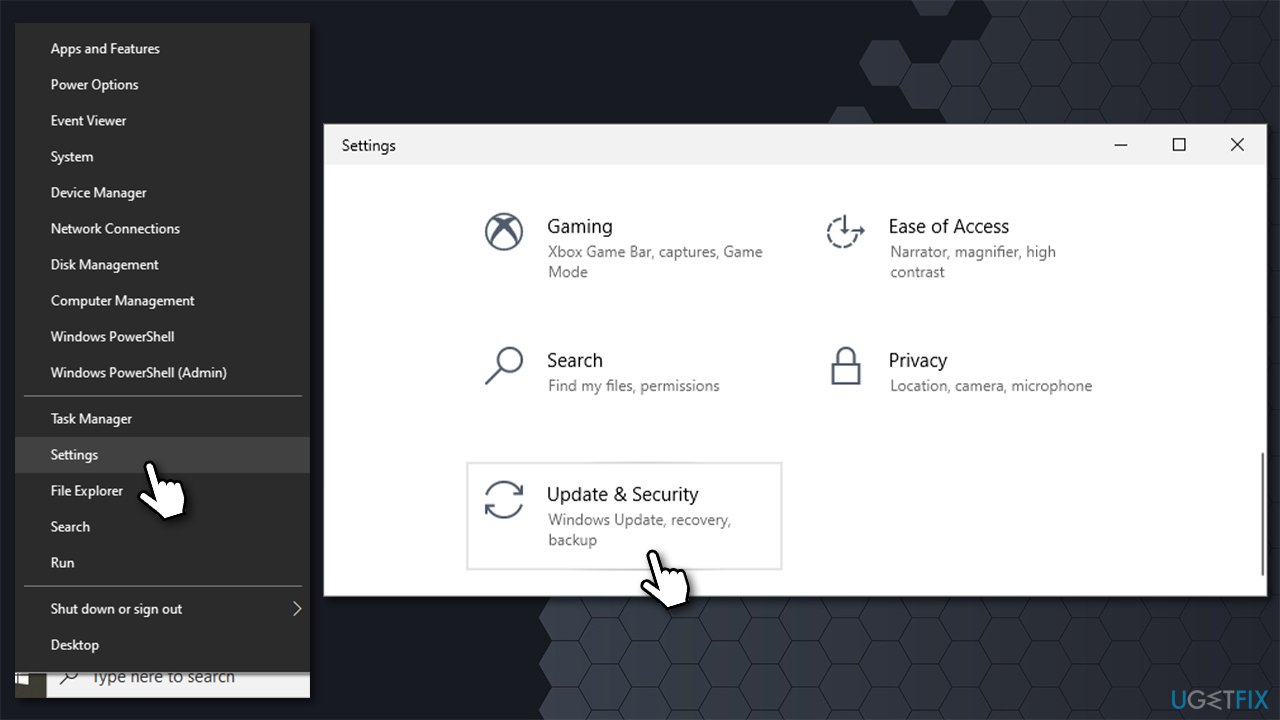
How to fix microsoft store missing after windows 10 update go to settings - Select Troubleshoot on the left
- If you can't see troubleshooters listed on the right, click Additional troubleshooters
- Select Windows Store Apps and click Run the troubleshooter.
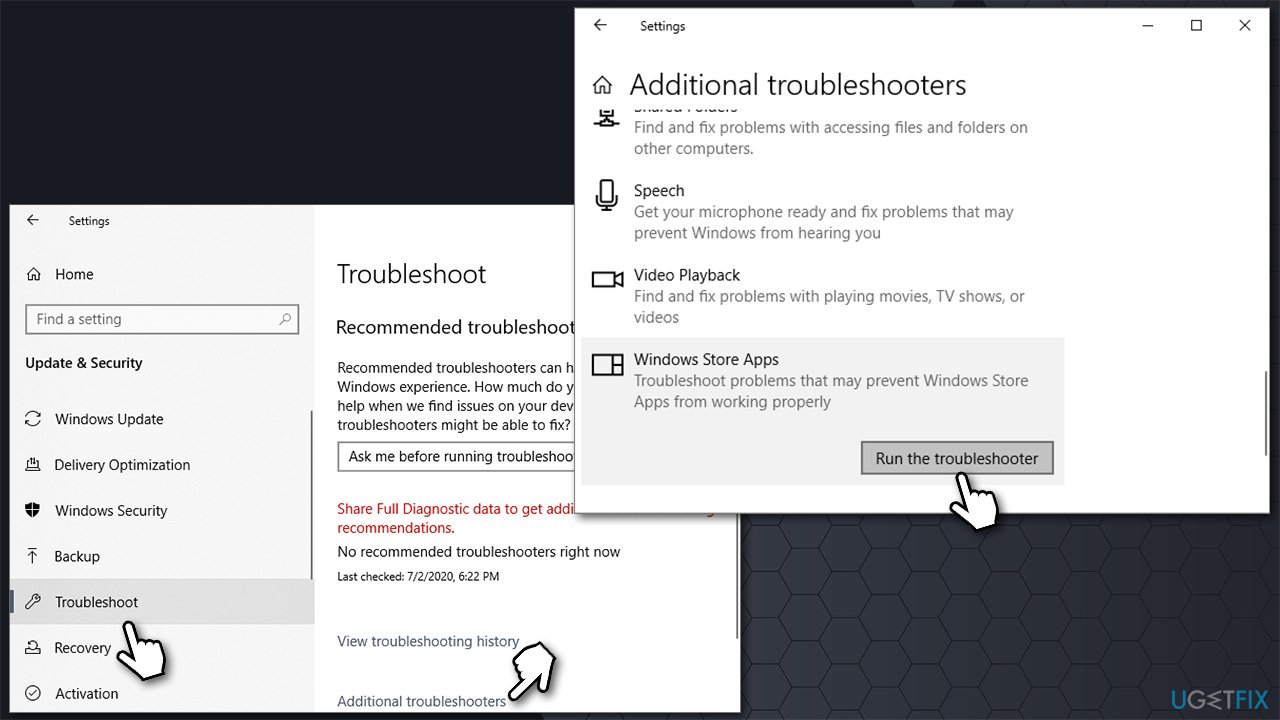
How to fix microsoft store missing after windows 10 update run troubleshooter - Reboot Windows and see if that helped.
Fix 2. Re-register Microsoft Store
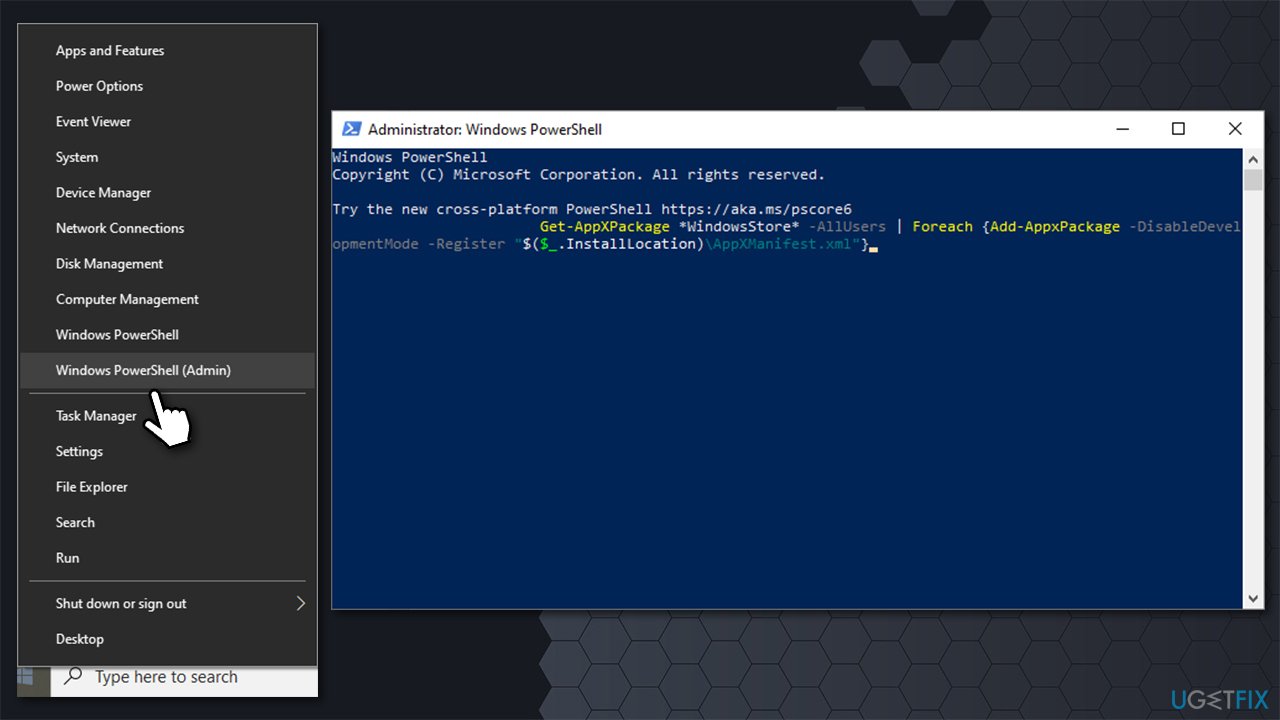
PowerShell[ref en-3] is a powerful tool that allows users to run commands to perform actions that are otherwise unavailable. Running the following command will force Windows to re-register the app and fix Microsoft Store missing issue.
- Right-click on Start and pick PowerShell (Admin)
- If User Account Control Shows up, click Yes
- In the new Window, type in the following command and press Enter:
Get-AppXPackage *WindowsStore* -AllUsers | Foreach {Add-AppxPackage -DisableDevelopmentMode -Register "$($_.InstallLocation)\\AppXManifest.xml"}
- Restart your computer and see if that solved the problem.
How to fix microsoft store missing after windows 10 update reregister store
Fix 3. Run the WSreset command
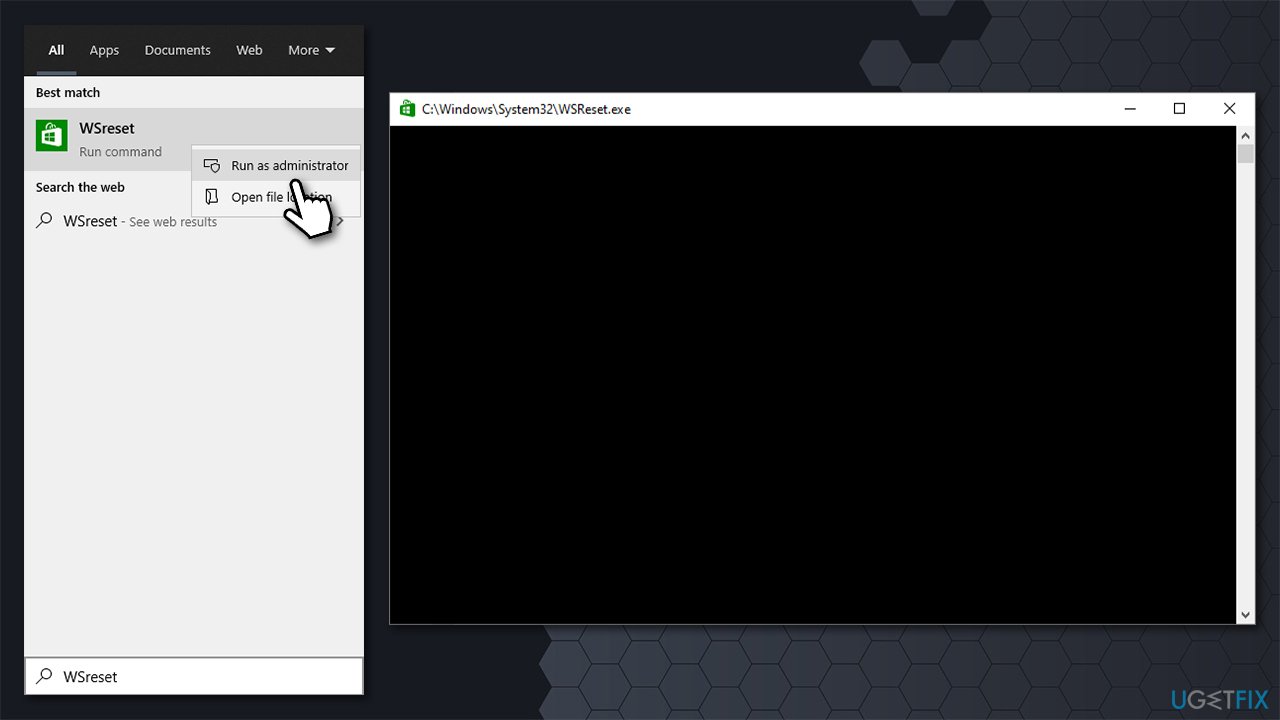
- Type in WSreset in Windows Search
- Right-click on WSreset result and select Run as administrator
- For a brief moment, a black pop-up screen should show up - do not close it
- Once it's gone, Microsoft Store should reset and launch automatically.
How to fix microsoft store missing after windows 10 update reset store
Fix 4. Reset the the Store via Apps & Features
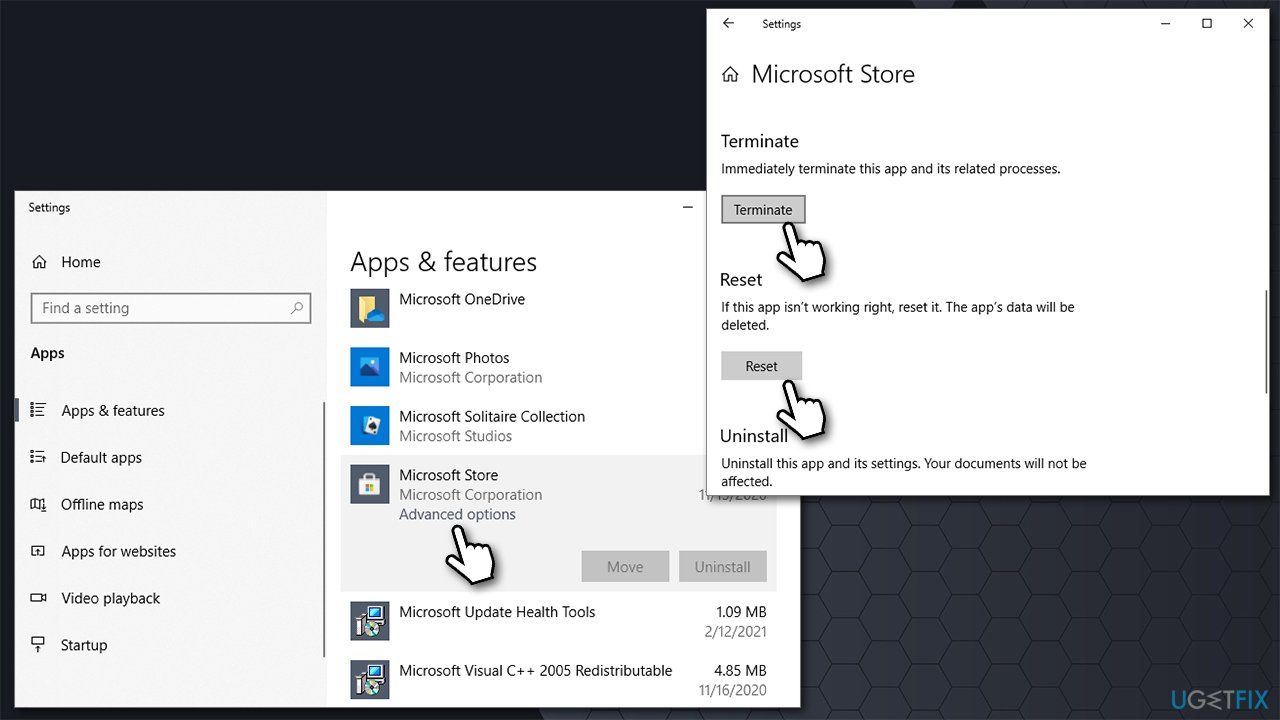
A more advanced way to reset Microsoft Store is by doing so via the Apps & Features section. Thus, if the previous solution didn't help you, you should try this one.
- Right-click on Start and pick Apps & Features
- Scroll down until you locate Microsoft Store and click Advanced Options
- Now click on Terminate and then follow up with Reset
How to fix microsoft store missing after windows 10 update reset via apps and features - Restart your computer.
Fix 5. Fix corrupted system files
If Windows system files are corrupted, you might notice the Microsoft store icon missing. If that is the case, running System File Checker might resolve the problem.
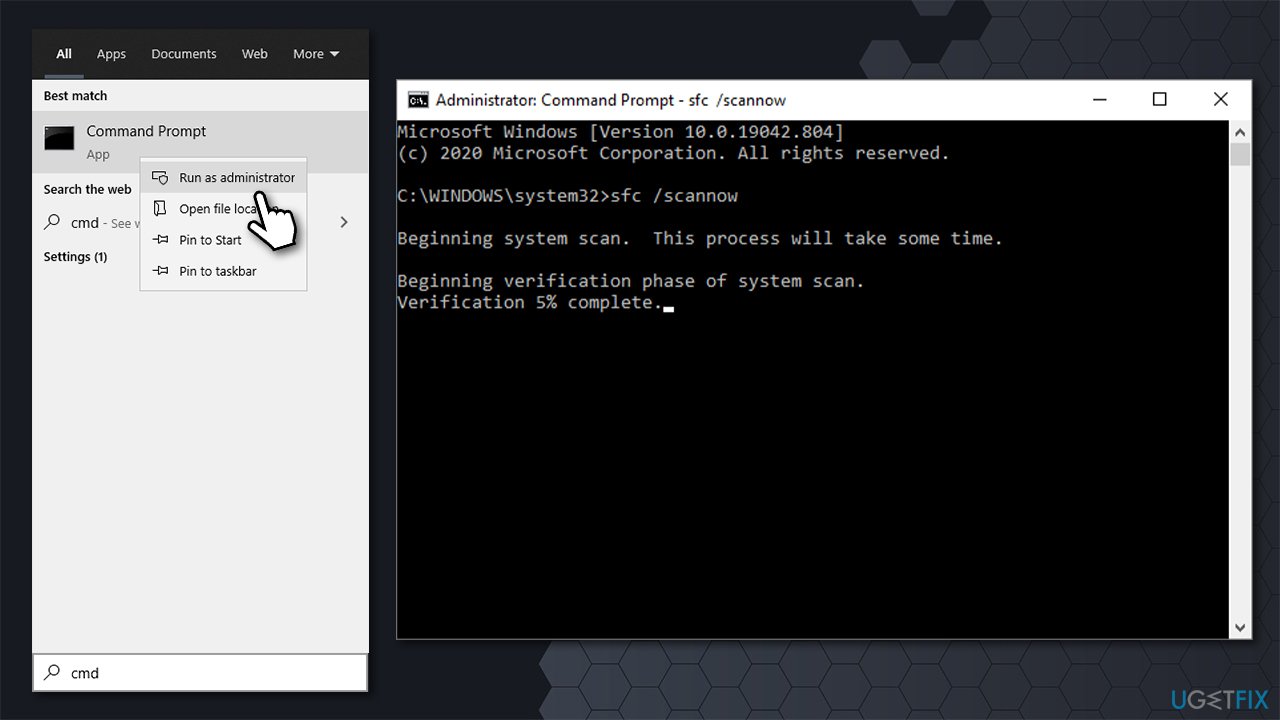
- Type cmd in Windows search
- Right-click on Command Prompt result and select Run as administrator
- In the new window, copy and paste the following command:
sfc /scannow
- Press Enter and wait for the scan to finish
How to fix microsoft store missing after windows 10 update run sfc scan - Restart your computer if SFC found and repaired issues.
Fix 6. Uninstall the latest Windows update and reinstall it
Since the problem occurs after installing the latest Windows updates, you should try uninstalling them and then rei-implementing them again.
- Type in Control Panel in Windows search and press Enter
- Go to Programs > Uninstall a program
- Click on View installed updates on the left
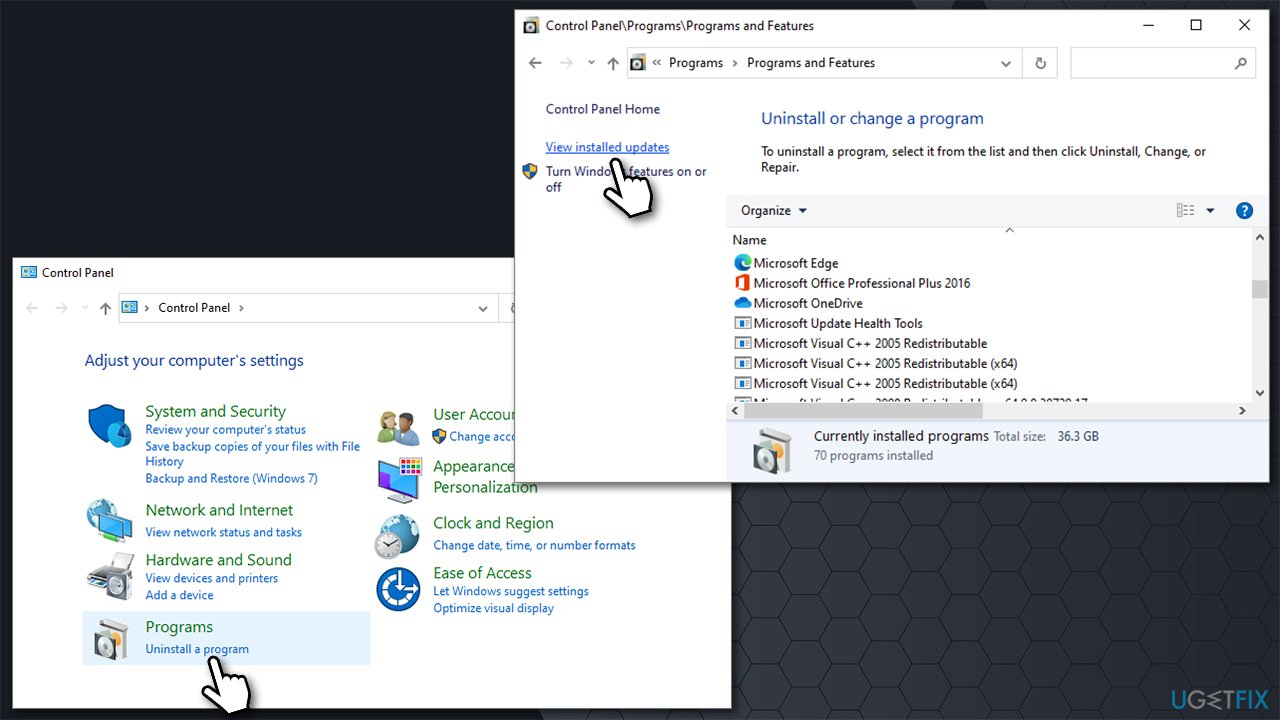
How to fix microsoft store missing after windows 10 update open control panel - Sort the updates by date
- Uninstall every single entry that has been installed recently.
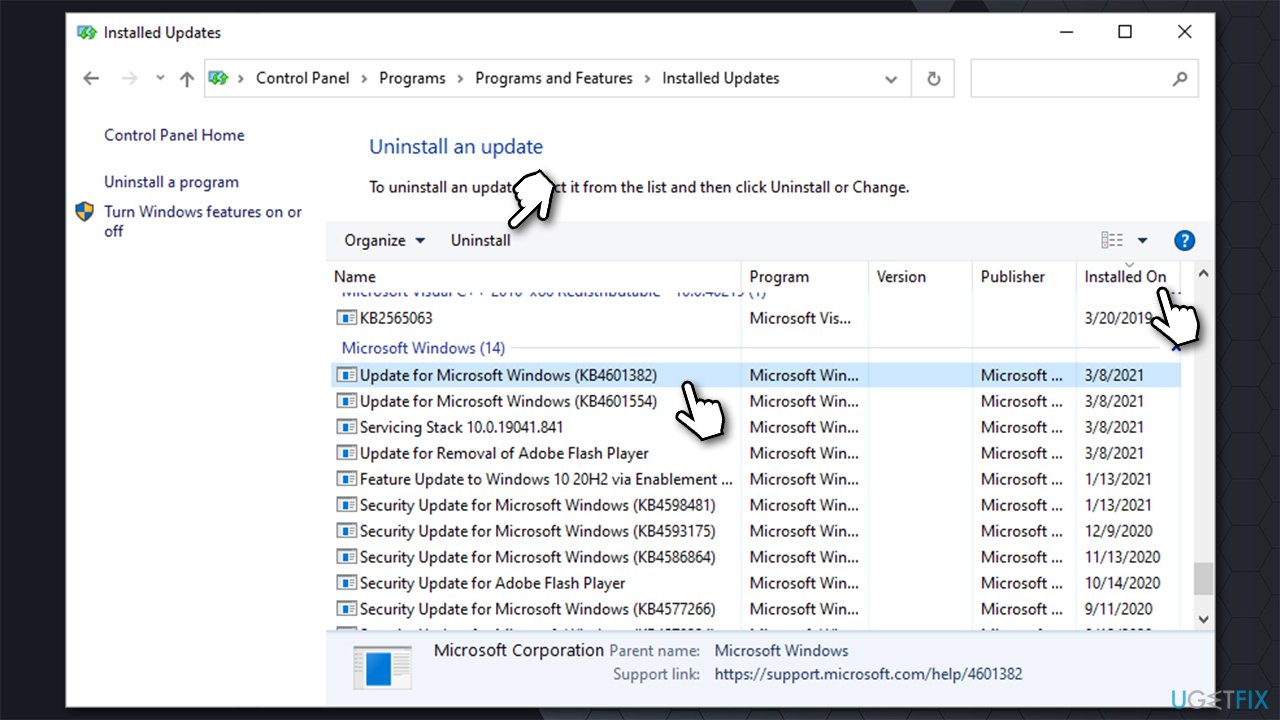
How to fix microsoft store missing after windows 10 update uninstall updates
Once done, type in Windows Update in Windows Search and press Enter. In here, click on Check for updates and wait till the updates are installed. Restart your computer and see if the problem persists.
Fix 7. Use System Restore
If none of the above helped you to fix missing Windows store, you should restore your Windows to the previous state when everything worked normally. Don't worry, you will not lose your personal files, but you might have to reinstall some apps.
- Type in Create a Restore point in Windows search and press Enter
- Go to System Protection tab and click on System restore
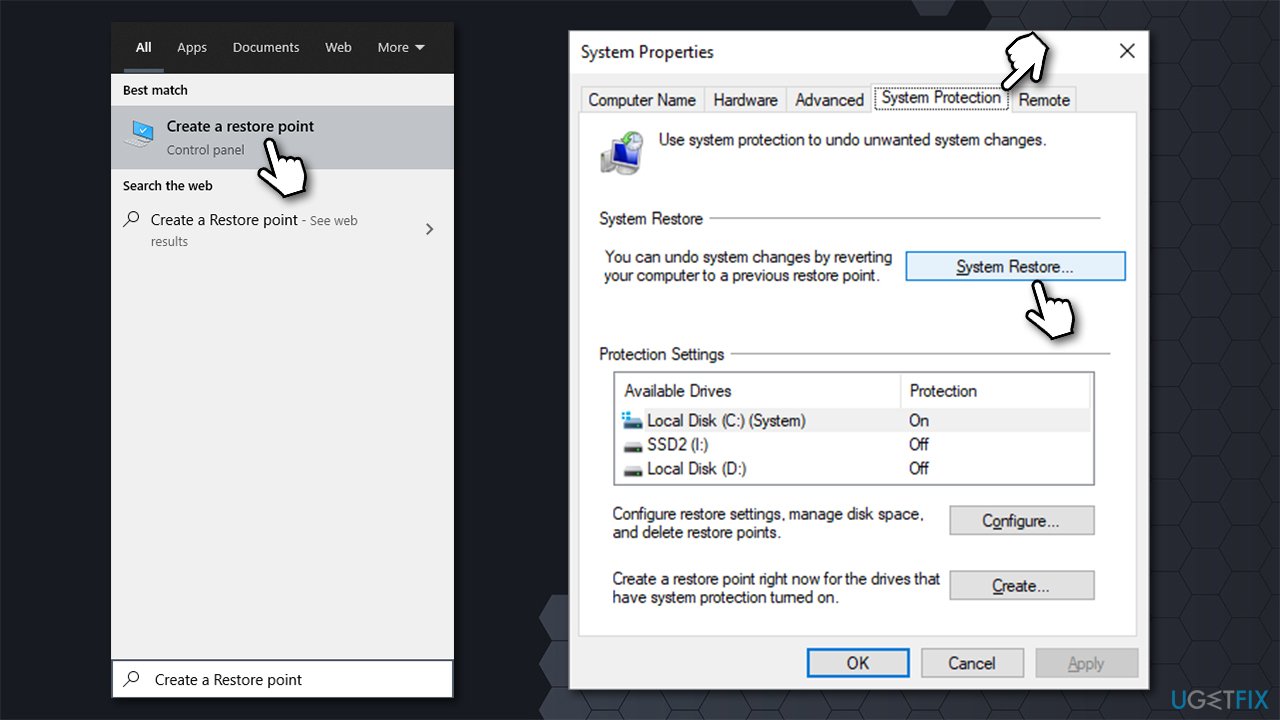
How to fix microsoft store missing after windows 10 update run system restore - Select Choose a different restore point and click Next
- Tick the Show more restore points box
- Pick the appropriate restore point and click Next and the Finish.
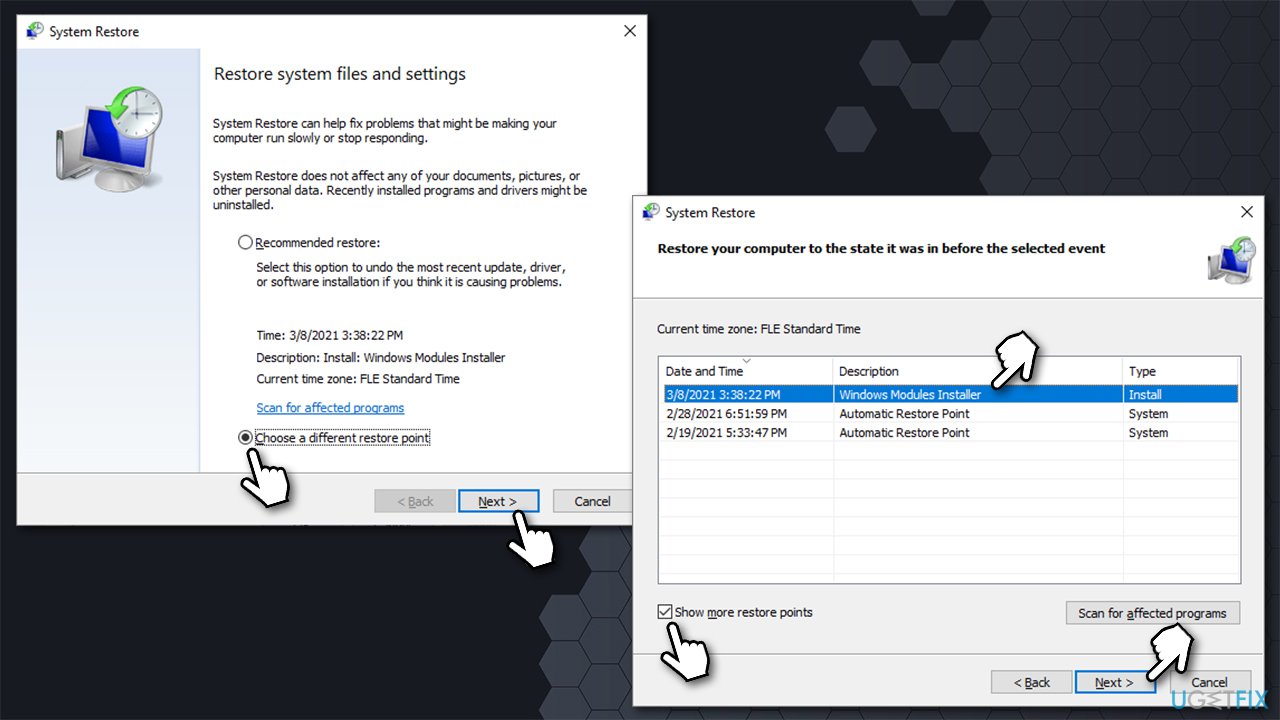
How to fix microsoft store missing after windows 10 update run system restore2
Bottom line
To fix the Microsoft Store missing issue, users can try running Windows troubleshooting tools or using advanced PC repair software. If these solutions do not resolve the problem, further manual steps may be necessary to restore the Microsoft Store.




Report an issue
What's wrong with this guide? We review every report and update or remove content.
Report received — thank you. We'll review and fix it.
You need a free account to submit a report.
Be the first to comment