How to fix
Api-ms-win-core-windowserrorreporting-l1-1-1.dll is missing
on Windows
Resolve the api-ms-win-core-windowserrorreporting-l1-1-1.dll missing error on Windows 10 and 11 quickly and easily. Expert-tested solutions await!


What causes How to fix api-ms-win-core-windowserrorreporting-l1-1-1.dll is missing on Windows?
- Missing DLL file due to improper installation of software
- Corrupted system files
- Incompatibility with Windows version
- Issues with Microsoft Visual Studio 2015 components
- Malware or virus affecting system files
Repairs Windows system files, removes malware, and restores a clean OS state — without reinstalling.
Hello. Every time I try opening any game on Windows 10, I receive an error that says that api-ms-win-core-windowserrorreporting-l1-1-1.dll is missing. Thus, I can't play any games on my computer, and it is very frustrating. Any solutions to this problem, please?
DLL[ref en-2] files are similar to EXE files since they are both executables, it is just the way of the operation differ. To be precise, Dynamic Link Libraries are data files that contain information needed to launch a particular command or a program, although they can not operate without an executable file. In other words, the yare called up whenever Windows needs them.
In this case, some users reported on online IT forums that they received api-ms-win-core-windowserrorreporting-l1-1-1.dll is missing error when trying to launch certain applications. Most commonly, this problem is related to various video games or programs that were created with the help of Microsoft Visual Studio 2015 and Windows 10 Software Development Kit.[ref en-3]
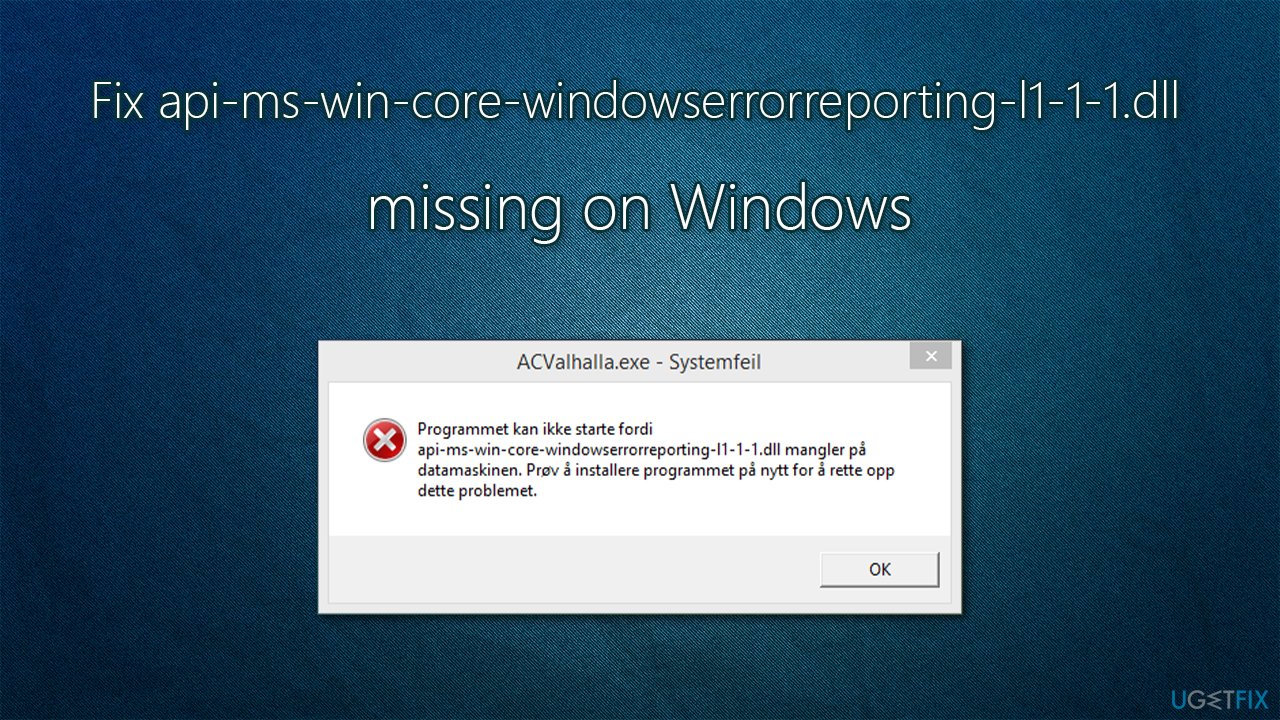
As a result, they are unable to launch an app because of the api-ms-win-core-windowserrorreporting-l1-1-1.dll missing error, which states the following:
XXX.exe - System Error
The program can't start because api-ms-win-core-windowserrorreporting-l1-1-1.dll is missing from your computer. Try reinstalling the program to fix this problem.
As evident, most users immediately try to reinstall the application in question - just like the error message suggests. Unfortunately, this does not usually yield any positive results, and the problem prevails. Some users also said that they received the api-ms-win-core-libraryloader-l1-1-1.dll is missing error instead.
So, the question is how to fix api-ms-win-core-windowserrorreporting-l1-1-1.dll is missing error on Windows? There is no universal answer to this question, as it depends on many factors, such as which operating system version you are using, for example.
Before you begin looking at manual solutions below, we strongly recommend you try running a scan with [d1] repair software, as it can oftentimes fix underlying problems on Windows systems, so you will not have to worry about errors, BSODs,[ref en-1] or missing DLLs.
1. Reinstall the program
While this might be something that you tried, some users might have not. Therefore, just a reminder we are putting out here - always read what the error message tells you. While it does not always provide much, it can indicate at the possible solution, and this time it is the case.
Therefore, you should first try to reinstall the program in question - this is particularly applicable if the error occurs only with one app. If api-ms-win-core-windowserrorreporting-l1-1-1.dll is missing error occurs when you are trying to launch multiple programs, proceed with fixes below.
2. Check the version of Windows
There are two main version of a Windows operating system: 64-bit and 32-bit. The latter, while still used by people, is considered redundant and only supports max 4GB of RAM capacity. Thus, many high GPU power demanding games long shifted to 64-bit versions only.
In order to check which version of Windows you are using, perform the following:
- Right-click on Start and pick System
- On the right side of the window, you should see Device specifications section
- Under System type, you should see whether 32-bit or 64-bit Windows is installed, and whether your processor supports 64-bit versions.
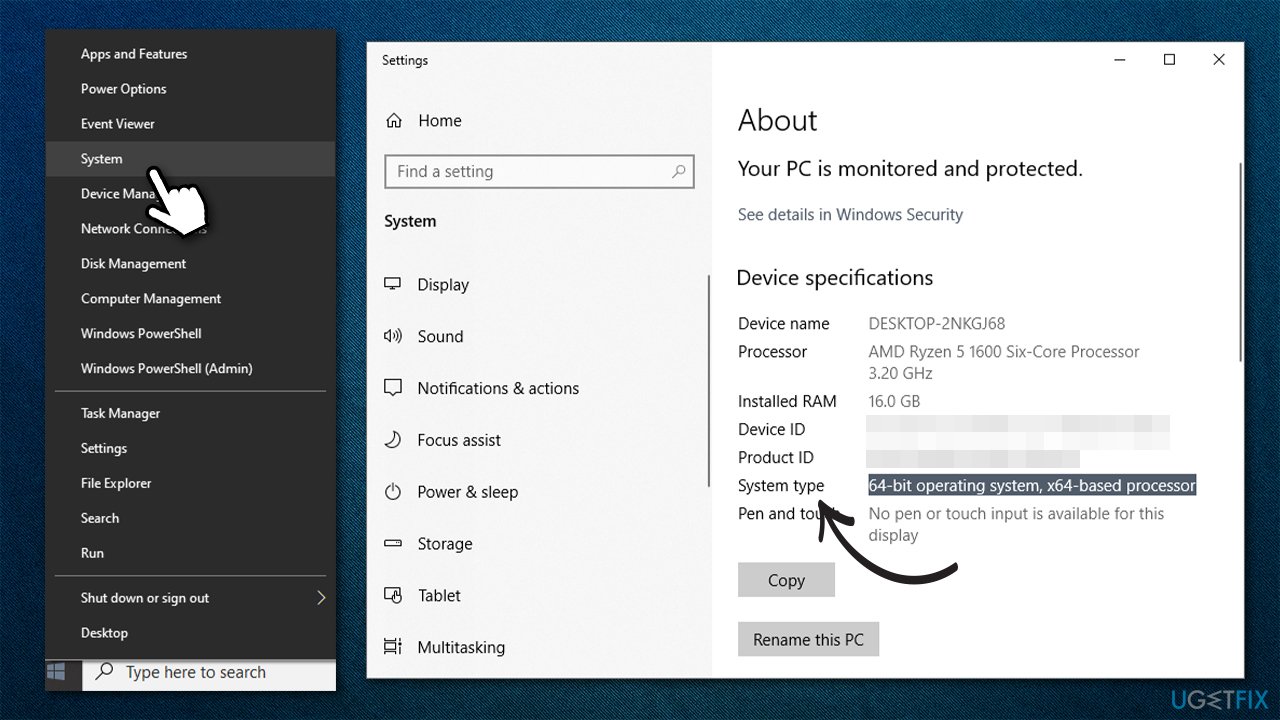
How to fix api ms win core windowserrorreporting l1 1 1 dll is missing on windows check os version
If you are using 32-bit Windows and have a support for 64-bit processor, you can upgrade for free. However, this will require for you to reinstall Windows - check out our comprehensive guide for that.
3. Update Windows
Make sure your Windows is up to date (also, install all the optional updates available):
- Type in Updates in Windows search and press Enter
- In here, click Check for updates
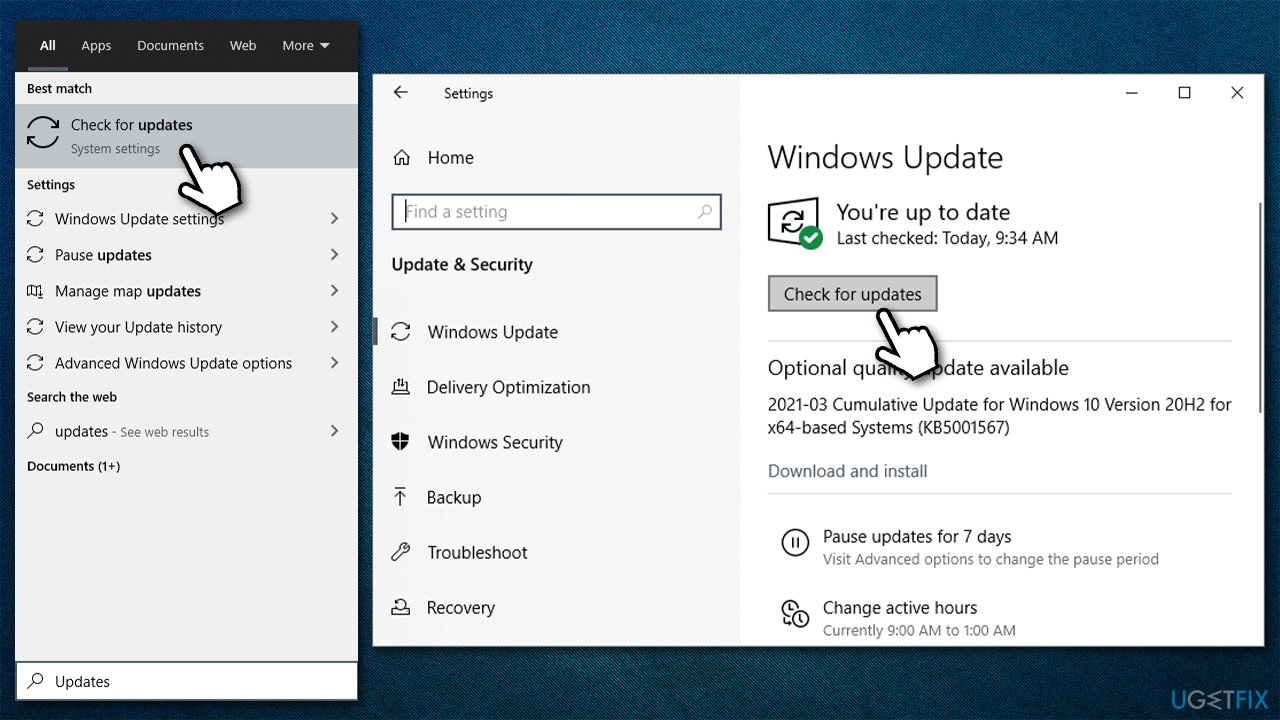
How to fix api ms win core windowserrorreporting l1 1 1 dll is missing on windows check for updates - Wait till Windows downloads and installs updates
- Reboot the system and check if the problem remains.
4. Run the app in compatibility mode
- Right-click on the main .exe launcher or the shortcut of the app in question and pick Properties
- Go to Compatibility tab
- Tick the Run this program in compatibility mode for
- From the drop-down menu, pick Windows 8 or another version
- Click Apply and OK
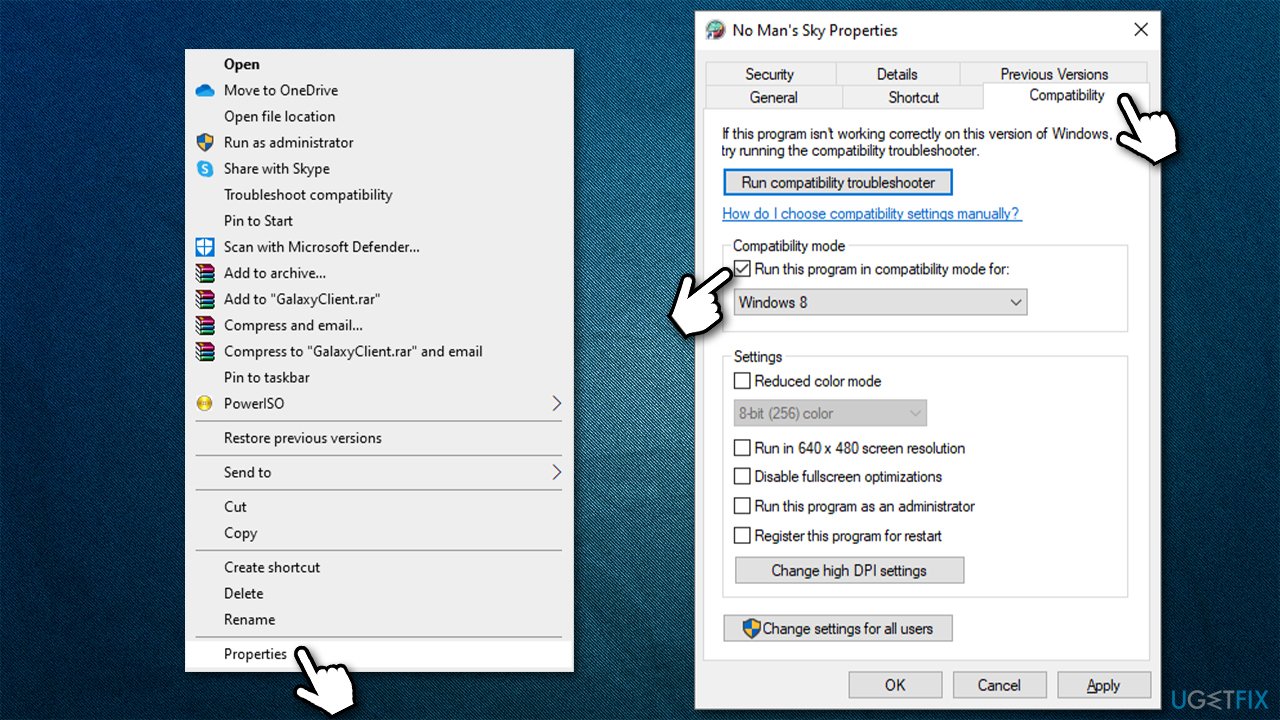
How to fix api ms win core windowserrorreporting l1 1 1 dll is missing on windows run in compatibility mode - Try launching the program again.
5. Install the latest version of Microsoft Visual C++
Your system might be missing the latest Visual C++ Redistributable. Here's how to install them:
- Visit the official Microsoft download page for Visual C++
- Here, download both of these files:
x86: vc_redist.x86.exe
x64: vc_redist.x64.exe - Install each of the files as per on-screen instructions and reboot your PC.
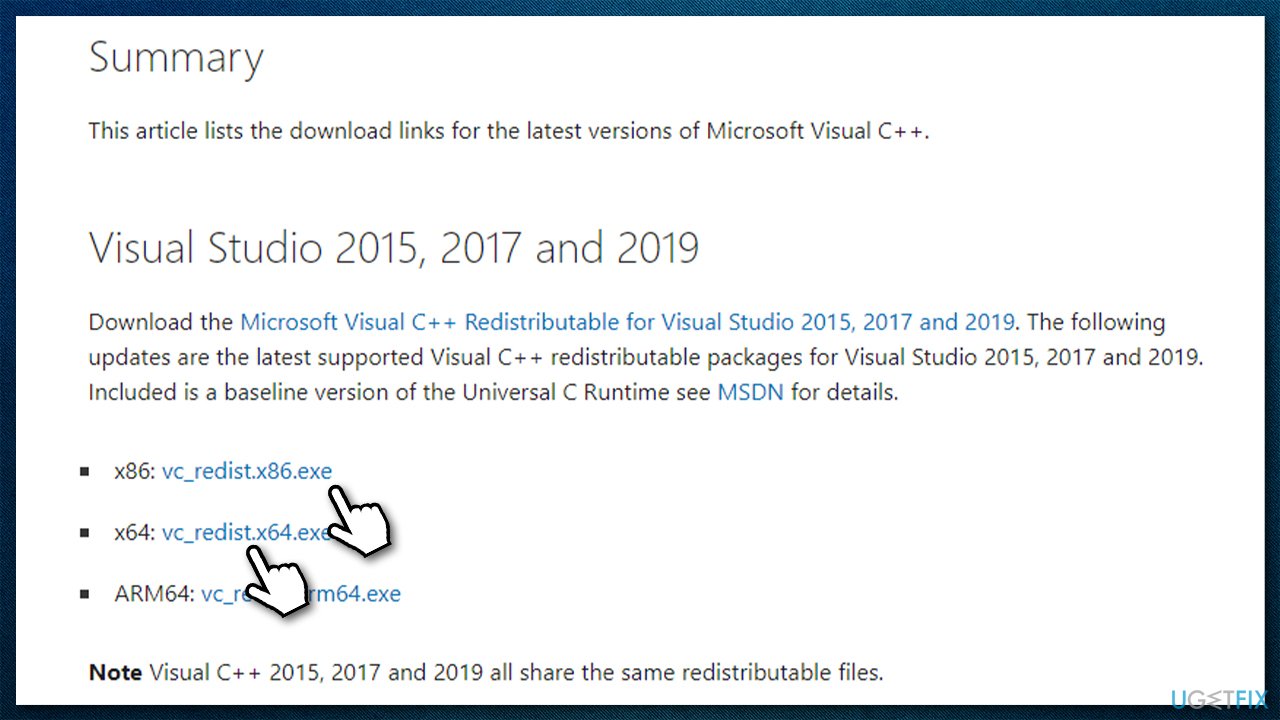
How to fix api ms win core windowserrorreporting l1 1 1 dll is missing on windows download visual c plus plus
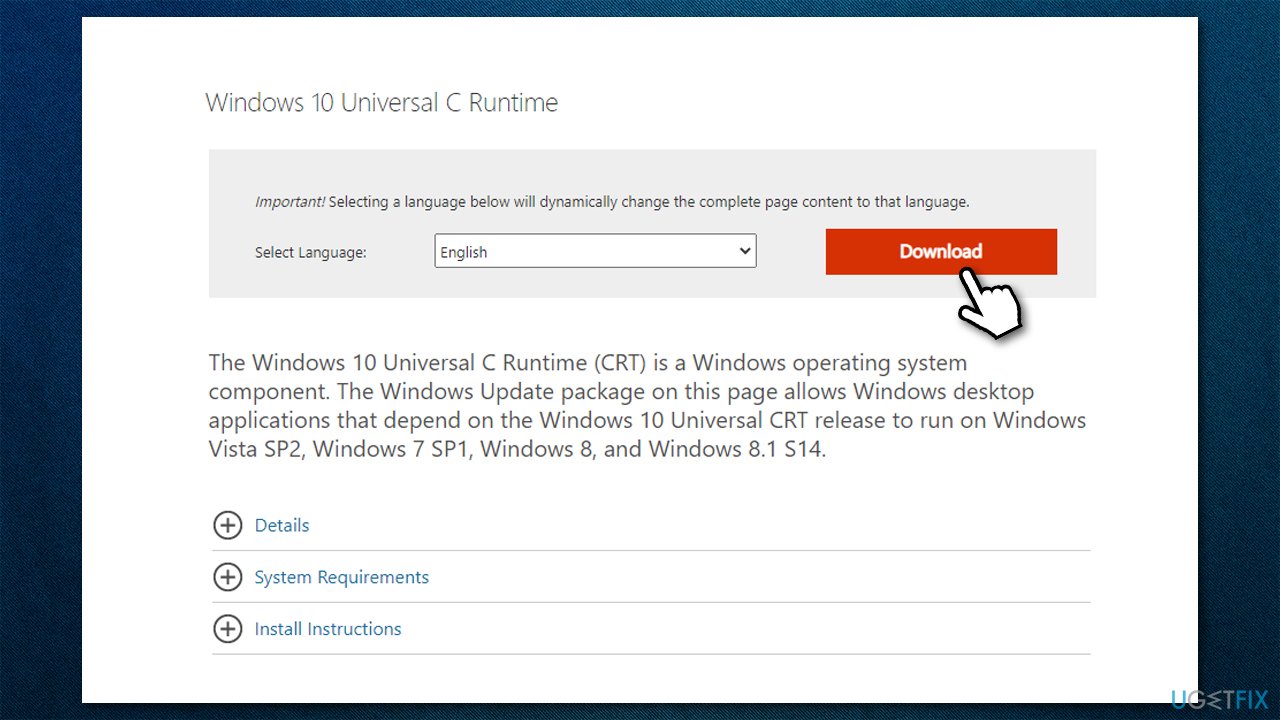
6. Download Windows 10 Universal CRT [older Windows versions]
If you are running Windows 8.1 or an earlier version, you need to install Windows 10 Universal C Runtime Windows system component. By installing it, you will allow applications that were created in this environment to run smoothly on a system that otherwise lacks this component.
All you have to do is visit the official Microsoft website, download the Windows 10 Universal C Runtime installer and install it as per on-screen instructions. Once done, reboot your system and try running the problematic program again.
Note: you can also try downloading the missing api-ms-win-core-windowserrorreporting-l1-1-1.dll component from third-party sites, although this is not recommended due to security reasons.
Bottom line
To fix the api-ms-win-core-windowserrorreporting-l1-1-1.dll missing error, you can try reinstalling the program, running a scan with repair software, or checking for system file corruption. If these solutions do not resolve the issue, consider seeking further technical support or exploring additional repair options.
Frequently asked questions
You can try restoring the missing DLL file by running the System File Checker tool. Open Command Prompt as an administrator and type 'sfc /scannow' to repair any corrupted system files.
Downloading DLL files from third-party websites is not recommended as it may expose your system to malware. Instead, use built-in tools like System File Checker or DISM to resolve the issue.
To prevent this error, keep your Windows operating system updated and regularly scan for malware. Additionally, avoid uninstalling system components or third-party applications that may rely on this DLL.




Report an issue
What's wrong with this guide? We review every report and update or remove content.
Report received — thank you. We'll review and fix it.
You need a free account to submit a report.
Be the first to comment