How to fix
Roblox high CPU usage
on Windows
Resolve Roblox high CPU usage issues on Windows 10 and 11 effortlessly. Quick fixes ensure smooth gameplay, expert-tested solutions included!


What causes How to fix Roblox high CPU usage in Windows?
- Game demanding more resources than the computer can allocate
- Increased graphic details
- Large number of scripts running simultaneously
- Background processes interfering with performance
- Compatibility issues
- Outdated drivers
Repairs Windows system files, removes malware, and restores a clean OS state — without reinstalling.
For the past week or some, I've noticed that my CPU is always at 100% whenever I play Roblox. The game worked perfectly fine before, so I'm not sure what happened. The CPU usage is not that extreme when I'm playing other games or watching videos online, for example.
Roblox, a globally recognized online platform, has carved its niche in the gaming community. It allows users to create and play games designed by other users, establishing an environment of creativity and engagement. Its unique concept, combined with an interactive interface, has led millions of gamers to flock to the platform, propelling it to immense popularity.
However, like any software of its scale, Roblox isn't devoid of technical hitches - we have previously discussed Initialization error 4, "We encountered an unrecoverable error," error code 267, and more. Another prevalent issue that players often report is Roblox high CPU usage on Windows devices.
While Roblox regularly pushes updates to enhance the user experience, these updates sometimes inadvertently introduce problems. Some users have pinpointed the onset of high CPU usage to moments right after a game version update. Conversely, for others, the triggers remain elusive. In some instances, players have reported no noticeable changes in their system or gaming behavior, yet they suddenly experience this spike in CPU consumption.
Roblox high CPU usage can stem from a myriad of reasons. One prominent cause is the game demanding more resources than the computer can allocate, often due to increased graphic details or a large number of scripts running simultaneously. Other times, the issue can originate from the Windows operating system itself. Background processes, compatibility issues, or outdated drivers can interfere with Roblox's optimal performance.

Understanding the exact root cause is crucial for finding the right solution. While in-depth instructions and solutions will be discussed below, it's important to note that sometimes, pinpointing the singular reason for a malfunction, especially in complex systems like Windows, can be a daunting task.
For those looking for a comprehensive approach to these technical glitches, the [d1] PC repair tool serves as an excellent option. This tool is particularly beneficial when the underlying issues are multifaceted, as with Roblox's high CPU usage. By addressing many Windows problems automatically, it offers a streamlined solution to restore optimal PC performance.
Fix 1. Lower in-game settings
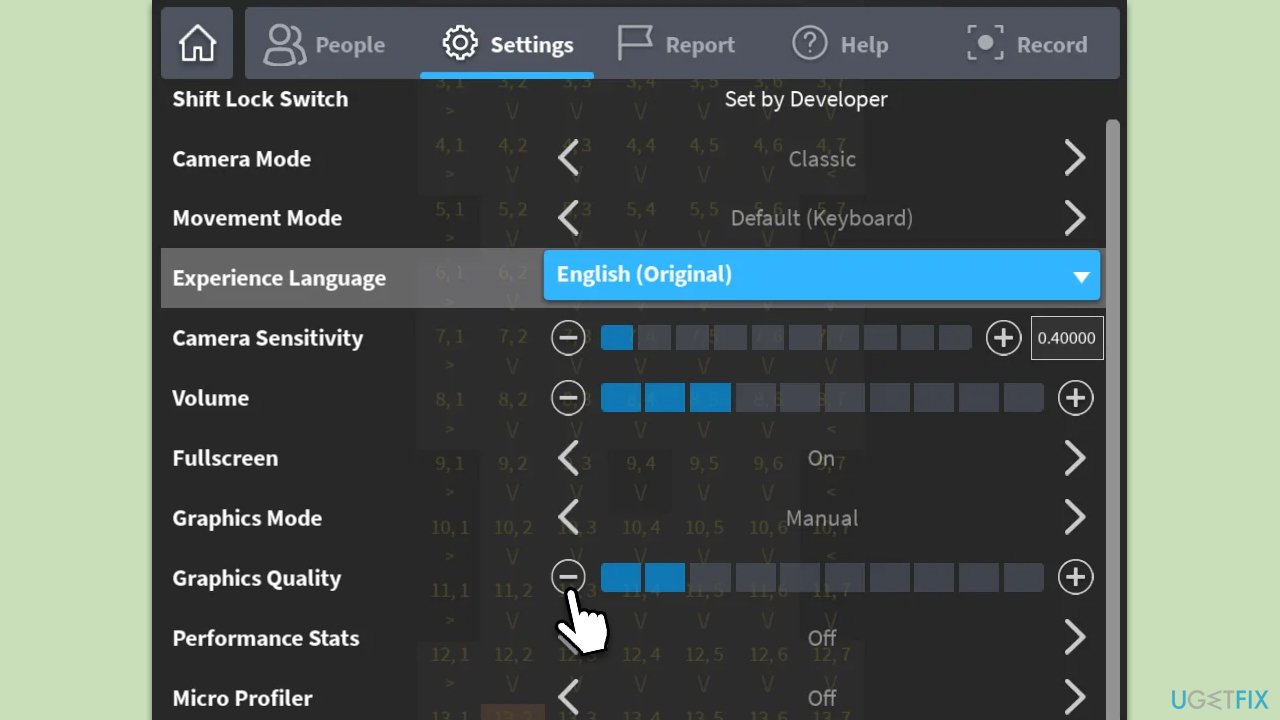
Roblox provides customization options within its settings to cater to a variety of hardware configurations. Reducing graphic and performance settings will decrease the strain on your CPU, potentially solving any over-usage issues.
- Launch Roblox Studio or any Roblox game you're playing.
- Within the game, press Esc on your keyboard to open the Settings menu.
- Navigate to the Graphics Mode and select Manual.
- Here, you'll find sliders or dropdown menus. Adjust these to lower settings. For instance, reduce texture quality or shadows.
- After making changes, save if required, and then restart the game to observe the difference.
Fix 2. Update graphics drivers
Graphics drivers serve as a bridge between the software and hardware. Keeping them updated ensures your games run smoothly and efficiently, as new versions often provide optimizations and compatibility patches. One of the fastest ways to do so is by employing an automatic updater such as [rev id="DriverFix], although you can also install drivers from device manufacturer's website or by using the Windows update feature:
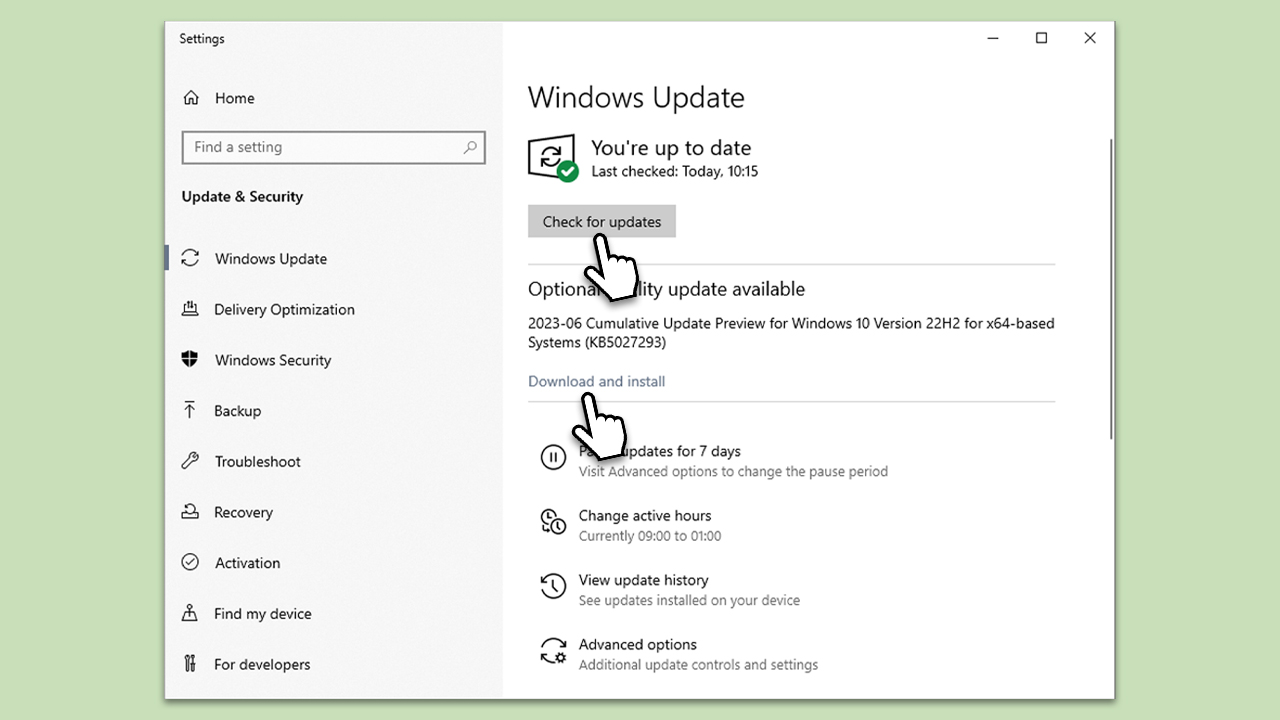
- Type Updates in Windows search and press Enter.
- In the new window, click Check for updates.
- If optional updates are available, install them as well.
- Wait till all the files are downloaded and installed.
- Restart your system.
Fix 3. Set Roblox to high-priority
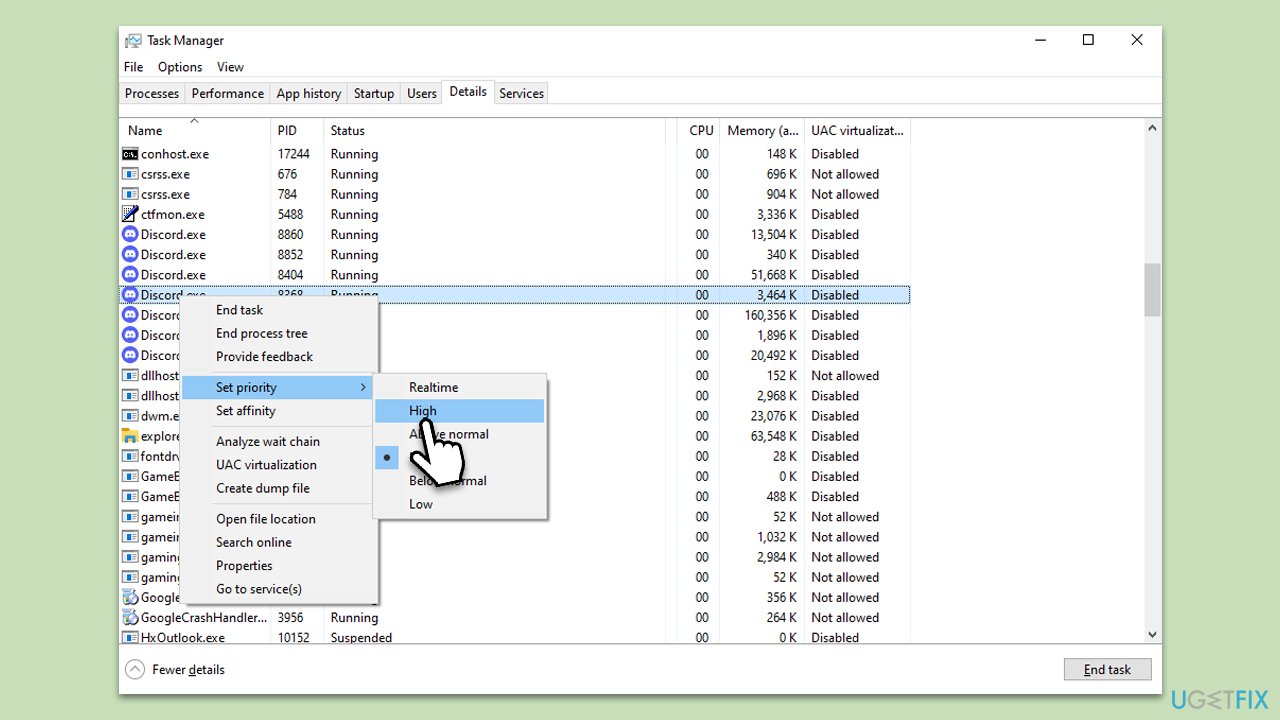
By default, Windows shares CPU resources among all running processes. Setting Roblox to high priority allocates more of these resources to the game.
- Press Ctrl + Shift + Esc to open Task Manager.
- Navigate to the Details tab.
- Scroll until you find Roblox or Roblox Studio from the list.
- Right-click on it and choose Set priority > High.
- Close down Task Manager and launch the game again.
Fix 4. Limit background processes
Having several applications open simultaneously divides CPU attention. Closing unessential processes can free up resources for Roblox.
- Open Task Manager again.
- Check the Processes tab for applications using a significant percentage of CPU.
- Identify any application that you aren't actively using.
- Right-click on such applications and select End Task.
Fix 5. Adjust power settings
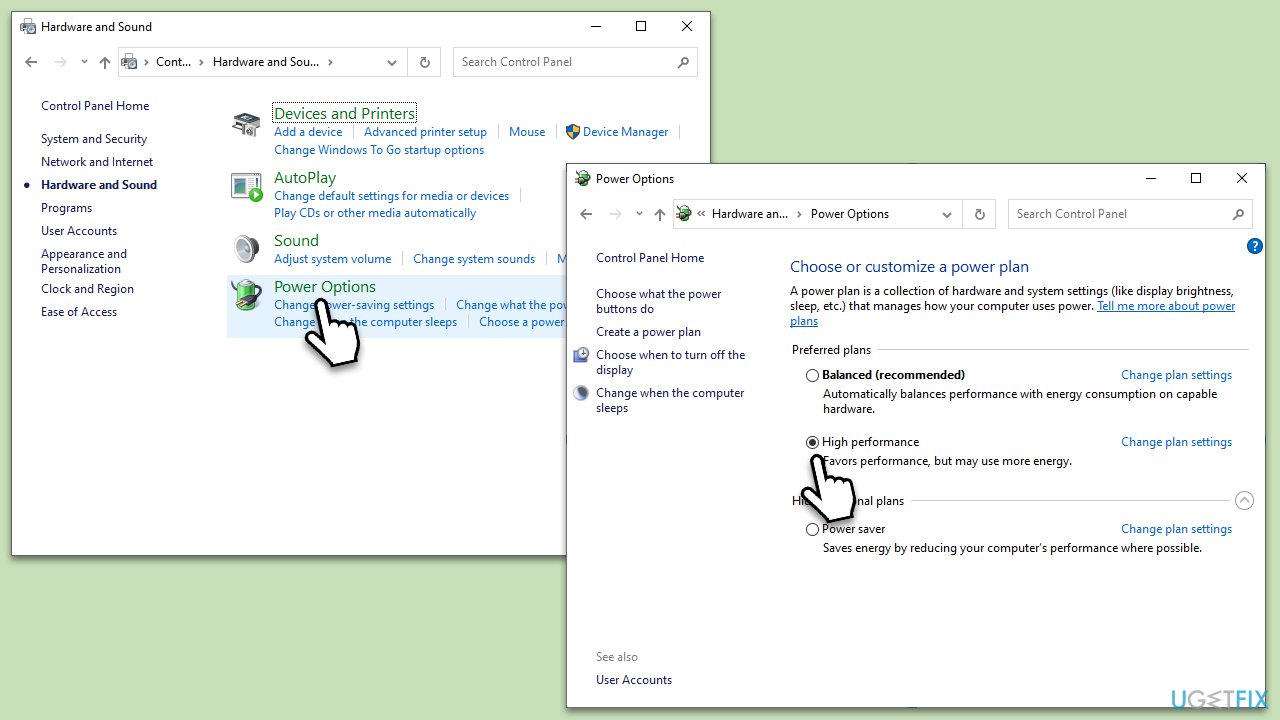
Your computer's power plan can influence performance. Using a high-performance setting may help in boosting the output of your CPU.
- In Windows search, type Control Panel and hit Enter.
- Here, go to Hardware and Sound > Power options.
- Here, you will see the listed plans.
- Change the plan from Power saver to High performance.
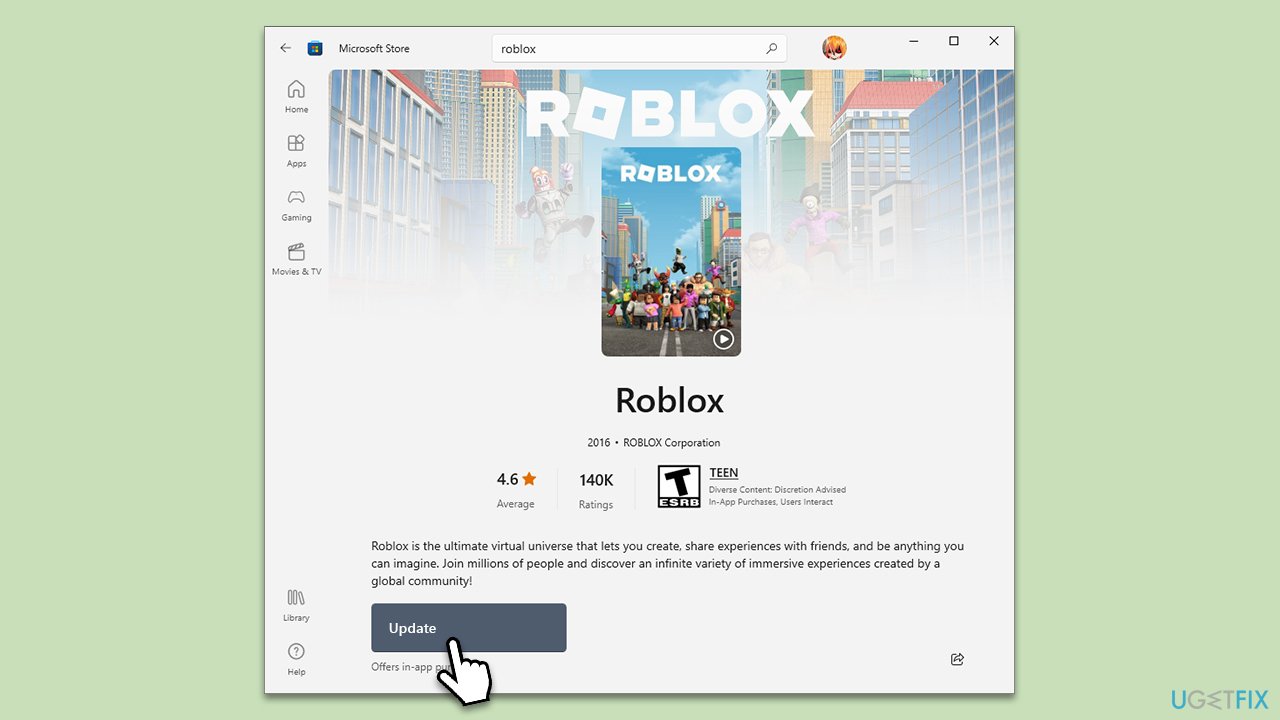
Fix 6. Update Roblox
- Open Microsoft Store.
- Use the search bar at the top and type in Roblox, then press Enter/Search.
- Note: you can also access the game through your Library in the app.
- On the Roblox page, click Update to install the latest game version.
Fix 7. Reinstall Roblox
- Right-click on Start and pick Apps and Features.
- Scroll down to find Roblox from the list.
- Click Uninstall and then confirm with Uninstall.
- Follow the prompts to remove the app.
- Next, press Win + E on your keyboard to open File Explorer.
- Navigate to the following location (make sure Hidden files are visible):
C:\Users\USERNAME\AppData\Local - Access the Roblox folder, press Ctrl + A to mark everything, and then Shift + Del to delete it all.
- Restart your computer.
- Launch the Microsoft Store and install the game again.
Bottom line
To address high CPU usage in Roblox, consider updating your graphics drivers, closing unnecessary background applications, and adjusting in-game settings for better performance. If these solutions do not resolve the issue, using a PC repair tool may help identify and fix underlying problems.
Frequently asked questions
Common causes include background processes running concurrently, outdated graphics drivers, and game settings that are too high for your system's capabilities.
You can reduce CPU usage by lowering the in-game graphics settings, closing unnecessary background applications, and ensuring your Windows 11 is fully updated.
Yes, you can use the Task Manager to monitor CPU usage by right-clicking the taskbar, selecting Task Manager, and checking the 'Processes' tab for Roblox's CPU consumption.




Report an issue
What's wrong with this guide? We review every report and update or remove content.
Report received — thank you. We'll review and fix it.
You need a free account to submit a report.
Be the first to comment